| Windows 7: Making the other 8GB of Memory available on my PC with Win 7 |
07 Nov 2011
|
#1 | | |
Making the other 8GB of Memory available on my PC with Win 7 I have a dell 8100 XPS and recently put in 4x 4GB 1333 Corsair DDR3 RAM to replace the 4x 2GB 1066 RAM simms. The system note says I have 16GB of RAM now with 7.99GB useable. Am I wasting the other 8GB or RAM or can I somehow get that to be useable? | My System Specs |
| System Manufacturer/Model Number Toshiba A215 OS Windows 7 CPU Turion 64 Motherboard Realtek Memory 1GB Graphics Card ATI Radion 1200 Sound Card integrated Hard Drives 160GB 2.5 internal |
07 Nov 2011
|
#2 | | Windows 7 Ultimate x64 SP1 Philadelphia, PA |
Did you verify that the system is capable of handling 16 GB of memory? I hate to be the bearer of possible bad news, but unless you have a very very specific usage or application need, you'd be wasting half that memory anyway. Even high-end games right now won't tax an 8 GB system, let alone 16 GB. | My System Specs | | OS Windows 7 Ultimate x64 SP1 CPU Intel Core i7-2600 Motherboard Gigabyte GA-P67A-UD3P-B3 Memory 12 GB Patriot Extreme DDR3-1333 Graphics Card Nvidia GTX 470 Monitor(s) Displays Dell UltraSharp 2209WA PSU OCZ ModStream 700W Case CoolerMaster HAF 912 Advanced Cooling CoolerMaster Hyper 212 Plus Hard Drives OCZ Agility3 240 GB, WD5001AALS, WD7501AALS |
07 Nov 2011
|
#3 | | MS Windows 7 Ultimate 64-bit SP1 Somewhere in the middle of Desert :-) |
Your system is capable of supporting 16GB of memory.
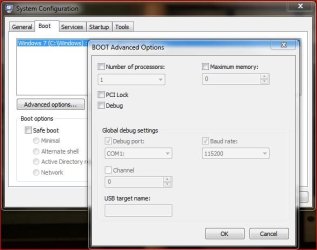
Try msconfig on run box and go to boot tab and advanced options buttons, remove the checkmark on no of processors and maximum memory, close the two boxes and if recommended reboot the system. Now check the memory in Computer properties. | My System Specs | | System Manufacturer/Model Number Toshiba Satellite P775-S7232 OS MS Windows 7 Ultimate 64-bit SP1 CPU i5-2410M 2.3GHz (2.9GHz Turbo-Boost) Sandy Bridge 32nm Motherboard Toshiba PHRAA ver. PSBY1U-00F003 Memory 4GB+4GB Samsung DDR3 PC3-10700 (1333 MHz) Graphics Card Video Intel(R) HD Graphics Family, 1696MB available memory Sound Card Realtek High Definition Audio version=6.0.1.6323 Monitor(s) Displays 17.3 " Trubrite TFT LCD, LED Backlit Screen Resolution 1600x900 32 bit, Native support for 720P content Keyboard Premium Raised Tile keyboard Mouse Logitech M215 wireless mouse PSU Toshiba AC/DC Adapter Case Notebook Cooling Built-in Fan Hard Drives TOSHIBA MK6476GSXN
580.614 [GB] partitioned C: 80GB and D: 500GB with hidden recovery partitons.
Spare bay for 2nd HDD but no SATA connector :-( Internet Speed Not fast enough Other Info Built-in Harman Kardon speakers with Dolby Advanced Audio, Waves MaxxAudio® 3. HDMI, 1xUSB3+3xUSB2 ports, WebCam, Battery life 4hrs 11mins, 4GB Readyboost SDHC card, WD My Book Essential Ext HDDs 2 TB, 2x1TB, My Passport SE 1TB and WDTV 1st Gen for Multimedia playing on a Sony Wega 32" LCD.
Recent addition to my toys are Asus Transformer Pad TF300T with 32GB onboard sd card + 32GB microsd card. |
07 Nov 2011
|
#4 | | Windows 7 Ultimate x64 SP1, Windows 8 Pro x64 Florida, USA |
| My System Specs | | Computer type PC/Desktop System Manufacturer/Model Number Custom Built OS Windows 7 Ultimate x64 SP1, Windows 8 Pro x64 CPU INTEL Core i7 3820 LGA 2011 Motherboard Gigabyte GA X79 UD5 v1.0 F13s Memory 16 GB (4 X 4GB) G-Skill Ripjaws Z DDR3 2133 Quad Channel Graphics Card EVGA GTX 460 SC 1GB Sound Card Realtek Onboard ALC898 Monitor(s) Displays Samsung BX2431 Screen Resolution 1920x1080 Keyboard Logitech G15 Mouse Microsoft Wireless Explorer Mouse PSU Corsair HX1000W Case Thermaltake Armor+ Cooling INTEL BXRTS2011LC Liquid-cooled Hard Drives OCZ Vertex 4 120GB 2.5 in. SSD FW 1.5
3x OCZ Vertex 3 120GB 2.5 in. SSD FW 2.25
4 x WD 2002FAEX SATA
4xWD 7501AALS SATA Internet Speed 6.0 Mb/s System Manufacturer/Model Number Toshiba A215 OS Windows 7 CPU Turion 64 Motherboard Realtek Memory 1GB Graphics Card ATI Radion 1200 Sound Card integrated Hard Drives 160GB 2.5 internal |
08 Nov 2011
|
#6 | | Windows 7 Home Premium 64bit |

Quote: Originally Posted by rraod Your system is capable of supporting 16GB of memory.
Try msconfig on run box and go to boot tab and advanced options buttons, remove the checkmark on no of processors and maximum memory, close the two boxes and if recommended reboot the system. Now check the memory in Computer properties. Like he said. | My System Specs | | System Manufacturer/Model Number HP ProBook 4530s XU015UT#ABA OS Windows 7 Home Premium 64bit CPU Intel Core i3-2310M Motherboard Hewlett-Packard 167C Memory 8GB DDR3 SDRAM Graphics Card Intel HD Graphics 3000 (Sandy Bridge GT2) Sound Card Intel Cougar Point PCH High Definition Audio Monitor(s) Displays 15.6" LED LG Philips LP156WH4-TLD1 Screen Resolution 1366 x 768 Mouse Logitech M315 Case Notebook Hard Drives WDC WD3200BEKT-60PVMT0 Internet Speed 12Mbps/2Mbps |
08 Nov 2011
|
#7 | | |
When I look into MSCONFIG - the boxes for both the number of processors and maximum memory are already unchecked. Checking 16345k and/or leaving the box unchecked still shows 16GB populated and only 7.69GB useable. | My System Specs | | System Manufacturer/Model Number Toshiba A215 OS Windows 7 CPU Turion 64 Motherboard Realtek Memory 1GB Graphics Card ATI Radion 1200 Sound Card integrated Hard Drives 160GB 2.5 internal |
08 Nov 2011
|
#8 | | Windows 7 Ultimate x64 SP1 Hampton VA |
To get a better understanding of what your system is using see this post - Memory/Ram
Then see this excellent article on RAM usage and Windows 7 - Windows 7 memory usage: What's the best way to measure? | ZDNet
And if those boxes in MSCONFIG are unticked there's no issue there. | My System Specs | | Computer type PC/Desktop System Manufacturer/Model Number Built by me OS Windows 7 Ultimate x64 SP1 CPU Intel Core i7-950 (3.06GHz) OC to 3.8GHz Motherboard Gigabyte GA-X58A-UD5 rev 1, F6 Bios Memory 12 gig Corsair DDR3 Dominator GT Memory (3X 4GB) Graphics Card AMD Radeon HD6950 2gig (Sapphire) Sound Card Soundblaster ZXR Monitor(s) Displays HP ZR22w 22" LCD Monitor Screen Resolution 1920 x 1080 Keyboard Logitech Wireless Wave Mouse Logitech Performance MX PSU Antec Signature - SG-850 Case Cooler Master HAF X Cooling Noctua NH-C12P SE14 Hard Drives Primary - OCZ Vertex 4 SSD (256GB). Storage - OCZ Vertex 2 SSD (120GB), 2TB WD Caviar Black. Internet Speed High Speed Cable Other Info Memory Timings - 1600MHz @ 8-8-8-20-1T @ 1.640 volts |
08 Nov 2011
|
#9 | | |
Interesting. I am showing 8253MB of hardware reserved memory! All the numbers add up to 16GB but wow, 8GB of hardware reserved memory? | My System Specs | | System Manufacturer/Model Number Toshiba A215 OS Windows 7 CPU Turion 64 Motherboard Realtek Memory 1GB Graphics Card ATI Radion 1200 Sound Card integrated Hard Drives 160GB 2.5 internal |
08 Nov 2011
|
#10 | | Windows 7 Ultimate x64 SP1 Hampton VA |
What do you have for free memory?
And can you post your resource monitor screenshot? - A Preferred Method of Uploading/Posting Screen Shots | My System Specs | | Computer type PC/Desktop System Manufacturer/Model Number Built by me OS Windows 7 Ultimate x64 SP1 CPU Intel Core i7-950 (3.06GHz) OC to 3.8GHz Motherboard Gigabyte GA-X58A-UD5 rev 1, F6 Bios Memory 12 gig Corsair DDR3 Dominator GT Memory (3X 4GB) Graphics Card AMD Radeon HD6950 2gig (Sapphire) Sound Card Soundblaster ZXR Monitor(s) Displays HP ZR22w 22" LCD Monitor Screen Resolution 1920 x 1080 Keyboard Logitech Wireless Wave Mouse Logitech Performance MX PSU Antec Signature - SG-850 Case Cooler Master HAF X Cooling Noctua NH-C12P SE14 Hard Drives Primary - OCZ Vertex 4 SSD (256GB). Storage - OCZ Vertex 2 SSD (120GB), 2TB WD Caviar Black. Internet Speed High Speed Cable Other Info Memory Timings - 1600MHz @ 8-8-8-20-1T @ 1.640 volts Making the other 8GB of Memory available on my PC with Win 7 problems? All times are GMT -5. The time now is 10:21 PM. | |