| Windows 7: Windows 7 won't read my external HD. Format only... |
07 Nov 2011
|
#1 | | Windows 7 Ultimate 32 bit |
Windows 7 won't read my external HD. Format only... I have a 1.5tb external USB drive. I was installing files to the drive when it stopped working. this is a regular occurance with the drive, and the solution is usually to trun it off and back on again... which I tried and got this error...
so I rebooted in the hope that it would sort itself out, but no joy. I have tried it on my dads pc and got the same error (we're both running the same build of Windows 7 Ultimate.
I have looked in the device manager and the drive is present. so I tried to re-install drivers, nothing happened. then I tried to re-enable it, nothing happened...
this drive contains around 1tb of files. music, pictures, games, videos... none of which I can get again and the last thing I want to do is format.
please tell me there is a solution to this... | My System Specs |
| System Manufacturer/Model Number Medion PC MT 7 OS Windows 7 Ultimate 32 bit CPU Intel® Core™2 Duo Processor E6750 Memory 2gb Graphics Card NVIDIA GeForce 850 GT Sound Card Terratec Aureon Universe 7.1 Surround Monitor(s) Displays HP 2009 Series Wide LCD Monitor Screen Resolution 1600x900 |
07 Nov 2011
|
#2 | | Dual Boot: Windows 7 Pro & Windows 8 VMs: Kali Linux, Ubuntu, Arch Linux, Windows Server 08 & 12 |
Lets start with the easiest (possible) solution:
Try using a known good USB cord and plug in with that.
Also, try all USB ports so we can eliminate that as a possible problem.
Can you fill out your system specs in the bottom left of your post OR in the USER CP? Also the make and model of the HD you are using. Do not reformat. Worst case scenario we can get the files off your HD before you do that.
If you get it working, even for just a minute, make sure you backup everything while it's working. | My System Specs | | Computer type PC/Desktop System Manufacturer/Model Number HP Pavillion p6310y OS Dual Boot: Windows 7 Pro & Windows 8 VMs: Kali Linux, Ubuntu, Arch Linux, Windows Server 08 & 12 CPU AMD Athlon II X4 630 Motherboard Asus M4A88T-M Memory 6GB DDR3 SDRAM PC3-8500 Graphics Card ATI Raedon 4250 Sound Card Realtek ALC888 . Hard Drives SSD Intel x25m 80gb
WD Cavier Blue 320 GB |
07 Nov 2011
|
#3 | | Windows 7 Ultimate SP1 64-Bit Peterborough, England |
Turning the drive on and off is the worst thing you can do as it has probably corrupted your data.
As mhansen1 says, do not format the drive. If you want to disconnect the drive you should be able to open Windows Explorer and right-click the drive icon before choosing Eject, after which you can unplug it safely.
Failing that, shut your computer down, and then disconnect the drive.
Looking at your internal drives, I'm a bit concerned that they are full with very little free space and I'm wondering if that has some bearing on your problem. | My System Specs | | System Manufacturer/Model Number HP Pavilion Elite 495UK OS Windows 7 Ultimate SP1 64-Bit CPU Intel Core i7 870 @ 2.93GHz Motherboard MSI 2A9C (CPU1) Memory 8Gb Dual-Channel DDR3 @ 664MHz Graphics Card nVidia GeForce GTX 460 1024MB dedicated RAM Sound Card Realtek HD Audio Monitor(s) Displays HP2310i Screen Resolution 1920 x 1080 Keyboard Logitech K750 solar-powered keyboard Mouse Logitech Wireless M180 mouse PSU 460W Case HP Elite Cooling Air cooled Hard Drives 1x1954GB Hitachi HDS22020ALA 330 (RAID), 1x1954GB Hitachi External for backup and storage Internet Speed 2Mb Other Info Pure Avanti Flow Internet Radio with iPod Dock, 64Gb iPod, HP USB Speakers, Sony MDR-V500 Headphones, Sony Vaio F-Series Laptop |
07 Nov 2011
|
#4 | | Windows 7 Ultimate 32 bit |
hey
thanks for the reply. I have just updated my system spec, as requested.
I have also just removed the HD from the housing and connected it internally using an IDE cable, however I still get the same error message asking to format.
the make and model of the drive is: Seagate Baracuda LP 1.5TB. S/N: 5XW0AHLM
any help is really apreciated. | My System Specs | | System Manufacturer/Model Number Medion PC MT 7 OS Windows 7 Ultimate 32 bit CPU Intel® Core™2 Duo Processor E6750 Memory 2gb Graphics Card NVIDIA GeForce 850 GT Sound Card Terratec Aureon Universe 7.1 Surround Monitor(s) Displays HP 2009 Series Wide LCD Monitor Screen Resolution 1600x900 |
07 Nov 2011
|
#5 | | Windows 7x64 Home Premium SP1 x 2 Australia |
You have probably corrupted your file system but most of your data should be intact. Try using RECUVA to recover your data (see free program listing on this forum). I would then use WD Lifeguard diagnostics to checkout your disk.
With WD disks like my "MyBook Essentials" they can go to sleep and you need to unplug and reconnect but NOT when the USB icon shows they are connected and certainly not when you are transferring data. Like Seavixen says eject first.
Edit: I must have WD on the brain! As you say you have a Seagate. When sorted run the Seagate diagnostics.
Last edited by mjf; 07 Nov 2011 at 04:08 PM..
Reason: Edit
| My System Specs | | System Manufacturer/Model Number Own build (+ Recased Acer Aspire x1800) OS Windows 7x64 Home Premium SP1 x 2 CPU Intel i7 2600k Motherboard ASUS P8Z68 Deluxe Memory G.Skill Ripjaws (DDR3-1600) 2x4GB Graphics Card Nvidia GeForce GTS 450; Intel HD Graphics 3000(GT2+) Monitor(s) Displays Dell Ultrasharp IPS panel U2311H, Samsung SyncMaster P2350 Screen Resolution 1920x1080 Keyboard Logitech MK520 (wireless) Mouse Logitech MK520 PSU Seasonic M12II 520W Case Lian Li Lancool PC-K60 Cooling Case: 1x120mm, 3x140mm CPU: Hyper 212+ Hard Drives Crucial M4 128GB (000F), Seagates 1TB Barracuda ST31000528AS + Internet Speed 6-7 Mbps Antivirus Norton NIS, Malwarebytes on 2 (MSE on 3rd PC) Browser FireFox Other Info Audio: Logitech Z523 2.1 |
07 Nov 2011
|
#6 | | Windows 7 Ultimate SP1 64-Bit Peterborough, England |
You can download Recuva here: Recuva - Download
I thoroughly recommend it after it recovered 5,000 photo images off a corrupted drive for me. | My System Specs | | System Manufacturer/Model Number HP Pavilion Elite 495UK OS Windows 7 Ultimate SP1 64-Bit CPU Intel Core i7 870 @ 2.93GHz Motherboard MSI 2A9C (CPU1) Memory 8Gb Dual-Channel DDR3 @ 664MHz Graphics Card nVidia GeForce GTX 460 1024MB dedicated RAM Sound Card Realtek HD Audio Monitor(s) Displays HP2310i Screen Resolution 1920 x 1080 Keyboard Logitech K750 solar-powered keyboard Mouse Logitech Wireless M180 mouse PSU 460W Case HP Elite Cooling Air cooled Hard Drives 1x1954GB Hitachi HDS22020ALA 330 (RAID), 1x1954GB Hitachi External for backup and storage Internet Speed 2Mb Other Info Pure Avanti Flow Internet Radio with iPod Dock, 64Gb iPod, HP USB Speakers, Sony MDR-V500 Headphones, Sony Vaio F-Series Laptop |
07 Nov 2011
|
#7 | | Windows 7 Ultimate 32 bit |

Quote: Originally Posted by mjf You have probably corrupted your file system but most of your data should be intact. Try using RECUVA to recover your data (see free program listing on this forum).
I would then use WD Lifeguard diagnostics to checkout your disk.
With WD disks like my "MyBook Essentials" they can go to sleep and you need to unplug and reconnect but NOT when the USB icon shows they are connected and certainly not when you are transferring data. Like Seavixen says eject first. I understand what you're saying, however the drive would disappear completly from explorer and from the list of drives on the side panel. so using 'eject' wasn't an option. and if it happened while transffering, windows would give me an error to say the location was no longer available.
I have just tried to use RECUVA and it could not find the location. it also doesn't appear in my device manager when I connect using an IDE cable. | My System Specs | | System Manufacturer/Model Number Medion PC MT 7 OS Windows 7 Ultimate 32 bit CPU Intel® Core™2 Duo Processor E6750 Memory 2gb Graphics Card NVIDIA GeForce 850 GT Sound Card Terratec Aureon Universe 7.1 Surround Monitor(s) Displays HP 2009 Series Wide LCD Monitor Screen Resolution 1600x900 |
07 Nov 2011
|
#8 | | Windows 7 Ultimate SP1 64-Bit Peterborough, England |
Have you checked in Disk Management to see if the drive still has a drive letter?
Does it show in Device Manager when connected to a USB port?
Hope these links help: Tips for solving problems with USB devices External Hard-Drive Not Showing Up | My System Specs | | System Manufacturer/Model Number HP Pavilion Elite 495UK OS Windows 7 Ultimate SP1 64-Bit CPU Intel Core i7 870 @ 2.93GHz Motherboard MSI 2A9C (CPU1) Memory 8Gb Dual-Channel DDR3 @ 664MHz Graphics Card nVidia GeForce GTX 460 1024MB dedicated RAM Sound Card Realtek HD Audio Monitor(s) Displays HP2310i Screen Resolution 1920 x 1080 Keyboard Logitech K750 solar-powered keyboard Mouse Logitech Wireless M180 mouse PSU 460W Case HP Elite Cooling Air cooled Hard Drives 1x1954GB Hitachi HDS22020ALA 330 (RAID), 1x1954GB Hitachi External for backup and storage Internet Speed 2Mb Other Info Pure Avanti Flow Internet Radio with iPod Dock, 64Gb iPod, HP USB Speakers, Sony MDR-V500 Headphones, Sony Vaio F-Series Laptop |
07 Nov 2011
|
#9 | | Windows 7 Ultimate x64 SP1 Philadelphia, PA |
What were you installing to the drive? | My System Specs | | OS Windows 7 Ultimate x64 SP1 CPU Intel Core i7-2600 Motherboard Gigabyte GA-P67A-UD3P-B3 Memory 12 GB Patriot Extreme DDR3-1333 Graphics Card Nvidia GTX 470 Monitor(s) Displays Dell UltraSharp 2209WA PSU OCZ ModStream 700W Case CoolerMaster HAF 912 Advanced Cooling CoolerMaster Hyper 212 Plus Hard Drives OCZ Agility3 240 GB, WD5001AALS, WD7501AALS |
07 Nov 2011
|
#10 | | Windows 7 Ultimate 32 bit |
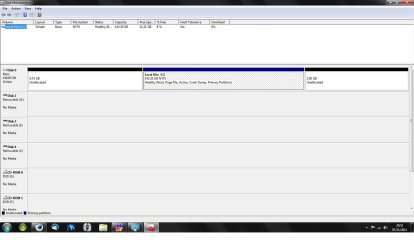
there's no sign of the drive in disk management (screenshot attached) and I believe the volume letter is M:
as far as I'm aware, it shows in the device manager when its connected via USB. although I'll have to put the drive back in the housing to double check. thanks for the links, I'll check them out. however I'm starting to lose hope...
I was installing Battlefield 3 game at the time. I clicked on the recycle bin to empty it, which is when the drive stopped working. | My System Specs | | System Manufacturer/Model Number Medion PC MT 7 OS Windows 7 Ultimate 32 bit CPU Intel® Core™2 Duo Processor E6750 Memory 2gb Graphics Card NVIDIA GeForce 850 GT Sound Card Terratec Aureon Universe 7.1 Surround Monitor(s) Displays HP 2009 Series Wide LCD Monitor Screen Resolution 1600x900 Windows 7 won't read my external HD. Format only... problems? All times are GMT -5. The time now is 07:40 PM. | |