|
Welcome to Windows 7 Forums. Our forum is dedicated to helping you find solutions with any problems, errors or issues you are experiencing with Windows 7. The Windows 7 forum also covers news and updates and has an extensive Windows 7 tutorial section that covers a wide range of tips and tricks.
Windows 7 - Help with hard drive management. |
11-07-2011
|
#1 | | 64 bit - Microsoft Windows 7 Home Premium |
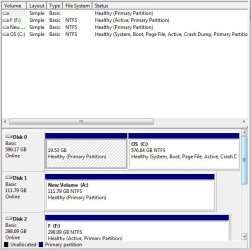
Help with hard drive management. I just got an Intel Solid-State Drive 320 Series 120GB, I just installed it but I have a couple minor issues I want to take care of. For 1, I have a 600GB harddrive as my main drive, it has 2 partitions on it, the first one listed is 19.53GB, with the second being the rest of the drive. I would like to get rid of that 19.52 partition and use it with the rest of the hard drive, but I'm not sure if the 19.52 partition contains any important files, I believe it's just a back up. And 2; I would like for my main hard drive to be listed before the new SSD in "My Computer." Here is a picture of my Computer Management.
| My System Specs | | OS 64 bit - Microsoft Windows 7 Home Premium |
11-07-2011
|
#2 | | Windows 7 SP1, Home Premium, 64-bit |
I assume this is not a home built PC and that you got it from a manufacturer--HP, Acer, etc.
That 19 GB partition probably is the means by which you could restore your PC to its factory condition. You might want to keep it around for that purpose. Or at a minimum burn some recovery CDs which would also restore you to factory condition.
If you really do want to get rid of it, it can be done. The best tool to do it is Partition Wizard bootable disc. Download the app, burn it to a disc, boot from that disc. and delete that partition. Then reassign the space to the other partition on the drive.
What are your plans for the SSD? Normally, people use them for the operating system, which you now have on a spinning drive. | My System Specs | | System Manufacturer/Model Number Ignatz Special; 4 speed manual gearbox; factory air conditioning; one of one OS Windows 7 SP1, Home Premium, 64-bit CPU Intel Sandy Bridge i5-2500, not overclocked Motherboard Gigabyte H67A-UD3H-B3, full ATX Memory 4 GB Crucial DDR3-1333 Graphics Card none; graphics are integrated on CPU Sound Card onboard: Realtek ALC892; external: USB Behringer UF0-202 Monitor(s) Displays NEC 90GX2-BK 19" LCD Screen Resolution 800 x 640 Keyboard Leopold Tenkeyless with Cherry Blue switches, USB Mouse Logitech or Microsoft optical wired; either USB or PS 2 PSU Seasonic SS-560KM, modular Case Antec Solo II Cooling CPU: Scythe Big Shuriken; Case: Scythe Slipstream 800 & 500 Hard Drives System: Intel 320 Series SSD, 80 GB;
Data: Samsung Spinpoint 103SJ, 1 TB;
Backup: WD Caviar Green WD15EADS-00P8B0, 1.5TB Other Info Power consumption of this system, including monitor: 68 watts at idle; 144 watts at full load |
11-07-2011
|
#3 | | Windows 7 Ultimate SP1 64-Bit |
You don't say whether your computer is a proprietary model such as Dell or HP, but I would imagine the 19 GB partition was or is a recovery partition.
However, as you have or are going to have Windows installed on your SSD there's nothing to stop you deleting the small partition on Drive 0 and extending the C drive to the left to take up the space.
You can't do it using Windows 7's Disk Management, but you can use the free version of Partition Wizard, as this tutorial explains. Partition Wizard : Use the Bootable CD
Download the Partition Wizard ISO and burn it to a blank CD then boot into it. Delete the required partition and extend the C drive, apply your changes then boot back into Windows on completion. | My System Specs | | System Manufacturer/Model Number HP Pavilion Elite 495UK OS Windows 7 Ultimate SP1 64-Bit CPU Intel Core i7 870 @ 2.93GHz Motherboard MSI 2A9C (CPU1) Memory 8Gb Dual-Channel DDR3 @ 664MHz Graphics Card nVidia GeForce GTX 460 1024MB dedicated RAM Sound Card Realtek HD Audio Monitor(s) Displays HP2310i Screen Resolution 1920 x 1080 Keyboard Logitech K750 solar-powered keyboard Mouse Logitech Wireless M180 mouse PSU 460W Case HP Elite Cooling Air cooled Hard Drives 1x1954GB Hitachi HDS22020ALA 330 (RAID), 1x1954GB Hitachi External for backup and storage Internet Speed 2Mb Other Info Pure Avanti Flow Internet Radio with iPod Dock, 64Gb iPod, HP USB Speakers, Sony MDR-V500 Headphones, Sony Vaio F-Series Laptop |
11-07-2011
|
#4 | | 64 bit - Microsoft Windows 7 Home Premium |
This is an Asus G73Jh, I plan on either using the 120 SSD either for a back up, or for just extra storage, I'm only deleting the partition if I do use it for a backup. | My System Specs | | OS 64 bit - Microsoft Windows 7 Home Premium |
11-07-2011
|
#5 | | Windows 7 SP1, Home Premium, 64-bit |

Quote: Originally Posted by ElliottGenocide This is an Asus G73Jh, I plan on either using the 120 SSD either for a back up, or for just extra storage, I'm only deleting the partition if I do use it for a backup. That's entirely your business and your decision, but using a 120 GB SSD for backup or storage pretty much defeats the purpose of getting an SSD rather than a spinning drive--to say nothing of the fact that an SSD is quite small compared to a spinning drive of the same price level. As a storage or backup drive, you would be hard pressed to tell the difference between an SSD and a spinning drive. Not so when comparing an OS on SSD versus an OS on a spinning drive. | My System Specs | | System Manufacturer/Model Number Ignatz Special; 4 speed manual gearbox; factory air conditioning; one of one OS Windows 7 SP1, Home Premium, 64-bit CPU Intel Sandy Bridge i5-2500, not overclocked Motherboard Gigabyte H67A-UD3H-B3, full ATX Memory 4 GB Crucial DDR3-1333 Graphics Card none; graphics are integrated on CPU Sound Card onboard: Realtek ALC892; external: USB Behringer UF0-202 Monitor(s) Displays NEC 90GX2-BK 19" LCD Screen Resolution 800 x 640 Keyboard Leopold Tenkeyless with Cherry Blue switches, USB Mouse Logitech or Microsoft optical wired; either USB or PS 2 PSU Seasonic SS-560KM, modular Case Antec Solo II Cooling CPU: Scythe Big Shuriken; Case: Scythe Slipstream 800 & 500 Hard Drives System: Intel 320 Series SSD, 80 GB;
Data: Samsung Spinpoint 103SJ, 1 TB;
Backup: WD Caviar Green WD15EADS-00P8B0, 1.5TB Other Info Power consumption of this system, including monitor: 68 watts at idle; 144 watts at full load |
11-07-2011
|
#6 | | Windows 7 Ultimate SP1 64-Bit |
Obviously, it is your choice, but you'll get a real performance boost if you install Windows on your SSD, and just use your spinner for data storage. | My System Specs | | System Manufacturer/Model Number HP Pavilion Elite 495UK OS Windows 7 Ultimate SP1 64-Bit CPU Intel Core i7 870 @ 2.93GHz Motherboard MSI 2A9C (CPU1) Memory 8Gb Dual-Channel DDR3 @ 664MHz Graphics Card nVidia GeForce GTX 460 1024MB dedicated RAM Sound Card Realtek HD Audio Monitor(s) Displays HP2310i Screen Resolution 1920 x 1080 Keyboard Logitech K750 solar-powered keyboard Mouse Logitech Wireless M180 mouse PSU 460W Case HP Elite Cooling Air cooled Hard Drives 1x1954GB Hitachi HDS22020ALA 330 (RAID), 1x1954GB Hitachi External for backup and storage Internet Speed 2Mb Other Info Pure Avanti Flow Internet Radio with iPod Dock, 64Gb iPod, HP USB Speakers, Sony MDR-V500 Headphones, Sony Vaio F-Series Laptop |
11-07-2011
|
#7 | | 64 bit - Microsoft Windows 7 Home Premium |
My OS is already installed on another SSD that came with this laptop, I think anyways. | My System Specs | | OS 64 bit - Microsoft Windows 7 Home Premium |
11-07-2011
|
#8 | | Windows 7 SP1, Home Premium, 64-bit |

Quote: Originally Posted by ElliottGenocide My OS is already installed on another SSD that came with this laptop, I think anyways. Your C partition (OS) is on the same drive as that 19 GB partition. There is only the slimmest chance that is an SSD. | My System Specs | | System Manufacturer/Model Number Ignatz Special; 4 speed manual gearbox; factory air conditioning; one of one OS Windows 7 SP1, Home Premium, 64-bit CPU Intel Sandy Bridge i5-2500, not overclocked Motherboard Gigabyte H67A-UD3H-B3, full ATX Memory 4 GB Crucial DDR3-1333 Graphics Card none; graphics are integrated on CPU Sound Card onboard: Realtek ALC892; external: USB Behringer UF0-202 Monitor(s) Displays NEC 90GX2-BK 19" LCD Screen Resolution 800 x 640 Keyboard Leopold Tenkeyless with Cherry Blue switches, USB Mouse Logitech or Microsoft optical wired; either USB or PS 2 PSU Seasonic SS-560KM, modular Case Antec Solo II Cooling CPU: Scythe Big Shuriken; Case: Scythe Slipstream 800 & 500 Hard Drives System: Intel 320 Series SSD, 80 GB;
Data: Samsung Spinpoint 103SJ, 1 TB;
Backup: WD Caviar Green WD15EADS-00P8B0, 1.5TB Other Info Power consumption of this system, including monitor: 68 watts at idle; 144 watts at full load |
11-07-2011
|
#9 | | Windows 7 Ultimate SP1 64-Bit |
I agree. A 600 GB SSD would cost an absolute fortune at current prices. | My System Specs | | System Manufacturer/Model Number HP Pavilion Elite 495UK OS Windows 7 Ultimate SP1 64-Bit CPU Intel Core i7 870 @ 2.93GHz Motherboard MSI 2A9C (CPU1) Memory 8Gb Dual-Channel DDR3 @ 664MHz Graphics Card nVidia GeForce GTX 460 1024MB dedicated RAM Sound Card Realtek HD Audio Monitor(s) Displays HP2310i Screen Resolution 1920 x 1080 Keyboard Logitech K750 solar-powered keyboard Mouse Logitech Wireless M180 mouse PSU 460W Case HP Elite Cooling Air cooled Hard Drives 1x1954GB Hitachi HDS22020ALA 330 (RAID), 1x1954GB Hitachi External for backup and storage Internet Speed 2Mb Other Info Pure Avanti Flow Internet Radio with iPod Dock, 64Gb iPod, HP USB Speakers, Sony MDR-V500 Headphones, Sony Vaio F-Series Laptop |
11-07-2011
|
#10 | | Windows 7 SP1, Home Premium, 64-bit |
You should be able to confirm if it is an SSD or standard HHD by getting the drive's details in Device Manager. | My System Specs | | System Manufacturer/Model Number Ignatz Special; 4 speed manual gearbox; factory air conditioning; one of one OS Windows 7 SP1, Home Premium, 64-bit CPU Intel Sandy Bridge i5-2500, not overclocked Motherboard Gigabyte H67A-UD3H-B3, full ATX Memory 4 GB Crucial DDR3-1333 Graphics Card none; graphics are integrated on CPU Sound Card onboard: Realtek ALC892; external: USB Behringer UF0-202 Monitor(s) Displays NEC 90GX2-BK 19" LCD Screen Resolution 800 x 640 Keyboard Leopold Tenkeyless with Cherry Blue switches, USB Mouse Logitech or Microsoft optical wired; either USB or PS 2 PSU Seasonic SS-560KM, modular Case Antec Solo II Cooling CPU: Scythe Big Shuriken; Case: Scythe Slipstream 800 & 500 Hard Drives System: Intel 320 Series SSD, 80 GB;
Data: Samsung Spinpoint 103SJ, 1 TB;
Backup: WD Caviar Green WD15EADS-00P8B0, 1.5TB Other Info Power consumption of this system, including monitor: 68 watts at idle; 144 watts at full load Help with hard drive management. problems? All times are GMT -5. The time now is 11:41 AM. |  |