

G'day hardware geeks.....
My Thermaltake Element S case has two inbuilt 22cm fans that plug directly into the PSU. They are a little bit noisy, and I was looking to lower their RPM to take the edge off the whir.
Initially, I was considering purchasing a dedicated fan control to fit into a spare 5.25" drive bay, but a colleague suggested I might try and "cross-over" the yellow 6v cable from the PSU with the red 12v cable to the fan, to halve the RPM of the fan.
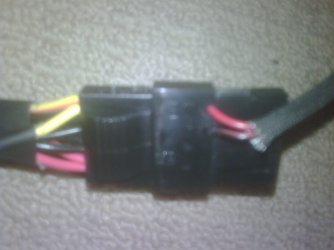
However, when I opened the case and examined the psu ---> fan connection, I noticed it already appears to be crossed-over as in the photo below (apologies for the poor quality).
The photo shows the yellow cable from the PSU on the left, connected to the red cable from the fan on the right. Thus, the fan is already running at half its RPM? Am I correct?
Regards,
Golden
My Thermaltake Element S case has two inbuilt 22cm fans that plug directly into the PSU. They are a little bit noisy, and I was looking to lower their RPM to take the edge off the whir.
Initially, I was considering purchasing a dedicated fan control to fit into a spare 5.25" drive bay, but a colleague suggested I might try and "cross-over" the yellow 6v cable from the PSU with the red 12v cable to the fan, to halve the RPM of the fan.
However, when I opened the case and examined the psu ---> fan connection, I noticed it already appears to be crossed-over as in the photo below (apologies for the poor quality).
The photo shows the yellow cable from the PSU on the left, connected to the red cable from the fan on the right. Thus, the fan is already running at half its RPM? Am I correct?
Regards,
Golden
Attachments
My Computer
At a glance
Windows 10 Pro x64 ; Xubuntu x64Intel i7 860 @ 2.80 GHz O/C'ed to 4.0GHz16GB Corsair Vengance DDR3 @ 661 MHz Dual Cha...EVGA NVidia GTX 560 1024MB
- Computer type
- PC/Desktop
- Computer Manufacturer/Model Number
- Golden Mk. I.4
- OS
- Windows 10 Pro x64 ; Xubuntu x64
- CPU
- Intel i7 860 @ 2.80 GHz O/C'ed to 4.0GHz
- Motherboard
- Gigabyte P55A-UD3R Rev.1. Award BIOS F13
- Memory
- 16GB Corsair Vengance DDR3 @ 661 MHz Dual Channel (9-9-9-24)
- Graphics Card(s)
- EVGA NVidia GTX 560 1024MB
- Sound Card
- Realtek Integrated
- Monitor(s) Displays
- Dual Samsung SyncMaster 2494HS
- Screen Resolution
- 1920*1080 and 1920*1080
- Hard Drives
- 1*Samsung 840 EVO 120GB SSD;
1*OCZ Vertex 2 60GB SSD;
2*Samsung F3 SpinPoint 1TB in RAID0;
1*Samsung F1 SpinPoint 1TB;
2*Western Digital 1TB External USB 3.0
1*Western Digital 500GB External USB 3.0
1*Seagate 500GB External USB 2.0
- PSU
- Thermaltake ToughPower QFan 750W
- Case
- Thermaltake Element S VK60001W2Z
- Cooling
- Corsair H60 Water Cooling, 2*230mm and 2*80mm case fans
- Keyboard
- Logitech G110
- Mouse
- Logitech MX518


 to both.


