
 |
Welcome to Windows 7 Forums. Our forum is dedicated to helping you find solutions with any problems, errors or issues you are experiencing with Windows 7. The Windows 7 forum also covers news and updates and has an extensive Windows 7 tutorial section that covers a wide range of tips and tricks.
Windows 7 - Windows 7's Trim Function |
11-11-2011
|
#1 | | Windows 7 Home Premium (Retail) Full version - With SP1 |
Windows 7's Trim Function I have just installed an Intel 80gb SSD. AHCI is set and fsutil reports the Trim function as enabled.
Intel offers an Toolbox that contains an Optimizer function that will use the Trim function on the SDD. Does Windows 7's Trim function automatically perform the the trim on the SDD thus eliminating the desirability or need for running the Toolbox/Optimizer?
Clearly, I am in over my head in this and would appreciate someone helping me out here.
Thank you.
| My System Specs | | System Manufacturer/Model Number Custom Home Brew OS Windows 7 Home Premium (Retail) Full version - With SP1 CPU 2.70 gigahertz AMD Athlon 64 X2 Dual Core Motherboard FOXCONN A7GM-S 2.0 FAB-A Memory 8192 Megabytes Usable Installed Memory Graphics Card ATI Radeon HD 2400 PRO (Microsoft Corporation WDDM 1.1) [D Sound Card High Definition Audio Device (2x) Monitor(s) Displays Samsung SyncMaster [Monitor] (19.1"vis, s/n HVELA10194, Octo Screen Resolution 1024 X 768 Keyboard HID Keyboard Device (logitech) Mouse Microsoft USB Comfort Optical Mouse 3000 (IntelliPoint) Hard Drives INTEL SSDSA2CW120G3 ATA Device [Hard drive] (120.03 GB)
INTEL SSDSA2CW080G3 ATA Device [Hard drive] (80.02 GB) Internet Speed adsl Other Info The above taken with Bel Arc Advisor |
11-11-2011
|
#2 | | Windows 7 Professional SP1 32-bit |
No need for the toolbox. If you've already confirmed with fsutil that TRIM is enabled, you're all set. TRIM is fully integrated with Windows' NTFS filesystem, shadow copies, search indexing and everything else. | My System Specs | | System Manufacturer/Model Number Custom-built OS Windows 7 Professional SP1 32-bit CPU Intel Core 2 Duo E6600 2.4GHz, overclocked to 2.7GHz Motherboard Asus PL5D2 Memory 3GB DDR2-667 (2x1GB + 2x512MB in dual-channel config) Graphics Card nVidia GeForce 9800 GT Sound Card on-board Realtek HD Monitor(s) Displays LG W2261 Screen Resolution 1920x1200 (DVI) Keyboard Standard Mouse Microsoft wireless optical mouse PSU Antec TruePower 2.0 Case Cooler Master Centurion Cooling various fans Hard Drives OCZ SSD Vertex Plus 60GB SATA (Firmware 3.55), 64MB cache
Hitachi HD321KJ SATA, 320GB, 7200rpm, 16MB cache Internet Speed DSL; ~700KB/sec down, ~65KB/sec up Other Info Have a laptop too :) (Compaq CQ60 also with Win7 Pro SP1 32-bit)
Drives in both systems:
C: - Windows 7 + apps. Pagefile is fixed size and located at the very end of the partition.
D: - various temp files/cache for Firefox and apps/games.
E: - videos, music, misc. storage, torrent downloads, etc. |
11-11-2011
|
#3 | | Windows 7 Home Premium (Retail) Full version - With SP1 |

Quote: Originally Posted by Corazon No need for the toolbox. If you've already confirmed with fsutil that TRIM is enabled, you're all set. TRIM is fully integrated with Windows' NTFS filesystem, shadow copies, search indexing and everything else. Thank you. The spirit of Alex Nichols lives. | My System Specs | | System Manufacturer/Model Number Custom Home Brew OS Windows 7 Home Premium (Retail) Full version - With SP1 CPU 2.70 gigahertz AMD Athlon 64 X2 Dual Core Motherboard FOXCONN A7GM-S 2.0 FAB-A Memory 8192 Megabytes Usable Installed Memory Graphics Card ATI Radeon HD 2400 PRO (Microsoft Corporation WDDM 1.1) [D Sound Card High Definition Audio Device (2x) Monitor(s) Displays Samsung SyncMaster [Monitor] (19.1"vis, s/n HVELA10194, Octo Screen Resolution 1024 X 768 Keyboard HID Keyboard Device (logitech) Mouse Microsoft USB Comfort Optical Mouse 3000 (IntelliPoint) Hard Drives INTEL SSDSA2CW120G3 ATA Device [Hard drive] (120.03 GB)
INTEL SSDSA2CW080G3 ATA Device [Hard drive] (80.02 GB) Internet Speed adsl Other Info The above taken with Bel Arc Advisor |
11-11-2011
|
#4 | | Window 7 Home Premium 64-bit |
NTFS and SSD isn't a very good combination. NTFS is a journalling file system and makes frequent entries (writes) to the SSD, even when there's no other activity going on. Solid-state flash drives have a limit rewritable life cycle, journalling isn't a good thing on SSDs.
FAT is better choice if the option is available. It's something Microsoft might want to look into. | My System Specs | | System Manufacturer/Model Number Custom Build - Gigabyte P67A-UD3-B3 OS Window 7 Home Premium 64-bit CPU Intel i7-2600 Motherboard Gigabyte P67A-UD3-B3 Memory 16GB DDR3-1666 Graphics Card Zotac Nvidia 295 GTX (Dual GPU) Sound Card Realtek --> SPDIF --> 1200W 7.1 Surround Sound Receiver Monitor(s) Displays LG 24" LCD Monitor Screen Resolution 1920x1080 Keyboard Logitech G19 Mouse Logitech G500 PSU Rosewill BRONZE Series RBR1000-M 1000W Continuous@40°C Case HEC Blitz Black Steel Edition ATX Mid Tower Computer Chassis Cooling Air Hard Drives OCZ 120GB RevoDrive SSD (2x 55GB [actually 110GB] RAID 0)
2x Seagate Barracuda 2TB HDD
Western Digital 500GB (swap/temp file)
Western Digital 1TB (backup) Internet Speed Cable (20 Mbit) |
11-11-2011
|
#5 | | Windows 7 Ultimate (x64) SP1 |

Quote: Originally Posted by Tae Song NTFS and SSD isn't a very good combination. NTFS is a journalling file system and makes frequent entries (writes) to the SSD, even when there's no other activity going on. Solid-state flash drives have a limit rewritable life cycle, journalling isn't a good thing on SSDs.
FAT is better choice if the option is available. It's something Microsoft might want to look into. That life-cycle is a lot longer then you're making out.The vast majority of people will upgrade their SSD long before it wears out | My System Specs | | System Manufacturer/Model Number tw33k OS Windows 7 Ultimate (x64) SP1 CPU Intel 3770k 4.7GHz Motherboard ASRock Fatal1ty z77 Professional Memory 8GB (2x 4GB) G-Skill 16000CL9D (2000MHz) Graphics Card Gigabyte HD 6950 (unlocked 910/1375) Sound Card On Board Realtek HD Audio Monitor(s) Displays 27" Acer B273HU (via HDMI) Screen Resolution 2048 x 1152 Keyboard Microsoft Wireless 5000 Mouse Microsoft Wireless 5000 PSU Corsair AX750 Gold Case Corsair Obsidian 800DW Cooling Phanteks PH-TC14PE 2x PH-F140 & UK 3000, 7x 120mm, 2x 140m Hard Drives Crucial C300 128GB
1TB Samsung F3 SATA
1TB WD Elite External Internet Speed 5mb/s Other Info Logitech z-2300 2.1 speakers
Lamptron FC-5 v2 |
11-11-2011
|
#6 | | Windows 7 X64 Professional/Windows 8 |

Quote: Originally Posted by Tae Song NTFS and SSD isn't a very good combination. NTFS is a journalling file system and makes frequent entries (writes) to the SSD, even when there's no other activity going on. Solid-state flash drives have a limit rewritable life cycle, journalling isn't a good thing on SSDs.
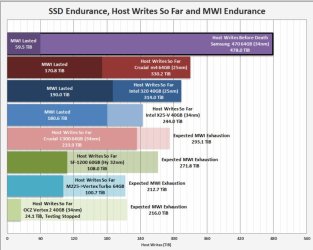
FAT is better choice if the option is available. It's something Microsoft might want to look into. Perhaps you should take the time an read the tests at extremesystems, you may find out that SSDs are more durable that you say. These are the writes to the drives. The first one to die had written 525TB on a 64GB SSD> | My System Specs | | System Manufacturer/Model Number Home Brew - Always under construction OS Windows 7 X64 Professional/Windows 8 CPU intel i7-2600K Motherboard Asus P8Z68 V-Pro/GEN 3 Memory 8GB G.Skill Sniper DDR3-2133 (2X4GB) Graphics Card EVGA 670 2GB Sound Card Asus Xonar Monitor(s) Displays Asus 24" LCD VW246H Screen Resolution 1920X1080 Keyboard Logitech G510 Mouse Logitech G500/Logitech Wireless PSU CORSAIR HX850W Case Cooler Master HAF X Cooling Corsair H100 w/ 4 noctua fans in push/pull. Hard Drives Crucial M4 128GB,Crucial M4 64GB,Samsung HD103SJ 1TB, 1TB WD FAEX,Samsung 1.5TB, EXTERNAL HD- 2X Rosewill case esata w/ 1TB Samsung spinpoints & Black X esata 1TB Spinpoint, Rosewill USB 3.0 dock 1TB Spinpoint, Seagate GOFlex Pro 500GB & 750GB USB Internet Speed Foot Messenger speed Other Info 2nd Computer- Samsung RF711-SO1 17" Laptop i5-2310M, 8GB DDR3-1333, Crucial M4 and OCZ vertex2, Nvidia GT540M.Win 7 HP X64. |
11-11-2011
|
#7 | | Vista and Windows7, sometimes Ubuntu and Fedora |

Quote: Originally Posted by Tae Song NTFS and SSD isn't a very good combination. NTFS is a journalling file system and makes frequent entries (writes) to the SSD, even when there's no other activity going on. Solid-state flash drives have a limit rewritable life cycle, journalling isn't a good thing on SSDs.
FAT is better choice if the option is available. It's something Microsoft might want to look into. I don't know from where you got that idea. My oldest 3 year old SSD has a remaining lifetime until 2021 - that is enough for me. All this hype about the fragility of SSDs is ridiculous. | My System Specs | | System Manufacturer/Model Number HP, Dell, Gateway - 2 laptops and 2 desktops OS Vista and Windows7, sometimes Ubuntu and Fedora CPU from 1.6GHz Duo to 2.5GHz Quad Monitor(s) Displays 2x HP w2207 Keyboard with trackball - no mices Mouse terrible devices, who wants them Hard Drives 5x HDD, 2x SSD, 6x Externals Internet Speed DSL 6000 |
11-12-2011
|
#8 | | Window 7 Home Premium 64-bit |

Quote: Originally Posted by tw33k 
Quote: Originally Posted by Tae Song NTFS and SSD isn't a very good combination. NTFS is a journalling file system and makes frequent entries (writes) to the SSD, even when there's no other activity going on. Solid-state flash drives have a limit rewritable life cycle, journalling isn't a good thing on SSDs.
FAT is better choice if the option is available. It's something Microsoft might want to look into. That life-cycle is a lot longer then you're making out.The vast majority of people will upgrade their SSD long before it wears out
That's engineering margin of safety... after that chances of failure increases and sometimes failure do occur even within the margin of safety. | My System Specs | | System Manufacturer/Model Number Custom Build - Gigabyte P67A-UD3-B3 OS Window 7 Home Premium 64-bit CPU Intel i7-2600 Motherboard Gigabyte P67A-UD3-B3 Memory 16GB DDR3-1666 Graphics Card Zotac Nvidia 295 GTX (Dual GPU) Sound Card Realtek --> SPDIF --> 1200W 7.1 Surround Sound Receiver Monitor(s) Displays LG 24" LCD Monitor Screen Resolution 1920x1080 Keyboard Logitech G19 Mouse Logitech G500 PSU Rosewill BRONZE Series RBR1000-M 1000W Continuous@40°C Case HEC Blitz Black Steel Edition ATX Mid Tower Computer Chassis Cooling Air Hard Drives OCZ 120GB RevoDrive SSD (2x 55GB [actually 110GB] RAID 0)
2x Seagate Barracuda 2TB HDD
Western Digital 500GB (swap/temp file)
Western Digital 1TB (backup) Internet Speed Cable (20 Mbit) |
11-12-2011
|
#9 | | Windows 7 X64 Professional/Windows 8 |

Quote: Originally Posted by Tae Song 
Quote: Originally Posted by tw33k 
Quote: Originally Posted by Tae Song NTFS and SSD isn't a very good combination. NTFS is a journalling file system and makes frequent entries (writes) to the SSD, even when there's no other activity going on. Solid-state flash drives have a limit rewritable life cycle, journalling isn't a good thing on SSDs.
FAT is better choice if the option is available. It's something Microsoft might want to look into. That life-cycle is a lot longer then you're making out.The vast majority of people will upgrade their SSD long before it wears out
That's engineering margin of safety... after that chances of failure increases and sometimes failure do occur even within the margin of safety. That's over 500TB written to a 64GB drive. None of us will ever wear one of those out. Engineering margin of safety? Intel Says you can write 5GB per day for 5 years. That equates to about 9TB. They have lasted over 500TB. That is much more than any engineering margin of safety. As far as a limited rewritable life cycle, everything in your computer has a limit of endurance. And try to get trim with FAT file system. | My System Specs | | System Manufacturer/Model Number Home Brew - Always under construction OS Windows 7 X64 Professional/Windows 8 CPU intel i7-2600K Motherboard Asus P8Z68 V-Pro/GEN 3 Memory 8GB G.Skill Sniper DDR3-2133 (2X4GB) Graphics Card EVGA 670 2GB Sound Card Asus Xonar Monitor(s) Displays Asus 24" LCD VW246H Screen Resolution 1920X1080 Keyboard Logitech G510 Mouse Logitech G500/Logitech Wireless PSU CORSAIR HX850W Case Cooler Master HAF X Cooling Corsair H100 w/ 4 noctua fans in push/pull. Hard Drives Crucial M4 128GB,Crucial M4 64GB,Samsung HD103SJ 1TB, 1TB WD FAEX,Samsung 1.5TB, EXTERNAL HD- 2X Rosewill case esata w/ 1TB Samsung spinpoints & Black X esata 1TB Spinpoint, Rosewill USB 3.0 dock 1TB Spinpoint, Seagate GOFlex Pro 500GB & 750GB USB Internet Speed Foot Messenger speed Other Info 2nd Computer- Samsung RF711-SO1 17" Laptop i5-2310M, 8GB DDR3-1333, Crucial M4 and OCZ vertex2, Nvidia GT540M.Win 7 HP X64. |
11-12-2011
|
#10 | | Windows 7 Professional SP1 32-bit |
For that matter, try to run Windows 7 on a FAT32 filesystem.
It's simply not possible. | My System Specs | | System Manufacturer/Model Number Custom-built OS Windows 7 Professional SP1 32-bit CPU Intel Core 2 Duo E6600 2.4GHz, overclocked to 2.7GHz Motherboard Asus PL5D2 Memory 3GB DDR2-667 (2x1GB + 2x512MB in dual-channel config) Graphics Card nVidia GeForce 9800 GT Sound Card on-board Realtek HD Monitor(s) Displays LG W2261 Screen Resolution 1920x1200 (DVI) Keyboard Standard Mouse Microsoft wireless optical mouse PSU Antec TruePower 2.0 Case Cooler Master Centurion Cooling various fans Hard Drives OCZ SSD Vertex Plus 60GB SATA (Firmware 3.55), 64MB cache
Hitachi HD321KJ SATA, 320GB, 7200rpm, 16MB cache Internet Speed DSL; ~700KB/sec down, ~65KB/sec up Other Info Have a laptop too :) (Compaq CQ60 also with Win7 Pro SP1 32-bit)
Drives in both systems:
C: - Windows 7 + apps. Pagefile is fixed size and located at the very end of the partition.
D: - various temp files/cache for Firefox and apps/games.
E: - videos, music, misc. storage, torrent downloads, etc. Windows 7's Trim Function problems? All times are GMT -5. The time now is 11:43 AM. |  |