|
Welcome to Windows 7 Forums. Our forum is dedicated to helping you find solutions with any problems, errors or issues you are experiencing with Windows 7. The Windows 7 forum also covers news and updates and has an extensive Windows 7 tutorial section that covers a wide range of tips and tricks.
Windows 7 - SSD newly installed |
11-15-2011
|
#1 | | Windows 7 Ultimate X86 SP1 |
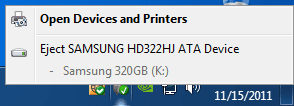
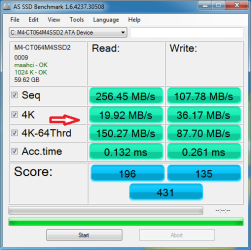
SSD newly installed I just installed a SSD, Crucial M4 64GB, which for now is connected via a SATAII header. If connected to the SATAIII, where it should be, it, or any drive, appears as a USB card with the Safely Remove icon.With it on SATAII it doesn't get the most performance. Any drive on SATAII shows as a normal HDD in computer. I have a 320GB HDD on the SATAIII header for storage in this snip.Performance seems a bit off for a SSD too, but I think that will improve after TRIM has more time to work.  | My System Specs | | System Manufacturer/Model Number Brittechnologies II OS Windows 7 Ultimate X86 SP1 CPU i5-2550K differing speeds depending on the day Motherboard ASUS P8X68-V PRO/GEN3 Memory 16GB G.Skill Sniper 2133MHz, 4X4GB Graphics Card ASUS ENGTX460 DirectCU/2DI/1GD5 GeForce GTX 460 Sound Card Onboard Realtek 5-1 Monitor(s) Displays Samsung P2570HD Screen Resolution 1920x1080 Keyboard Old Dell USB From 10 yrs Ago Mouse Gigabyte m6900 wired PSU Corsair HX650W Case Inwin Dragon rider Cooling Hyper 212 EVO w/two Noctua fans @1300 RPM Hard Drives TBA Internet Speed 8-19 Mbs down, 3-4 Mbs up Comcast Cable Other Info 5 fans, LG Bluray/R/RE, ASUS DVD/R/RW |

11-15-2011
|
#2 | | Windows 7 Professional SP1 32-bit |
The "eject devices" icon is actually perfectly normal if you're running in AHCI mode, because of the hotplugging feature that comes with it. Since you'll never unplug your OS drive of course (and it probably wouldn't let you anyway), just ignore the icon.
You say it doesn't appear with devices connected to the SATA-II ports vs. SATA-III. That makes me wonder if you have separate BIOS settings to configure either one as IDE or AHCI, independently of the other. | My System Specs | | System Manufacturer/Model Number Custom-built OS Windows 7 Professional SP1 32-bit CPU Intel Core 2 Duo E6600 2.4GHz, overclocked to 2.7GHz Motherboard Asus PL5D2 Memory 3GB DDR2-667 (2x1GB + 2x512MB in dual-channel config) Graphics Card nVidia GeForce 9800 GT Sound Card on-board Realtek HD Monitor(s) Displays LG W2261 Screen Resolution 1920x1200 (DVI) Keyboard Standard Mouse Microsoft wireless optical mouse PSU Antec TruePower 2.0 Case Cooler Master Centurion Cooling various fans Hard Drives OCZ SSD Vertex Plus 60GB SATA (Firmware 3.55), 64MB cache
Hitachi HD321KJ SATA, 320GB, 7200rpm, 16MB cache Internet Speed DSL; ~700KB/sec down, ~65KB/sec up Other Info Have a laptop too :) (Compaq CQ60 also with Win7 Pro SP1 32-bit)
Drives in both systems:
C: - Windows 7 + apps. Pagefile is fixed size and located at the very end of the partition.
D: - various temp files/cache for Firefox and apps/games.
E: - videos, music, misc. storage, torrent downloads, etc. |
11-15-2011
|
#3 | | Windows 7 Ultimate x64 & Mac OS X 10.7.1 |
did you have both drives plugged in when you changed to AHCI and installed windows?
Some people have had issues. | My System Specs | | System Manufacturer/Model Number Built by badgers!!! OS Windows 7 Ultimate x64 & Mac OS X 10.7.1 CPU Intel Core i5 2500k Motherboard Asus P8z68 Memory Corsair Vengence 8gb 1866mhz Graphics Card XFX Ati HD6950 2Gb Sound Card Mobo Optical to Yamaha Rx-V667 7.2 home cinema system Monitor(s) Displays Samsung LED 32" TV Screen Resolution 1920x1080 Keyboard Saitek Cyborg V7 Mouse Saitek R.A.T 9 PSU Corsair HX650w Modular Case NZXT Phantom White Cooling Corsair H60 Push/Pull Hard Drives 120gb Corsair Force 3 SSD Internet Speed Too slow! Other Info AMD fusion E350N Home server-Windows Home Server 2011 (also made by badgers!)
2011 Macbook 2.4ghz Core2Duo, 4gb ddr3, 120gb Ocz Vertex SSD |
11-15-2011
|
#4 | | |
I think you have that drive K connected to an ESATA port. That will automatically treat it as hot-swap. | My System Specs | | System Manufacturer/Model Number Built 2/11/2011 OS Windows 7 Pro-x64 CPU i7-2600 3.4GHz - 3.8GHz Turbo Motherboard Intel DH67BL-B3 Memory 8Gb - 2x4GB, Muskin 991770 PC3-1333 Graphics Card Integrated Intel HD 2000 Sound Card Integrated Intel 10.1 HD, RealTek ALC892 Monitor(s) Displays Asus LCD VH222H, Haier HL24XSL2a Screen Resolution 1920x1080, 1920x1080 Keyboard Logitech EX100 Wireless Mouse Logitech EX100 Wireless PSU Seasonic 650W 80+ Gold Modular Case Rosewill Defender Cooling Stock CPU, Four 120mm case fans, PCH fan added Hard Drives Crucial C300-128Gb,
Western Digital WD5002AALX - 500Gb,
Western Digital WD7501AALS - 750Gb Internet Speed 2.5/1.5 Mbs Other Info Antec Veris Premier-Multimedia IR Station,
Cyber Accoustics-3602 Speakers,
AFT XM-5U Card Reader,
Hauppauge TV-HVR-2250,
Sony LX300 USB Turntable |
11-15-2011
|
#5 | | |
Is this one of those Frankenstein boards with two drive controllers?
I looked at a photo of your board and couldn't find the SATA3 ports. Are they white and laid on their side? | My System Specs | | System Manufacturer/Model Number Built 2/11/2011 OS Windows 7 Pro-x64 CPU i7-2600 3.4GHz - 3.8GHz Turbo Motherboard Intel DH67BL-B3 Memory 8Gb - 2x4GB, Muskin 991770 PC3-1333 Graphics Card Integrated Intel HD 2000 Sound Card Integrated Intel 10.1 HD, RealTek ALC892 Monitor(s) Displays Asus LCD VH222H, Haier HL24XSL2a Screen Resolution 1920x1080, 1920x1080 Keyboard Logitech EX100 Wireless Mouse Logitech EX100 Wireless PSU Seasonic 650W 80+ Gold Modular Case Rosewill Defender Cooling Stock CPU, Four 120mm case fans, PCH fan added Hard Drives Crucial C300-128Gb,
Western Digital WD5002AALX - 500Gb,
Western Digital WD7501AALS - 750Gb Internet Speed 2.5/1.5 Mbs Other Info Antec Veris Premier-Multimedia IR Station,
Cyber Accoustics-3602 Speakers,
AFT XM-5U Card Reader,
Hauppauge TV-HVR-2250,
Sony LX300 USB Turntable |
11-15-2011
|
#6 | | Windows 7 X64 Professional/Windows 8 |
Gary, plug it into the sata3 port and see what happens. It should boot fine, just check it in bios. Open As SSD and dont run the test, just look at the top left and see what driver it shows. | My System Specs | | System Manufacturer/Model Number Home Brew - Always under construction OS Windows 7 X64 Professional/Windows 8 CPU intel i7-2600K Motherboard Asus P8Z68 V-Pro/GEN 3 Memory 8GB G.Skill Sniper DDR3-2133 (2X4GB) Graphics Card EVGA 670 2GB Sound Card Asus Xonar Monitor(s) Displays Asus 24" LCD VW246H Screen Resolution 1920X1080 Keyboard Logitech G510 Mouse Logitech G500/Logitech Wireless PSU CORSAIR HX850W Case Cooler Master HAF X Cooling Corsair H100 w/ 4 noctua fans in push/pull. Hard Drives Crucial M4 128GB,Crucial M4 64GB,Samsung HD103SJ 1TB, 1TB WD FAEX,Samsung 1.5TB, EXTERNAL HD- 2X Rosewill case esata w/ 1TB Samsung spinpoints & Black X esata 1TB Spinpoint, Rosewill USB 3.0 dock 1TB Spinpoint, Seagate GOFlex Pro 500GB & 750GB USB Internet Speed Foot Messenger speed Other Info 2nd Computer- Samsung RF711-SO1 17" Laptop i5-2310M, 8GB DDR3-1333, Crucial M4 and OCZ vertex2, Nvidia GT540M.Win 7 HP X64. |
11-16-2011
|
#7 | | Windows 7 Ultimate X86 SP1 |

Quote: Originally Posted by Corazon The "eject devices" icon is actually perfectly normal if you're running in AHCI mode, because of the hotplugging feature that comes with it. Since you'll never unplug your OS drive of course (and it probably wouldn't let you anyway), just ignore the icon.
You say it doesn't appear with devices connected to the SATA-II ports vs. SATA-III. That makes me wonder if you have separate BIOS settings to configure either one as IDE or AHCI, independently of the other. I have aboth drives connected to SATA AHCI, only the K has the Safe to remove.  It is SATA III, my eSATA ports are on the back of the mobo. 
Quote: Originally Posted by carwiz Is this one of those Frankenstein boards with two drive controllers?
I looked at a photo of your board and couldn't find the SATA3 ports. Are they white and laid on their side? Yes, actually 3 contollers, JMicron, Marvell, and GSata. One for SATA II, SATA III, and yet another for eSATA. Yes the SATA III are those white ones. | My System Specs | | System Manufacturer/Model Number Brittechnologies II OS Windows 7 Ultimate X86 SP1 CPU i5-2550K differing speeds depending on the day Motherboard ASUS P8X68-V PRO/GEN3 Memory 16GB G.Skill Sniper 2133MHz, 4X4GB Graphics Card ASUS ENGTX460 DirectCU/2DI/1GD5 GeForce GTX 460 Sound Card Onboard Realtek 5-1 Monitor(s) Displays Samsung P2570HD Screen Resolution 1920x1080 Keyboard Old Dell USB From 10 yrs Ago Mouse Gigabyte m6900 wired PSU Corsair HX650W Case Inwin Dragon rider Cooling Hyper 212 EVO w/two Noctua fans @1300 RPM Hard Drives TBA Internet Speed 8-19 Mbs down, 3-4 Mbs up Comcast Cable Other Info 5 fans, LG Bluray/R/RE, ASUS DVD/R/RW |
11-16-2011
|
#8 | | Windows 7 Professional SP1 32-bit |
Sounds to me like your SATA-II simply doesn't have the hardware support for hotplugging. Which makes sense as it's much more useful for your eSATA ports. | My System Specs | | System Manufacturer/Model Number Custom-built OS Windows 7 Professional SP1 32-bit CPU Intel Core 2 Duo E6600 2.4GHz, overclocked to 2.7GHz Motherboard Asus PL5D2 Memory 3GB DDR2-667 (2x1GB + 2x512MB in dual-channel config) Graphics Card nVidia GeForce 9800 GT Sound Card on-board Realtek HD Monitor(s) Displays LG W2261 Screen Resolution 1920x1200 (DVI) Keyboard Standard Mouse Microsoft wireless optical mouse PSU Antec TruePower 2.0 Case Cooler Master Centurion Cooling various fans Hard Drives OCZ SSD Vertex Plus 60GB SATA (Firmware 3.55), 64MB cache
Hitachi HD321KJ SATA, 320GB, 7200rpm, 16MB cache Internet Speed DSL; ~700KB/sec down, ~65KB/sec up Other Info Have a laptop too :) (Compaq CQ60 also with Win7 Pro SP1 32-bit)
Drives in both systems:
C: - Windows 7 + apps. Pagefile is fixed size and located at the very end of the partition.
D: - various temp files/cache for Firefox and apps/games.
E: - videos, music, misc. storage, torrent downloads, etc. |
11-17-2011
|
#9 | | Windows 7 Ultimate x64 & Mac OS X 10.7.1 |
All sata3 controllers are different from sata2. | My System Specs | | System Manufacturer/Model Number Built by badgers!!! OS Windows 7 Ultimate x64 & Mac OS X 10.7.1 CPU Intel Core i5 2500k Motherboard Asus P8z68 Memory Corsair Vengence 8gb 1866mhz Graphics Card XFX Ati HD6950 2Gb Sound Card Mobo Optical to Yamaha Rx-V667 7.2 home cinema system Monitor(s) Displays Samsung LED 32" TV Screen Resolution 1920x1080 Keyboard Saitek Cyborg V7 Mouse Saitek R.A.T 9 PSU Corsair HX650w Modular Case NZXT Phantom White Cooling Corsair H60 Push/Pull Hard Drives 120gb Corsair Force 3 SSD Internet Speed Too slow! Other Info AMD fusion E350N Home server-Windows Home Server 2011 (also made by badgers!)
2011 Macbook 2.4ghz Core2Duo, 4gb ddr3, 120gb Ocz Vertex SSD |
11-17-2011
|
#10 | | |

Quote: Originally Posted by badger906 All sata3 controllers are different from sata2. Not really. Intel does it with one. It's part of the Platform Controller Hub. Only one driver set is needed. Motherboards that have multiple controllers need a driver set for each. In the above case, Marvell drivers AND Micron drivers depending on which controller is used. If you use both, then both driver sets are needed. If the ESATA is on a separate controller, then it too needs a driver set. | My System Specs | | System Manufacturer/Model Number Built 2/11/2011 OS Windows 7 Pro-x64 CPU i7-2600 3.4GHz - 3.8GHz Turbo Motherboard Intel DH67BL-B3 Memory 8Gb - 2x4GB, Muskin 991770 PC3-1333 Graphics Card Integrated Intel HD 2000 Sound Card Integrated Intel 10.1 HD, RealTek ALC892 Monitor(s) Displays Asus LCD VH222H, Haier HL24XSL2a Screen Resolution 1920x1080, 1920x1080 Keyboard Logitech EX100 Wireless Mouse Logitech EX100 Wireless PSU Seasonic 650W 80+ Gold Modular Case Rosewill Defender Cooling Stock CPU, Four 120mm case fans, PCH fan added Hard Drives Crucial C300-128Gb,
Western Digital WD5002AALX - 500Gb,
Western Digital WD7501AALS - 750Gb Internet Speed 2.5/1.5 Mbs Other Info Antec Veris Premier-Multimedia IR Station,
Cyber Accoustics-3602 Speakers,
AFT XM-5U Card Reader,
Hauppauge TV-HVR-2250,
Sony LX300 USB Turntable SSD newly installed problems? All times are GMT -5. The time now is 11:47 AM. |  |