Windows 7 Forums Search
Welcome to Windows 7 Forums. Our forum is dedicated to helping you find solutions with any problems, errors or issues you are experiencing with Windows 7. The Windows 7 forum also covers news and updates and has an extensive Windows 7 tutorial section that covers a wide range of tips and tricks.


Windows 7 - Little bit confused about RAM

 
11-15-2011   #1


Windows 7 Ultimaite x64


Little bit confused about RAM

I am confused about this Ram thing.I have Asus N75SF laptop with two graphic cards.
One is Intel HD graphic card
the other is Nvida Ge Force GT 555M 2 gb with optimus techology.
I have 8gb of Ram,when i go in properties on My computer i cant see usebale memory
see on the screenshot.
Little bit confused about RAM-picture.png
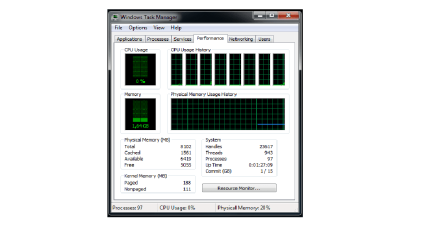
so I open task manager to see how much useable memory i have and this is confusing me it says 8102 total
Cached 1561
Avaliable 6419 and
Free 5055
And this is confusing me is this normal? How much useable memory i have?I am running Windows ultimate 7 64 bit.
Little bit confused about RAM-picture-2.png
And i went to system infromation and here is a screen shot from there
Little bit confused about RAM-picture-3.png
Can someone help me why my laptop doesnt use the whole ram memory?Is it because of the graphic cards?
Thanks in advance

My System SpecsSystem Spec
11-15-2011   #2


Windows 7 Ultimate SP1 x64


It's OK.
So, Avaliable 6419 + Used 1.6GB = 8GB Total.
You can use all 8GB of RAM memory. And yes, I think that graphic card is using some of your ram memory because it's integrated.
My System SpecsSystem Spec
11-15-2011   #3


Windows 7 Ultimaite x64


Ok thamks very much StalkeR.So i dont have to worry anymore.But i have one more queistion.Why when i go propereties i cant see how much useable memory i have.I only see the installed memory and that is 8 gb.I have that on the first screenshot.
Thanks
My System SpecsSystem Spec
.


11-15-2011   #4


Windows 7 Ultimate SP1 64-Bit


Quote   Quote: Originally Posted by Petrushevski View Post
Ok thamks very much StalkeR.So i dont have to worry anymore.But i have one more queistion.Why when i go propereties i cant see how much useable memory i have.I only see the installed memory and that is 8 gb.I have that on the first screenshot.
Thanks
That is normal as system properties just shows what is installed, not how much is being used.
My System SpecsSystem Spec
11-15-2011   #5


Windows 7 Ultimaite x64


Ok thanks
My System SpecsSystem Spec
11-15-2011   #6
whs


Vista and Windows7, sometimes Ubuntu and Fedora


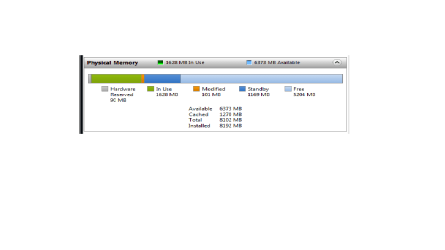
The best way to look at your RAM is in Resource Monitor > Memory tab. On the colored graph, everything that is blue (light and dark) is available.

Example:
Attached Thumbnails
Little bit confused about RAM-2011-11-15_1828.png  
My System SpecsSystem Spec
11-15-2011   #7


Windows 7 Ultimate SP1 x64


Usable memory is not listed there.
As whs said that is the best way to see....
My System SpecsSystem Spec
11-15-2011   #8


Windows 7 Ultimaite x64


So is this normal?Is it ok? Sorry for asking too much but i just want to be sure that everything is fine with my Laptop
Here is again screenshot
Little bit confused about RAM-picture-4.png
My System SpecsSystem Spec
11-16-2011   #9


Windows 7 Ultimate (x64) SP1


Yes...that's OK
My System SpecsSystem Spec
11-16-2011   #10


Windows 7 Ultimaite x64


Thanks a lot to all of you
My System SpecsSystem Spec
Reply

 Little bit confused about RAM problems?


Thread Tools


Similar Threads for: Little bit confused about RAM
Thread Forum
Solved Confused!!! Backup and Restore
Confused? Graphic Cards
Very Very confused Backup and Restore
I'm confused! General Discussion
Confused General Discussion


All times are GMT -5. The time now is 11:47 AM.


Windows 7 Forums is an independent web site and has not been authorized,
sponsored, or otherwise approved by Microsoft Corporation.
"Windows 7" and related materials are trademarks of Microsoft Corp.
© Designer Media Ltd
  

1 2 3 4 5 6 7 8 9 10 11 12 13 14 15 16 17 18 19 20 21 22 23 24 25 26 27 28 29 30