|
Welcome to Windows 7 Forums. Our forum is dedicated to helping you find solutions with any problems, errors or issues you are experiencing with Windows 7. The Windows 7 forum also covers news and updates and has an extensive Windows 7 tutorial section that covers a wide range of tips and tricks.
Windows 7 - DVD ROM not working , but it should work. |
11-16-2011
|
#1 | | |
DVD ROM not working , but it should work. Hi ,
I have an Asus N53SV laptop, My DVD rom doesn't read any type of DVD in windows , but I just installed windows 7 from a bootable DVD , I think this problem occurred after I tried to change my partitioning with paragon partition magic , I was trying to shrink , join and so , after that my windows showed an error that windows cannot find [weird address] on hard disk every time on starts.
windows itself says the DVD drive works correctly and driver is working properly, but no DVD or CD can be read , note that the DVD I'm trying to read is the same DVD which I used to install windows some minutes ago.
I don't know what's the problem | My System Specs | | OS windows 7 ultimate x64 |
11-16-2011
|
#2 | | Windows 7 Ultimate x64 & Mac OS X 10.7.1 |
if youve just installed windows, maybe there is a driver needed. its a longshot, but try looking for the drivers for your laptop on the ASUS website. | My System Specs | | System Manufacturer/Model Number Built by badgers!!! OS Windows 7 Ultimate x64 & Mac OS X 10.7.1 CPU Intel Core i5 2500k Motherboard Asus P8z68 Memory Corsair Vengence 8gb 1866mhz Graphics Card XFX Ati HD6950 2Gb Sound Card Mobo Optical to Yamaha Rx-V667 7.2 home cinema system Monitor(s) Displays Samsung LED 32" TV Screen Resolution 1920x1080 Keyboard Saitek Cyborg V7 Mouse Saitek R.A.T 9 PSU Corsair HX650w Modular Case NZXT Phantom White Cooling Corsair H60 Push/Pull Hard Drives 120gb Corsair Force 3 SSD Internet Speed Too slow! Other Info AMD fusion E350N Home server-Windows Home Server 2011 (also made by badgers!)
2011 Macbook 2.4ghz Core2Duo, 4gb ddr3, 120gb Ocz Vertex SSD |
11-16-2011
|
#3 | | |
the driver is installed , and windows says the device is working properly , I think the problem is about the Partitioning I've mentioned in my previous post. is there any tools to find the partitioning errors? | My System Specs | | OS windows 7 ultimate x64 |
11-16-2011
|
#4 | | Windows 7 Ultimate SP1 64-Bit |
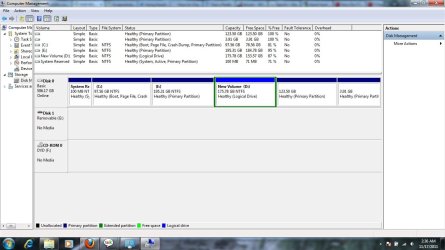
Please upload a screenshot of your expanded disk management layout so that we can check if your partitioning excercise has any bearing on your problem. Screenshots and Files - Upload and Post in Seven Forums | My System Specs | | System Manufacturer/Model Number HP Pavilion Elite 495UK OS Windows 7 Ultimate SP1 64-Bit CPU Intel Core i7 870 @ 2.93GHz Motherboard MSI 2A9C (CPU1) Memory 8Gb Dual-Channel DDR3 @ 664MHz Graphics Card nVidia GeForce GTX 460 1024MB dedicated RAM Sound Card Realtek HD Audio Monitor(s) Displays HP2310i Screen Resolution 1920 x 1080 Keyboard Logitech K750 solar-powered keyboard Mouse Logitech Wireless M180 mouse PSU 460W Case HP Elite Cooling Air cooled Hard Drives 1x1954GB Hitachi HDS22020ALA 330 (RAID), 1x1954GB Hitachi External for backup and storage Internet Speed 2Mb Other Info Pure Avanti Flow Internet Radio with iPod Dock, 64Gb iPod, HP USB Speakers, Sony MDR-V500 Headphones, Sony Vaio F-Series Laptop |
11-16-2011
|
#5 | | |
screenshot attached to the post | My System Specs | | OS windows 7 ultimate x64 |
11-16-2011
|
#6 | | Win 7 Home Premium (64-bit), Win 7 Pro (32-bit) |
Are you trying to access the DVD drive as drive F:? According to the screenshot, the DVD drive letter is F: and there is no disc in the drive. If there is actually a disc in the drive then it's possible that the drive failed. When you put a disc in the drive can you here it spinning up? Can you here it attempting to read the disk? | My System Specs | | System Manufacturer/Model Number Dell XPS 8100 Desktop, Dell Inspiron 1520 Laptop OS Win 7 Home Premium (64-bit), Win 7 Pro (32-bit) CPU 2.8Ghz Core i7 860, 2.4Ghz Core 2 Duo Motherboard Dell, Dell Memory 8G, 3G Graphics Card ATI Radeon HD 5770, Mobile Intel 965 Sound Card ATI High Definition Audio (Built-in to mobo) Monitor(s) Displays Dell 2409W 24" Screen Resolution 1920x1080 Keyboard IBM Model M - used continuously since 1986 Mouse Microsoft Hard Drives 1T OS; 1.5T Data on Desktop, 320G for laptop Internet Speed 1.5M down 1.2M up :-( Other Info Also have an Acer Aspire netbook, a home-built AMD Dual core (Minecraft server) and home-built Pent 4 all running Win 7. Also have various machines running XP, Win Server 2K, Win Server 2003, Linux and DOS. I think I have a problem... |
11-16-2011
|
#7 | | Windows 7 Ultimate SP1 64-Bit |
I'm a bit concerned with the message you're getting when Windows starts.
I'm assuming you installed Windows to the C drive.
What do you have on the D drive (the logical partition)?
At present, you've got four primary partitions, one of which is too small to be of any use, and a logical partition that appears to have data on it because its free space is less than the partition size.
When you go into Windows Explorer does it indicate whether there is a DVD in your DVD drive?
I think at this stage I'd be inclined to wipe the drive and reinstall Windows. Once you've got Windows up and running we can sort out your partitioning afterwards, but of course we can't do that until we get your DVD drive working. | My System Specs | | System Manufacturer/Model Number HP Pavilion Elite 495UK OS Windows 7 Ultimate SP1 64-Bit CPU Intel Core i7 870 @ 2.93GHz Motherboard MSI 2A9C (CPU1) Memory 8Gb Dual-Channel DDR3 @ 664MHz Graphics Card nVidia GeForce GTX 460 1024MB dedicated RAM Sound Card Realtek HD Audio Monitor(s) Displays HP2310i Screen Resolution 1920 x 1080 Keyboard Logitech K750 solar-powered keyboard Mouse Logitech Wireless M180 mouse PSU 460W Case HP Elite Cooling Air cooled Hard Drives 1x1954GB Hitachi HDS22020ALA 330 (RAID), 1x1954GB Hitachi External for backup and storage Internet Speed 2Mb Other Info Pure Avanti Flow Internet Radio with iPod Dock, 64Gb iPod, HP USB Speakers, Sony MDR-V500 Headphones, Sony Vaio F-Series Laptop |
11-16-2011
|
#8 | | |
windows is installed on C: , D contains typical stuffs , music - docs.... .
I don't know what's that 100 MB system reserved for?
in the start of booting , computer reads the DVD and boots into it, but in windows it seems that there is nothing in DVD rom , and another thing , my Drive (D) is the Drive (E) of the time before new windows installation and vice versa. | My System Specs | | OS windows 7 ultimate x64 |
11-16-2011
|
#9 | | Windows 7 Ultimate SP1 64-Bit |
Ah, we're getting somewhere.
The 100mb reserved partition is the active partition that holds the Windows master boot record files and it appears that it has been corrupted.
You need to carry out a Startup Repair three times with a reboot between each one, as this tutorial explains. Startup Repair
Once we've got you up and running, we can sort out your hard drive partitions.
As it's getting late here in the UK, I'm shutting down for the night, but there'll be others about from a different time zone who can help you. | My System Specs | | System Manufacturer/Model Number HP Pavilion Elite 495UK OS Windows 7 Ultimate SP1 64-Bit CPU Intel Core i7 870 @ 2.93GHz Motherboard MSI 2A9C (CPU1) Memory 8Gb Dual-Channel DDR3 @ 664MHz Graphics Card nVidia GeForce GTX 460 1024MB dedicated RAM Sound Card Realtek HD Audio Monitor(s) Displays HP2310i Screen Resolution 1920 x 1080 Keyboard Logitech K750 solar-powered keyboard Mouse Logitech Wireless M180 mouse PSU 460W Case HP Elite Cooling Air cooled Hard Drives 1x1954GB Hitachi HDS22020ALA 330 (RAID), 1x1954GB Hitachi External for backup and storage Internet Speed 2Mb Other Info Pure Avanti Flow Internet Radio with iPod Dock, 64Gb iPod, HP USB Speakers, Sony MDR-V500 Headphones, Sony Vaio F-Series Laptop OS windows 7 ultimate x64 DVD ROM not working , but it should work. problems? All times are GMT -5. The time now is 11:48 AM. |  |