Windows 7 Forums


Windows 7: Formatted HDD...Do I still need it formatted?

17 Nov 2011   #1

Window 7 Home Premium
 
 
Formatted HDD...Do I still need it formatted?

about 1 1/2 years ago, i was having BSOD issues...MS worked with me for a long time (KUDOS!!) Anyway...the cause of my problem was an overheated CPU due to the crappy stock fan INTEL sells you...

Very Long story short...MS formatted my HDD, I think it was just a "back up or dup installation"...and now I want my 90 gigs back and avail to me...how can i tell if Windows 7 and everything is just duplicated on my disc or if I still need the formatting? It is called Drive D and I never seem to have to access it...

I hope this makes sense.

My System SpecsSystem Spec

17 Nov 2011   #2

Window 7 Home Premium


The main file is called WINDOWS IMAGE BACK UP ...it is 60 gigs w/ 17 files and 4 folders.
It is READ ONLY
My System SpecsSystem Spec
17 Nov 2011   #3

Windows 7 SP1, Home Premium, 64-bit


Doesn't make much sense to me.

You say you want 90 GB back and that you can't access the D drive.

Your second post implies you made an image file. Is it on the D drive? It's a way of restoring your PC to the way it was at the time the image was made. You don't need that image file to operate and you can delete it and reclaim the space--if that is what you want to do.

But I'm unclear on your situation.

More details or better explanation needed.

What is on the D drive? You may be able to delete it and add the space to C--if that is what you want to do.

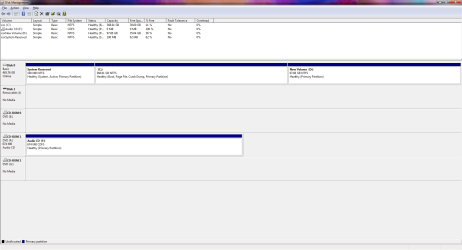
A screen shot of your Disk Management window would probably help decipher the situation.
My System SpecsSystem Spec
.


17 Nov 2011   #4

Windows 7 Ultimate x64 SP1
Philadelphia, PA


Yeah, I'm very much confused as well.

On a side note, the Intel fans are rated and tested for the processors they ship with. If you had an overheating CPU, the HSF was either not installed properly, or the case itself was failing to properly cool the system.
My System SpecsSystem Spec
17 Nov 2011   #5

Window 7 Home Premium


OK...forget the fan issue...it was solved...the plastic clip was worn (cheap) and i bought a new fan and everything works fine now...

Back to D drive...Yes...I want the space back that is being called D drive...I want it back in my C drive...
Disc Management window? Unclear what that is exactly...

The Files on the D Drive are:

New Volume: (D)

WIndowsImageBackUp>

Stone-HOME>

Backup 2010-03-18 144458>
10 XML Docs 2 VHD files

Catalog>
Backup Global Catalog
Global Catalog

SPPMetadataCache>
File
My System SpecsSystem Spec
17 Nov 2011   #6

Windows 7 SP1, Home Premium, 64-bit


You can get to Disk Management by typing those 2 words in the start search box.

In all likelihood, you (or "MS") created a D partition and then stored an image of the C drive on that newly created D partition.

Are you positive you have no personal data on D?

If you don't, you can delete the D partition in Disk Management. That will generate "unoccupied space".

You should then be able to "expand" C so that it takes up that unoccupied space, through Disk Management.

But a screenshot of what you see in Disk Management would be much preferred to confirm your situation.
My System SpecsSystem Spec
17 Nov 2011   #7

Window 7 Home Premium


There is no personal data...it was created on mar 18 2010 and not touched since...all the "Date Midified" are the same.
Yes MS did it for me while truing to solve BSOD issues due to overheated PROC ( unknown at the time).

I tried to Prtsc...but nothing happened...

ALSO...Thank you for your time
My System SpecsSystem Spec
17 Nov 2011   #8

Windows 7 SP1, Home Premium, 64-bit


A printscreen won't magically cause a picture to appear in this thread.

You'd have to paste that printscreen into your photo editor. save the file, and then attach that file to your next post in this thread using "manage attachments" function.

No need to do that to the extent you have no personal data on D. Just delete the partition in Disk Management. Highlight it and look for "delete volume".
My System SpecsSystem Spec
17 Nov 2011   #9

Windows 8 Pro
Standish, Lancashire, England


For how to upload a screenshot or file, read here
My System SpecsSystem Spec
17 Nov 2011   #10

Window 7 Home Premium


Formatted HDD...Do I still need it formatted?-discman.png
My System SpecsSystem Spec
Reply

 Formatted HDD...Do I still need it formatted? problems?


Thread Tools


Similar help and support threads for: Formatted HDD...Do I still need it formatted?
Thread Forum
pen drive not formatted General Discussion
All USBs Want to be Formatted Hardware & Devices
please help with getting my USB formatted/bootable Hardware & Devices
Install on a new HDD - not formatted yet Installation & Setup
Formatted and need help. Drivers


All times are GMT -5. The time now is 06:47 PM.


Seven Forums Android App Seven Forums IOS App Follow us on Facebook

Windows 7 Forums is an independent web site and has not been authorized,
sponsored, or otherwise approved by Microsoft Corporation.
"Windows 7" and related materials are trademarks of Microsoft Corp.
© Designer Media Ltd
  

1 2 3 4 5 6 7 8 9 10 11 12 13 14 15 16 17 18 19 20 21 22 23 24 25 26 27 28 29 30 31 32