| Windows 7: Connected old HDD from XP and 7 recognizes as Recovery Partition |
17 Nov 2011
|
#1 | | |
Connected old HDD from XP and 7 recognizes as Recovery Partition Hey guys,
I'm having a bit of a problem. I recently built a new computer and it has Windows 7 64-bit on it. My old computer is a Windows XP. Now the Windows XP had 2 physical hard drives. One was the boot (320gb) of course and the other one was data (160gb).
I connected both of these drives to my NEW computer running Windows 7. Now I can access ONE of the drives (320gb) which was the boot drive in my old computer. It was partitioned and I can access both of them which is great.
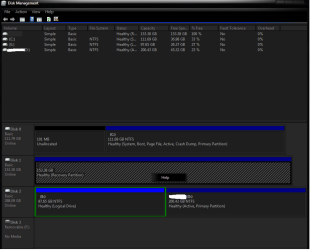
Now the 160gb data HD.. it doesn't come up in My Computer. BIOS recognizes it and so does Disk Management. However in Disk Management, it comes up as a Recovery Partition (all 160gb of it). If I right click it, I only get "Help" and no other options. Theres data on the HD from XP that I really need but I can't even format it.
Can anyone help me with this?
Thanks | My System Specs |
| OS Windows 7 Ultimate x64 |
18 Nov 2011
|
#3 | | |
I've attached the Disk Management sshot.
Thanks! | My System Specs | | OS Windows 7 Ultimate x64 |
18 Nov 2011
|
#4 | | Windows 7 Ultimate SP1 X64/ linux in VM NW Florida |
To recover your data, try to copy-paste from the recovery console. Once you have your data off, try diskpart to clean and format the disk for windows 7 use. | My System Specs | | Computer type PC/Desktop System Manufacturer/Model Number Home Built- Always under construction OS Windows 7 Ultimate SP1 X64/ linux in VM CPU Intel i7-3770K Motherboard Asus Maximus V Extreme Z77 Memory 8GB G.Skill Ripjaws Z DDR3-2400 (2X4GB) Graphics Card EVGA GTX 670 SC 4GB Sound Card On Board Monitor(s) Displays Asus 24" LCD Screen Resolution 1920X1080 Keyboard Logitech G510 Mouse Logitech G500 PSU CORSAIR AX850 Case Cooler Master HAF X Cooling Custom Water Cooling Hard Drives Samsung 840 Pro 256 GB, Samsung 840 Pro 256 GB, Samsung 830 256GB, Samsung HD103SJ 1TB . External HD- Black X dock esata 1TB Samsung Spinpoint, Rosewill USB 3.0 dock 1TB Samsung Spinpoint Internet Speed carrier pigeon speed Antivirus MSE/MBAM Browser ie9 Other Info 2nd Rig,Windows 7 Ultimate SP1 X64, i7-2600K, Asrock P67 Extreme 4, 8GB DDR3-2133, HAF XM case, Noctua NH-D14, Gigabyte HD6950 OC 1GB, 2 X Crucial M4 128GB, Asus 24" LED.
Laptop- Samsung RF711-SO1 17" i5-2310M, 8GB DDR3-1333, Samsung 830 256Gb, Nvidia GT540M.Win 7 HP X64 SP1. |
18 Nov 2011
|
#5 | | |
In that thread, it says that the HD needs to be readable by the PC. Is that the case with mine? I mean yes BIOS and Disk Management recognize it but they show the data as 100% FREE. | My System Specs | | OS Windows 7 Ultimate x64 |
18 Nov 2011
|
#6 | | Windows 7 Ultimate SP1 X64/ linux in VM NW Florida |
It does need to be readable. If it came from XP it should be readable from windows 7. If you have an external hard drive enclosure, try putting it in that and see if you can assign it a drive letter. Once it is assigned a drive letter you can open it and look at what is inside. Another option is to download Recuva, which is a free recovery program. You could also try to assign it a letter using diskpart. | My System Specs | | Computer type PC/Desktop System Manufacturer/Model Number Home Built- Always under construction OS Windows 7 Ultimate SP1 X64/ linux in VM CPU Intel i7-3770K Motherboard Asus Maximus V Extreme Z77 Memory 8GB G.Skill Ripjaws Z DDR3-2400 (2X4GB) Graphics Card EVGA GTX 670 SC 4GB Sound Card On Board Monitor(s) Displays Asus 24" LCD Screen Resolution 1920X1080 Keyboard Logitech G510 Mouse Logitech G500 PSU CORSAIR AX850 Case Cooler Master HAF X Cooling Custom Water Cooling Hard Drives Samsung 840 Pro 256 GB, Samsung 840 Pro 256 GB, Samsung 830 256GB, Samsung HD103SJ 1TB . External HD- Black X dock esata 1TB Samsung Spinpoint, Rosewill USB 3.0 dock 1TB Samsung Spinpoint Internet Speed carrier pigeon speed Antivirus MSE/MBAM Browser ie9 Other Info 2nd Rig,Windows 7 Ultimate SP1 X64, i7-2600K, Asrock P67 Extreme 4, 8GB DDR3-2133, HAF XM case, Noctua NH-D14, Gigabyte HD6950 OC 1GB, 2 X Crucial M4 128GB, Asus 24" LED.
Laptop- Samsung RF711-SO1 17" i5-2310M, 8GB DDR3-1333, Samsung 830 256Gb, Nvidia GT540M.Win 7 HP X64 SP1. |
18 Nov 2011
|
#7 | | |
^ You are awesome. I just got into diskpart and assigned a letter to it and the drive showed up in My Computer. However in Disk Management, it has NO letter and still is a Recovery partition which I am okay with. I'm gonna get the data off it and format the entire thing using Diskpart.
Thanks very much! | My System Specs | | OS Windows 7 Ultimate x64 |
18 Nov 2011
|
#8 | | Windows 7 Ultimate SP1 X64/ linux in VM NW Florida |
Glad I could help. I was scratching my head for a while though. | My System Specs | | Computer type PC/Desktop System Manufacturer/Model Number Home Built- Always under construction OS Windows 7 Ultimate SP1 X64/ linux in VM CPU Intel i7-3770K Motherboard Asus Maximus V Extreme Z77 Memory 8GB G.Skill Ripjaws Z DDR3-2400 (2X4GB) Graphics Card EVGA GTX 670 SC 4GB Sound Card On Board Monitor(s) Displays Asus 24" LCD Screen Resolution 1920X1080 Keyboard Logitech G510 Mouse Logitech G500 PSU CORSAIR AX850 Case Cooler Master HAF X Cooling Custom Water Cooling Hard Drives Samsung 840 Pro 256 GB, Samsung 840 Pro 256 GB, Samsung 830 256GB, Samsung HD103SJ 1TB . External HD- Black X dock esata 1TB Samsung Spinpoint, Rosewill USB 3.0 dock 1TB Samsung Spinpoint Internet Speed carrier pigeon speed Antivirus MSE/MBAM Browser ie9 Other Info 2nd Rig,Windows 7 Ultimate SP1 X64, i7-2600K, Asrock P67 Extreme 4, 8GB DDR3-2133, HAF XM case, Noctua NH-D14, Gigabyte HD6950 OC 1GB, 2 X Crucial M4 128GB, Asus 24" LED.
Laptop- Samsung RF711-SO1 17" i5-2310M, 8GB DDR3-1333, Samsung 830 256Gb, Nvidia GT540M.Win 7 HP X64 SP1. Connected old HDD from XP and 7 recognizes as Recovery Partition problems? All times are GMT -5. The time now is 12:49 AM. | |