| Windows 7: RAM: 4GB installed and only 2.93 usable. |
19 Nov 2011
|
#1 | | Windows 7 Home Premium 64 Aberdeen |
RAM: 4GB installed and only 2.93 usable. I have 4GB installed and only 2.93 usable.
I tried the solution given by rektalstab
1)Run
2)type "msconfig"
3)Go under the "boot" tab
4)click "advanced options" button
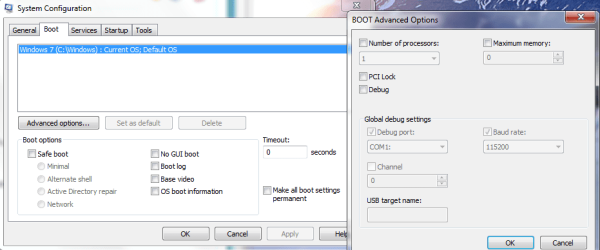
5)UNCHECK! "Maximum memory"
6)Reboot
This had no effect so i tried another "solution"
"open a cmd prompt (admin rights), type bcdedit.exe /SET PAE ForceEnable and reboot."
Still not fixed the problem.
I have enclosed two screenshots. If any more information is needed then please get in touch.
Thanks in advance for any help offered.
L Martin | My System Specs |
| System Manufacturer/Model Number Lenovo Ideapad Z570 OS Windows 7 Home Premium 64 CPU Intel Core i3-2350M CPU @ 2.30GHz Sandy Bridge Motherboard LENOVO Emerald Lake Memory 8.00 GB Dual-Channel DDR3 @ 665MHz Graphics Card 1024MB GeForce GT 520M Sound Card Realtek High Definition Audio Intel(R) Display Audio Monitor(s) Displays 15.6 Screen Resolution 1366x768 Mouse hp Hard Drives 500GB Seagate 2.5" SATA @5400 & a 600GB Lacie external HDD Internet Speed Never fast enough |
19 Nov 2011
|
#2 | | Windows 8 Pro with Media Center x64 Southern California, USA |
NONE of those options should be checked, have you been playing around with computer settings?: 
Do both of your RAM match (are they the same RAM stick) or do you just have a single stick.
When did this problem start happening?
You have a 64bit opperating system, so this is weird. what are all the settings you've played with in windows thus far, and why?
Also, your video card may be sharing internal memory. Your motherboard needs a 48bit or 64bit chipset, and your BIOS must support 64bit memory mapping (and it may need to manually be enabled by you). Be very careful in the BIOS, as one false step and you'll be reloading your operating system all over again
I think you are using on-board graphics, so that is probably where the missing RAM is going to | My System Specs | | Computer type PC/Desktop System Manufacturer/Model Number Dell Inspiron M5040 OS Windows 8 Pro with Media Center x64 CPU AMD E-450 APU 1.65 GHz Memory 4GB Graphics Card Built-in Radeon HD 6320 Graphics Screen Resolution 1366 x 768 Mouse Microsoft Wireless Mobile Mouse 3500 Cooling fan Hard Drives 500GB Internet Speed 2.86Mbps Download Speed, 2.85Mbps Upload Speed & 26ms Ping Antivirus Defender Browser IE10 |
19 Nov 2011
|
#3 | | Windows 7 Home Premium 64 Aberdeen |

Quote: Originally Posted by DustSailor NONE of those options should be checked, have you been playing around with computer settings?: Attachment 184385
Do both of your RAM match (are they the same RAM stick) or do you just have a single stick.
When did this problem start happening?
You have a 64bit opperating system, so this is weird. what are all the settings you've played with in windows thus far, and why?
Also, your video card may be sharing internal memory. Your motherboard needs a 48bit or 64bit chipset, and your BIOS must support 64bit memory mapping (and it may need to manually be enabled by you). Be very careful in the BIOS, as one false step and you'll be reloading your operating system all over again
I think you are using on-board graphics, so that is probably where the missing RAM is going to Hi, thanks for responding so quickly.
I've only just installed the 64bit version, from the 32bit, a few days ago, so I've not had the chance to play with any settings.
I have two 2gb sticks. They match in every spec, except for brand.
I'll check the other details when I'm on the laptop in question. (i posted in the BSOD section earlier. That post has pretty much all the specs, if you don't mind checking it out)
Thanks again
L | My System Specs | | System Manufacturer/Model Number Lenovo Ideapad Z570 OS Windows 7 Home Premium 64 CPU Intel Core i3-2350M CPU @ 2.30GHz Sandy Bridge Motherboard LENOVO Emerald Lake Memory 8.00 GB Dual-Channel DDR3 @ 665MHz Graphics Card 1024MB GeForce GT 520M Sound Card Realtek High Definition Audio Intel(R) Display Audio Monitor(s) Displays 15.6 Screen Resolution 1366x768 Mouse hp Hard Drives 500GB Seagate 2.5" SATA @5400 & a 600GB Lacie external HDD Internet Speed Never fast enough |
19 Nov 2011
|
#4 | | Windows 8 Pro with Media Center x64 Southern California, USA |
Did you do a clean install?
Is your current system specs out of date or something?
I found this thread for you, might pertain to your problem: Windows 7 64 bit RAM issue? | My System Specs | | Computer type PC/Desktop System Manufacturer/Model Number Dell Inspiron M5040 OS Windows 8 Pro with Media Center x64 CPU AMD E-450 APU 1.65 GHz Memory 4GB Graphics Card Built-in Radeon HD 6320 Graphics Screen Resolution 1366 x 768 Mouse Microsoft Wireless Mobile Mouse 3500 Cooling fan Hard Drives 500GB Internet Speed 2.86Mbps Download Speed, 2.85Mbps Upload Speed & 26ms Ping Antivirus Defender Browser IE10 |
19 Nov 2011
|
#5 | | Win 7 Ultimate x64 Etobicoke, Ontario |
Chipset limitation. Full specs on that Acer laptop, Acer Support: Extensa 5630Z Series Specifications
and the specs on the GL40 Express chipset in it, Mobile Intel® GL40 Express Chipset
It only supports up to 4 GB. And why it is happening, The system memory that is reported in the System Information dialog box in Windows Vista is less than you expect if 4 GB of RAM is installed Quote: The BIOS must support the memory remapping feature. The memory remapping feature allows for the segment of system memory that was previously overwritten by the Peripheral Component Interconnect (PCI) configuration space to be remapped above the 4 GB address line. This feature must be enabled in the BIOS configuration utility on the computer. View your computer product documentation for instructions that explain how to enable this feature. Many consumer-oriented computers may not support the memory remapping feature. No standard terminology is used in documentation or in BIOS configuration utilities for this feature. Therefore, you may have to read the descriptions of the various BIOS configuration settings that are available to determine whether any of the settings enable the memory remapping feature. Without the above option in the bios 64 bit Windows will have the same memory limitations as 32 bit Windows. | My System Specs | | System Manufacturer/Model Number Me OS Win 7 Ultimate x64 CPU Phenom II x4 955 @ 4 GHz. Motherboard Asus M5A97 EVO Memory 2x2 GB Kingston HyperX DDR3 1600 Graphics Card Sapphire HD 6850 Sound Card Xonar DGX w/ Logitech X-530 Monitor(s) Displays Acer S232HL Abid Screen Resolution 1920x1080 Keyboard Logitech Wave Mouse Logitech G5 v2 PSU Antec Earthwatts 650W Green Case Antec Three Hundred Cooling Cooler Master 212 EVO Hard Drives 120 GB OCZ Vertex 3
500 GB Seagate 7200.12 Internet Speed 24000/1000 |
19 Nov 2011
|
#6 | | Windows 7 Home Premium 64 Aberdeen |
It was a clean install and system specs are bang up to date (I filled out the spec sheet just last night (18/11/11))
To refer to your first response, the options that you said should not be checked, were not checked. When i tried the fix that is mentioned, the box it said to uncheck was already done so. | My System Specs | | System Manufacturer/Model Number Lenovo Ideapad Z570 OS Windows 7 Home Premium 64 CPU Intel Core i3-2350M CPU @ 2.30GHz Sandy Bridge Motherboard LENOVO Emerald Lake Memory 8.00 GB Dual-Channel DDR3 @ 665MHz Graphics Card 1024MB GeForce GT 520M Sound Card Realtek High Definition Audio Intel(R) Display Audio Monitor(s) Displays 15.6 Screen Resolution 1366x768 Mouse hp Hard Drives 500GB Seagate 2.5" SATA @5400 & a 600GB Lacie external HDD Internet Speed Never fast enough |
19 Nov 2011
|
#7 | | Windows 7 Home Premium 64 Aberdeen |

Quote: Originally Posted by stormy13 Chipset limitation. Full specs on that Acer laptop, Acer Support: Extensa 5630Z Series Specifications
and the specs on the GL40 Express chipset in it, Mobile Intel® GL40 Express Chipset
It only supports up to 4 GB. And why it is happening, The system memory that is reported in the System Information dialog box in Windows Vista is less than you expect if 4 GB of RAM is installed Quote: The BIOS must support the memory remapping feature. The memory remapping feature allows for the segment of system memory that was previously overwritten by the Peripheral Component Interconnect (PCI) configuration space to be remapped above the 4 GB address line. This feature must be enabled in the BIOS configuration utility on the computer. View your computer product documentation for instructions that explain how to enable this feature. Many consumer-oriented computers may not support the memory remapping feature. No standard terminology is used in documentation or in BIOS configuration utilities for this feature. Therefore, you may have to read the descriptions of the various BIOS configuration settings that are available to determine whether any of the settings enable the memory remapping feature. Without the above option in the bios 64 bit Windows will have the same memory limitations as 32 bit Windows. So does this basically mean that i don't have the hardware to support 4gb RAM?
Or is it that it does support it but some of the memory has been syphoned off to the integrated video card and other resources ? | My System Specs | | System Manufacturer/Model Number Lenovo Ideapad Z570 OS Windows 7 Home Premium 64 CPU Intel Core i3-2350M CPU @ 2.30GHz Sandy Bridge Motherboard LENOVO Emerald Lake Memory 8.00 GB Dual-Channel DDR3 @ 665MHz Graphics Card 1024MB GeForce GT 520M Sound Card Realtek High Definition Audio Intel(R) Display Audio Monitor(s) Displays 15.6 Screen Resolution 1366x768 Mouse hp Hard Drives 500GB Seagate 2.5" SATA @5400 & a 600GB Lacie external HDD Internet Speed Never fast enough |
19 Nov 2011
|
#8 | | Windows 8 Pro with Media Center x64 Southern California, USA |

Quote: Originally Posted by lrm537 So does this basically mean that i don't have the hardware to support 4gb RAM?
Or is it that it does support it but some of the memory has been syphoned off to the integrated video card and other resources ? Either-or or both. Your integrated graphics are probably using some of the RAM. You could install more RAM and see if it helps, but up to you. Do you really need more RAM, since you really wont be using it much as your graphics are integrated anyway?
Unless you have 7 programs open at once and 11 tabs open in your browser, you shouldn't have any slowdowns.
32bit really isn't that bad of a choice in your situation, but I'm not sure it is that important that you reinstall or anything (oh, it isn't). | My System Specs | | Computer type PC/Desktop System Manufacturer/Model Number Dell Inspiron M5040 OS Windows 8 Pro with Media Center x64 CPU AMD E-450 APU 1.65 GHz Memory 4GB Graphics Card Built-in Radeon HD 6320 Graphics Screen Resolution 1366 x 768 Mouse Microsoft Wireless Mobile Mouse 3500 Cooling fan Hard Drives 500GB Internet Speed 2.86Mbps Download Speed, 2.85Mbps Upload Speed & 26ms Ping Antivirus Defender Browser IE10 |
19 Nov 2011
|
#9 | | Windows 7 Home Premium 64 Aberdeen |

Quote: Originally Posted by DustSailor 
Quote: Originally Posted by lrm537 So does this basically mean that i don't have the hardware to support 4gb RAM?
Or is it that it does support it but some of the memory has been syphoned off to the integrated video card and other resources ? Either-or or both. Your integrated graphics are probably using some of the RAM. You could install more RAM and see if it helps, but up to you. Do you really need more RAM, since you really wont be using it much as your graphics are integrated anyway?
Unless you have 7 programs open at once and 11 tabs open in your browser, you shouldn't have any slowdowns.
32bit really isn't that bad of a choice in your situation, but I'm not sure it is that important that you reinstall or anything (oh, it isn't). Thanks for all the advice. I think i'll just leave things as they are, i'm away to look for a new laptop soon anyway. This one has served me well for just over 2 years so i can't complain. It still does what it's supposed to do and that's the main thing. | My System Specs | | System Manufacturer/Model Number Lenovo Ideapad Z570 OS Windows 7 Home Premium 64 CPU Intel Core i3-2350M CPU @ 2.30GHz Sandy Bridge Motherboard LENOVO Emerald Lake Memory 8.00 GB Dual-Channel DDR3 @ 665MHz Graphics Card 1024MB GeForce GT 520M Sound Card Realtek High Definition Audio Intel(R) Display Audio Monitor(s) Displays 15.6 Screen Resolution 1366x768 Mouse hp Hard Drives 500GB Seagate 2.5" SATA @5400 & a 600GB Lacie external HDD Internet Speed Never fast enough |
19 Nov 2011
|
#10 | | Windows 8 Pro with Media Center x64 Southern California, USA |
Leslie,
Keeping up with technology huh?
That computer you have there should last you another 5 years at least. Most people only upgrade because they play games (some of which require expensive hardware in order for the graphics to look good) or because they are using some kind of program (graphic editing as an example) that requires a lot of heavy duty parts.
There are always ways to clean up a computer if it gets slower or crowded in the future. In my signature, I listed an "Optimize windows 7" link that you might try out. It is a tutorial for a whole buch of little things you can do to speed up your computer (by all means you don't have to do all of them).
Glad we were able to clear some things up for you. Take care now | My System Specs | | Computer type PC/Desktop System Manufacturer/Model Number Dell Inspiron M5040 OS Windows 8 Pro with Media Center x64 CPU AMD E-450 APU 1.65 GHz Memory 4GB Graphics Card Built-in Radeon HD 6320 Graphics Screen Resolution 1366 x 768 Mouse Microsoft Wireless Mobile Mouse 3500 Cooling fan Hard Drives 500GB Internet Speed 2.86Mbps Download Speed, 2.85Mbps Upload Speed & 26ms Ping Antivirus Defender Browser IE10 RAM: 4GB installed and only 2.93 usable. problems? All times are GMT -5. The time now is 01:18 AM. | |