|
Welcome to Windows 7 Forums. Our forum is dedicated to helping you find solutions with any problems, errors or issues you are experiencing with Windows 7. The Windows 7 forum also covers news and updates and has an extensive Windows 7 tutorial section that covers a wide range of tips and tricks.
Windows 7 - W7 resets bootable flag on HDD |
11-19-2011
|
#1 | | |
W7 resets bootable flag on HDD Hello,
I have four partitions on my HDD with Windows 7 on the second one. I want the boot flag ( Boot flag - Wikipedia, the free encyclopedia ) on the first partition and only on it. It contains a menu, that gives me a choice of what OS to boot. Whenever I boot Windows 7 from the second partition, it resets the boot flag to the second partition only and thus I can't get back.
How do I tell Windows 7 not to do this?
Alternatively, is there a way to reset it manually from within Windows 7 so I don't have to boot a rescue CD? (looking forward to UEFI, when the rescue CDs won't boot...) | My System Specs | | System Manufacturer/Model Number Lenovo T420 OS Ultimate x64 CPU Core i7 Memory 4GB Graphics Card Intel GMA HD3000, Nvidia Quadro NVS 4200 Monitor(s) Displays built-in panel 1600x900 |
11-19-2011
|
#2 | | Windows 7 Ultimate SP1 64-Bit |
Welcome to Windows Seven Forums.
It will help us to help you if you post a screenshot of your fully-expanded disk management layout. Screenshots and Files - Upload and Post in Seven Forums
This tutorial may solve your problem. Bootrec.exe Tool - How to Use in Windows Recovery Environment
Last edited by seavixen32; 11-19-2011 at 04:22 AM..
Reason: Extra information
| My System Specs | | System Manufacturer/Model Number HP Pavilion Elite 495UK OS Windows 7 Ultimate SP1 64-Bit CPU Intel Core i7 870 @ 2.93GHz Motherboard MSI 2A9C (CPU1) Memory 8Gb Dual-Channel DDR3 @ 664MHz Graphics Card nVidia GeForce GTX 460 1024MB dedicated RAM Sound Card Realtek HD Audio Monitor(s) Displays HP2310i Screen Resolution 1920 x 1080 Keyboard Logitech K750 solar-powered keyboard Mouse Logitech Wireless M180 mouse PSU 460W Case HP Elite Cooling Air cooled Hard Drives 1x1954GB Hitachi HDS22020ALA 330 (RAID), 1x1954GB Hitachi External for backup and storage Internet Speed 2Mb Other Info Pure Avanti Flow Internet Radio with iPod Dock, 64Gb iPod, HP USB Speakers, Sony MDR-V500 Headphones, Sony Vaio F-Series Laptop |
11-19-2011
|
#3 | | |
Thank you for your quick answer!
I'll try the tutorial, I'm sorry that I didn't find it myself, I've probably used wrong queries on Google :-) . I'll report back, thanks again! | My System Specs | | System Manufacturer/Model Number Lenovo T420 OS Ultimate x64 CPU Core i7 Memory 4GB Graphics Card Intel GMA HD3000, Nvidia Quadro NVS 4200 Monitor(s) Displays built-in panel 1600x900 |
11-19-2011
|
#4 | | |
So I've tried the How To, but I've run into these issues:
1) The OS selection box didn't list anything (I don't have any CD with drivers, so the suggested "Load drivers" solution didn't help).
2) When I proceeded anyway, the bcdedit failed: Code: > bcdedit /export C:\BCD_Backup
The store export operation failed.
The system cannot find the file specified I'm not sure what do you mean by "fully-expanded disk management layout". I can provide fdisk info, it should show the same information: Code: Device Boot Start End Blocks Id System
/dev/sda1 2048 97656831 48827392 83 Linux
/dev/sda2 * 97656832 292968447 97655808 7 HPFS/NTFS/exFAT
/dev/sda3 292968448 308592639 7812096 82 Linux swap / Solaris
/dev/sda4 308592640 976771071 334089216 83 Linux As you can see, sda2 has the boot flag. I can reset it to sda1 with fdisk, but when I start Windows 7 again, it automatically resets it to sda2. | My System Specs | | System Manufacturer/Model Number Lenovo T420 OS Ultimate x64 CPU Core i7 Memory 4GB Graphics Card Intel GMA HD3000, Nvidia Quadro NVS 4200 Monitor(s) Displays built-in panel 1600x900 |
11-19-2011
|
#5 | | Windows 7 Ultimate SP1 64-Bit |
This is what I was hoping for.
To get into Disk Management is Start>Control Panel>System & Security>Administrative Tools>Create & Format Hard Disk Partitions
However, I suspect your problem is related to Linux and as I know nothing about it, you may have to wait for others who have used it to post a solution for you. | My System Specs | | System Manufacturer/Model Number HP Pavilion Elite 495UK OS Windows 7 Ultimate SP1 64-Bit CPU Intel Core i7 870 @ 2.93GHz Motherboard MSI 2A9C (CPU1) Memory 8Gb Dual-Channel DDR3 @ 664MHz Graphics Card nVidia GeForce GTX 460 1024MB dedicated RAM Sound Card Realtek HD Audio Monitor(s) Displays HP2310i Screen Resolution 1920 x 1080 Keyboard Logitech K750 solar-powered keyboard Mouse Logitech Wireless M180 mouse PSU 460W Case HP Elite Cooling Air cooled Hard Drives 1x1954GB Hitachi HDS22020ALA 330 (RAID), 1x1954GB Hitachi External for backup and storage Internet Speed 2Mb Other Info Pure Avanti Flow Internet Radio with iPod Dock, 64Gb iPod, HP USB Speakers, Sony MDR-V500 Headphones, Sony Vaio F-Series Laptop |
11-19-2011
|
#6 | | |
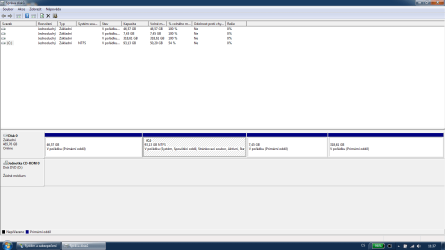
Here's the screenshot. I'm sorry for the language, I don't have a clue how to switch it to English. One of the notes to C: is "Spouštěcí oddíl", i.e. "bootable partition". This is what I need to change. I want the first partition to be the bootable partition. When I change it via fdisk it works fine, but as soon as I start Windows 7, it's back to C: .
It doesn't have anything to do with Linux. It can be OS X on the first partiotion, or W XP, Solaris, or even another instance of Windows 7. The only issue is that Windows 7 on the second partition changes the bootable flag.
Last edited by tadeas; 11-19-2011 at 05:47 AM..
Reason: Wrong word order
| My System Specs | | System Manufacturer/Model Number Lenovo T420 OS Ultimate x64 CPU Core i7 Memory 4GB Graphics Card Intel GMA HD3000, Nvidia Quadro NVS 4200 Monitor(s) Displays built-in panel 1600x900 |
11-19-2011
|
#7 | | Windows 7 Ultimate SP1 64-Bit |
Use this tutorial to make your C drive inactive. Partition - Mark as Inactive
Usde this tutorial to make the first (system reserved) partition active. Partition - Mark as Active
Next, run a startup repair three times with a reboot after each one so the the master boot record is created in your system reserved partition rather than the C drive. Startup Repair | My System Specs | | System Manufacturer/Model Number HP Pavilion Elite 495UK OS Windows 7 Ultimate SP1 64-Bit CPU Intel Core i7 870 @ 2.93GHz Motherboard MSI 2A9C (CPU1) Memory 8Gb Dual-Channel DDR3 @ 664MHz Graphics Card nVidia GeForce GTX 460 1024MB dedicated RAM Sound Card Realtek HD Audio Monitor(s) Displays HP2310i Screen Resolution 1920 x 1080 Keyboard Logitech K750 solar-powered keyboard Mouse Logitech Wireless M180 mouse PSU 460W Case HP Elite Cooling Air cooled Hard Drives 1x1954GB Hitachi HDS22020ALA 330 (RAID), 1x1954GB Hitachi External for backup and storage Internet Speed 2Mb Other Info Pure Avanti Flow Internet Radio with iPod Dock, 64Gb iPod, HP USB Speakers, Sony MDR-V500 Headphones, Sony Vaio F-Series Laptop |
11-19-2011
|
#8 | | |
Great! Diskpart is what I've been looking for. I've successfully changed the boot flag from the second partition to the first. However when I start Windows again, it changes the boot flags again :-/ .
But at least I don't have to boot from a CD  .
So if there's no way to prevent Windows from doing that, what is the easiest way to automate this? I don't know anything about scripting Windows  . | My System Specs | | System Manufacturer/Model Number Lenovo T420 OS Ultimate x64 CPU Core i7 Memory 4GB Graphics Card Intel GMA HD3000, Nvidia Quadro NVS 4200 Monitor(s) Displays built-in panel 1600x900 |
11-19-2011
|
#9 | | Windows 7 Ultimate SP1 64-Bit |
Like I said, now that you've changed the boot flag from your C drive to the system reserved partition, you need to run a startup repair three times with a reboot between each one.
This tutorial explains how: Startup Repair
This tutorial explains why it is sometimes necessary to carry out the startup repair three times: Startup Repair - Run 3 Separate Times
This tutorial explains how to create a system repair disc if you don't have one or don't have a Windows 7 DVD to boot into: System Repair Disc - Create | My System Specs | | System Manufacturer/Model Number HP Pavilion Elite 495UK OS Windows 7 Ultimate SP1 64-Bit CPU Intel Core i7 870 @ 2.93GHz Motherboard MSI 2A9C (CPU1) Memory 8Gb Dual-Channel DDR3 @ 664MHz Graphics Card nVidia GeForce GTX 460 1024MB dedicated RAM Sound Card Realtek HD Audio Monitor(s) Displays HP2310i Screen Resolution 1920 x 1080 Keyboard Logitech K750 solar-powered keyboard Mouse Logitech Wireless M180 mouse PSU 460W Case HP Elite Cooling Air cooled Hard Drives 1x1954GB Hitachi HDS22020ALA 330 (RAID), 1x1954GB Hitachi External for backup and storage Internet Speed 2Mb Other Info Pure Avanti Flow Internet Radio with iPod Dock, 64Gb iPod, HP USB Speakers, Sony MDR-V500 Headphones, Sony Vaio F-Series Laptop |
11-19-2011
|
#10 | | |

Quote: Originally Posted by tadeas Code: Device Boot Start End Blocks Id System
/dev/sda1 2048 97656831 48827392 83 Linux
/dev/sda2 * 97656832 292968447 97655808 7 HPFS/NTFS/exFAT
/dev/sda3 292968448 308592639 7812096 82 Linux swap / Solaris
/dev/sda4 308592640 976771071 334089216 83 Linux
Windows can not boot from a Linux partition.
What are you trying to do? | My System Specs | | W7 resets bootable flag on HDD problems? All times are GMT -5. The time now is 11:52 AM. |  |