
Windows 7 Forums


Windows 7: chkdsk and bad sector?

19 Nov 2011   #1

Win7 Starter 32 bits
 
 
chkdsk and bad sector?

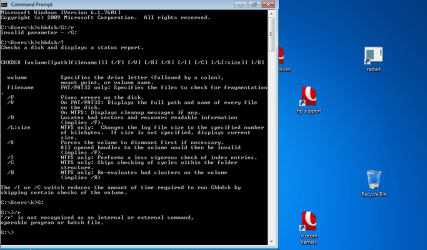
how do u check bad sector in USB flash drive, (this is in drive G)?
i followed someone's instruction, but that did not work.chkdsk and bad sector?-chkdsk2.png
My System SpecsSystem Spec

19 Nov 2011   #2

Windows 8 Pro with Media Center x64
Southern California, USA


Fluidmotion,

You might try this in a command prompt (with administrative privileges): "chkdsk X: /r", without quotes and where X is your USB drive.

I also found this link. However, it is only something I looked up through a quick google search, so use at your own risk. From the ehow.com website: http://www.ehow.com/how_6055690_test...pen-drive.html
My System SpecsSystem Spec
20 Nov 2011   #3

Win7 Starter 32 bits


typed command..did not work...
run as administrator is key...
here's output....
do u know what this mean?
chkdsk and bad sector?-chkdsk.complete.png
My System SpecsSystem Spec
.


20 Nov 2011   #4

Windows 8 Pro with Media Center x64
Southern California, USA


Fm,

It means it found no problems o.0

Are you experiencing problems with it?
My System SpecsSystem Spec
20 Nov 2011   #5

Win7 Starter 32 bits


yep,
trouble is;
i downloaded bootloader, unetbootin, and made persistent usb flash drive,
and ran ubuntu 11.04 from this usb flash drive,
got error message on monitor "................... can not mount...................... "

Quote   Quote: Originally Posted by DustSailor View Post
Fm,

It means it found no problems o.0

Are you experiencing problems with it?

Last edited by fluidmotion; 21 Nov 2011 at 02:51 AM..
My System SpecsSystem Spec
20 Nov 2011   #6

Windows 8 Pro with Media Center x64
Southern California, USA


I really have no idea o.0
My System SpecsSystem Spec
20 Nov 2011   #7

Windows 7 Professional SP1 32-bit
Fantasyland


You got this "can not mount" error in Ubuntu or in Windows? When exactly did it pop up?
My System SpecsSystem Spec
21 Nov 2011   #8

Win7 Starter 32 bits


error message popped up in ubuntu,
after i changed boot order,
and ubnutu was booting from usb flash drive.


Quote   Quote: Originally Posted by Corazon View Post
You got this "can not mount" error in Ubuntu or in Windows? When exactly did it pop up?
My System SpecsSystem Spec
21 Nov 2011   #9

Windows 7 Ultimate 64 bit Steve Ballmer Signature Edition
So Cal (I.E.)


Did you change boot order on flash? If so, you hosed the install on the flash and will have to start over.
My System SpecsSystem Spec
21 Nov 2011   #10

Win7 Starter 32 bits


yep,
changed boot order,
USB diskette on key/USB hard disk is the first in order.
My System SpecsSystem Spec
Reply

 chkdsk and bad sector? problems?


Thread Tools


Similar help and support threads for: chkdsk and bad sector?
Thread Forum
Backup cloning from 512 byte/sector HDD to 4KB/sector HDD Backup and Restore
Solved chkdsk showed 4kb in bad sector help !!!! Hardware & Devices
BAd sector in Harddisk0\DR0 Hardware & Devices
Solved Bad boot sector Installation & Setup
Bad sector Hardware & Devices


All times are GMT -5. The time now is 06:54 PM.


Seven Forums Android App Seven Forums IOS App Follow us on Facebook

Windows 7 Forums is an independent web site and has not been authorized,
sponsored, or otherwise approved by Microsoft Corporation.
"Windows 7" and related materials are trademarks of Microsoft Corp.
© Designer Media Ltd
  

1 2 3 4 5 6 7 8 9 10 11 12 13 14 15 16 17 18 19 20 21 22 23 24 25 26 27 28 29 30 31 32