Windows 7 Forums Search
Welcome to Windows 7 Forums. Our forum is dedicated to helping you find solutions with any problems, errors or issues you are experiencing with Windows 7. The Windows 7 forum also covers news and updates and has an extensive Windows 7 tutorial section that covers a wide range of tips and tricks.


Windows 7 - usb 3.0 not found

 
12-01-2011   #1
pam


windows7 home 64 bit


usb 3.0 not found

I am having a problem with usb 3.0 host controller not being found. I don't know how to fix this problem. I am really not a pc savy type person and I don't know all the pc lingo so if you could me by making it as simple as possible that would be great. Thank you.
how I noticed this was, I have a seagate external hard drive that I do all my backups on. But the last few times I have done this I noticed it was going very slow. So I did a few searchs and found out a few people were having trouble with their usb 3.0 so I clicked on my icon I have in my all programs and mine also said
usb 3.0 host controller not found. I do belive it is from NEC electronics well that is the name of the folder that I found it in.
I did go to the Nec electronics forum to see if there was anything I could do to fix it, but it just all was so confusing to me.
my system is.....
Alienware Auroa
cpu...intel Core i7 960
Motherboard...Intel x58 Southbridge Intel 82801JR(Ich10R)
Memory...6GB Triple Channel 1333Mhz DDR3
Graphics Card.....
Single 1.8GB NVIDIA GeForce GTX 295
Hard Drives...1.2TB RAID 0 (2x 640GB SATA-II, 7,200 RPM, 16MB Cache HDDs)

please let me know if there is anything eles you need to know. I am really hoping someone is able to help me. Thank you!

My System SpecsSystem Spec
12-01-2011   #2


Windows 7 Professional x64


Hey Pam, and welcome to Sevenforums! Does your computer have a particular model? It is Alienware, but which one? Follow the Alienware website and download the most recent drivers according to your setup: Alienware : The Ultimate Gaming Machine

Let me know if you need any other help. If you've already downloaded a driver, you don't need to download another, but there are quite a few to check. If you aren't sure, you can just install a new one anyway. Don't worry about the Nvidia graphics driver though.
My System SpecsSystem Spec
12-01-2011   #3


Windows 7 Home Premium 64 bit


Sounds like it needs the Chipset (motherboard) driver installed
My System SpecsSystem Spec
.


12-01-2011   #4


Windows 7 Ultimate SP1 x64


If it is NEC, simply go to this link at station drivers... RENESAS/NEC Drivers & Firmwares

Look for the one that says 2.1.28.0 and click on the image of the little floppy disk to download the driver. Run the program and it should install itself. If not let us know and we can walk you through installing it through device manager...

If you can, I would also update the firmware of the USB 3 controller

Another thing I always do in device manager is make sure to select the "better performance" policy under the disk drives tab... (This only works when you actually have the USB hard drive plugged in)...
My System SpecsSystem Spec
12-01-2011   #5
pam


windows7 home 64 bit


thank you all for helping me out with this matter.
I updated my motherboard driver, that did not work. I updated one other driver (all from Dell site)MICRO-STAR-INTERNATIONAL-CO-_A00_R268307.exe (7MB) which applied to USB 3.0 PCIe 1x that did not work.
I also went and downloaded the 2.1.28.0 driver. But I did not install this one yet. Because I got a bit scared when a window poped up saying....this program is not commonly downloaded and could harm your computer.

Also my pc is ..... Alienware Aurora which will only be 2yrs old come Jan.

Oh and Sedril you also said...If you can, I would also update the firmware of the USB 3 controller
where do I find the firmware to download? I am so sorry if I am being, Well lets just say kinda dumb on this,but it is my first time around do this kind of stuff.

Last edited by pam; 12-01-2011 at 11:06 PM.. Reason: forgot to add something
My System SpecsSystem Spec
12-02-2011   #6


Windows 7 Professional x64


Pam, no problem, no need to rush anything. Windows update can usually update drivers for you. This link is from Microsoft itself. You don't need to install Silverlight unless you want to watch that particular video. Reading through it should be enough explaination: http://windows.microsoft.com/en-US/w...-your-hardware

When you were on the Dell website and IE told you it might be harmful, it was only being very cautious. It said it "CAN" be harmful, but if you trust it it will be fine. You can trust Dell, it is a major computer manufacturer (which owns alienware). So you can choose to download it manually, or have windows do it for you.

A lot of times, windows might not find all the drivers you may need, that is why I suggested finding it manually. It is your call. Hope I've helped. As you can see, there are sometimes more than one place to find a driver, as others may mention.

I usually download all of my drivers manually from the manufacturer's website, as they would probably know what is best for their own product (In your case it would be Alienware). However, Windows update can be just as good, automatically searching for what you may need. It will be listed as an optional update (well, usually). You might try that method if it is easiest for you.

I know I like typing and giving a lot of detail, but its a lot more simple than I make it out to be. I'd be happy to give you a more step-by-step detailed answer if you need one. Let me know if I've been clear.

Last edited by DustSailor; 12-03-2011 at 04:47 PM.. Reason: Fixed wrong website
My System SpecsSystem Spec
12-02-2011   #7


MS Windows 7 Ultimate 64-bit SP1


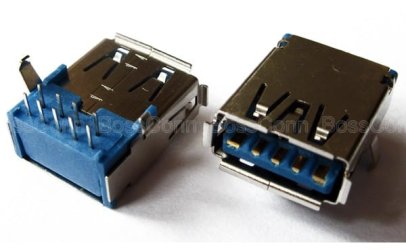
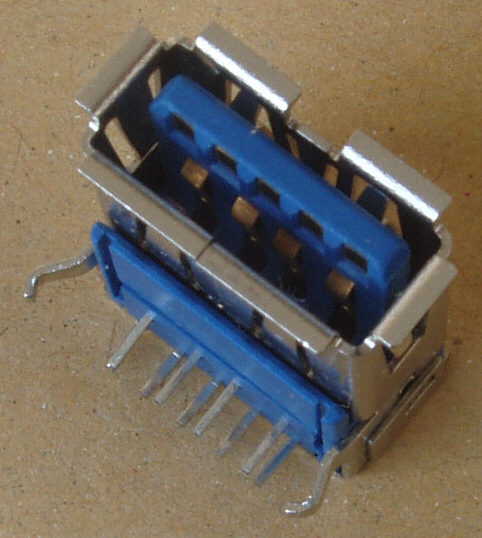
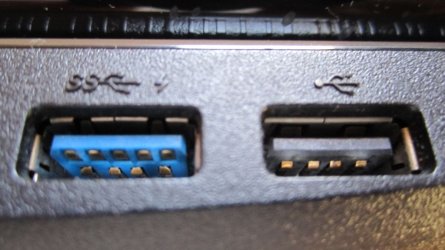
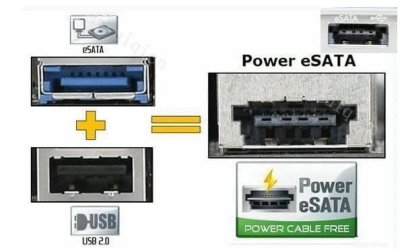
May be this is a silly question. Excuse me! Does your USB 3.0 socket on your computer looks like this? The right side image is what you see from outside of computer.

You can also check in BIOS whether USB 3.0 settings are present.

USB 3.0 socket and plugs are easily identifiable with the Blue color. To get full USB 3.0 speed, you should have USB 3.0 (socket + controller) in your computer and a external HDD with USB 3.0 capability and USB 3.0 cable.

A non USB 3.0 external HDD will not give you the USB 3.0 speed benefits eventhough you connect it through the USB 3.0 socket.
Attached Thumbnails
usb 3.0 not found-usb-3.0-socket.jpg  
My System SpecsSystem Spec
12-02-2011   #8
pam


windows7 home 64 bit


DustSailor,
I am sorry i was not clear on all the drivers. the 2.1.28.0 driver. I did not get from Dell I got this from the NEC electronic site and this is the one that said....(this program is not commonly downloaded and could harm your computer.)So I have not installed this one because I was a bit scared it would harm my pc.(Sorry if I am being a dope) The dell drivers I did install and they did nothing to help me with my problem.

rraod,
I don't see a blue color socket. The first time I saw the USB 3.0 show up was with my external hard drive It came with USB 3.0 pc card adapter installation and I installed it. It did work. that is when I first seen the divce. I only seen this when I did my backups and they were pretty fast, but now a window comes up saying usb3.0 host controller is not found. and it takes forever to do a backup now.
So now I am really confused! Now I don't know Do I have 3.0 or not. by what you are telling me.
My System SpecsSystem Spec
12-02-2011   #9


Win7 Pro 32-bit, Win7 Home 32-bit


The major visible difference between USB 2.0 sockets and USB 3.0 is that the latter are BLUE -- as seen in the images in the previous post. If your socket is one of the "black" ones, it is most likely NOT USB 3.0. Given that the wiring scheme is different between USB 2.0 and USB 3.0, I don't know if a USB 3.0 cable will work with a USB 2.0 socket.
My System SpecsSystem Spec
12-02-2011   #10


Windows 7 Professional x64


Quote   Quote: Originally Posted by pam View Post
I don't see a blue color socket. The first time I saw the USB 3.0 show up was with my external hard drive It came with USB 3.0 pc card adapter installation and I installed it. It did work. that is when I first seen the divce. I only seen this when I did my backups and they were pretty fast, but now a window comes up saying usb3.0 host controller is not found. and it takes forever to do a backup now.
So now I am really confused! Now I don't know Do I have 3.0 or not. by what you are telling me.
What exactly is showing up? Here is a link to an example of a USB 3.0 card on Newegg. Mark is right, USB 3.0 is blue in color, and come to think of it, the Dell drivers probably didn't work because they don't have USB 3.0. If it isn't wrapped in blue, the blue would be seen after looking in to the card's port (the newegg link is an example of having the blue inside the 2 holes).

USB 3.0 is backwards compatible, meaning you can use a 3.0 device or port with a 2.0 device or port, etc (Most people don't have 1.0 or 1.1, especially with Windows 7). You can use it with any other USB version, but if the software isn't upgraded, it could cause it some trouble.

What type of card is this, if I got your meaning? If you aren't sure what it is, let me know what antivirus you have (because if something random is poping up that isn't supposed to be, it might not be so good).
My System SpecsSystem Spec
Reply

 usb 3.0 not found problems?


Thread Tools


Similar Threads for: usb 3.0 not found
Thread Forum
Network drive found but not found? Network & Sharing
Solved HDD nowhere to be found General Discussion
Solved DLL not found General Discussion


All times are GMT -5. The time now is 01:00 PM.


Windows 7 Forums is an independent web site and has not been authorized,
sponsored, or otherwise approved by Microsoft Corporation.
"Windows 7" and related materials are trademarks of Microsoft Corp.
© Designer Media Ltd
  

1 2 3 4 5 6 7 8 9 10 11 12 13 14 15 16 17 18 19 20 21 22 23 24 25 26 27 28 29 30