Windows 7 Forums Search
Welcome to Windows 7 Forums. Our forum is dedicated to helping you find solutions with any problems, errors or issues you are experiencing with Windows 7. The Windows 7 forum also covers news and updates and has an extensive Windows 7 tutorial section that covers a wide range of tips and tricks.


Windows 7 - Upgrade to SSD? (SATA II)

 
12-01-2011   #1


Windows 7 X64 Professional


Upgrade to SSD? (SATA II)

Obvious reliability due to lack of moving parts argument aside, how much of a realistic performance gain (read/write speeds) can I expect by replacing my notebook's 7200 RPM HDD with a SSD? Keep in mind I'm talking SATA II controller not SATA III.

My System SpecsSystem Spec
12-01-2011   #2


Windows 7 Ultimate x64 & Mac OS X 10.7.1


Even on sata2 you'll be looking at 250-300Mbps read/write speed. So a giant improvement.

its a worth while investment, and you've the bonus of being able to shove your laptops current drive in a caddy and have a portable HHD

My System SpecsSystem Spec
12-01-2011   #3


Windows 7 X64 Professional


Quote   Quote: Originally Posted by badger906 View Post
Even on sata2 you'll be looking at 250-300Mbps read/write speed.
Just for comparison, what is the average read/write of a conventional SATA II HDD? forgive my ignorance...and my laziness to do my own research.
My System SpecsSystem Spec
.


12-01-2011   #4


Windows 7 x64 Ultimate


The gain in read write speeds is good but the 100 fold gain in access time is really what makes it fly. Coupled with the fact that notbook drives are notoriously slow to start with, it's night and day!

I recently replaced the craptastic notebook spinner in my otherwise somewhat high end laptop with an SSD. It was a Sony so I was able to get all the OEM drivers for all the funky bits working completely with a clean windows install. It now behaves like it SHOULD. Laptop drives slow you down on any disk io, program launching, booting etc so much.

Only problem is, you will likely lose a lot of storage space, but if ou really don;t NEED that 500 meg drive and a 60 or 120 will do... AND if you can restore all your oem drivers. Then it's definately a win!
My System SpecsSystem Spec
12-01-2011   #5


7 Ultimate x64


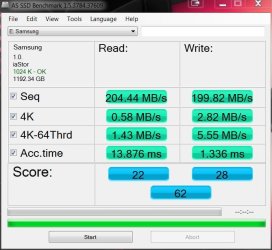
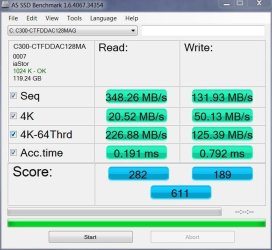
These are a couple of old benchmarks I have. it should give you a rough idea of the performance disparity.

Conventional HDD (RAID 0 - sorry, don't have a single HDD benchmark):

Upgrade to SSD? (SATA II)-hd-samsung-mbs.jpg

And a Crucial C300 on Sata II:

Upgrade to SSD? (SATA II)-hd-ssd-c300-fw-007.jpg

SSD wins.
My System SpecsSystem Spec
12-01-2011   #6


Windows7 Pro 64bit SP-1; Windows XP Pro 32bit


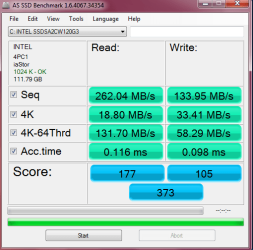
Both on exact same moboard and SATA 2 or correctly Sata 3.0Gbs Intel controller.

My WD CaviarBlack 7200RPM before SSD installed.
Note max Read speed and access time.

12.1ms on WD.
0.116ms on the Intel 320.

111.2 MB/s WD
262.04 MB/s Intel 320
Attached Thumbnails
Upgrade to SSD? (SATA II)-19-september-2010_21-46.png   Upgrade to SSD? (SATA II)-ssd-bench3.png  
My System SpecsSystem Spec
12-01-2011   #7


Windows 7 x64 Ultimate


And note that a laptop HD will typically be MUCH slower than a 7200RPM desktop drive. Like 2-4 times slower transfer rate.
My System SpecsSystem Spec
12-01-2011   #8


Windows 7 X64 Professional


Thanks everybody! I think my questions have been answered.

Quote   Quote: Originally Posted by fseal View Post
Only problem is, you will likely lose a lot of storage space, but if ou really don;t NEED that 500 meg drive and a 60 or 120 will do... AND if you can restore all your oem drivers. Then it's definately a win!
Well, the notebook in question is an 18" HP DV8T. It came with 2 X 500 GB HDDs. I'm barely using one of them.

The plan is to replace the boot drive with an SSD and use the other one for all my data. I'm doing that with my MAINGEAR desktop set up and it is outstanding!

I've done clean installs on both the MAINGEAR desktop and another, different laptop and had only negligible problems with drivers. I had to search for and run in XP Compatibilty 2 drivers on the older laptop. Other than that, Windows 7 has amazed me with the speed it takes to go from format to running computer! The HP laptop is modern (except for the SATA II controller). I don't foresee any problems with Windows automatically finding drivers for it.

Last edited by bug67; 12-01-2011 at 12:40 PM..
My System SpecsSystem Spec
12-01-2011   #9


Windows7 Pro 64bit SP-1; Windows XP Pro 32bit


Your welcome Bug67.


fseal
Now I see why everyone that adds an SSD to a laptop is so amazed. They have a much bigger "relative" performance gain.
My System SpecsSystem Spec
Reply

 Upgrade to SSD? (SATA II) problems?


Thread Tools


Similar Threads for: Upgrade to SSD? (SATA II)
Thread Forum
Will I still see good speeds using a SATA 3 SSD on a SATA 2 mobo? Hardware & Devices
Sata Hdd / cable / motherboard sata / problem? Hardware & Devices
HDD SATA 3 (6.0Gb/s) works with SATA 2 (3.0Gb/s) controller??? Hardware & Devices
SATA-II Drive on SATA Raid Controller? Hardware & Devices
Trying To Reinstall w7 Upgrade on new Sata III as c: with AHCI support Installation & Setup


All times are GMT -5. The time now is 01:01 PM.


Windows 7 Forums is an independent web site and has not been authorized,
sponsored, or otherwise approved by Microsoft Corporation.
"Windows 7" and related materials are trademarks of Microsoft Corp.
© Designer Media Ltd
  

1 2 3 4 5 6 7 8 9 10 11 12 13 14 15 16 17 18 19 20 21 22 23 24 25 26 27 28 29 30