Windows 7 Forums Search
Welcome to Windows 7 Forums. Our forum is dedicated to helping you find solutions with any problems, errors or issues you are experiencing with Windows 7. The Windows 7 forum also covers news and updates and has an extensive Windows 7 tutorial section that covers a wide range of tips and tricks.


Windows 7 - Hard disk:maintenance, partitioning question

 
12-02-2011   #1


windows 7 Pro x64


Hard disk:maintenance, partitioning question

Hello

2 questions on Har Disk:

Partitioning:

I have a 640 gb hard disk. This one is partitioned in two drives. Windows 7 Disk Management Tool give me these values

Disk 0 : Base 596.17 GB
Not allocated:101 MB
C: 195.31 GB
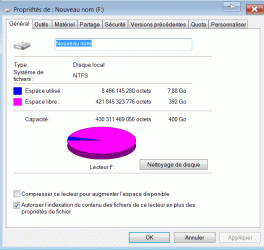
F: 400.76 GB

Question: How could I redistribute disk allocation space. My disk C: as 195.31 GB allocated and it is filled up to82%, while my fisk F: as 400 GB and is filled for less than 2%

What is the "Not allocated space" of 101 MB

My disk as a 640 GB capacity.
If I add the partition for disk Not allocated space & C & F = .1 + 195.31 + 400.76 = 595.17 GB allowed

If my disk is 640 GB - 595.17 = 43.93 GB that is missing somewhere


Disk maintenance:

What is the best tool to verify and maintain disk integrity. I got important file in it and I want to reduce my risk of problems. Actually, my backup is executed via an network external backup hard disk

Martin

My System SpecsSystem Spec
12-02-2011   #2


Windows 7 SP1, Home Premium, 64-bit


A 640 GB disk has about 595 GB usable, so nothing is missing.

You could enlarge C and make F smaller.

Or, if you have been keeping your personal data on C, you could move your data to F, which would free up some space on C so you might not have to enlarge it. That's probably what I would do. You might then even be able to shrink C and give some more space to F.

What do you use F for now?

Is most or all of your personal data now on C and do you definitely want to keep it on C?

You could also move whatever is on F to C and then delete F. Then enlarge C to take up the space previously used by F. That would give you 1 partition covering the entire disk.

Answer back, along with a screen shot of your Disk Management.

You might be able to resize partitions with Disk Management or you might have to use something like Partition Wizard.

Disk maintenance: S.M.A.R.T., chkdsk, and your hard drive manufacturer's disk utility tools available for download from their site. And occasional defragmentation. You should also have a general idea of what your hard disk temperatures are and use a tool such as HWInfo32 to monitor those temps. It will also monitor other temps and fan speeds.
My System SpecsSystem Spec
12-02-2011   #3


windows 7 Pro x64


Quote   Quote: Originally Posted by ignatzatsonic View Post
A 640 GB disk has about 595 GB usable, so nothing is missing.

You could enlarge C and make F smaller.

Or, if you have been keeping your personal data on C, you could move your data to F, which would free up some space on C so you might not have to enlarge it. That's probably what I would do. You might then even be able to shrink C and give some more space to F.

What do you use F for now?

Is most or all of your personal data now on C and do you definitely want to keep it on C?

You could also move whatever is on F to C and then delete F. Then enlarge C to take up the space previously used by F. That would give you 1 partition covering the entire disk.

Answer back, along with a screen shot of your Disk Management.

You might be able to resize partitions with Disk Management or you might have to use something like Partition Wizard.

Disk maintenance: S.M.A.R.T., chkdsk, and your hard drive manufacturer's disk utility tools available for download from their site. And occasional defragmentation. You should also have a general idea of what your hard disk temperatures are and use a tool such as HWInfo32 to monitor those temps. It will also monitor other temps and fan speeds.
Thank you ignatzatsonic

I did took snapshot of my disk, but I need to get a place to upload them.

Can i directly modify my allocation form each disk?. Is there any danger to do so?
I will try to move some files to F:

Thanks for the info. I will visit my drive manufacturer for it
Drive temp: By touching it, not to hot, but i will see if I could manage it

Martin

P.S. Excuse my English, I'm more fluent in French
My System SpecsSystem Spec
.


12-02-2011   #4


Windows 7 SP1, Home Premium, 64-bit


Your English is fine. I don't parlez vous hardly at all. Comprendre?

You can post your picture directly into this thread by using the "go advanced" button at the bottom of your screen and then "manage attachments". Just browse to your picture and then choose "upload".

You can modify the size of any partition. The proper tool for the job depends on what we see from your picture of Disk Management.

There is some minor danger. You should always have your data backed up as a precaution.

Any drive temperature under 40 Celsius is acceptable, assuming you are in a room with ordinary temperatures. Laptop temperatures may be higher.
My System SpecsSystem Spec
12-02-2011   #5


windows 7 Pro x64


Quote:
Your English is fine. I don't parlez vous hardly at all. Comprendre?
LOL

I learned something about this site... Pictures management

Hard drive temp: definitively lower than 40. I would guess around 25 by touching it, but I will look for tool to measure it

Martin
Attached Thumbnails
Hard disk:maintenance, partitioning question-snap1.gif   Hard disk:maintenance, partitioning question-snap2.gif   Hard disk:maintenance, partitioning question-snap3.gif  
My System SpecsSystem Spec
12-02-2011   #6


Windows 7 Ultimate x64 SP1, LinuxMint 9 LTS x64, Debian 6, Ubuntu 10.04 LTS x64


Martin - try HWINFO64 as suggested. When you run it, choose the Sensor-only option at the flash screen.

Regards,
Golden
Attached Images
 
My System SpecsSystem Spec
12-02-2011   #7


windows 7 Pro x64


Quote   Quote: Originally Posted by Golden View Post
Martin - try HWINFO64 as suggested. When you run it, choose the Sensor-only option at the flash screen.

Regards,
Golden
Interesting tool

By looking at it, I see that my drive operate at 43C No message from the software that this is a problem, but I will seek info

Martin
My System SpecsSystem Spec
12-02-2011   #8


MS Windows 7 Ultimate 64-bit SP1


Your C: size is more than enough. Infact 80-100GB is fairly large enough for holding OS and applications.

Looking at your disk usage, it seems you have kept all your user data in C: keeping your F: partition empty. I suggest you move all the data from C: to F:. This will make lot of free space in C:. That is all you have to do and nothing to worry!
My System SpecsSystem Spec
12-02-2011   #9


windows 7 Pro x64


Thanks,

OK, I see

I will work on moving my data

I realized that I have an old old ** habit from the DOS time to load everything on C:

* Yes, I have worked with 15 inches, 10k hard disk and 8 inch floppy disk in the past. We where calling them the anchor, they where very heavy...
My System SpecsSystem Spec
12-02-2011   #10


Windows 7 SP1, Home Premium, 64-bit


As suspected, you will have to use Partition Wizard bootable disk if you want to increase the size of C.

The general procedure in Partition Wizard would be to shrink F, which would generate some "unallocated space". You could then add that unallocated space to C.

Personally, I would not do that. Instead, I would move personal data from C to F. And then possibly reduce the size of C. Or you could just leave C the same size and not reduce it.

Here is how to use Partition Wizard:

Partition Wizard : Use the Bootable CD

Your hard drive temperature is acceptable.
My System SpecsSystem Spec
Reply

 Hard disk:maintenance, partitioning question problems?


Thread Tools


Similar Threads for: Hard disk:maintenance, partitioning question
Thread Forum
how i can do unallocated partitioning of my hard disk General Discussion
Solved Hard disk partitioning for Windows 7 on Fujitsu AH531. Please help Installation & Setup
need help in Partitioning hard drive using disk management General Discussion
Partitioning my hard disk Installation & Setup
Partitioning main hard disk Installation & Setup


All times are GMT -5. The time now is 01:01 PM.


Windows 7 Forums is an independent web site and has not been authorized,
sponsored, or otherwise approved by Microsoft Corporation.
"Windows 7" and related materials are trademarks of Microsoft Corp.
© Designer Media Ltd
  

1 2 3 4 5 6 7 8 9 10 11 12 13 14 15 16 17 18 19 20 21 22 23 24 25 26 27 28 29 30