|
Welcome to Windows 7 Forums. Our forum is dedicated to helping you find solutions with any problems, errors or issues you are experiencing with Windows 7. The Windows 7 forum also covers news and updates and has an extensive Windows 7 tutorial section that covers a wide range of tips and tricks.
Windows 7 - Hard drive assigned letters problem |
12-02-2011
|
#1 | | |
Hi new and first time here., and I need help please.
I have several hard drives to storage photos and other media files.
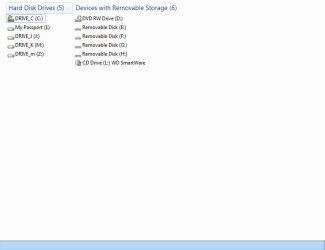
I found that the letters assigned in two of the hard drives are difeferent
drive_K (M)
drive_m (Z) orginal this was drive_m (K)
I tried to change the (K) to "Z " in the computer management, to see if (_m) was change but it stils there.
Is this right? I wil appreciate help
orlando
iam trying to add the screen
Last edited by Brink; 12-02-2011 at 05:03 PM..
Reason: merged consecutive posts
| My System Specs | | System Manufacturer/Model Number Dell OS Windows 7 64bit |
12-02-2011
|
#2 | | Windows 7 Home Premium 64 bit |
If you have a card reader installed that is why the drive letters can't be change, remove the card reader and then you can change the drive letters. | My System Specs | | System Manufacturer/Model Number Dell XPS 730 OS Windows 7 Home Premium 64 bit CPU Intel Core 2 quad Extreme Q9770 @ 3.2 GHz Memory 4x2 GB Muskin 1600 MHz ram Graphics Card NVidia GTX 250 Sound Card Soundblaster X-Fi Fatality Champion Monitor(s) Displays 2 Dell 2007WFP Ultrascans Screen Resolution 3360 x 1050 Keyboard MS Natrual Keyboard Pro Mouse Logitech Wireless Trackball PSU 1000 Watt Cooling air Hard Drives WD Black 1TB sata, 2-WD Black 500 sata, 2-Seagate 500 Go external Internet Speed DSL Elite |
12-02-2011
|
#3 | | |
Yes, the computer is built with card reader, so I cannot remove that. So is that ok to have
drive_K (M)
drive_m (Z)? or will it make a mess with the files storage in each hard drive?
Can I change those letters on another computer which has not card reader built in such as a laptop?
Last edited by Brink; 12-02-2011 at 05:03 PM..
Reason: merged consecutive posts
| My System Specs | | System Manufacturer/Model Number Dell OS Windows 7 64bit |
12-02-2011
|
#4 | | Windows 7 Home Premium 64 bit |
It won't hurt anything, but you will have to remember where you put things. As long as C:/ is os and that's where programs are loaded by default, the other drives are storage you can go into Windows Explorer and right click the drive and rename it, for instance OS C:, Pictures J:, Music K:, MY Stuff Z:, that way it would keep it strait. Try it and let me know. | My System Specs | | System Manufacturer/Model Number Dell XPS 730 OS Windows 7 Home Premium 64 bit CPU Intel Core 2 quad Extreme Q9770 @ 3.2 GHz Memory 4x2 GB Muskin 1600 MHz ram Graphics Card NVidia GTX 250 Sound Card Soundblaster X-Fi Fatality Champion Monitor(s) Displays 2 Dell 2007WFP Ultrascans Screen Resolution 3360 x 1050 Keyboard MS Natrual Keyboard Pro Mouse Logitech Wireless Trackball PSU 1000 Watt Cooling air Hard Drives WD Black 1TB sata, 2-WD Black 500 sata, 2-Seagate 500 Go external Internet Speed DSL Elite |
12-02-2011
|
#5 | | Windows 7 Home Premium 64 bit |
I forgot to ask are these individual drives, not partitions on one drive | My System Specs | | System Manufacturer/Model Number Dell XPS 730 OS Windows 7 Home Premium 64 bit CPU Intel Core 2 quad Extreme Q9770 @ 3.2 GHz Memory 4x2 GB Muskin 1600 MHz ram Graphics Card NVidia GTX 250 Sound Card Soundblaster X-Fi Fatality Champion Monitor(s) Displays 2 Dell 2007WFP Ultrascans Screen Resolution 3360 x 1050 Keyboard MS Natrual Keyboard Pro Mouse Logitech Wireless Trackball PSU 1000 Watt Cooling air Hard Drives WD Black 1TB sata, 2-WD Black 500 sata, 2-Seagate 500 Go external Internet Speed DSL Elite |
12-02-2011
|
#6 | | |
Thanks so much for your help.
Yes, all of them are individual hard diks. | My System Specs | | System Manufacturer/Model Number Dell OS Windows 7 64bit |
12-02-2011
|
#7 | | Windows 7 Home Premium 64 bit |
Let us know how it work out | My System Specs | | System Manufacturer/Model Number Dell XPS 730 OS Windows 7 Home Premium 64 bit CPU Intel Core 2 quad Extreme Q9770 @ 3.2 GHz Memory 4x2 GB Muskin 1600 MHz ram Graphics Card NVidia GTX 250 Sound Card Soundblaster X-Fi Fatality Champion Monitor(s) Displays 2 Dell 2007WFP Ultrascans Screen Resolution 3360 x 1050 Keyboard MS Natrual Keyboard Pro Mouse Logitech Wireless Trackball PSU 1000 Watt Cooling air Hard Drives WD Black 1TB sata, 2-WD Black 500 sata, 2-Seagate 500 Go external Internet Speed DSL Elite |
12-02-2011
|
#8 | | |

Quote: Originally Posted by 1Bowtie If you have a card reader installed that is why the drive letters can't be change, remove the card reader and then you can change the drive letters.
I don't understand why you need to remove card reader connections to assign drives, I understand assignment to drives by windows, even my system still has floppy designators | My System Specs | | System Manufacturer/Model Number Workstation for CAD/Photoshop/Electronics OS Windows 7 Pro 64bit CPU i5 2500K 3.3GHz, Cooler Master Hyper N520 Heatpipe Motherboard Supermicro C7P67 Memory 16GB of Kingston HyperX DDR3 1333, Max is 32GB Graphics Card SAPPHIRE Radeon HD 5770 1GB 128-bit GDDR5 Sound Card On Board REALTEK ALC889 7.1 HD Audio with optional S/PDIF Monitor(s) Displays Two eMachine E230H Screen Resolution 1920x1080 Keyboard Logitech 920-000914 USB Wired Ultra-thin Illuminated KB Mouse two/Logitech Trackman Marble/Microsoft Optical Mouse 3000 PSU Tagan BZ Series Modular 800W Case Thermaltake Armor+MX ATX Tower Cooling 1/230mm, 3/120mm Enermax T.B. Silence Twister Bearing Hard Drives Four 500GB Seagates, two Samsung CD/DVD SH-S223C Internet Speed Cable Modem SB5100, 22Mbps Down/4.3Mbps Up Other Info CISCO RVS4000, two EnGenius ESR9850 (Router/repeater mode), Epson Perfection V500 Photo Scanner, Cyber Power 850AVR, Scythe KAZE SERVER Advanced Fan Controller, Spyder 3 Express, StarTech PCI Post Diagnostics Test Card, ADS DVDXpressDX2, SIIG USB Video Capture, SIIG 7.1 PCI Soundwave, Panasonic RP-HTX7 Headphone, SanDisk CF Type I/II ImageMate. |
12-02-2011
|
#9 | | Windows 7 Professional SP1 32-bit |
You don't need to remove cardreaders just to change drive letters.
What 1Bowtie meant was that you'd have to remove it if you wanted to assign letters to your disks that are already in use by the cardreader. Otherwise, no, it's not necessary. | My System Specs | | System Manufacturer/Model Number Custom-built OS Windows 7 Professional SP1 32-bit CPU Intel Core 2 Duo E6600 2.4GHz, overclocked to 2.7GHz Motherboard Asus PL5D2 Memory 3GB DDR2-667 (2x1GB + 2x512MB in dual-channel config) Graphics Card nVidia GeForce 9800 GT Sound Card on-board Realtek HD Monitor(s) Displays LG W2261 Screen Resolution 1920x1200 (DVI) Keyboard Standard Mouse Microsoft wireless optical mouse PSU Antec TruePower 2.0 Case Cooler Master Centurion Cooling various fans Hard Drives OCZ SSD Vertex Plus 60GB SATA (Firmware 3.55), 64MB cache
Hitachi HD321KJ SATA, 320GB, 7200rpm, 16MB cache Internet Speed DSL; ~700KB/sec down, ~65KB/sec up Other Info Have a laptop too :) (Compaq CQ60 also with Win7 Pro SP1 32-bit)
Drives in both systems:
C: - Windows 7 + apps. Pagefile is fixed size and located at the very end of the partition.
D: - various temp files/cache for Firefox and apps/games.
E: - videos, music, misc. storage, torrent downloads, etc. |
12-02-2011
|
#10 | | |
I must be missing something here or to slow for the catch, but I thought the words used were Harddrives, you are writing about, "assign letters to your disks that are already in use by the cardreader".
Disk used but cardreaders, I didn't know harddrives connect to cardreaders, I'm missing something here. | My System Specs | | System Manufacturer/Model Number Workstation for CAD/Photoshop/Electronics OS Windows 7 Pro 64bit CPU i5 2500K 3.3GHz, Cooler Master Hyper N520 Heatpipe Motherboard Supermicro C7P67 Memory 16GB of Kingston HyperX DDR3 1333, Max is 32GB Graphics Card SAPPHIRE Radeon HD 5770 1GB 128-bit GDDR5 Sound Card On Board REALTEK ALC889 7.1 HD Audio with optional S/PDIF Monitor(s) Displays Two eMachine E230H Screen Resolution 1920x1080 Keyboard Logitech 920-000914 USB Wired Ultra-thin Illuminated KB Mouse two/Logitech Trackman Marble/Microsoft Optical Mouse 3000 PSU Tagan BZ Series Modular 800W Case Thermaltake Armor+MX ATX Tower Cooling 1/230mm, 3/120mm Enermax T.B. Silence Twister Bearing Hard Drives Four 500GB Seagates, two Samsung CD/DVD SH-S223C Internet Speed Cable Modem SB5100, 22Mbps Down/4.3Mbps Up Other Info CISCO RVS4000, two EnGenius ESR9850 (Router/repeater mode), Epson Perfection V500 Photo Scanner, Cyber Power 850AVR, Scythe KAZE SERVER Advanced Fan Controller, Spyder 3 Express, StarTech PCI Post Diagnostics Test Card, ADS DVDXpressDX2, SIIG USB Video Capture, SIIG 7.1 PCI Soundwave, Panasonic RP-HTX7 Headphone, SanDisk CF Type I/II ImageMate. Hard drive assigned letters problem problems? All times are GMT -5. The time now is 01:01 PM. |  |