| Windows 7: Disk Management disc tools - can't format uneducated space RAID5 |
03 Dec 2011
|
| | Windows 7 Ultimate 32bit SP1 11 posts Chattanooga, TN |
Disk Management disc tools - can't format unallocated space RAID5 I am using Windows 7 Ultimate 32-bit & I have a 2 3Ware Escalade 9500S-8 SATA controllers with four 1.8 TB drives. The 1st partition is 2 TB and is the boot partition. After that I can see the rest of my space as 5.2 TB and labeled as Unallocated Space. When I right click on it everything is ghosted out except properties. I tried splitting the 2 TB partition in half to see if I could expand the new 1 TB partition to use any of the unallocated space but could not. I have tried every partition tool I could download but none will work with the 5.2 TB partition. Any suggestions as to how I can access this space. I am trying to use it as a FTP server.
Thanks in advance,
Chris.
Last edited by sysopchris; 03 Dec 2011 at 04:57 PM..
| My System Specs |
| System Manufacturer/Model Number Custom built OS Windows 7 Ultimate 32bit SP1 CPU Two 3.07 gigahertz Intel Xeon - Hyper-threaded 4 total Motherboard Supermicro X5DP8 PCB Version Memory 3968 Megabytes Usable Installed Memory Graphics Card Motherboard - Standard VGA Graphics Adapter Display adapter Sound Card Built-in Motherboard Monitor(s) Displays Acer AL1716 (17.1") Screen Resolution 1440 x 900 Hard Drives Qty. 5 - Hitachi HDS5C3020ALA632 [Hard drive] (2000.40 GB)
rev ML6OA580 Other Info AMCC 3ware 9500S SATA RAID Controller (2x)
3.07 gigahertz Intel Xeon (2 installed)
8 kilobyte primary memory cache
512 kilobyte secondary memory cache
Hyper-threaded (4 total) |
03 Dec 2011
|
| | Windows 7 Professional SP1 32-bit 1,784 posts Fantasyland |
You will need to go to Disk Management and reinitialize the disk as as GPT disk, then create new partitions on it.
I'm assuming that currently it's formatted as an MBR disk - the MBR partitioning scheme however can only address total disk space up to 2TB. Beyond that, it's incapable of "reaching" the rest.
Here's more information about GPT for your perusal: Windows and GPT FAQ | My System Specs | | System Manufacturer/Model Number Custom-built OS Windows 7 Professional SP1 32-bit CPU Intel Core 2 Duo E6600 2.4GHz, overclocked to 2.7GHz Motherboard Asus PL5D2 Memory 4GB DDR2-667 (4x1GB in dual-channel config) Graphics Card nVidia GeForce 9800 GT Sound Card Creative X-Fi XtremeMusic Monitor(s) Displays Acer Screen Resolution 1920x1200 (DVI) Keyboard Standard Mouse Microsoft wireless optical mouse PSU Antec TruePower 2.0 Case Cooler Master Centurion Cooling various fans Hard Drives OCZ SSD Vertex Plus 60GB SATA (Firmware 3.55), 64MB cache
Hitachi HD321KJ SATA, 320GB, 7200rpm, 16MB cache Internet Speed DSL; ~330KB/sec down, ~110KB/sec up Other Info Have a laptop too :) (Compaq CQ60 also with Win7 Pro SP1 32-bit)
Drives in both systems:
C: - Windows 7 + apps. Pagefile is fixed size and located at the very end of the partition.
D: - various temp files/cache for Firefox and apps/games.
E: - videos, music, misc. storage, torrent downloads, etc. |
03 Dec 2011
|
| | Windows 7 Ultimate 32bit SP1 11 posts Chattanooga, TN |
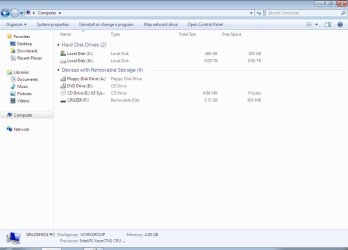
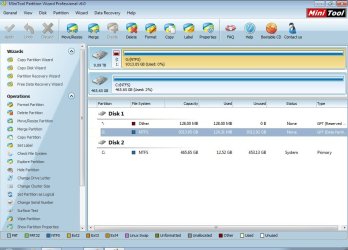
The partition is not formatted. When it is selected and I go to the actions menu and select all tasks, or right-click on it, all options are ghosted out. When I use the command line DISKPART cmd. the volume is not shown. I would not mind multiple 2 TB partitions then I could use the 5.4 TB. I have attached a screen capture. In the rectangle where it is displayed the only text is 'Unallocated'.
Thanks... | My System Specs | | System Manufacturer/Model Number Custom built OS Windows 7 Ultimate 32bit SP1 CPU Two 3.07 gigahertz Intel Xeon - Hyper-threaded 4 total Motherboard Supermicro X5DP8 PCB Version Memory 3968 Megabytes Usable Installed Memory Graphics Card Motherboard - Standard VGA Graphics Adapter Display adapter Sound Card Built-in Motherboard Monitor(s) Displays Acer AL1716 (17.1") Screen Resolution 1440 x 900 Hard Drives Qty. 5 - Hitachi HDS5C3020ALA632 [Hard drive] (2000.40 GB)
rev ML6OA580 Other Info AMCC 3ware 9500S SATA RAID Controller (2x)
3.07 gigahertz Intel Xeon (2 installed)
8 kilobyte primary memory cache
512 kilobyte secondary memory cache
Hyper-threaded (4 total) |
03 Dec 2011
|
| | Windows 7 Professional SP1 32-bit 1,784 posts Fantasyland |
It's not a question of what to do with the partition. You can't use that space because, as I explained before, the entire disk (all 7.2TB of it) is using the MBR partitioning scheme.
That scheme cannot address more than 2TB of space on the disk, which is what you're currently using - hence the remaining 5.2TB of unallocated space.
Maybe there are partition management apps that can convert an MBR disk to a GPT disk without destroying existing partitions. I honestly don't know; one of the other forum members who is more knowledgeable in this regard will hopefully comment on this. EDIT: It turns out that Partition Wizard (a widely recommended free partition manager in this forum) can do this. http://www.partitionwizard.com/conve...-gpt-disk.html | My System Specs | | System Manufacturer/Model Number Custom-built OS Windows 7 Professional SP1 32-bit CPU Intel Core 2 Duo E6600 2.4GHz, overclocked to 2.7GHz Motherboard Asus PL5D2 Memory 4GB DDR2-667 (4x1GB in dual-channel config) Graphics Card nVidia GeForce 9800 GT Sound Card Creative X-Fi XtremeMusic Monitor(s) Displays Acer Screen Resolution 1920x1200 (DVI) Keyboard Standard Mouse Microsoft wireless optical mouse PSU Antec TruePower 2.0 Case Cooler Master Centurion Cooling various fans Hard Drives OCZ SSD Vertex Plus 60GB SATA (Firmware 3.55), 64MB cache
Hitachi HD321KJ SATA, 320GB, 7200rpm, 16MB cache Internet Speed DSL; ~330KB/sec down, ~110KB/sec up Other Info Have a laptop too :) (Compaq CQ60 also with Win7 Pro SP1 32-bit)
Drives in both systems:
C: - Windows 7 + apps. Pagefile is fixed size and located at the very end of the partition.
D: - various temp files/cache for Firefox and apps/games.
E: - videos, music, misc. storage, torrent downloads, etc. |
04 Dec 2011
|
| | Windows 7 Ultimate 32bit SP1 11 posts Chattanooga, TN |
Now I understand the problem. Losing everything on the disk is not a problem. I just want to access all my space. At this point I could have re-installed Windows a dozen times with the amount of time I've wasted on solving this. Should have come here first.
Thanks!!!
Chris | My System Specs | | System Manufacturer/Model Number Custom built OS Windows 7 Ultimate 32bit SP1 CPU Two 3.07 gigahertz Intel Xeon - Hyper-threaded 4 total Motherboard Supermicro X5DP8 PCB Version Memory 3968 Megabytes Usable Installed Memory Graphics Card Motherboard - Standard VGA Graphics Adapter Display adapter Sound Card Built-in Motherboard Monitor(s) Displays Acer AL1716 (17.1") Screen Resolution 1440 x 900 Hard Drives Qty. 5 - Hitachi HDS5C3020ALA632 [Hard drive] (2000.40 GB)
rev ML6OA580 Other Info AMCC 3ware 9500S SATA RAID Controller (2x)
3.07 gigahertz Intel Xeon (2 installed)
8 kilobyte primary memory cache
512 kilobyte secondary memory cache
Hyper-threaded (4 total) |
04 Dec 2011
|
| | MS Windows 7 Ultimate 64-bit SP1 747 posts Somewhere in the middle of Desert :-) |
Your 4x1.8TB hard disks are connected in RAID 5 (striped form) showing as 7.2TB single hard disk. To make use of all the space you need to break the strip set.
If there is no problem in losing the data, the easiest method is to remove the data connectors of 1, 2, 3 HDDs keeping 0 HDD. Reinstall Windows 7 on this HDD with the partitions you wanted to create. Once Windows 7 is up and running, connect Disk 1, make all the space on this Disk as unallocated and then create partitions and format in Disk Management program of Windows. Then do the same for Disk 2 and then later on for Disk 3.
Now you will have 4 independent disks with partitions available to you. | My System Specs | | System Manufacturer/Model Number Toshiba Satellite P775-S7232 OS MS Windows 7 Ultimate 64-bit SP1 CPU i5-2410M 2.3GHz (2.9GHz Turbo-Boost) Sandy Bridge 32nm Motherboard Toshiba PHRAA ver. PSBY1U-00F003 Memory 4GB+4GB Samsung DDR3 PC3-10700 (1333 MHz) Graphics Card Video Intel(R) HD Graphics Family, 1696MB available memory Sound Card Realtek High Definition Audio version=6.0.1.6323 Monitor(s) Displays 17.3 " Trubrite TFT LCD, LED Backlit Screen Resolution 1600x900 32 bit, Native support for 720P content Keyboard Premium Raised Tile keyboard Mouse Logitech M215 wireless mouse PSU Toshiba AC/DC Adapter Case Notebook Cooling Built-in Fan Hard Drives TOSHIBA MK6476GSXN
580.614 [GB] partitioned C: 80GB and D: 500GB with hidden recovery partitons.
Spare bay for 2nd HDD but no SATA connector :-( Internet Speed Not fast enough Other Info Built-in Harman Kardon speakers with Dolby Advanced Audio, Waves MaxxAudio® 3. HDMI, 1xUSB3+3xUSB2 ports, WebCam, Battery life 4hrs 11mins, 4GB Readyboost SDHC card, WD My Book Essential Ext HDDs 2 TB, 2x1TB, My Passport SE 1TB and WDTV 1st Gen for Multimedia playing on a Sony Wega 32" LCD.
Recent addition to my toys are Asus Transformer Pad TF300T with 32GB onboard sd card + 32GB microsd card. |
04 Dec 2011
|
| | Windows 7 Ultimate 32bit SP1 11 posts Chattanooga, TN |
I can't wait to give this a try. Your instructions are very detailed and sound easy enough. Unfortunately the server is not at my home but at a restaurant close by. Usually I manage it with Team Viewer but I will need to be on-site for this which will be tomorrow morning at the earliest.
There is also another problem which I will have to address later. In the BIOS for the 3Ware Escalade 9500S-8 SATA controllers (I have two cards) only four of the five 1.8 TB Hitachi hard drives are in use. The 5th says 'Not in use'.
I should have done this to start with. I have completed my profile here for system specs. and attached my Belarc system profile as a PDF document and here is my Gravator profile. http://en.gravatar.com/sysopchris
As soon as I complete your instruction I will post a reply here to let you know how it goes. I really appreciate your time helping me out. Thanks so very much!
Regards,
Chris
Last edited by sysopchris; 04 Dec 2011 at 07:50 PM..
| My System Specs | | System Manufacturer/Model Number Custom built OS Windows 7 Ultimate 32bit SP1 CPU Two 3.07 gigahertz Intel Xeon - Hyper-threaded 4 total Motherboard Supermicro X5DP8 PCB Version Memory 3968 Megabytes Usable Installed Memory Graphics Card Motherboard - Standard VGA Graphics Adapter Display adapter Sound Card Built-in Motherboard Monitor(s) Displays Acer AL1716 (17.1") Screen Resolution 1440 x 900 Hard Drives Qty. 5 - Hitachi HDS5C3020ALA632 [Hard drive] (2000.40 GB)
rev ML6OA580 Other Info AMCC 3ware 9500S SATA RAID Controller (2x)
3.07 gigahertz Intel Xeon (2 installed)
8 kilobyte primary memory cache
512 kilobyte secondary memory cache
Hyper-threaded (4 total) |
04 Dec 2011
|
| | Windows 7 Professional SP1 32-bit 1,784 posts Fantasyland |
Good luck - let us know how things turn out. | My System Specs | | System Manufacturer/Model Number Custom-built OS Windows 7 Professional SP1 32-bit CPU Intel Core 2 Duo E6600 2.4GHz, overclocked to 2.7GHz Motherboard Asus PL5D2 Memory 4GB DDR2-667 (4x1GB in dual-channel config) Graphics Card nVidia GeForce 9800 GT Sound Card Creative X-Fi XtremeMusic Monitor(s) Displays Acer Screen Resolution 1920x1200 (DVI) Keyboard Standard Mouse Microsoft wireless optical mouse PSU Antec TruePower 2.0 Case Cooler Master Centurion Cooling various fans Hard Drives OCZ SSD Vertex Plus 60GB SATA (Firmware 3.55), 64MB cache
Hitachi HD321KJ SATA, 320GB, 7200rpm, 16MB cache Internet Speed DSL; ~330KB/sec down, ~110KB/sec up Other Info Have a laptop too :) (Compaq CQ60 also with Win7 Pro SP1 32-bit)
Drives in both systems:
C: - Windows 7 + apps. Pagefile is fixed size and located at the very end of the partition.
D: - various temp files/cache for Firefox and apps/games.
E: - videos, music, misc. storage, torrent downloads, etc. |
06 Dec 2011
|
| | Windows 7 Ultimate 32bit SP1 11 posts Chattanooga, TN |
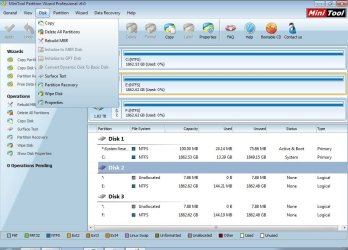
I am unable to initialize the disk to GPT. No matter what I do it's always ghosted out in MiniTool Partition Wizard Pro 6.0. Can you please look at my screen capture and see what I am doing wrong. I have one drive on the 1st controller with Windows and two drives on the other controller. All three are now recognized by Windows.
Thanks... | My System Specs | | System Manufacturer/Model Number Custom built OS Windows 7 Ultimate 32bit SP1 CPU Two 3.07 gigahertz Intel Xeon - Hyper-threaded 4 total Motherboard Supermicro X5DP8 PCB Version Memory 3968 Megabytes Usable Installed Memory Graphics Card Motherboard - Standard VGA Graphics Adapter Display adapter Sound Card Built-in Motherboard Monitor(s) Displays Acer AL1716 (17.1") Screen Resolution 1440 x 900 Hard Drives Qty. 5 - Hitachi HDS5C3020ALA632 [Hard drive] (2000.40 GB)
rev ML6OA580 Other Info AMCC 3ware 9500S SATA RAID Controller (2x)
3.07 gigahertz Intel Xeon (2 installed)
8 kilobyte primary memory cache
512 kilobyte secondary memory cache
Hyper-threaded (4 total) |
06 Dec 2011
|
| | Windows 7 Ultimate 32bit SP1 11 posts Chattanooga, TN |
I may be on to something here. Once I deleted the partition then I could select GPT. Trying it now... | My System Specs | | System Manufacturer/Model Number Custom built OS Windows 7 Ultimate 32bit SP1 CPU Two 3.07 gigahertz Intel Xeon - Hyper-threaded 4 total Motherboard Supermicro X5DP8 PCB Version Memory 3968 Megabytes Usable Installed Memory Graphics Card Motherboard - Standard VGA Graphics Adapter Display adapter Sound Card Built-in Motherboard Monitor(s) Displays Acer AL1716 (17.1") Screen Resolution 1440 x 900 Hard Drives Qty. 5 - Hitachi HDS5C3020ALA632 [Hard drive] (2000.40 GB)
rev ML6OA580 Other Info AMCC 3ware 9500S SATA RAID Controller (2x)
3.07 gigahertz Intel Xeon (2 installed)
8 kilobyte primary memory cache
512 kilobyte secondary memory cache
Hyper-threaded (4 total) Disk Management disc tools - can't format uneducated space RAID5 problems? All times are GMT -5. The time now is 02:36 AM. | |