Windows 7 Forums


Windows 7: I need some reassuring on SSDs

11 Dec 2011   #21

Windows 7 Home-Premium 64bit
United Kingdom


Quote   Quote: Originally Posted by whs View Post
Quote   Quote: Originally Posted by jayrap View Post
I've just had a read on Gibibytes and Gigabytes, I suppose that's the mathematics you were talking about - rather confusing :S
Yeah, that's what you get when you fall asleep in school when they teach binary - lol.
Well, we learned binary but in traditional bits and bytes as opposed to IEC. I suppose this means that Windows is displaying the drive data capacity in GiB instead of GB am I right?


This is what I've read http://www.brettbits.com/Text/MissingHardDriveSpace/
My System SpecsSystem Spec

11 Dec 2011   #22
whs

Vista, Windows7, Mint Mate, Zorin, Windows 8
Florida in winter, Black Forest/Germany


Windows displays the capacity in binary. What is on the box when you buy a disk is in decimal. And since there are 1024 bytes in 1KB in binary (and not 1000), you get a number that is 7% smaller (in the GB range). http://www.codinghorror.com/blog/2007/09/gigabyte-decimal-vs-binary.html
My System SpecsSystem Spec
11 Dec 2011   #23

Windows 7 Home-Premium 64bit
United Kingdom


Well I suppose I have enough info to keep me happy.

But if you could maybe tell me how to put my user files on a different drive then that would be quite useful
My System SpecsSystem Spec
.


11 Dec 2011   #24
whs

Vista, Windows7, Mint Mate, Zorin, Windows 8
Florida in winter, Black Forest/Germany


Quote   Quote: Originally Posted by jayrap View Post
Well I suppose I have enough info to keep me happy.

But if you could maybe tell me how to put my user files on a different drive then that would be quite useful
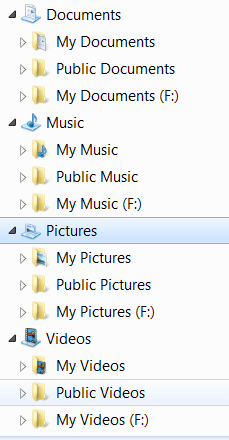
Very simple - rather than changing the default location (which is one option) but can make problems if you don't do it right, I prefer this easy method:

1. Define a partition on your HDD
2. Define those folders in that partition: Documents, Pictures, Music, Videos
3. Right click on each of those folders and INCLUDE it into the corresponding library
4. Move your files to those folders - where they belong

In your library structure you will then find those folders - in F: in my case )see Pic). The big advantage is that all the folders that the system and the programs generate are clearly seperated from your own folders because they go to the default folder - and there will be quite some, especially in Documents.

I also have some additional libraries (which do not show in the Pic) that I defined myself. But that is optional depending on your whim.
Attached Thumbnails
I need some reassuring on SSDs-2011-12-11_2121.png  
My System SpecsSystem Spec
11 Dec 2011   #25

Windows 7 Ultimate SP1 X64/ linux in VM
NW Florida


My System SpecsSystem Spec
11 Dec 2011   #26

Windows 7 Home-Premium 64bit
United Kingdom


Thanks guys
My System SpecsSystem Spec
12 Dec 2011   #27

Windows 7 Ultimate x64 & Mac OS X 10.7.1
United Kingdom


My ocz 120gb drive has 120.4gb of space lol was expecting 111gb because of the 7% rule lol

My System SpecsSystem Spec
12 Dec 2011   #28

Windows 7 Ultimate x64


I think most concerns with SSD's are unfounded and mostly FUD.
  1. Many things were initially speculated
  2. Many who are concerned are those who haven't purchased one yet
  3. Those with a negative opinion of something are often the loudest on the web.

I have a couple of Intel drives and am 100% satisfied with them.

I agree 100% on the USE of a UPS. These are nowhere near as expensive as some might believe. I can often find 500-550VA APC brand for around $50-$60 like this one.
Newegg.com - APC Back-UPS ES BE550G 550 VA 330 Watts (4) NEMA 5-15R (Battery Backup) (4) NEMA 5-15R (Surge Protection) Outlets UPS
My System SpecsSystem Spec
Reply

 I need some reassuring on SSDs problems?


Thread Tools


Similar help and support threads for: I need some reassuring on SSDs
Thread Forum
Think you know SSDs? Think again. Hardware & Devices
The Truth About SSDs Hardware & Devices
48 SSDs tested Hardware & Devices
SSDs and Superfetch Hardware & Devices
SSDs Hardware & Devices


All times are GMT -5. The time now is 02:01 AM.


Seven Forums Android App Seven Forums IOS App Follow us on Facebook

Windows 7 Forums is an independent web site and has not been authorized,
sponsored, or otherwise approved by Microsoft Corporation.
"Windows 7" and related materials are trademarks of Microsoft Corp.
© Designer Media Ltd
  

1 2 3 4 5 6 7 8 9 10 11 12 13 14 15 16 17 18 19 20 21 22 23 24 25 26 27 28 29 30 31 32