Windows 7 Forums Search
Welcome to Windows 7 Forums. Our forum is dedicated to helping you find solutions with any problems, errors or issues you are experiencing with Windows 7. The Windows 7 forum also covers news and updates and has an extensive Windows 7 tutorial section that covers a wide range of tips and tricks.


Windows 7 - Printers not showing up in Devices and Printers

 
12-12-2011   #1


windows 7 professional 32 bit


Printers not showing up in Devices and Printers

This is the second time I have had this problem and I cannot remember what I did to fix it the last time. I have been searching for the last couple of hours and nothing is working.

When I try to print I get the message that no printers are installed.

What I have tried:
  • Found print spooler was off. I re-started and the printers re-appear but then disappear again.
  • I "started" the bluetooth services and set to auto per the threads I found while searching. No change.
  • Tried the MS fix printer tool. No change.
  • Re-booted about 100 times (slight exaggeration).
  • Re-installing drivers does not help.
Something is causing the print spooler to turn off. Help!

My System SpecsSystem Spec
12-12-2011   #2


Windows 7 Ultimate SP1 64-Bit


Welcome to Windows System Forums.

Have you tried 'Start>Devices & Printers>Add a printer' as well?

As a matter of interest, what printer are you trying to install?

http://windows.microsoft.com/en-us/w...ems-in-windows

http://support.microsoft.com/kb/2000007
My System SpecsSystem Spec
12-12-2011   #3


Win 7 64 bit


Hello there.

I assume you have the correct driver for the printer. With HP printers, I prefer to use HP's own (with HP's, run dvd/file as a complete setup - less problems). So if the installation disk isn't at hand, download the correct driver from its mfr's site and save it.

Next:
1. Goto Device Manager and Uninstall the printer. Disconnect printer from computer (unplug).
2. Roboot for the 101th time ...
3. This is Optional: Install the utility program(s) - if you need them.
4. Connect the printer to computer. Windows will 'find' the new device (msg in lower right corner) and find its driver (if windows has one in its database) or it will open the installation window. Don't let it search online, direct it to the folder/drive where the (downloaded) driver resides.

Paul

Last edited by PaulSoebekti; 12-12-2011 at 10:06 PM.. Reason: correct typos
My System SpecsSystem Spec
.


12-13-2011   #4


windows 7 professional 32 bit


It's not just one printer, it is four printers. Two local printers and two network printers. They appear when I manually start the print spooler, but then disappear when I try to print.

If this were just one printer then you could assume there was a driver problem. But this is four printers. Something is wrong relating to the print spooler. I found a fix the last time this happened but I can't find it this time. I really need to solve this as this is my work computer and I need to print some business documents.
My System SpecsSystem Spec
12-13-2011   #5


Windows 7 Ultimate SP1 64-Bit


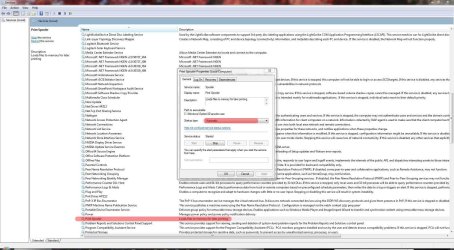
Click Start and type services.msc in the Search field then press Enter.

Check that the Print Spooler service is set to Automatic.

Printers not showing up in Devices and Printers-spool.jpg
My System SpecsSystem Spec
12-13-2011   #6


windows 7 professional 32 bit


Print Spooler is set to auto.

Partially solved the problem. I re-started the print spooler which then allowed Devices and Printers to show my installed printers. I then deleted my default printer. That allowed me to print to the other printers as the print spooler was now longer stopping by itself.

After rebooting, the deleted printer re-appeared, but was grayed out. I discovered there was a document in the que. After some seaching, I was able to figure out how to delete the qued document. I then deleted the problem printer again and it stayed deleted.

I then tried to re-install the deleted printer but for some reason Windows 7 does not see the printer attached to the USB port. I can't figure out how to re-install the printer. Any suggestions?
My System SpecsSystem Spec
12-13-2011   #7


Windows 7 Ultimate SP1 64-Bit


Do you still have any printer drivers installed?

If so, I'd be inclined to uninstall them, reboot and make a fresh start.
My System SpecsSystem Spec
12-20-2011   #8


windows 7 professional 32 bit


Tried deleting and reinstalling the 3100cn drivers. Rebooted. Windows still does not see the USB printer.

I deleted the drivers again. I also used regedit to delete all instances of "3100cn" in the registry. Strangely, Windows would not allow me to delete two keys but all others were deleted.

Reinstalled driver (printer not plugged in of course). Windows still does not see the printer. I tried multiple USB ports but it makes no difference. Windows will not recognize and install the printer.
My System SpecsSystem Spec
Reply

 Printers not showing up in Devices and Printers problems?


Thread Tools


Similar Threads for: Printers not showing up in Devices and Printers
Thread Forum
Solved No items showing in Devices and Printers Hardware & Devices
"Devices and Printers" window grouping / hiding printers Hardware & Devices
Let's see your Devices & Printers Chillout Room
No devices or printers showing in Device and printers General Discussion
Installed printers not displayed in Devices & Printers Hardware & Devices


All times are GMT -5. The time now is 01:29 PM.


Windows 7 Forums is an independent web site and has not been authorized,
sponsored, or otherwise approved by Microsoft Corporation.
"Windows 7" and related materials are trademarks of Microsoft Corp.
© Designer Media Ltd
  

1 2 3 4 5 6 7 8 9 10 11 12 13 14 15 16 17 18 19 20 21 22 23 24 25 26 27 28 29 30