JavaScript is disabled. For a better experience, please enable JavaScript in your browser before proceeding.
You are using an out of date browser. It may not display this or other websites correctly.
You should upgrade or use an
alternative browser .
Solved 750GB drive shows as only 365GB drive - where's the rest of it?
I bought a hard drive enclosure so I could use an old (year old) 750GB drive as a place to store backups - the USB drive I've been using will only hold one system image at a time, and if I end up having to reinstall Windows using it I invariably lose some files.
Win 7 HP 64 bit Intel i3 6GB Integrated w/ MoBo Lenovo K320 Win 7 HP 64 bit Intel i3 Intel 6GB Integrated w/ MoBo Same as above E-Machine 17" Seagate 1TB Stock 450Watt stock stock
Aspiring Gnome
Guru
Gold Member
VIP
Post a screen shot of Disk Management.
Windows 7 Home Premium SP1, 64-bit Intel Skylake i5-6600K, not overclocked 8 GB HyperX DDR4-2666 (2 x 4 GB) none; graphics are integrated on CPU PC/Desktop Ignatz Special; 4 speed manual gearbox; factory air conditioning; one of one Windows 7 Home Premium SP1, 64-bit Intel Skylake i5-6600K, not overclocked AsRock Z170M Extreme 4, micro ATX 8 GB HyperX DDR4-2666 (2 x 4 GB) none; graphics are integrated on CPU onboard: Realtek ALC1150; external: USB Behringer UF0-202 Dell S2340M 23 inch IPS 1600 x 900 System: Crucial MX100 series SSD, 128 GB; Rosewill SilentNight 500 watt fanless, semi-modular Antec Solo II Noctua NH-U12S; Noctua F12 intake, Noctua S12A exhaust Microsoft 200 6JH-00001 USB Dell or Microsoft optical wired; USB Microsoft Security Essentials and Malwarebytes Premium Pale Moon All fans PWM; speeds at idle: CPU circa 500 rpm; intake circa 600 rpm; exhaust circa 600 rpm; CPU temps 27 idle and 47 C load in a warm room (27 C/81 F) when running Intel Extreme Tuning Utility stress test.
Do you mean start>administrative tools>computer management?
Win 7 HP 64 bit Intel i3 6GB Integrated w/ MoBo Lenovo K320 Win 7 HP 64 bit Intel i3 Intel 6GB Integrated w/ MoBo Same as above E-Machine 17" Seagate 1TB Stock 450Watt stock stock
Aspiring Gnome
Guru
Gold Member
VIP
Yep; and then poke "Disk Management" on the left side of that window.
Windows 7 Home Premium SP1, 64-bit Intel Skylake i5-6600K, not overclocked 8 GB HyperX DDR4-2666 (2 x 4 GB) none; graphics are integrated on CPU PC/Desktop Ignatz Special; 4 speed manual gearbox; factory air conditioning; one of one Windows 7 Home Premium SP1, 64-bit Intel Skylake i5-6600K, not overclocked AsRock Z170M Extreme 4, micro ATX 8 GB HyperX DDR4-2666 (2 x 4 GB) none; graphics are integrated on CPU onboard: Realtek ALC1150; external: USB Behringer UF0-202 Dell S2340M 23 inch IPS 1600 x 900 System: Crucial MX100 series SSD, 128 GB; Rosewill SilentNight 500 watt fanless, semi-modular Antec Solo II Noctua NH-U12S; Noctua F12 intake, Noctua S12A exhaust Microsoft 200 6JH-00001 USB Dell or Microsoft optical wired; USB Microsoft Security Essentials and Malwarebytes Premium Pale Moon All fans PWM; speeds at idle: CPU circa 500 rpm; intake circa 600 rpm; exhaust circa 600 rpm; CPU temps 27 idle and 47 C load in a warm room (27 C/81 F) when running Intel Extreme Tuning Utility stress test.
yeah.... in that left pane -> Disk Management
Windows 7 Ultimate 64-bit SP1 AMD Athlon II X2 260 @ 3.2 Ghz Kingston 8.0GB Dual-Channel DDR3 @ 669MHz (9-... ASUS EAH 5450 - 1 GB Assembled Windows 7 Ultimate 64-bit SP1 AMD Athlon II X2 260 @ 3.2 Ghz Gigabyte Technology Co., Ltd. M68MT-S2 (Socket M2) Kingston 8.0GB Dual-Channel DDR3 @ 669MHz (9-9-9-24) ASUS EAH 5450 - 1 GB Realtek HD Audio 23 Inch - DELL SP2309W 2048 x 1152 488GB Seagate ST3500418AS ATA Device (SATA) 450W Iball - Standard Form - i8190 Stock Cooling Logitech Logitech 1 MB/Sec Creative Inspire 2.1 Speakers, LITEON 24x DVD Writer
Duh, no coffee yet - here it is:
Win 7 HP 64 bit Intel i3 6GB Integrated w/ MoBo Lenovo K320 Win 7 HP 64 bit Intel i3 Intel 6GB Integrated w/ MoBo Same as above E-Machine 17" Seagate 1TB Stock 450Watt stock stock
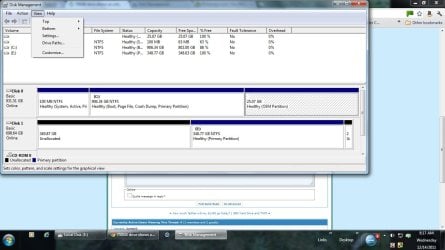
I was just looking at disk management, and it shows unallocated space as 349.87 and the 2nd as 348.77 primary, healthy NTFS partiton.
Win 7 HP 64 bit Intel i3 6GB Integrated w/ MoBo Lenovo K320 Win 7 HP 64 bit Intel i3 Intel 6GB Integrated w/ MoBo Same as above E-Machine 17" Seagate 1TB Stock 450Watt stock stock
Can I simply delete the 348.77 volume, then reformat the disk?
Win 7 HP 64 bit Intel i3 6GB Integrated w/ MoBo Lenovo K320 Win 7 HP 64 bit Intel i3 Intel 6GB Integrated w/ MoBo Same as above E-Machine 17" Seagate 1TB Stock 450Watt stock stock
Aspiring Gnome
Guru
Gold Member
VIP
You need to add that unallocated space to a partition.
Windows 7 Home Premium SP1, 64-bit Intel Skylake i5-6600K, not overclocked 8 GB HyperX DDR4-2666 (2 x 4 GB) none; graphics are integrated on CPU PC/Desktop Ignatz Special; 4 speed manual gearbox; factory air conditioning; one of one Windows 7 Home Premium SP1, 64-bit Intel Skylake i5-6600K, not overclocked AsRock Z170M Extreme 4, micro ATX 8 GB HyperX DDR4-2666 (2 x 4 GB) none; graphics are integrated on CPU onboard: Realtek ALC1150; external: USB Behringer UF0-202 Dell S2340M 23 inch IPS 1600 x 900 System: Crucial MX100 series SSD, 128 GB; Rosewill SilentNight 500 watt fanless, semi-modular Antec Solo II Noctua NH-U12S; Noctua F12 intake, Noctua S12A exhaust Microsoft 200 6JH-00001 USB Dell or Microsoft optical wired; USB Microsoft Security Essentials and Malwarebytes Premium Pale Moon All fans PWM; speeds at idle: CPU circa 500 rpm; intake circa 600 rpm; exhaust circa 600 rpm; CPU temps 27 idle and 47 C load in a warm room (27 C/81 F) when running Intel Extreme Tuning Utility stress test.
Hopefully this will show ...
Win 7 HP 64 bit Intel i3 6GB Integrated w/ MoBo Lenovo K320 Win 7 HP 64 bit Intel i3 Intel 6GB Integrated w/ MoBo Same as above E-Machine 17" Seagate 1TB Stock 450Watt stock stock
Aspiring Gnome
Guru
Gold Member
VIP
It looks like absolutely nothing is on E, the 348.77 gb partition.
Windows 7 Home Premium SP1, 64-bit Intel Skylake i5-6600K, not overclocked 8 GB HyperX DDR4-2666 (2 x 4 GB) none; graphics are integrated on CPU PC/Desktop Ignatz Special; 4 speed manual gearbox; factory air conditioning; one of one Windows 7 Home Premium SP1, 64-bit Intel Skylake i5-6600K, not overclocked AsRock Z170M Extreme 4, micro ATX 8 GB HyperX DDR4-2666 (2 x 4 GB) none; graphics are integrated on CPU onboard: Realtek ALC1150; external: USB Behringer UF0-202 Dell S2340M 23 inch IPS 1600 x 900 System: Crucial MX100 series SSD, 128 GB; Rosewill SilentNight 500 watt fanless, semi-modular Antec Solo II Noctua NH-U12S; Noctua F12 intake, Noctua S12A exhaust Microsoft 200 6JH-00001 USB Dell or Microsoft optical wired; USB Microsoft Security Essentials and Malwarebytes Premium Pale Moon All fans PWM; speeds at idle: CPU circa 500 rpm; intake circa 600 rpm; exhaust circa 600 rpm; CPU temps 27 idle and 47 C load in a warm room (27 C/81 F) when running Intel Extreme Tuning Utility stress test.
I think this is right ....
desktop drive.jpg
124.4 KB
· Views: 29
Win 7 HP 64 bit Intel i3 6GB Integrated w/ MoBo Lenovo K320 Win 7 HP 64 bit Intel i3 Intel 6GB Integrated w/ MoBo Same as above E-Machine 17" Seagate 1TB Stock 450Watt stock stock
Aspiring Gnome
Guru
Gold Member
VIP
You just won a cigar.
Windows 7 Home Premium SP1, 64-bit Intel Skylake i5-6600K, not overclocked 8 GB HyperX DDR4-2666 (2 x 4 GB) none; graphics are integrated on CPU PC/Desktop Ignatz Special; 4 speed manual gearbox; factory air conditioning; one of one Windows 7 Home Premium SP1, 64-bit Intel Skylake i5-6600K, not overclocked AsRock Z170M Extreme 4, micro ATX 8 GB HyperX DDR4-2666 (2 x 4 GB) none; graphics are integrated on CPU onboard: Realtek ALC1150; external: USB Behringer UF0-202 Dell S2340M 23 inch IPS 1600 x 900 System: Crucial MX100 series SSD, 128 GB; Rosewill SilentNight 500 watt fanless, semi-modular Antec Solo II Noctua NH-U12S; Noctua F12 intake, Noctua S12A exhaust Microsoft 200 6JH-00001 USB Dell or Microsoft optical wired; USB Microsoft Security Essentials and Malwarebytes Premium Pale Moon All fans PWM; speeds at idle: CPU circa 500 rpm; intake circa 600 rpm; exhaust circa 600 rpm; CPU temps 27 idle and 47 C load in a warm room (27 C/81 F) when running Intel Extreme Tuning Utility stress test.
Isn't it already formatted? It does say NTFS
Win 7 HP 64 bit Intel i3 6GB Integrated w/ MoBo Lenovo K320 Win 7 HP 64 bit Intel i3 Intel 6GB Integrated w/ MoBo Same as above E-Machine 17" Seagate 1TB Stock 450Watt stock stock
Aspiring Gnome
Guru
Gold Member
VIP
Yeah, I didn't catch that in the pic.
Windows 7 Home Premium SP1, 64-bit Intel Skylake i5-6600K, not overclocked 8 GB HyperX DDR4-2666 (2 x 4 GB) none; graphics are integrated on CPU PC/Desktop Ignatz Special; 4 speed manual gearbox; factory air conditioning; one of one Windows 7 Home Premium SP1, 64-bit Intel Skylake i5-6600K, not overclocked AsRock Z170M Extreme 4, micro ATX 8 GB HyperX DDR4-2666 (2 x 4 GB) none; graphics are integrated on CPU onboard: Realtek ALC1150; external: USB Behringer UF0-202 Dell S2340M 23 inch IPS 1600 x 900 System: Crucial MX100 series SSD, 128 GB; Rosewill SilentNight 500 watt fanless, semi-modular Antec Solo II Noctua NH-U12S; Noctua F12 intake, Noctua S12A exhaust Microsoft 200 6JH-00001 USB Dell or Microsoft optical wired; USB Microsoft Security Essentials and Malwarebytes Premium Pale Moon All fans PWM; speeds at idle: CPU circa 500 rpm; intake circa 600 rpm; exhaust circa 600 rpm; CPU temps 27 idle and 47 C load in a warm room (27 C/81 F) when running Intel Extreme Tuning Utility stress test.
OK, I should be good to go then - can I now mark this as solved?
Win 7 HP 64 bit Intel i3 6GB Integrated w/ MoBo Lenovo K320 Win 7 HP 64 bit Intel i3 Intel 6GB Integrated w/ MoBo Same as above E-Machine 17" Seagate 1TB Stock 450Watt stock stock
Aspiring Gnome
Guru
Gold Member
VIP
Sure, assuming you have no further issues.
Windows 7 Home Premium SP1, 64-bit Intel Skylake i5-6600K, not overclocked 8 GB HyperX DDR4-2666 (2 x 4 GB) none; graphics are integrated on CPU PC/Desktop Ignatz Special; 4 speed manual gearbox; factory air conditioning; one of one Windows 7 Home Premium SP1, 64-bit Intel Skylake i5-6600K, not overclocked AsRock Z170M Extreme 4, micro ATX 8 GB HyperX DDR4-2666 (2 x 4 GB) none; graphics are integrated on CPU onboard: Realtek ALC1150; external: USB Behringer UF0-202 Dell S2340M 23 inch IPS 1600 x 900 System: Crucial MX100 series SSD, 128 GB; Rosewill SilentNight 500 watt fanless, semi-modular Antec Solo II Noctua NH-U12S; Noctua F12 intake, Noctua S12A exhaust Microsoft 200 6JH-00001 USB Dell or Microsoft optical wired; USB Microsoft Security Essentials and Malwarebytes Premium Pale Moon All fans PWM; speeds at idle: CPU circa 500 rpm; intake circa 600 rpm; exhaust circa 600 rpm; CPU temps 27 idle and 47 C load in a warm room (27 C/81 F) when running Intel Extreme Tuning Utility stress test.
Thanks
Hey, thank you very much! Yeah, not much flair in that name, is there?
Win 7 HP 64 bit Intel i3 6GB Integrated w/ MoBo Lenovo K320 Win 7 HP 64 bit Intel i3 Intel 6GB Integrated w/ MoBo Same as above E-Machine 17" Seagate 1TB Stock 450Watt stock stock