OS Win 7 Home Premium 64bit OEM CPU Intell i5 2500k Motherboard ASUS P8Z68 V PRO /GEN3 Memory GSkills ripjaws Graphics Card XFX Radeon HD 6970 Sound Card None Monitor(s) Displays Dell U2412M
PSU Corsair AX850 Gold Case Corsair Graphite 600T Cooling Hyper 212 Hard Drives Crucial M4 SSD
Hitachi 1TB
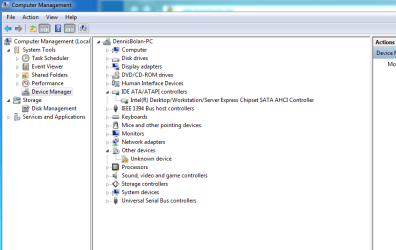
You wouldn't find it under IDE since your drive is SATA.
You could try updating your chipset drivers for the sata ports.
Windows supplies the drivers for your drive.
You could try clicking on the DV-CDrom in device manager>update driver software and let windows search for a better driver.
The other thing you can do is search the manufaturers site for a firmware update.
Also you need to get the "unkonw device" with the yellow exclimation point in device manger fixed.
Try clicking on it.properties.update driver sooftware.
If that doesn't work click on it> properties>details tab> drop down menu>select hardware id> copy and paste the id string and we'll see if we can find a driver for you.
System Manufacturer/Model Number Self Built OS Windows 7 ultimate 64 bit / XP Home sp3 CPU intel Core 2 Duo E8400 3.0ghz Motherboard Asus P5ND bios 1401 Memory 8 gigs 1066 OCZ Fata1ty Graphics Card EVGA GTX 580 Call of Duty Black Ops Edition Sound Card Creative Soundblaster Audigy 2zs Monitor(s) Displays Asus 24in LCD's 2MS X2 Screen Resolution 1920x1080p @60Hz
Keyboard Logitech Bluetooth Wireless MX5000 Mouse Logitech Bluetooth Wireless MX1000 PSU OCZ 700W GameXtreme Case NZXT Apollo Cooling Corsair H50 CPU/120mm x3 /60mm x2 /Corsair Dominator Ram Hard Drives WD Caviar 500 Black/ WD Caviar 200 Blue Internet Speed Download 19.83 Upload 0.97 Other Info Logitech Z2300 Speakers/ Bose Noise Cancelling Headphones/Avermedia PCI-e Hybrid TV Bravo/Epson NX415 all in one/ 4 Port Powered USB Hub/ LG 10x Bluray Burner /TSST Corp DVDRW External
System Manufacturer/Model Number HP, Dell, Gateway, Toshiba - 4 laptops and 2 desktops OS Vista, Windows7, Mint Mate, Zorin, Windows 8 CPU from 1.6GHz Duo to i7 Monitor(s) Displays 2x HP w2207
Keyboard with trackball - no mices Mouse Trackball mice Hard Drives 5x HDD, 7x SSD, 12x Externals Internet Speed DSL 6000
OS Win 7 Home Premium 64bit OEM CPU Intell i5 2500k Motherboard ASUS P8Z68 V PRO /GEN3 Memory GSkills ripjaws Graphics Card XFX Radeon HD 6970 Sound Card None Monitor(s) Displays Dell U2412M
PSU Corsair AX850 Gold Case Corsair Graphite 600T Cooling Hyper 212 Hard Drives Crucial M4 SSD
Hitachi 1TB
You could try hooking up the drive to the non-Intel controller and setting the mode to IDE.
Hard drives and SSD's take advantage of AHCI, but having an optical drive on a controller with AHCI
enabled can degrade the performance of the optical drive.
I usually place my optical drives on the second controller and enable the IDE mode.
System Manufacturer/Model Number Self-built OS Windows 7 Home Premium 64 bit CPU Intel Core i7-3770 Motherboard MSI Z77A-G45 Memory G.SKILL 8GB (2 x 4GB) DDR3 F3-10666CL9D-8GBNT Graphics Card Sapphire ATI Radeon HD 6670 Sound Card On-Board Realtek Monitor(s) Displays Samsung SyncMaster P2370HD, Dell 1703FPT Screen Resolution 1920 x 1080, 1280 x 1024
Keyboard Logitech K270 Mouse Logitech M705 PSU SeaSonic M12II SS-500GM Case Lian Li PC-9F Cooling Zalman CNPS9900ALED Hard Drives Samsung HD103SJ Internet Speed 16 Mbps Other Info Bose Companion 2 Multimedia Speakers
You could try hooking up the drive to the non-Intel controller and setting the mode to IDE.
Hard drives and SSD's take advantage of AHCI, but having an optical drive on a controller with AHCI
enabled can degrade the performance of the optical drive.
I usually place my optical drives on the second controller and enable the IDE mode.
Not sure I know how to do that, find the "second controller", is that in bios?
OS Win 7 Home Premium 64bit OEM CPU Intell i5 2500k Motherboard ASUS P8Z68 V PRO /GEN3 Memory GSkills ripjaws Graphics Card XFX Radeon HD 6970 Sound Card None Monitor(s) Displays Dell U2412M
PSU Corsair AX850 Gold Case Corsair Graphite 600T Cooling Hyper 212 Hard Drives Crucial M4 SSD
Hitachi 1TB
Only things connected to my USB are keyboard,mouse and Belkin network adapter. I have the Graphite 600T case which has a front panel USB 3.0 that has to be routed to the rear of the MB, but I tried unplugging it.
As far as the cdrom, I searched, no driver/firmware updates. I even downloaded Microsofts update search utility. I also went on ASUS/support and downloaded the Jenkins (Ithink) drivers, nothing. I didnt download the "Marvell" since I'm not using those 2 6Dbs ports
OS Win 7 Home Premium 64bit OEM CPU Intell i5 2500k Motherboard ASUS P8Z68 V PRO /GEN3 Memory GSkills ripjaws Graphics Card XFX Radeon HD 6970 Sound Card None Monitor(s) Displays Dell U2412M
PSU Corsair AX850 Gold Case Corsair Graphite 600T Cooling Hyper 212 Hard Drives Crucial M4 SSD
Hitachi 1TB
OS Win 7 Home Premium 64bit OEM CPU Intell i5 2500k Motherboard ASUS P8Z68 V PRO /GEN3 Memory GSkills ripjaws Graphics Card XFX Radeon HD 6970 Sound Card None Monitor(s) Displays Dell U2412M
PSU Corsair AX850 Gold Case Corsair Graphite 600T Cooling Hyper 212 Hard Drives Crucial M4 SSD
Hitachi 1TB