Windows 7 Forums


Windows 7: 4-pin or 6-pin instead of 8-pin?

17 Dec 2011   #1

W7 Pro 32bit
Vidalia, GA
 
 
4-pin or 6-pin instead of 8-pin?

I'm building a PC with an ASUS P8H67-V mobo. It has two PCIe2.0x16 slots (SLI ready). I'm going to use ONE slot for a video card (ASUS GT430 128bit). My Power Supply (600W) has a 6-pin & a 4-pin cable connector, not a 6+2.

If I'm only going to use one PCIe slot, would the 6-pin be adquate?

Thanx,

Party cloudy

My System SpecsSystem Spec

17 Dec 2011   #2

Win 7 Ultimate x64
Etobicoke, Ontario


Seeing as the GT 430 doesn't require an external power connection, where are you looking to plug this into?
My System SpecsSystem Spec
17 Dec 2011   #3

64-bit Windows 7 Ultimate SP1 & Windows 8 Enterprise
Texas


Hello Partly Cloudy,

The number of pins required (6, 4, or 6+2) on the PCI-E power cable depends on how many are required for your graphics card.

Looking at your ASUS GT430 128bit graphic card's specs at the link below, it does not require a extra power connection with a PCI-E power cable, so you do not need to worry about it.

ASUSTeK Computer Inc. - Graphics Cards- ASUS ENGT430/DI/1GD3(LP)

Hope this helps,
Shawn
My System SpecsSystem Spec
.


17 Dec 2011   #4

W7 Pro 32bit
Vidalia, GA


Maybe I'm confused, but my mobo has an 8-pin pwr conn labeled EATX12V. Is my 4-pin yellow/black from the PS adequate? It's running a Core i5 (no OC).

Thanx,

Party cloudy
My System SpecsSystem Spec
17 Dec 2011   #5

Win 7 Ultimate x64
Etobicoke, Ontario


According to the manual for your motherboard it should be OK with just the 4 pin in the CPU (ATX12V) connection,

4-pin or 6-pin instead of 8-pin?-atx12v.png

seeing as the ATX 2.0 spec only calls for a single 4 pin CPU connector. All things considering if your power supply is that old I would consider looking at a new one that is up to the current specs (ATX 2.3).
My System SpecsSystem Spec
17 Dec 2011   #6

64-bit Windows 7 Ultimate SP1 & Windows 8 Enterprise
Texas


Sorry Party cloudy,

We thought you were referring to the power connection on your graphics card.

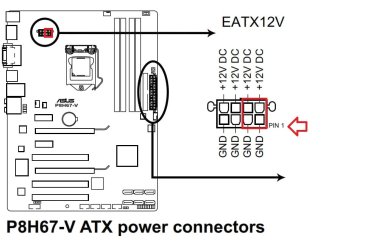
Stormy (Richard) is correct that you could use either a 4-pin or 8-pin ATX +12V power plug. This is to power your CPU. Just be sure to plug it in on the side (right side on diagram above & below) closet to pin 1 on the motherboard's 8-pin (EATX12V) power connecter.

4-pin or 6-pin instead of 8-pin?-pin1.jpg
My System SpecsSystem Spec
17 Dec 2011   #7

W7 Pro 32bit
Vidalia, GA


Thanks,

Yeah, the 4-pin worked just fine. I'm loading the OS now.

What would you need an 8-pin for? I'm running an i5. Would it be if I were using an i7 instead?

Thanx,

partly cloudy
My System SpecsSystem Spec
17 Dec 2011   #8

64-bit Windows 7 Ultimate SP1 & Windows 8 Enterprise
Texas


It's just that a 8-pin is recommended to be able to provide more power if needed for the CPU say if it was more powerful, under a heavy load, or overclocked. That's all.
My System SpecsSystem Spec
Reply

 4-pin or 6-pin instead of 8-pin? problems?


Thread Tools


All times are GMT -5. The time now is 12:27 PM.


Seven Forums Android App Seven Forums IOS App Follow us on Facebook

Windows 7 Forums is an independent web site and has not been authorized,
sponsored, or otherwise approved by Microsoft Corporation.
"Windows 7" and related materials are trademarks of Microsoft Corp.
© Designer Media Ltd
  

1 2 3 4 5 6 7 8 9 10 11 12 13 14 15 16 17 18 19 20 21 22 23 24 25 26 27 28 29 30 31 32