Windows 7 Forums Search
Welcome to Windows 7 Forums. Our forum is dedicated to helping you find solutions with any problems, errors or issues you are experiencing with Windows 7. The Windows 7 forum also covers news and updates and has an extensive Windows 7 tutorial section that covers a wide range of tips and tricks.


Windows 7 - Trying to format 250 g external drive (laptop hd) but only getting 31g

 
12-17-2011   #1


windows 7 home premium 64bit


Trying to format 250 g external drive (laptop hd) but only getting 31g

So I am trying to get my external laptop drive to show that is 250 g but every time i format it only 31g show up....
I havn't set anything that i know of ....
So some help would be great
Kodiak

My System SpecsSystem Spec
12-17-2011   #2


Windows 7 Ultimate x64 SP1


Not to ask the obvious, but you are formatting the drive as ntfs?
also,what does your disk management screen show about the drive.

Rich
My System SpecsSystem Spec
12-21-2011   #3


windows 7 home premium 64bit


Quote   Quote: Originally Posted by richnrockville View Post
Not to ask the obvious, but you are formatting the drive as ntfs?
Yes I am trying to format in "NTFS"

Quote:
also,what does your disk management screen show about the drive.
Rich
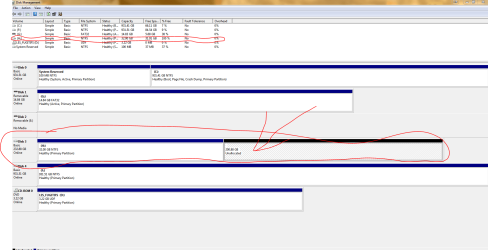
So the disk mang. tells me that there is 200 g unalocated. How would i change this...

Trying to format 250 g external drive (laptop hd) but only getting 31g-disk-man..png


Sorry it took so long to respond was doing exams....
Kodiak
My System SpecsSystem Spec
.


12-21-2011   #4


Windows 7 SP1, Home Premium, 64-bit


You should be able to extend the H partition to encompass that 200.88 GB of unallocated space using Disk Management .

Highlight the H partition and then look at menu choices, maybe from a right click.

Look for "extend volume" or words to that effect.
My System SpecsSystem Spec
12-21-2011   #5


If you are trying to format a 31 GB HD, it can only give you the same 31 GB. Using Disk Management, delete the 31 GB partition first so that you can see one 250 GB unallocated space, then create a 250 GB partition and format that.

Kari
My System SpecsSystem Spec
12-21-2011   #6


windows 7 home premium 64bit


Quote   Quote: Originally Posted by Kari View Post
If you are trying to format a 31 GB HD, it can only give you the same 31 GB. Using Disk Management, delete the 31 GB partition first so that you can see one 250 GB unallocated space, then create a 250 GB partition and format that.

Kari

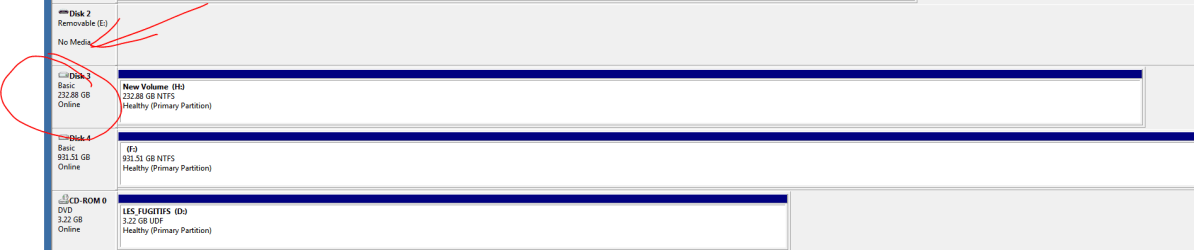
That work thanx for the help
Trying to format 250 g external drive (laptop hd) but only getting 31g-disk-mang.2.png
My System SpecsSystem Spec
12-21-2011   #7


windows 7 home premium 64bit


Quote   Quote: Originally Posted by ignatzatsonic View Post
You should be able to extend the H partition to encompass that 200.88 GB of unallocated space using Disk Management .

Highlight the H partition and then look at menu choices, maybe from a right click.

Look for "extend volume" or words to that effect.
Thanx this also worked
My System SpecsSystem Spec
12-21-2011   #8


windows 7 home premium 64bit


Thanx all for your time

Happy holidays
My System SpecsSystem Spec
Reply

 Trying to format 250 g external drive (laptop hd) but only getting 31g problems?


Thread Tools


Similar Threads for: Trying to format 250 g external drive (laptop hd) but only getting 31g
Thread Forum
Solved External hard drive needs format Hardware & Devices
Solved Can't Format my External Drive. Hardware & Devices
how can i format my external HD drive into FAT32 format Hardware & Devices
How can I format my external drive to NTFS? Hardware & Devices
Prevent Windows ask to format my external drive Hardware & Devices


All times are GMT -5. The time now is 01:33 PM.


Windows 7 Forums is an independent web site and has not been authorized,
sponsored, or otherwise approved by Microsoft Corporation.
"Windows 7" and related materials are trademarks of Microsoft Corp.
© Designer Media Ltd
  

1 2 3 4 5 6 7 8 9 10 11 12 13 14 15 16 17 18 19 20 21 22 23 24 25 26 27 28 29 30