| Windows 7: unerasable partition |
18 Dec 2011
|
#1 | | |
unerasable partition hello,
I have on my computer one hard drive with 3 partitions: C for windows, D for other stuff, and Q which i can't access, nor delete. it shows that Q is local hard drive, but with 0 capacity. I got my computer with this partition showing, btw. another weird thing is that sometimes it shows and sometimes it doesn't. i cannot access it as i said and when i try to format it, it said that i don't have the sufficiet right to do so.
how can I get read of this partition and why it's on my computer anyway??
thanks for your help. | My System Specs |
| |
18 Dec 2011
|
#2 | | |
Please post a screenshot of disk mgmt window. | My System Specs | | OS Vista x64 / 7 X64 CPU E8400 Motherboard ASRock 1333 GLAN R2.0 Memory 2x1 gb 800mhz Graphics Card 9500gt 1gb Case Coolermaster Cooling Winpower 500w Hard Drives Maxtor 160gb-2mb cache |
18 Dec 2011
|
#3 | | |
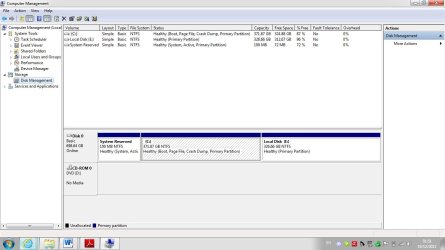
the tricky thing is that the Q hard drive doesn't appear in the comp mgmt... here: | My System Specs | | |
18 Dec 2011
|
#4 | | |
I believe that is caused by MS Office 2010 - no idea what it is for - I am not using Office 2010. | My System Specs | | OS Vista x64 / 7 X64 CPU E8400 Motherboard ASRock 1333 GLAN R2.0 Memory 2x1 gb 800mhz Graphics Card 9500gt 1gb Case Coolermaster Cooling Winpower 500w Hard Drives Maxtor 160gb-2mb cache |
18 Dec 2011
|
#5 | | Windows 7 Pro 64 SP1 East Bay Area, CA |

Quote: Originally Posted by SIW2 I believe that is caused by MS Office 2010 - no idea what it is for - I am not using Office 2010. Yep, Office 2010 click to run installs a Q drive, An overview of Microsoft Office Click-to-Run for Office 2010 | My System Specs | | Computer type PC/Desktop System Manufacturer/Model Number Compaq sr5410f case OS Windows 7 Pro 64 SP1 CPU AMD X2 4450E @ 2.3 ghz Motherboard Biostar MCP6P M2+ Memory 4.0 g Graphics Card Nvidia GeForce 9600 GT , 512mb Sound Card onboard Monitor(s) Displays auria eq2367 Screen Resolution 1920 x 1080 Keyboard logitech wave cordless Mouse logitech LX8 cordless laser mouse PSU 250 watts Case Compaq Cooling couple fans Hard Drives 1 tb Hitachi HDT721010SLA scsi, 500 gb external Internet Speed comcast hi speed 19 dn 8 up Antivirus Microsoft Security Essentials Browser IE10 Other Info Laptop specs: HP g7-1365dx /
CPU: AMD A6-3420M APU with Radeon(tm) HD Graphics /
RAM: Crucial 8Gb (2x4Gb) /
SSD: Crucial M4-CT128M4SSD2 ATA Device/ FW 000F /
GFX: AMD Radeon HD 6520G /
OS: Microsoft Windows 7 Professional 64-bit 7601 Multiprocessor Free Service Pack 1 |
18 Dec 2011
|
#6 | | Windows 7 Home Premium 32 bit |
If you want to remove the Q drive, you may have to uninstall Office starter 2010 and MS Office One-Click.
Just google "Q drive" and you will get tons of info on it. | My System Specs | | OS Windows 7 Home Premium 32 bit |
18 Dec 2011
|
#7 | | Windows 7 Ultimate X64 SP1 Mt. Crumpit/Whoville |
If my math is correct, the Q partition is about 1MB in size and is shown in your snip, but it's truncated due to its small size. If you don't need/use the Office click to run stuff, uninstall it. It may leave the Q intact though. It is completely inconsequential and Windows can't modify partitions below a certain size. | My System Specs | | Computer type PC/Desktop System Manufacturer/Model Number Home Built Desktop By DataTech OS Windows 7 Ultimate X64 SP1 CPU Intel i5-2550K, Differing ~4.4-4.8GHz No built in GPU Motherboard ASUS P8Z68-V PRO/GEN3 Memory 16GB G.Skill Sniper 2133MHz 4x4GB Graphics Card ASUS ENGTX460 DirectCU/2DI/1GD5 GeForce GTX 460 Sound Card Onboard Realtek 5-1 Monitor(s) Displays Samsung P2570HD Screen Resolution 1920x1080 Keyboard Old, beat-up Dell USB From 10 yrs Ago Mouse Gigabyte m6900 wired PSU Corsair HX650W Case Inwin Dragon Rider Cooling Hyper 212 EVO w/two Noctua fans, push-pull, @1300 RPM Hard Drives Crucial M4 128GB for OS, 750GB Seagate MomentusXT for data, 500GB Seagate Constellation for storage Internet Speed 8-19 Mbs down, 3-4 Mbs up Comcast Cable Antivirus Norton Internet Security Browser IE 9, Opera when needed Other Info 4 case fans, LG BluRay-RE, ASUS DVD-RW, Mr. Fusion power generator with flux capacitor, 1.21 gigawatts. |
18 Dec 2011
|
#8 | | Windows 7 Home Premium 32 bit |
| My System Specs | | OS Windows 7 Home Premium 32 bit |
18 Dec 2011
|
#9 | | Vista, Windows7, Mint Mate, Zorin, Windows 8 Florida in winter, Black Forest/Germany |
I think SIW2 is right. It is a VHD that the Office Installer left behind. Should normally disappear with a reboot. Search for VHD on your C. Then you can unattach it.
PS: there are a couple of other installers that use VHDs too. | My System Specs | | System Manufacturer/Model Number HP, Dell, Gateway, Toshiba - 4 laptops and 2 desktops OS Vista, Windows7, Mint Mate, Zorin, Windows 8 CPU from 1.6GHz Duo to i7 Monitor(s) Displays 2x HP w2207 Keyboard with trackball - no mices Mouse Trackball mice Hard Drives 5x HDD, 7x SSD, 12x Externals Internet Speed DSL 6000 |
18 Dec 2011
|
#10 | | Windows 7 Pro 64 SP1 East Bay Area, CA |

Quote: Originally Posted by Britton30 If my math is correct, the Q partition is about 1MB in size and is shown in your snip, but it's truncated due to its small size. If you don't need/use the Office click to run stuff, uninstall it. It may leave the Q intact though. It is completely inconsequential and Windows can't modify partitions below a certain size. Attachment 188944 I believe it's a virtual drive Gary, | My System Specs | | Computer type PC/Desktop System Manufacturer/Model Number Compaq sr5410f case OS Windows 7 Pro 64 SP1 CPU AMD X2 4450E @ 2.3 ghz Motherboard Biostar MCP6P M2+ Memory 4.0 g Graphics Card Nvidia GeForce 9600 GT , 512mb Sound Card onboard Monitor(s) Displays auria eq2367 Screen Resolution 1920 x 1080 Keyboard logitech wave cordless Mouse logitech LX8 cordless laser mouse PSU 250 watts Case Compaq Cooling couple fans Hard Drives 1 tb Hitachi HDT721010SLA scsi, 500 gb external Internet Speed comcast hi speed 19 dn 8 up Antivirus Microsoft Security Essentials Browser IE10 Other Info Laptop specs: HP g7-1365dx /
CPU: AMD A6-3420M APU with Radeon(tm) HD Graphics /
RAM: Crucial 8Gb (2x4Gb) /
SSD: Crucial M4-CT128M4SSD2 ATA Device/ FW 000F /
GFX: AMD Radeon HD 6520G /
OS: Microsoft Windows 7 Professional 64-bit 7601 Multiprocessor Free Service Pack 1 unerasable partition problems? All times are GMT -5. The time now is 07:06 AM. | |