
Windows 7 Forums Search
Welcome to Windows 7 Forums. Our forum is dedicated to helping you find solutions with any problems, errors or issues you are experiencing with Windows 7. The Windows 7 forum also covers news and updates and has an extensive Windows 7 tutorial section that covers a wide range of tips and tricks.


Windows 7 - Keyboard CTRL not working.

 
12-19-2011   #1


Windows 7 ultimate x64


Keyboard CTRL not working.

I recently bought a new wireless keyboard to replace my Dell AT102w (I know I know, replacing a mechanical beast with a tiny chiclet, but it's necessary due to recent space issues).
For some reason the CTRL doesn't seem to work at all, there are two CTRL's as you'd expect and neither of them seem to register within windows I can't see both of them not working, seems like to much of a coincidence.

Here is the keyboard layout:
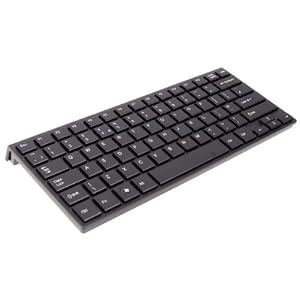


I've tried reinstalling drivers by removing the little dongle and putting it in a different USB but it doesn't help. What is strange is the keyboard has an FN key but no keys to use in conjunction with it.
Thanks for any replies/suggestions, it's greatly appreciated.

My System SpecsSystem Spec
12-19-2011   #2


The associated Fn keys are in blue and probably on the ASDFG.... keys.

You didn't say what the make and model number of the new keyboard is.
My System SpecsSystem Spec
12-19-2011   #3


Windows 7 ultimate x64


Sorry, the keyboard is a Xenta super compact wireless: Xenta Super Compact micro slim Wireless UK Keyboard: Amazon.co.uk: Electronics
Also the F5 either doesn't work or doesn't want to refresh pages in my browsers for some reason.
My System SpecsSystem Spec
.


12-19-2011   #4


Windows 7 ultimate x64


Just did a quick keyboard test and both of my CTRL keys nor my F5 key work, It's a strange issue and it could be a hardware problem (faulty keyboard) but it does seem a little coincidental that both of my CTRL's don't work, very strange.
My System SpecsSystem Spec
12-20-2011   #5


I would return it for a replacement.
My System SpecsSystem Spec
12-20-2011   #6


MS Windows 7 Home Premium SP1 64-bit (Family Pack Lic.) Upgrade


you might try to unplug the new KB and use the onscreen KB see if the problem persists.

(start) >> enter " osk.exe " (without the quotes) then enter

Mike
My System SpecsSystem Spec
Reply

 Keyboard CTRL not working. problems?


Thread Tools


Similar Threads for: Keyboard CTRL not working.
Thread Forum
Keyboard Problem (Ctrl and Shift keys don't work correctly) Hardware & Devices
Cannot assign Ctrl+Alt+F as a keyboard shortcut General Discussion
Solved Keyboard issue = Ctrl, Tab when combined with other keys Hardware & Devices
Solved keyboard CTRL+C doesn't work Hardware & Devices
Ctrl-Alt-s does not type ß anymore (US International keyboard layout) Software


All times are GMT -5. The time now is 01:35 PM.


Windows 7 Forums is an independent web site and has not been authorized,
sponsored, or otherwise approved by Microsoft Corporation.
"Windows 7" and related materials are trademarks of Microsoft Corp.
© Designer Media Ltd
  

1 2 3 4 5 6 7 8 9 10 11 12 13 14 15 16 17 18 19 20 21 22 23 24 25 26 27 28 29 30