|
Welcome to Windows 7 Forums. Our forum is dedicated to helping you find solutions with any problems, errors or issues you are experiencing with Windows 7. The Windows 7 forum also covers news and updates and has an extensive Windows 7 tutorial section that covers a wide range of tips and tricks.
Windows 7 - Partition question : Unallocated Space Before |
12-20-2011
|
#1 | | Windows 7 Ultimate x64 SP1, LinuxMint 9 LTS x64, Debian 6, Ubuntu 10.04 LTS x64 |
Partition question : Unallocated Space Before G'day Fella's,
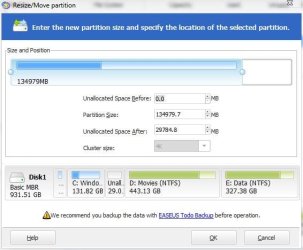
I'm using EASEUS Partition Master Home Edition to create a single Logical partition on a WD10EARS-00Y5B1 1TB HDD. After wiping the disk completely, and selecting to create a single NTFS partition, I note that there is a 7.8MB unallocated space at the front of the disk (see image).
Can someone explain what this space is, and why it is unallocated?
Thanks,
Golden
| My System Specs | | System Manufacturer/Model Number Golden Mk. I.3 OS Windows 7 Ultimate x64 SP1, LinuxMint 9 LTS x64, Debian 6, Ubuntu 10.04 LTS x64 CPU Intel i7 860 @ 2.80 GHz Motherboard Gigabyte P55A-UD3R Rev.1. Award BIOS F13 Memory 16GB Corsair Vengance DDR3 @ 661 MHz Dual Channel (9-9-9-24) Graphics Card EVGA NVidia GTX 560 1024MB Sound Card Realtek Integrated Monitor(s) Displays Dual Samsung SyncMaster 2494HS Screen Resolution 1920*1080 and 1920*1080 Keyboard Logitech G110 Mouse Logitech MX518 PSU Thermaltake ToughPower QFan 750W Case Thermaltake Element S VK60001W2Z Cooling Corsair H60 Water Cooling, 2*230mm and 2*80mm case fans Hard Drives 1*OCZ Vertex 2 60GB SSD;
2*Samsung F3 SpinPoint 1TB in RAID0;
2*Samsung F1 SpinPoint 1TB in RAID1;
1*Western Digital WD10EARS 1TB
1*Western Digital 500GB External USB 3.0
1*Seagate 500GB External USB 2.0 Internet Speed Not fast enough!!! |
12-20-2011
|
#2 | | |
The 7.8MB unallocated space was before you partitioned the drive as your pic shows that the 7.8MB unallocated space is 0 after, no problems to worry about there mate. | My System Specs | | System Manufacturer/Model Number Home build OS Windows 7 Pro x64 CPU AMD FX 4100 4 Core 3.6GHz AM3+ Motherboard ASROCK 970 Extreme3 Memory 16GB G.Skill RipjawsX Graphics Card Radeon 6850 Sound Card ASUS Xonar D1 Monitor(s) Displays ASUS 23" LCD PSU 700W Case Antec 100 Cooling Hyper 212 Plus Hard Drives SSD 120GB
WD 750GB Black series
WD 640GB Black series Internet Speed 50MB |
12-20-2011
|
#3 | | Windows 7 Professional x64 |

Quote: Originally Posted by mgp1964 The 7.8MB unallocated space was before you partitioned the drive as your pic shows that the 7.8MB unallocated space is 0 after, no problems to worry about there mate. I believe the before and after we are looking at refers to where it is located on the disc in relation to the new partition (did that make sense?).
Golden, I am really not sure about this one. It looks like you can adjust those numbers. Is there anyway to make that amount smalller? Is there a possibility of it being bad sectors being left out of the partition? Can you try doing it in disk managment? For some reason it wants that space unallocated. For some reason it wants that space to be free. It's only 7.4 MB. You might just want let it be. | My System Specs | | System Manufacturer/Model Number Dell Vostro 1700 OS Windows 7 Professional x64 CPU Core 2 Duo 2.00GHz T7250 Memory 4GB DDR2 667 Graphics Card Intel GM965 Sound Card SigmaTel HD Audio Monitor(s) Displays Built-in 17.2" and Insignia 22" Screen Resolution 1440x900 and 1360x768 Hard Drives 160GB Western Digital Scorpio Blue
1TB Seagate FreeAgent External Other Info Current warranty does not expire until 4/14/2012 |
12-20-2011
|
#4 | | |

Quote: Originally Posted by Petey7 
Quote: Originally Posted by mgp1964 The 7.8MB unallocated space was before you partitioned the drive as your pic shows that the 7.8MB unallocated space is 0 after, no problems to worry about there mate. I believe the before and after we are looking at refers to where it is located on the disc in relation to the new partition (did that make sense?).
Golden, I am really not sure about this one. It looks like you can adjust those numbers. Is there anyway to make that amount smalller? Is there a possibility of it being bad sectors being left out of the partition? Can you try doing it in disk managment? For some reason it wants that space unallocated. For some reason it wants that space to be free. It's only 7.4 MB. You might just want let it be. I'm pretty sure it is the size and not the location, if you slide either side of that partition in it will give you before and after sizes. | My System Specs | | System Manufacturer/Model Number compaq sr5410f case OS Windows 7 Pro 64 SP1 CPU AMD X2 4450E @ 2.3 ghz Motherboard Biostar MCP6P M2+ Memory 4.0 g Graphics Card Nvidia GeForce 9600 GT , 512mb Sound Card onboard Monitor(s) Displays auria eq2367 Screen Resolution 1920 x 1080 Keyboard logitech wave cordless Mouse logitech LX8 cordless laser mouse PSU 250 watts Case compaq Cooling couple fans Hard Drives 1 tb Hitachi HDT721010SLA scsi, 500 gb external Internet Speed comcast hi speed 19 dn 8 up Other Info Laptop specs: HP g7-1365dx /
CPU: AMD A6-3420M APU with Radeon(tm) HD Graphics /
RAM: Crucial 8Gb (2x4Gb) /
SSD: Crucial M4-CT128M4SSD2 ATA Device/ FW 000F /
GFX: AMD Radeon HD 6520G /
OS: Microsoft Windows 7 Professional 64-bit 7601 Multiprocessor Free Service Pack 1 |
12-20-2011
|
#5 | | Windows 7 Professional x64 |
Alright then. I'm not all-to familiar with Partition Master. I was assuming what it was based on Golden's post. | My System Specs | | System Manufacturer/Model Number Dell Vostro 1700 OS Windows 7 Professional x64 CPU Core 2 Duo 2.00GHz T7250 Memory 4GB DDR2 667 Graphics Card Intel GM965 Sound Card SigmaTel HD Audio Monitor(s) Displays Built-in 17.2" and Insignia 22" Screen Resolution 1440x900 and 1360x768 Hard Drives 160GB Western Digital Scorpio Blue
1TB Seagate FreeAgent External Other Info Current warranty does not expire until 4/14/2012 |
12-20-2011
|
#6 | | |

Quote: Originally Posted by Petey7 Alright then. I'm not all-to familiar with Partition Master. I was assuming what it was based on Golden's post. Yeah, it's hard to tell which end had the unallocated space in his screenshot since the slider is already moved to the end. | My System Specs | | System Manufacturer/Model Number compaq sr5410f case OS Windows 7 Pro 64 SP1 CPU AMD X2 4450E @ 2.3 ghz Motherboard Biostar MCP6P M2+ Memory 4.0 g Graphics Card Nvidia GeForce 9600 GT , 512mb Sound Card onboard Monitor(s) Displays auria eq2367 Screen Resolution 1920 x 1080 Keyboard logitech wave cordless Mouse logitech LX8 cordless laser mouse PSU 250 watts Case compaq Cooling couple fans Hard Drives 1 tb Hitachi HDT721010SLA scsi, 500 gb external Internet Speed comcast hi speed 19 dn 8 up Other Info Laptop specs: HP g7-1365dx /
CPU: AMD A6-3420M APU with Radeon(tm) HD Graphics /
RAM: Crucial 8Gb (2x4Gb) /
SSD: Crucial M4-CT128M4SSD2 ATA Device/ FW 000F /
GFX: AMD Radeon HD 6520G /
OS: Microsoft Windows 7 Professional 64-bit 7601 Multiprocessor Free Service Pack 1 |
12-20-2011
|
#7 | | Windows 7 Pro x64 / WinXP Pro x86 on (1), Win7 Pro X64 / WinXP Pro x86 on (2) |

Quote: Originally Posted by Golden I'm using EASEUS Partition Master Home Edition to create a single Logical partition on a WD10EARS-00Y5B1 1TB HDD. After wiping the disk completely, and selecting to create a single NTFS partition, I note that there is a 7.8MB unallocated space at the front of the disk (see image).
Can someone explain what this space is, and why it is unallocated? Need just a little explanation here about disk theory.
A "logical" partition is defined inside of what's called an "extended partition", which is a special purpose "primary" partition inside of which one or more "logical" partitions can be sub-defined.
A basic MBR hard drive can support up to four primary partitions, and any one of them can be used as an "extended" partition so that one or more "logical" partitions can be sub-defined inside of it.
So you can have three real "primary" partitions, and one "extended" partition inside of which any number of "logical" partitions can then be sub-defined. Of course you can also have ZERO real "primary" partitions and just one "extended" partition on your drive (as you've done), so that all partitions defined on that drive are "logical" and located within the one single "extended" partition.
The "extended" partition has some control information (think of it as sort of a "prefix") which lives outside of real data area that's used by the "logical" partitions inside of it. This "prefix" isn't very large, but needs to exist. Since space allocation on a drive is in sector group units of 8MB, just one 8MB allocation unit is sufficient to hold the "prefix" information associated with the "extended" partition. But once it's been partially consumed for that purpose, the remainder of that 8MB is unavailable for further allocation since space allocation is in complete 8MB units.
===>> That's why you see 7.8MB "unallocated", because .2MB of that 8MB unit of space has been used for the "prefix" information tied to the one "extended" partition inside of which your "logical" partitions live.
Don't worry about it. That's perfectly normal and by design. You will not be able to make use of this 7.8MB for any purpose. | My System Specs | | System Manufacturer/Model Number Home-built, two systems (1) and (2) OS Windows 7 Pro x64 / WinXP Pro x86 on (1), Win7 Pro X64 / WinXP Pro x86 on (2) CPU E6850 3.0Ghz/4MB-cache (1); E8400 3.0Ghz/6MB-cache (2) Motherboard SuperMicro C2SBX (1); ASUS P5Q3 (2) Memory 4GB PC3-8500 DDR3 (1); 4GB PC3-10600 DDR3 (2) Graphics Card ATI HD4850 (1); ATI HD5770 (dual-DVI) (2) (see TV cards) Sound Card Realtek ALC883 HD Audio (1); Realtek ALC1200 HD Audio (2) Monitor(s) Displays Eizo 24" S2433W (1); Eizo HD2441W LCD, Eizo S2433W (2) Screen Resolution 1920x1200 (1); 1920x1200, 1920x1200 (2) Keyboard IBM PS/2 (1) and (2) Mouse Microsoft wired (1); Logitech MX Revolution wireless (2) PSU Nesteq ECS-6001 600W (1); Nesteq ECS-5001 500W (2) Case Acousti-Case 360 (1) and (2) Cooling Zalman CNPS9700-NT for CPU, 2x120mm case fans (1) and (2) Hard Drives (1) 1x1TB SATA (7200 RPM), 1x300GB U320 SCSI (10000RPM), 1x750GB SATA (7200RPM), 1x150GB SATA (10000RPM) for OS;
(2) 1x320GB SATA (7200RPM), 1x140GB SCSI 10000RPM U320, 1x150GB SATA (10000RPM) for OS Internet Speed 15mbps down / 2mbps up Other Info Ceton InfiniTV 4-tuner cablecard-enabled TV card as well as ATI TV Wonder 650 Combo PCIe OTA/ATSC 2-tuner TV card in (2), running under Win7 WMC |
12-20-2011
|
#8 | | Windows 7 Professional x32 |
You dont need to worry about that as same 7.8MB unallocated space is on my had shown by easus | My System Specs | | System Manufacturer/Model Number Sony VAIO VPCSB25FG/B OS Windows 7 Professional x32 CPU Intel® Core™ i3-2310M Processor 2.10 GHz*1 Motherboard Asus Memory 4GB Graphics Card AMD Radeon™ HD 6470M (SPEED MODE) / Intel® HD Graphics 3000 Sound Card Intel® High Definition Audio Monitor(s) Displays 13.3 (33.8cm) wide (WXGA: 1366x768) TFT colour display (VAIO Screen Resolution 1366x768 Hard Drives 500 GB*4 (Serial ATA, 5400 rpm) |
12-20-2011
|
#9 | | Windows 7 Pro x64 / WinXP Pro x86 on (1), Win7 Pro X64 / WinXP Pro x86 on (2) |
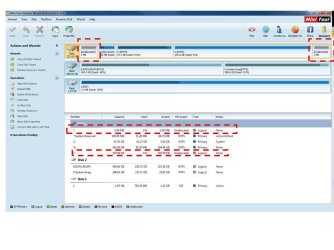
Just some more interesting examples of this small "unallocated" space tied to the presence of an "extended" partition on a drive, depending on the order in which you defined your partitions (some primary, some logical, at the start of free-space, at the end of free-space, etc.)...
(1) it doesn't have to PRECEDE the "extended" partition. It can also be located AFTER the "extended" partition.
(2) it doesn't even have to be CONSECUTIVE (i.e. adjacent) to the "extended" partition. It can actually be SEPARATED from the "extended" partition by a primary partition!
Bottom line: forget about it. This is simply part of primary/logical partition architecture. | My System Specs | | System Manufacturer/Model Number Home-built, two systems (1) and (2) OS Windows 7 Pro x64 / WinXP Pro x86 on (1), Win7 Pro X64 / WinXP Pro x86 on (2) CPU E6850 3.0Ghz/4MB-cache (1); E8400 3.0Ghz/6MB-cache (2) Motherboard SuperMicro C2SBX (1); ASUS P5Q3 (2) Memory 4GB PC3-8500 DDR3 (1); 4GB PC3-10600 DDR3 (2) Graphics Card ATI HD4850 (1); ATI HD5770 (dual-DVI) (2) (see TV cards) Sound Card Realtek ALC883 HD Audio (1); Realtek ALC1200 HD Audio (2) Monitor(s) Displays Eizo 24" S2433W (1); Eizo HD2441W LCD, Eizo S2433W (2) Screen Resolution 1920x1200 (1); 1920x1200, 1920x1200 (2) Keyboard IBM PS/2 (1) and (2) Mouse Microsoft wired (1); Logitech MX Revolution wireless (2) PSU Nesteq ECS-6001 600W (1); Nesteq ECS-5001 500W (2) Case Acousti-Case 360 (1) and (2) Cooling Zalman CNPS9700-NT for CPU, 2x120mm case fans (1) and (2) Hard Drives (1) 1x1TB SATA (7200 RPM), 1x300GB U320 SCSI (10000RPM), 1x750GB SATA (7200RPM), 1x150GB SATA (10000RPM) for OS;
(2) 1x320GB SATA (7200RPM), 1x140GB SCSI 10000RPM U320, 1x150GB SATA (10000RPM) for OS Internet Speed 15mbps down / 2mbps up Other Info Ceton InfiniTV 4-tuner cablecard-enabled TV card as well as ATI TV Wonder 650 Combo PCIe OTA/ATSC 2-tuner TV card in (2), running under Win7 WMC |
12-20-2011
|
#10 | | Windows 7 Ultimate x64 SP1, LinuxMint 9 LTS x64, Debian 6, Ubuntu 10.04 LTS x64 |
Excellent - thanks guys. It was more about the why the 7.8MB (in logical disks its always at the front of the disk, in primary disks its always 10MB at the back of the disk). Desperber's disk theory post is what I was after.
In Windows Disk Management you never see the unallocated space graphically - it only shows up in more advanced partioning software such as EASEUS and Partition Wizard MiniTool.
Thanks again.
Last edited by Golden; 12-20-2011 at 05:53 PM..
| My System Specs | | System Manufacturer/Model Number Golden Mk. I.3 OS Windows 7 Ultimate x64 SP1, LinuxMint 9 LTS x64, Debian 6, Ubuntu 10.04 LTS x64 CPU Intel i7 860 @ 2.80 GHz Motherboard Gigabyte P55A-UD3R Rev.1. Award BIOS F13 Memory 16GB Corsair Vengance DDR3 @ 661 MHz Dual Channel (9-9-9-24) Graphics Card EVGA NVidia GTX 560 1024MB Sound Card Realtek Integrated Monitor(s) Displays Dual Samsung SyncMaster 2494HS Screen Resolution 1920*1080 and 1920*1080 Keyboard Logitech G110 Mouse Logitech MX518 PSU Thermaltake ToughPower QFan 750W Case Thermaltake Element S VK60001W2Z Cooling Corsair H60 Water Cooling, 2*230mm and 2*80mm case fans Hard Drives 1*OCZ Vertex 2 60GB SSD;
2*Samsung F3 SpinPoint 1TB in RAID0;
2*Samsung F1 SpinPoint 1TB in RAID1;
1*Western Digital WD10EARS 1TB
1*Western Digital 500GB External USB 3.0
1*Seagate 500GB External USB 2.0 Internet Speed Not fast enough!!! Partition question : Unallocated Space Before problems? All times are GMT -5. The time now is 01:35 PM. |  |