|
Welcome to Windows 7 Forums. Our forum is dedicated to helping you find solutions with any problems, errors or issues you are experiencing with Windows 7. The Windows 7 forum also covers news and updates and has an extensive Windows 7 tutorial section that covers a wide range of tips and tricks.
Windows 7 - RAM Configuration: KHX1600C9D3K2/8GX |
12-22-2011
|
#1 | | |
RAM Configuration: KHX1600C9D3K2/8GX I think this should be an easy one, but I thought I'd check.
I got this memory: http://www.kingston.com/datasheets/K...C9D3K2_8GX.pdf
(spec sheet)
And I want to make sure I have it set up properly in the BIOS.
The BIOS gives me a huge list of options, like:
CPU Core
CPC Core
IGPU Voltage
DRAM Voltage
RCH Voltage
CPU PLC Voltage
VTT Voltage
VCCSA Voltage
...
How do I figure out what to set everything to?
The spec sheet says it runs at "DDR-1600", but then it mentions 1333 mhZ... | My System Specs | | System Manufacturer/Model Number Specs: https://docs.google.com/spreadsheet/ccc?key=0ApEvyoOwrfzBdFlZR19iZXJFSGR5ak5falh4d0l2eVE&auth OS Windows 7 - 64-bit CPU Intel Core i3-2100 3.1GHz Dual-Core 65W LGA1155 Motherboard ASRock H61M/U3S3 LGA 1155 Intel H61 HDMI SATA 6Gb/s USB 3.0 Memory Kingston Technology HyperX 8 GB (2x4 GB Modules) 1600 MHz DD Graphics Card Sapphire Radeon HD 5850 Monitor(s) Displays ASUS VH238H Screen Resolution 1920x1080 Keyboard Macally iKeySlim Mouse Razer Deathadder PSU Antec BP550 Plus 550W Continuous Power ATX12V V2.2 80 PLUS C Case Cooler Master RC-692-KKN2 Advanced Hard Drives Samsung 1 TB Spinpoint 7200 RPM 32MB Cache SATA 3.5 inch Bulk/OEM Desktop Hard Drive HD103SJ Internet Speed wi-fi (Netgear WN300 usb adapter) |
12-22-2011
|
#2 | | Windows 7 X64 Professional/Windows 8 |
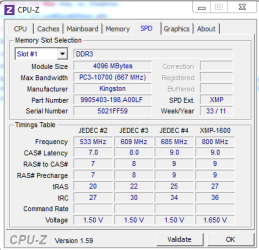
On the side of the ram sticks there is a sticker that will tell you the voltage and the first 3 timings. Your board may have a Ram (or Dram) configuration section. If you set it to XMP and set the correct voltage, it should run at specs. You may have to set the timings manually, but not usually. Download CPUz and post a screenshot of the memory and SPD tabs. When you set bios at optimizwd defaults, everything else should be set correctly. You will just have to set your sata controller to what you want, set the ram and set the boot order. In your list above is dram voltage. That is your ram voltage, it is on the sticker on your ram sticks and probably the package they came in. it will usually say 1.5V or 1.6V something like that. But, your board will usually read it right, but make sure. | My System Specs | | System Manufacturer/Model Number Home Brew - Always under construction OS Windows 7 X64 Professional/Windows 8 CPU intel i7-2600K Motherboard Asus P8Z68 V-Pro/GEN 3 Memory 8GB G.Skill Sniper DDR3-2133 (2X4GB) Graphics Card EVGA 670 2GB Sound Card Asus Xonar Monitor(s) Displays Asus 24" LCD VW246H Screen Resolution 1920X1080 Keyboard Logitech G510 Mouse Logitech G500/Logitech Wireless PSU CORSAIR HX850W Case Cooler Master HAF X Cooling Corsair H100 w/ 4 noctua fans in push/pull. Hard Drives Crucial M4 128GB,Crucial M4 64GB,Samsung HD103SJ 1TB, 1TB WD FAEX,Samsung 1.5TB, EXTERNAL HD- 2X Rosewill case esata w/ 1TB Samsung spinpoints & Black X esata 1TB Spinpoint, Rosewill USB 3.0 dock 1TB Spinpoint, Seagate GOFlex Pro 500GB & 750GB USB Internet Speed Foot Messenger speed Other Info 2nd Computer- Samsung RF711-SO1 17" Laptop i5-2310M, 8GB DDR3-1333, Crucial M4 and OCZ vertex2, Nvidia GT540M.Win 7 HP X64. |
12-22-2011
|
#3 | | |

Quote: Originally Posted by FallibleCanine I think this should be an easy one, but I thought I'd check.
I got this memory: http://www.kingston.com/datasheets/K...C9D3K2_8GX.pdf
(spec sheet)
And I want to make sure I have it set up properly in the BIOS.
The BIOS gives me a huge list of options, like:
CPU Core
CPC Core
IGPU Voltage
DRAM Voltage
RCH Voltage
CPU PLC Voltage
VTT Voltage
VCCSA Voltage
...
How do I figure out what to set everything to?
The spec sheet says it runs at "DDR-1600", but then it mentions 1333 mhZ... The RAM will default to 1333 unless you change the BIOS settings. The easiest way to do that is to enable the XMP profile. (I feel too lazy to check your MB manual to see where that's done.) ALternately, you can probably set the memory frequency, voltage, and timings manually. (That's what I usually do.) | My System Specs | | System Manufacturer/Model Number homegrown OS Windows 7 Pro X64 SP1 CPU Intel Core I7-3930k Motherboard Asus P9X79 Pro Memory 16 GB Gskill DDR3-2133 Graphics Card eVGA GTX680 Sound Card Creative X-Fi Titanium Monitor(s) Displays As PA246Q Screen Resolution 1920 X 1200 Keyboard cheap Logitech USB Mouse Microsoft Intellimouse Explorer (old optical) USB PSU PCP&C Silencer 750 Crossfire Case Silverstone FT02 Cooling Noctua NH-D14 Hard Drives Corsair Force GT, 120 GB
WDC 1.5TB Caviar Black Internet Speed 6Mb cable Other Info Pioneer BDR-205
Samsung SH-203B
Monsoon 5.1 speakers |
12-23-2011
|
#4 | | |
Thanks! 
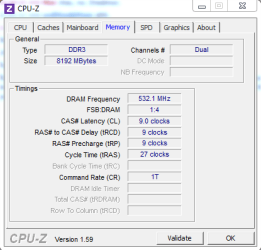
Quote: Originally Posted by essenbe On the side of the ram sticks there is a sticker that will tell you the voltage and the first 3 timings. Your board may have a Ram (or Dram) configuration section. If you set it to XMP and set the correct voltage, it should run at specs. You may have to set the timings manually, but not usually. Download CPUz and post a screenshot of the memory and SPD tabs. When you set bios at optimizwd defaults, everything else should be set correctly. You will just have to set your sata controller to what you want, set the ram and set the boot order. In your list above is dram voltage. That is your ram voltage, it is on the sticker on your ram sticks and probably the package they came in. it will usually say 1.5V or 1.6V something like that. But, your board will usually read it right, but make sure. The voltage is 1.65V, although I've read that it's best to set it to 1.5V.
The timings are 9-9-27.
The only two things I changed in the BIOS were that I changed the 24 to 27 and I changed the voltage to 1.65V. 
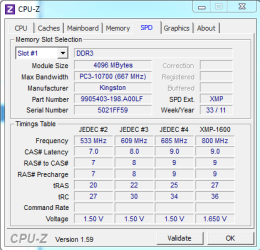
Quote: Originally Posted by bobkn The RAM will default to 1333 unless you change the BIOS settings. The easiest way to do that is to enable the XMP profile. (I feel too lazy to check your MB manual to see where that's done.) ALternately, you can probably set the memory frequency, voltage, and timings manually. (That's what I usually do.) I have an Asrock motherboard, and I don't think it supports XMP yet. But cpu-z does show an XMP column; is that giving me the XMP numbers?
If "auto" isn't totally reliable, I'd rather set everything manually, but I'm not sure how to do so. There are an awful lot of numbers on that sheet. I also can't tell when the specs are indicating the most extreme possible setting (for overclocking) and when they're giving the recommended number.
Last edited by FallibleCanine; 12-23-2011 at 02:43 PM..
| My System Specs | | System Manufacturer/Model Number Specs: https://docs.google.com/spreadsheet/ccc?key=0ApEvyoOwrfzBdFlZR19iZXJFSGR5ak5falh4d0l2eVE&auth OS Windows 7 - 64-bit CPU Intel Core i3-2100 3.1GHz Dual-Core 65W LGA1155 Motherboard ASRock H61M/U3S3 LGA 1155 Intel H61 HDMI SATA 6Gb/s USB 3.0 Memory Kingston Technology HyperX 8 GB (2x4 GB Modules) 1600 MHz DD Graphics Card Sapphire Radeon HD 5850 Monitor(s) Displays ASUS VH238H Screen Resolution 1920x1080 Keyboard Macally iKeySlim Mouse Razer Deathadder PSU Antec BP550 Plus 550W Continuous Power ATX12V V2.2 80 PLUS C Case Cooler Master RC-692-KKN2 Advanced Hard Drives Samsung 1 TB Spinpoint 7200 RPM 32MB Cache SATA 3.5 inch Bulk/OEM Desktop Hard Drive HD103SJ Internet Speed wi-fi (Netgear WN300 usb adapter) |
12-23-2011
|
#5 | | Windows 7 X64 Professional/Windows 8 |
I have an Asrock motherboard too, only mine is a P67 version. Mine does support XML. It is in the overclocking section. If you have it, open it, go to the dram configuration, and enable XMP, set the profile to auto and it should set the ram to specs. But, I always check. On the SPD tab you showed, the XMP is what you will want it set to. | My System Specs | | System Manufacturer/Model Number Home Brew - Always under construction OS Windows 7 X64 Professional/Windows 8 CPU intel i7-2600K Motherboard Asus P8Z68 V-Pro/GEN 3 Memory 8GB G.Skill Sniper DDR3-2133 (2X4GB) Graphics Card EVGA 670 2GB Sound Card Asus Xonar Monitor(s) Displays Asus 24" LCD VW246H Screen Resolution 1920X1080 Keyboard Logitech G510 Mouse Logitech G500/Logitech Wireless PSU CORSAIR HX850W Case Cooler Master HAF X Cooling Corsair H100 w/ 4 noctua fans in push/pull. Hard Drives Crucial M4 128GB,Crucial M4 64GB,Samsung HD103SJ 1TB, 1TB WD FAEX,Samsung 1.5TB, EXTERNAL HD- 2X Rosewill case esata w/ 1TB Samsung spinpoints & Black X esata 1TB Spinpoint, Rosewill USB 3.0 dock 1TB Spinpoint, Seagate GOFlex Pro 500GB & 750GB USB Internet Speed Foot Messenger speed Other Info 2nd Computer- Samsung RF711-SO1 17" Laptop i5-2310M, 8GB DDR3-1333, Crucial M4 and OCZ vertex2, Nvidia GT540M.Win 7 HP X64. |
12-23-2011
|
#6 | | |
Thanks! I'll look for it. If it's not there, maybe I'll update.
So I'm guessing I should manually change the TRC to 36.
What about Command Rate?
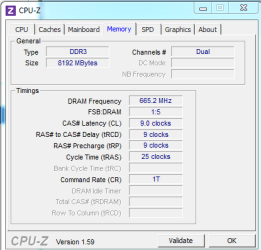
Also, it gives 800 mHz as the frequency ... um ... I think I have the frequency set to 1333, because that was the highest it would go. Is it something like "set command rate to 2 and then set frequency to 800"? It's 1600 mhz memory. | My System Specs | | System Manufacturer/Model Number Specs: https://docs.google.com/spreadsheet/ccc?key=0ApEvyoOwrfzBdFlZR19iZXJFSGR5ak5falh4d0l2eVE&auth OS Windows 7 - 64-bit CPU Intel Core i3-2100 3.1GHz Dual-Core 65W LGA1155 Motherboard ASRock H61M/U3S3 LGA 1155 Intel H61 HDMI SATA 6Gb/s USB 3.0 Memory Kingston Technology HyperX 8 GB (2x4 GB Modules) 1600 MHz DD Graphics Card Sapphire Radeon HD 5850 Monitor(s) Displays ASUS VH238H Screen Resolution 1920x1080 Keyboard Macally iKeySlim Mouse Razer Deathadder PSU Antec BP550 Plus 550W Continuous Power ATX12V V2.2 80 PLUS C Case Cooler Master RC-692-KKN2 Advanced Hard Drives Samsung 1 TB Spinpoint 7200 RPM 32MB Cache SATA 3.5 inch Bulk/OEM Desktop Hard Drive HD103SJ Internet Speed wi-fi (Netgear WN300 usb adapter) |
12-23-2011
|
#7 | | |
I hunted through the BIOS line-by-line and I didn't see XMP.
manual for motherboard: ran search for XMP and didn't come up with anything http://download.asrock.com/manual/H61MU3S3.pdf | My System Specs | | System Manufacturer/Model Number Specs: https://docs.google.com/spreadsheet/ccc?key=0ApEvyoOwrfzBdFlZR19iZXJFSGR5ak5falh4d0l2eVE&auth OS Windows 7 - 64-bit CPU Intel Core i3-2100 3.1GHz Dual-Core 65W LGA1155 Motherboard ASRock H61M/U3S3 LGA 1155 Intel H61 HDMI SATA 6Gb/s USB 3.0 Memory Kingston Technology HyperX 8 GB (2x4 GB Modules) 1600 MHz DD Graphics Card Sapphire Radeon HD 5850 Monitor(s) Displays ASUS VH238H Screen Resolution 1920x1080 Keyboard Macally iKeySlim Mouse Razer Deathadder PSU Antec BP550 Plus 550W Continuous Power ATX12V V2.2 80 PLUS C Case Cooler Master RC-692-KKN2 Advanced Hard Drives Samsung 1 TB Spinpoint 7200 RPM 32MB Cache SATA 3.5 inch Bulk/OEM Desktop Hard Drive HD103SJ Internet Speed wi-fi (Netgear WN300 usb adapter) |
12-23-2011
|
#8 | | Windows 7 X64 Professional/Windows 8 |
If it shows 800 on the memory tab of cpuz, that is correct. Ram id double data rate (DDR) so it should be at 600 (which is 1600). If you enable XMP it will ruually set everything correctly. It reads it off of the ram. | My System Specs | | System Manufacturer/Model Number Home Brew - Always under construction OS Windows 7 X64 Professional/Windows 8 CPU intel i7-2600K Motherboard Asus P8Z68 V-Pro/GEN 3 Memory 8GB G.Skill Sniper DDR3-2133 (2X4GB) Graphics Card EVGA 670 2GB Sound Card Asus Xonar Monitor(s) Displays Asus 24" LCD VW246H Screen Resolution 1920X1080 Keyboard Logitech G510 Mouse Logitech G500/Logitech Wireless PSU CORSAIR HX850W Case Cooler Master HAF X Cooling Corsair H100 w/ 4 noctua fans in push/pull. Hard Drives Crucial M4 128GB,Crucial M4 64GB,Samsung HD103SJ 1TB, 1TB WD FAEX,Samsung 1.5TB, EXTERNAL HD- 2X Rosewill case esata w/ 1TB Samsung spinpoints & Black X esata 1TB Spinpoint, Rosewill USB 3.0 dock 1TB Spinpoint, Seagate GOFlex Pro 500GB & 750GB USB Internet Speed Foot Messenger speed Other Info 2nd Computer- Samsung RF711-SO1 17" Laptop i5-2310M, 8GB DDR3-1333, Crucial M4 and OCZ vertex2, Nvidia GT540M.Win 7 HP X64. |
12-23-2011
|
#9 | | Windows 7 X64 Professional/Windows 8 |
I didn't see it either, but in the OC tweeker section, try setting the frequency and the timings on the ram just like the XMP profile in cpuz SPD tab and see if that works.
EDIT: Page 37 of the manual. | My System Specs | | System Manufacturer/Model Number Home Brew - Always under construction OS Windows 7 X64 Professional/Windows 8 CPU intel i7-2600K Motherboard Asus P8Z68 V-Pro/GEN 3 Memory 8GB G.Skill Sniper DDR3-2133 (2X4GB) Graphics Card EVGA 670 2GB Sound Card Asus Xonar Monitor(s) Displays Asus 24" LCD VW246H Screen Resolution 1920X1080 Keyboard Logitech G510 Mouse Logitech G500/Logitech Wireless PSU CORSAIR HX850W Case Cooler Master HAF X Cooling Corsair H100 w/ 4 noctua fans in push/pull. Hard Drives Crucial M4 128GB,Crucial M4 64GB,Samsung HD103SJ 1TB, 1TB WD FAEX,Samsung 1.5TB, EXTERNAL HD- 2X Rosewill case esata w/ 1TB Samsung spinpoints & Black X esata 1TB Spinpoint, Rosewill USB 3.0 dock 1TB Spinpoint, Seagate GOFlex Pro 500GB & 750GB USB Internet Speed Foot Messenger speed Other Info 2nd Computer- Samsung RF711-SO1 17" Laptop i5-2310M, 8GB DDR3-1333, Crucial M4 and OCZ vertex2, Nvidia GT540M.Win 7 HP X64. |
12-24-2011
|
#10 | | Windows 7 Ult x64 - SP1/ Windows 8 CP x64 |

Quote: Originally Posted by FallibleCanine Thanks! I'll look for it. If it's not there, maybe I'll update.
So I'm guessing I should manually change the TRC to 36.
What about Command Rate?
Also, it gives 800 mHz as the frequency ... um ... I think I have the frequency set to 1333, because that was the highest it would go. Is it something like "set command rate to 2 and then set frequency to 800"? It's 1600 mhz memory. Your RAM is listed on your motherboard RAM compatibility site: ASRock > Products > H61M/U3S3 > Memory Support List
As suggested the best way to set your RAM to 1600 MHz (in UEFI it is 800MHZ: DDR = Double Data Rate, 800 x 2 =1600) is to select XMP in your UEFI.
OC Tweaker screen > DRAM Timing Control > DRAM Frequency
Default is 'Auto', check there for the XMP options.
The H61 is limited as far as OC'ing and may be limited on RAM settings, as the documentation is vague at best.
If there is no XMP setting then check the DRAM Frequency 'Manual' setting, see if it has a 800MHz selection (that is what you use to get 1600MHz).
Set the first four RAM timings as per the CPUZ SPD XMP tab, 9-9-9-27 and leave the rest on auto.
DRAM voltage to 1.65v
VTT voltage to 1.15v
If it's not stable change the CR (Command Rate) to 2N.
If that is not stable you will need to bump the VTT voltage, CPU integrated memory controller.
You have to be careful with this voltage, let us know before you do any adjustments.
Let us know how it's going.
Last edited by Dave76; 12-24-2011 at 11:30 AM..
| My System Specs | | System Manufacturer/Model Number 76~1.4 OS Windows 7 Ult x64 - SP1/ Windows 8 CP x64 CPU Intel Core i5-750 3.84GHz Motherboard Gigabyte GA-P55A-UD4P, SATA 6Gb/s USB 3, f14 Memory 8GB (2X4GB) DDR3 1600 Corsair Vengeance CL8 1.5v Graphics Card XFX HD 5770 1GB DDR5 Sound Card Realtek HD Audio ALC889 Integrated Chip Monitor(s) Displays 22" LCD Dell Screen Resolution 1680x1050 Keyboard Logitech Wave Mouse CM Sentinel PSU Corsair HX650W Case Cooler Master Storm Scout Cooling Corsair H80 2x12cm Noctua NF P12 , 2x14cm case fans Hard Drives Intel X25 M 120GB SSD,
Seagate Barracuda 500GB SATA2 7200rpm 32MB cache, Seagate Barracuda 1TB SATA2 7200rpm 32MB cache, Internet Speed Dismal Other Info eSATA ports,
External eSATA Seagate 500GB SATA2 7200rpm,
External USB WD 500GB RAM Configuration: KHX1600C9D3K2/8GX problems? All times are GMT -5. The time now is 01:38 PM. |  |