
Windows 7 Forums


Windows 7: xbox 360 not connecting to live through laptop

11 Aug 2009  
Statico

Windows 7
6 posts
 
 
xbox 360 not connecting to live through laptop

Ok, so I've been searching how to get this to work but it doesn't
I want to be able to get to Live through my laptops wifi, connecting the xbox via ethernet to my computer


I know i have to bridge the LAN and the wireless network connection but it doesnt work the "allow other network users to connect through this comp internet..." option is disabled in both

my pc is running the windows 7 RC 7100

here is the status of the bridge connection when the xbox is plugged to my computer
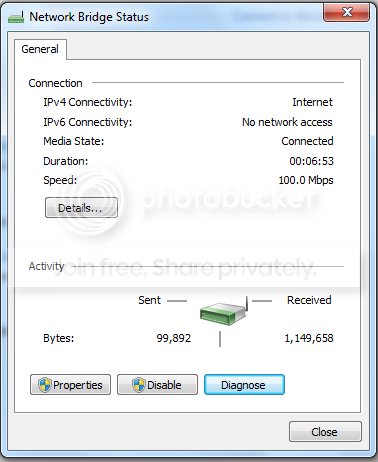


clearly it says that does not have internet access, but i don't know how to solve that



hope you guys can help me, if you need any detail, let me know
My System SpecsSystem Spec

11 Aug 2009  
minhtuanp

Windows 7 + Ubuntu 9.04
3 posts


Well, I've found that Windows 7 is somehow quite difficult to set up, maybe I didnt use Vista though. In XP, i didnt even have to bridge connection, just turned on the sharing function, plugged-in the ethernet cable and there you go. It worked the same way in windows 7 until recently it just doesnt work no more. So I tried bridge the connection, and set the ip on XBOX 360 manually. and it worked. funny thing is if i try to test my live connection, it'd connect flawlessly; however I still couldnt sign-in my live account though. I'm updating my dashboard atm, let see what gonna happen. cheers
My System SpecsSystem Spec
12 Aug 2009  
Statico

Windows 7
6 posts


yeah I know, I have dual-boot pc with Vista and 7
in vista was easy to set up, but I don't use that partition anymore,

so i want to be able to do it in seven

anyone that suggest another method?
My System SpecsSystem Spec
.


12 Aug 2009  
Dark Nova Gamer

Windows 7 Ultimate, OS X 10.7, Ubuntu 11.04
3,864 posts
Pembroke


Why people always try to bridge I'll never know.

Unbridge everything, make it how it was before.

If your laptop connects via wifi constantly (like mine, its my only means of high speed) then follow this;

Step 1:
Left-click this Attachment 22691


Step 2:
Right-Click the Wireless connection that you are connecting to. Then select Status.


Step 3:
Select Properties.
Attachment 22693


Step 4:
Select the Sharing tab and then check off both boxes.
Attachment 22694

-

Hope this helps.

Last edited by Dark Nova Gamer; 23 Aug 2009 at 08:15 PM..
My System SpecsSystem Spec
12 Aug 2009  
Dark Nova Gamer

Windows 7 Ultimate, OS X 10.7, Ubuntu 11.04
3,864 posts
Pembroke


Just thought I should add, this is EXACTLY how I connect my Xbox 360 to the internet. So there should be no problems.
My System SpecsSystem Spec
12 Aug 2009  
Statico

Windows 7
6 posts


hey man, thanks for the tip
but it didn't work for me =\


this comes up on the active networks window
don't they have to be part of the same network to work?
My System SpecsSystem Spec
12 Aug 2009  
Dark Nova Gamer

Windows 7 Ultimate, OS X 10.7, Ubuntu 11.04
3,864 posts
Pembroke


One moment.

EDIT: Okay try doing that, and have an Ethernet cable plugged into your laptop and run it to your 360, it should work. Mine shows it as the same too but I'm on XBL right now.
Attachment 22702

EDIT 2: Okay so it works fine even though it says 'no internet access', all you really need to do is just turn your Xbox 360 on, try connecting to XBL and it SHOULD work.

I have to go for a while, so if it doesn't work feel free to leave messages. I am sure others could help!

Last edited by Dark Nova Gamer; 23 Aug 2009 at 08:15 PM..
My System SpecsSystem Spec
12 Aug 2009  
minhtuanp

Windows 7 + Ubuntu 9.04
3 posts


Quote   Quote: Originally Posted by DarkNovaGundam View Post
Why people always try to bridge I'll never know.

Unbridge everything, make it how it was before.

If your laptop connects via wifi constantly (like mine, its my only means of high speed) then follow this;

Step 1:
Left-click this Attachment 22691


Step 2:
Right-Click the Wireless connection that you are connecting to. Then select Status.


Step 3:
Select Properties.
Attachment 22693


Step 4:
Select the Sharing tab and then check off both boxes.
Attachment 22694

-

Hope this helps.

It stopped working on my 7 recently for some reasons. Anyway, I got it working now by using bridge connection method.

@Statico: Have you tried to config IP on Xbox 360 ??? Set it manually and let see if it worked
My System SpecsSystem Spec
12 Aug 2009  
Statico

Windows 7
6 posts


it looks like my lan does not have access to the internet
like if the wireless does not share with LAN

when I click the LAN to see it's properties, it says No internet access
in both IPv4 connectivity and IPv6

when my Wireless shows that it has internet access in the IPv4

i don't know whats the problem here
My System SpecsSystem Spec
12 Aug 2009  
minhtuanp

Windows 7 + Ubuntu 9.04
3 posts


Quote   Quote: Originally Posted by Statico View Post
it looks like my lan does not have access to the internet
like if the wireless does not share with LAN

when I click the LAN to see it's properties, it says No internet access
in both IPv4 connectivity and IPv6

when my Wireless shows that it has internet access in the IPv4

i don't know whats the problem here
well, even your LAN says " no internet access", you still connect to xbox live if you follow one of the above method. good luck...

btw, there are so many cheaters on FIFA 09 servers these days...
My System SpecsSystem Spec
Reply

 xbox 360 not connecting to live through laptop problems?


Thread Tools


Similar help and support threads for: xbox 360 not connecting to live through laptop
Thread Forum
Connecting to Xbox Live using Ethernet Cable, Laptop & USB Dongle Network & Sharing
Create Xbox Live open NAT, but connected through laptop for wireless? Network & Sharing
Connecting to Xbox Live Network & Sharing
Xbox Live Through Laptop Network & Sharing
How to bridge wireless connection through laptop to xbox live? Gaming


All times are GMT -5. The time now is 02:36 AM.


Windows 7 Forums is an independent web site and has not been authorized,
sponsored, or otherwise approved by Microsoft Corporation.
"Windows 7" and related materials are trademarks of Microsoft Corp.
© Designer Media Ltd