Windows 7 Forums Search
Welcome to Windows 7 Forums. Our forum is dedicated to helping you find solutions with any problems, errors or issues you are experiencing with Windows 7. The Windows 7 forum also covers news and updates and has an extensive Windows 7 tutorial section that covers a wide range of tips and tricks.


Windows 7 - Noisy multi speed Fan

 
12-28-2011   #1


Windows 7 Home premium 64bit SP 1


Noisy multi speed Fan

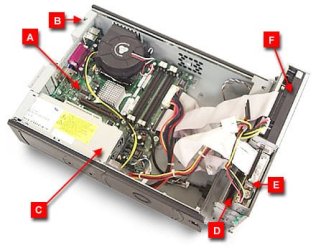
Hey guy's I may be way off base with this post here, but I have a old gateway E Series 4300 that I use as a backup box, and would like to find a solution to the noisy cooling system it sports. It's a SFF case with a noisy multi speed fan and I really don't want to go to all the trouble of moving everything to a bigger case! I thought with all the new technology in cooling there might be a solution utilizing the stock case?
Thanks in advance for any help!
N2
gateway-e4300
Windows XP Professional Service Pack 3
3.20 gigahertz Intel Pentium 4
16 kilobyte primary memory cache
1024 kilobyte secondary memory cache
Board: Intel Corporation D915GUX AAC85199-202
Bus Clock: 200 megahertz


My System SpecsSystem Spec
12-28-2011   #2


Is it a PWM type fan?
My System SpecsSystem Spec
12-28-2011   #3


Windows 7 SP1, Home Premium, 64-bit


Are you referring to an exhaust fan--on the rear of the case?

What diameter?

If the PC has no temperature issues and low-noise is your goal, I would look at a Scythe Slipstream, probably 800 RPM.

Nexus and Noctua make some good low-noise fans as well.

If you get above 1000 RPM, even low-noise fans become noticeable--it's a tradeoff between cooling requirements and the noise level you are willing to tolerate.

An SFF case may have a small diameter fan, which further complicates the issue--small fans have to spin faster to cool adequately and may be noisier than you would like.
My System SpecsSystem Spec
.


12-28-2011   #4


Windows 7 Home premium 64bit SP 1


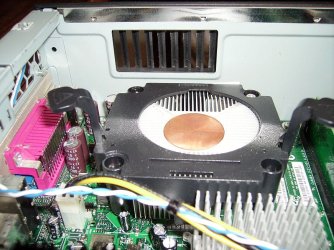
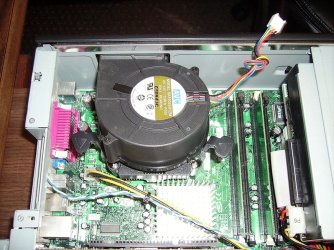
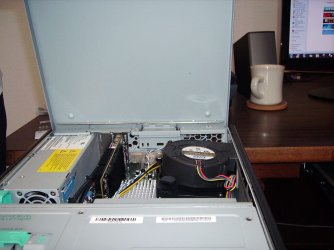
Don't know the particulars of the fan, but here is a picture of it...
Attached Thumbnails
Noisy multi speed Fan-fan-top-view.jpg  
My System SpecsSystem Spec
12-28-2011   #5


Windows 7 SP1, Home Premium, 64-bit


That pic doesn't have any detail.

I still don't know if you are referring to an exhaust fan, an intake fan, a graphics card fan, or whatever.

Here is the user's manual:

http://support.gateway.com/s/Manuals...00/9529609.pdf

But it doesn't have fan details as far as I can see.

It's up to you to better describe the fan. Otherwise, no one can help with a recommendation.
My System SpecsSystem Spec
12-28-2011   #6


Quote   Quote: Originally Posted by N2Abyss View Post
Don't know the particulars of the fan, but here is a picture of it...
That looks like a 60mm 'snail' shrouded fan.

So, ignoring what I asked earlier, it's unlikely to be a PWM type.

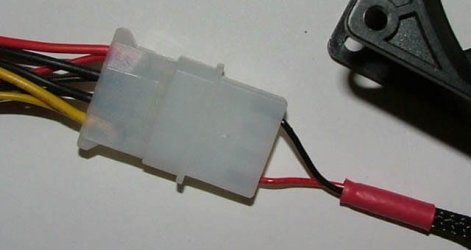
It will be a two or three pin unit.

Unless you want to dremel the case and fit a grill, converting it to a larger diameter slow revving 'lift' type of fan you're stuck with a 60mm replacement.

You may find it's a specific manufacturers part, in order to fit within the shrouding.
My System SpecsSystem Spec
12-28-2011   #7


Windows 7 Home premium 64bit SP 1


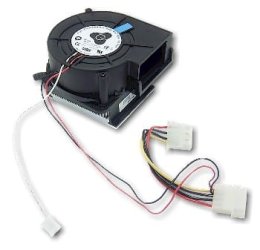
Sorry, this is as close as I can find,It looks to set over processor w/heat sink?
  • e2100 / e4100 Hornet Cooling Fan with Heatsink
  • Used on Gateway Desktop Computers with e2100 / e4100 Hornet Chassis
  • Manufacturer - AVC Model F9733B12LE Dual Ball Bearing DC 12V, 0.72A
  • Condition - Refurbished, 30 Day Warranty.
Part Numbers: 8006994, 8006995, 8008594, F9733B12LE
(Multiple P/N's are interchangeable and ship based on availability)
Attached Thumbnails
Noisy multi speed Fan-fan-part.jpg  
My System SpecsSystem Spec
12-28-2011   #8


Windows 7 SP1, Home Premium, 64-bit


I have no idea if that Hornet fan is what you have, but..........if the Gateway has always been noisy, then the existing fan may be still performing well.

On the other hand, if the Gateway used to be quiet, but has recently become noisy, then maybe a replacement is worthwhile.

I'd be reluctant to fiddle with it unless you KNOW you have a proper replacement and unless you use the PC a lot and therefore have to listen to it constantly.

Any 60mm fan designed to cool a PC is likely to be high RPM and therefore noisy by definition.
My System SpecsSystem Spec
12-28-2011   #9


Windows 7 Ultimate 64


When was the last time you cleaned the fins and fan with compressed air? Likely the reason it's louder is because it's trying to push more air over dirty fins.
My System SpecsSystem Spec
12-28-2011   #10


Windows 7 Home premium 64bit SP 1


My System SpecsSystem Spec
Reply

 Noisy multi speed Fan problems?


Thread Tools


Similar Threads for: Noisy multi speed Fan
Thread Forum
Solved Noisy PC Fan! Hardware & Devices
Noisy Fan Performance & Maintenance
Too Noisy Background Sound & Audio
CPU in Very high speed and noisy Performance & Maintenance
windows 7 noisy !!!!!!! General Discussion


All times are GMT -5. The time now is 01:44 PM.


Windows 7 Forums is an independent web site and has not been authorized,
sponsored, or otherwise approved by Microsoft Corporation.
"Windows 7" and related materials are trademarks of Microsoft Corp.
© Designer Media Ltd
  

1 2 3 4 5 6 7 8 9 10 11 12 13 14 15 16 17 18 19 20 21 22 23 24 25 26 27 28 29 30