| Windows 7: Formatting partition to FAT32? |
29 Dec 2011
|
#1 | | |
Formatting partition to FAT32? I apologise if this has been posted before.
I bought an external HDD today and I want to make two partitions one NTFS and one FAT32 because I want to use it on my ps3. Is this possible? The reason I want a
NTFS partition is because I also want to backup my pc.
Can someone post a tutorial or recommend good software?
My external HDD is a 500GB samsung s2 and my os is windows 7.
Thank you. | My System Specs |
| OS windows 7 ultimate CPU AMD athlon x2 64 Memory 3GB Graphics Card geforce 9100M G |
29 Dec 2011
|
#2 | | Windows 7 Pro x64 (1), Win7 Pro X64 / WinXP Pro x86 on (2) |
Setting up two partitions on your external drive with one FAT32 and the second NTFS is certainly possible, and easy.
I don't know exactly what you plan to do on that FAT32 partition that requires use of FAT32, but if you can survive with a 32GB FAT32 partition I'd suggest you limit it to that value. However FAT32 can certainly be used for much larger partitions than just 32GB. But FAT32 has "vulnerability" during power failures, etc., which requires CHKDSK to be used to verify the integrity of the file system and attempt to repair it (almost always successful, but...).
Make the rest of the drive your NTFS partition. This is essentially a bullet-proof and failsafe and 100% dependable and reliable file system. It is more efficient than FAT32 and should always be used if given a choice.
Anyway, your best and easiest tool for partitioning functions is to download and install Partition Wizard v7 Home Edition. It is extremely intuitive for all types of create, delete, move, resize, etc. functions. All functions other than maintenance on the C-partiton itself (where Windows 7 lives) can be performed while running the installed version under Windows 7 itself.
For running other functions on the C-partition which cannot be performed while Windows 7 itself is up and running, you should also download and burn the ISO image for Partition Wizard Standalone Boot CD. Everything can be done with this standalone boot version, but of course you will not see Windows assigned drive letters... you'll only see the drives and partitions.
So download and install PW for yourself, open the program, and I'll bet the "how do I use it" questions will be self-answered. It's very intuitive. Your drives and existing partitions will appear, and if you select a drive or partition and right-click, the context menu will offer you the options open to you with that space.
Or, you can select the drive/partition and then explicitly select the function to be performed on the left side. That list may change dynamically depending on the drive/partition you select in the graphical area.
You can set up a list of one or more "queued" operations (which can be UNDO'd if you change your mind). Nothing is actually performed until you push the APPLY button. However the graphical area will be changed and updated as you queue the operations, showing you what the drive/partition WILL LOOK LIKE AFTER YOU "APPLY", so that you can easily see what you're accomplishing.
But if you do have questions once you get started, please ask.
One more thing about removable USB drives...
If you want to disconnect them from your PC, be sure you first "safely remove hardware" and wait for Windows to pop up the "it is now safe to remove..." message. Now you can pull the USB cable out of the PC.
This method is mandatory for ALL removable USB devices that are assigned Windows drive letters dynamically when connected, simply because of the data buffering issues inherent in dealing with such devices. This "safely remove" technique guarantees all data will be flushed out and written to the drive before disconnecting, thus ensuring drive data and file system integrity. | My System Specs | | System Manufacturer/Model Number Home-built, two systems (1) and (2) OS Windows 7 Pro x64 (1), Win7 Pro X64 / WinXP Pro x86 on (2) CPU i5-3350p 3.1Ghz/6MB-cache (1); E8400 3.0Ghz/6MB-cache (2) Motherboard ASUS P8Z77-V Pro (1); ASUS P5Q3 (2) Memory 8GB PC3-12800 DDR3 (1); 4GB PC3-10600 DDR3 (2) Graphics Card ATI HD5770 dual-DVI (1), (see TV cards); ATI HD4850 (2) Sound Card Realtek ALC892 HD Audio (1); Realtek ALC1200 HD Audio (2) Monitor(s) Displays Eizo HD2441W LCD, Eizo S2433W (1); Eizo 24" S2433W (2) Screen Resolution 1920x1200, 1920x1200 (1); 1920x1200 (2) Keyboard IBM PS/2 (1) and (2) Mouse Logitech MX Revolution wireless (1); Microsoft wired (2) PSU Nesteq ECS-6001 600W (1); Nesteq ECS-5001 500W (2) Case Acousti-Case 360 (1) and (2) Cooling Noctua NH-U12P SE2 for CPU, 2x120mm case fans (1) and (2) Hard Drives (1) 1TB SATA-II (7200RPM), 2TB SATA-II (7200RPM), 2TB SATA-III (7200RPM), 250GB SATA-III (10000RPM) for OS;

(2) 320GB SATA-II (7200RPM), 750GB SATA-II (7200RPM), 150GB SATA-II (10000RPM) for OS Internet Speed 15mbps down / 2mbps up Other Info Ceton InfiniTV 4-tuner cablecard-enabled TV card as well as Hauppauge HVR-2250 OTA/ATSC 2-tuner TV card in (1), running under Win7 WMC |
29 Dec 2011
|
#3 | | |
Thanks alot! You were very helpful. | My System Specs | | OS windows 7 ultimate CPU AMD athlon x2 64 Memory 3GB Graphics Card geforce 9100M G |
29 Dec 2011
|
#4 | | Windows 7 SP1, Home Premium, 64-bit |
I'd think you could partition an external hard drive with Windows Disk Management, without using another program.
I could be wrong--I've never used an external. | My System Specs | | System Manufacturer/Model Number Ignatz Special; 4 speed manual gearbox; factory air conditioning; one of one OS Windows 7 SP1, Home Premium, 64-bit CPU Intel Sandy Bridge i5-2500, not overclocked Motherboard Gigabyte H67A-UD3H-B3, full ATX Memory 4 GB Crucial DDR3-1333 Graphics Card none; graphics are integrated on CPU Sound Card onboard: Realtek ALC892; external: USB Behringer UF0-202 Monitor(s) Displays NEC 90GX2-BK 19" LCD Screen Resolution 800 x 640 Keyboard Leopold Tenkeyless with Cherry Blue switches, USB Mouse Logitech or Microsoft optical wired; either USB or PS 2 PSU Seasonic SS-560KM, modular Case Antec Solo II Cooling CPU: Scythe Big Shuriken; Case: Scythe Slipstream 800 & 500 Hard Drives System: Intel 320 Series SSD, 80 GB;
Data: Samsung Spinpoint 103SJ, 1 TB;
Backup: WD Caviar Green WD15EADS-00P8B0, 1.5TB Other Info Power consumption of this system, including monitor: 68 watts at idle; 144 watts at full load |
29 Dec 2011
|
#5 | | Windows 7 Home Premium 32 bit |
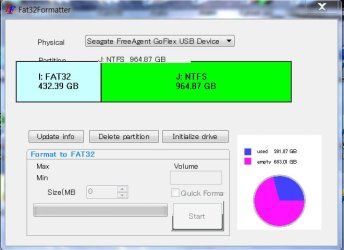
One can use FAT32 Formatter Fat32Formatter to create a FAT32 partition of any size. Rest of the unallocated space can be formatted NTFS in Windows Disk Management. | My System Specs | | OS Windows 7 Home Premium 32 bit |
29 Dec 2011
|
#6 | | Windows 7 Pro x64 (1), Win7 Pro X64 / WinXP Pro x86 on (2) |
Many ways to skin a cat.
They all work.
I just prefer the Partition Wizard user-interface and its additional set of useful and powerful enhanced functionality over DISKMGMT and DISKPART, as well as the "queued" approach to scheduling a series of consecutive operations which don't actually get performed until you push APPLY (with the ability to UNDO along the way if you make a mistake or change your mind). But the GUI presentation changes along with your growing queue of operations, so that you see exactly what you're accomplishing.
Also I like its identical user-interface when booted to the standalone boot CD version.
Also I like that if you do unwittingly initiate an operation while under Windows 7 that cannot actually be completed while Windows 7 is up and running, it will ask for your permission to re-boot at which time its standalone version kicks in to complete the queued operations, after which the rest of the normal Windows boot process completes.
If you pay a few dollars and buy the "professional" edition, you can also build a standalone bootable USB flash drive as well as a standalone bootable CD. And you can also "merge" multiple partitions which is an additional function in the non-free version.
To each his own. I come from a long history of using the old now vendor-abandoned Partition Magic program, and Partition Wizard is essentially that same program. So I'm very used to it. | My System Specs | | System Manufacturer/Model Number Home-built, two systems (1) and (2) OS Windows 7 Pro x64 (1), Win7 Pro X64 / WinXP Pro x86 on (2) CPU i5-3350p 3.1Ghz/6MB-cache (1); E8400 3.0Ghz/6MB-cache (2) Motherboard ASUS P8Z77-V Pro (1); ASUS P5Q3 (2) Memory 8GB PC3-12800 DDR3 (1); 4GB PC3-10600 DDR3 (2) Graphics Card ATI HD5770 dual-DVI (1), (see TV cards); ATI HD4850 (2) Sound Card Realtek ALC892 HD Audio (1); Realtek ALC1200 HD Audio (2) Monitor(s) Displays Eizo HD2441W LCD, Eizo S2433W (1); Eizo 24" S2433W (2) Screen Resolution 1920x1200, 1920x1200 (1); 1920x1200 (2) Keyboard IBM PS/2 (1) and (2) Mouse Logitech MX Revolution wireless (1); Microsoft wired (2) PSU Nesteq ECS-6001 600W (1); Nesteq ECS-5001 500W (2) Case Acousti-Case 360 (1) and (2) Cooling Noctua NH-U12P SE2 for CPU, 2x120mm case fans (1) and (2) Hard Drives (1) 1TB SATA-II (7200RPM), 2TB SATA-II (7200RPM), 2TB SATA-III (7200RPM), 250GB SATA-III (10000RPM) for OS;
(2) 320GB SATA-II (7200RPM), 750GB SATA-II (7200RPM), 150GB SATA-II (10000RPM) for OS Internet Speed 15mbps down / 2mbps up Other Info Ceton InfiniTV 4-tuner cablecard-enabled TV card as well as Hauppauge HVR-2250 OTA/ATSC 2-tuner TV card in (1), running under Win7 WMC |
30 Dec 2011
|
#7 | | |
''I don't know exactly what you plan to do on that FAT32 partition that requires use of FAT32, but if you can survive with a 32GB FAT32 partition I'd suggest you limit it to that value. However FAT32 can certainly be used for much larger partitions than just 32GB. But FAT32 has "vulnerability" during power failures, etc., which requires CHKDSK to be used to verify the integrity of the file system and attempt to repair it (almost always successful, but...)''
What if a power failure occurs, what is the worst thing that can happen? | My System Specs | | OS windows 7 ultimate CPU AMD athlon x2 64 Memory 3GB Graphics Card geforce 9100M G |
30 Dec 2011
|
#8 | | Windows 7 Pro x64 (1), Win7 Pro X64 / WinXP Pro x86 on (2) |

Quote: Originally Posted by chilloh ''I don't know exactly what you plan to do on that FAT32 partition that requires use of FAT32, but if you can survive with a 32GB FAT32 partition I'd suggest you limit it to that value. However FAT32 can certainly be used for much larger partitions than just 32GB. But FAT32 has "vulnerability" during power failures, etc., which requires CHKDSK to be used to verify the integrity of the file system and attempt to repair it (almost always successful, but...)''
What if a power failure occurs, what is the worst thing that can happen? Well, I remember that when I used FAT32 on my partitions Win98/WinXP would simply automatically initiate CHKDSK at the next boot following an abnormal shutdown or power-caused failure and re-boot. So you'd see it.
And CHKDSK is clearly designed and intended to detect file system errors and correct them... if possible. This almost always is successful, if there is actually a file system error detected that needs fixing.
It's just that the nature of NTFS is such that under the same outage/re-boot circumstances either (a) CHKDSK is not required, or (b) CHKDSK is hardly every required, or (c) there is rarely an actual NTFS file failure/integrity issue that requires correcting by CHKDSK.
My experience with CHKDSK and FAT32 is that if "orphan" pieces of files are discovered, that they are not "re-woven" back into the original files verywell. In theory they can be used (by whom??) for "recovery" of data, but I've never known how that actually gets done.
Haven't ever had the same situation occur with NTFS.
We are honestly talking about very very rare circumstances here.
Your best bet if you truly have critical data and want to protect yourself sensibly is to connect your critical computer hardware to a UPS (uninterruptible power supply), like from APC. This will provide sufficient battery backup time for you to gracefully shut down Windows if you're working on the machine when the power failure occurs.
The APC software also performs an auto-shutdown of Windows (if you're not there when the power outage hits) when the remaining battery life hits the 5-minutes remaining limit. | My System Specs | | System Manufacturer/Model Number Home-built, two systems (1) and (2) OS Windows 7 Pro x64 (1), Win7 Pro X64 / WinXP Pro x86 on (2) CPU i5-3350p 3.1Ghz/6MB-cache (1); E8400 3.0Ghz/6MB-cache (2) Motherboard ASUS P8Z77-V Pro (1); ASUS P5Q3 (2) Memory 8GB PC3-12800 DDR3 (1); 4GB PC3-10600 DDR3 (2) Graphics Card ATI HD5770 dual-DVI (1), (see TV cards); ATI HD4850 (2) Sound Card Realtek ALC892 HD Audio (1); Realtek ALC1200 HD Audio (2) Monitor(s) Displays Eizo HD2441W LCD, Eizo S2433W (1); Eizo 24" S2433W (2) Screen Resolution 1920x1200, 1920x1200 (1); 1920x1200 (2) Keyboard IBM PS/2 (1) and (2) Mouse Logitech MX Revolution wireless (1); Microsoft wired (2) PSU Nesteq ECS-6001 600W (1); Nesteq ECS-5001 500W (2) Case Acousti-Case 360 (1) and (2) Cooling Noctua NH-U12P SE2 for CPU, 2x120mm case fans (1) and (2) Hard Drives (1) 1TB SATA-II (7200RPM), 2TB SATA-II (7200RPM), 2TB SATA-III (7200RPM), 250GB SATA-III (10000RPM) for OS;
(2) 320GB SATA-II (7200RPM), 750GB SATA-II (7200RPM), 150GB SATA-II (10000RPM) for OS Internet Speed 15mbps down / 2mbps up Other Info Ceton InfiniTV 4-tuner cablecard-enabled TV card as well as Hauppauge HVR-2250 OTA/ATSC 2-tuner TV card in (1), running under Win7 WMC |
30 Dec 2011
|
#9 | | |
But is it the same with an external harddrive with no os or other technical software on it? | My System Specs | | OS windows 7 ultimate CPU AMD athlon x2 64 Memory 3GB Graphics Card geforce 9100M G |
30 Dec 2011
|
#10 | | Windows 7 Pro x64 (1), Win7 Pro X64 / WinXP Pro x86 on (2) |

Quote: Originally Posted by chilloh But is it the same with an external harddrive with no os or other technical software on it? The data written to any hard drive is just data... OS, programs, JPGs, AVI's, DOC's, whatever.
That data is written using the file system's protocol, no matter what that data is.
If the file system is "compromised" because a critical buffer of data that was supposed to be written out to that drive got lost, and never written, and thus there is maybe a "broken link" or "broken sector chain" or whatever, then that's the job of CHKDSK to discover and hopefully repair... by "sewing up the broken chain" in the least harmful way possible.
Obviously the lost data that should have been written is not recoverable and thus is lost, but at least the file system's chains (of allocated and free data) can be repaired so that you at least still have say the 500GB's of capacity you though you had. You won't just suddenly lose 100GB of space that "fell off a cliff" because a disk chain got broken.
This story is appropriate for ANYTHING written to disk. Doesn't matter whether it's an internal or external drive, or the nature of the data. These drives are all formatted essentially the same way, and an NTFS format partition is simply less likely to fall victim to a condition which could not be repaired by CHKDSK than is FAT32 format which as I described is simply "more vulnerable".
All low probability occurrences, all made less likely or impossible through the use of a UPS if your data is truly critical. | My System Specs | | System Manufacturer/Model Number Home-built, two systems (1) and (2) OS Windows 7 Pro x64 (1), Win7 Pro X64 / WinXP Pro x86 on (2) CPU i5-3350p 3.1Ghz/6MB-cache (1); E8400 3.0Ghz/6MB-cache (2) Motherboard ASUS P8Z77-V Pro (1); ASUS P5Q3 (2) Memory 8GB PC3-12800 DDR3 (1); 4GB PC3-10600 DDR3 (2) Graphics Card ATI HD5770 dual-DVI (1), (see TV cards); ATI HD4850 (2) Sound Card Realtek ALC892 HD Audio (1); Realtek ALC1200 HD Audio (2) Monitor(s) Displays Eizo HD2441W LCD, Eizo S2433W (1); Eizo 24" S2433W (2) Screen Resolution 1920x1200, 1920x1200 (1); 1920x1200 (2) Keyboard IBM PS/2 (1) and (2) Mouse Logitech MX Revolution wireless (1); Microsoft wired (2) PSU Nesteq ECS-6001 600W (1); Nesteq ECS-5001 500W (2) Case Acousti-Case 360 (1) and (2) Cooling Noctua NH-U12P SE2 for CPU, 2x120mm case fans (1) and (2) Hard Drives (1) 1TB SATA-II (7200RPM), 2TB SATA-II (7200RPM), 2TB SATA-III (7200RPM), 250GB SATA-III (10000RPM) for OS;
(2) 320GB SATA-II (7200RPM), 750GB SATA-II (7200RPM), 150GB SATA-II (10000RPM) for OS Internet Speed 15mbps down / 2mbps up Other Info Ceton InfiniTV 4-tuner cablecard-enabled TV card as well as Hauppauge HVR-2250 OTA/ATSC 2-tuner TV card in (1), running under Win7 WMC Formatting partition to FAT32? problems? All times are GMT -5. The time now is 12:40 AM. | |