Windows 7 Forums Search
Welcome to Windows 7 Forums. Our forum is dedicated to helping you find solutions with any problems, errors or issues you are experiencing with Windows 7. The Windows 7 forum also covers news and updates and has an extensive Windows 7 tutorial section that covers a wide range of tips and tricks.


Windows 7 - Problem Changing Backup Drive Designation

 
12-30-2011   #1
hwp


Windows 7


Problem Changing Backup Drive Designation

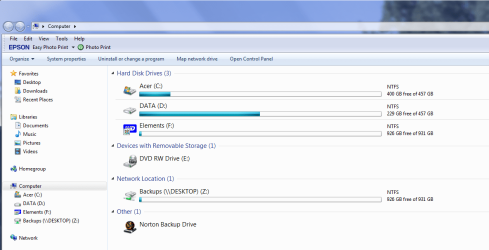
I recently changed from having a desktop and a laptop networked to having two Windows 7 desktop computers networked. I have an external harddrive attached to DESKTOP for backup. Part of that external harddrive is designated as Backups(\\DESKTOP)(Z) . I am running Norton 360 on both desktops and they both backup to drive Z:. I would like to change the name of DESKTOP to something like DESKTOP1 (to differentiate it from DESKTOP2), which I know how to do, but I don't know how to change the designation of the Z: portion of the external harddrive. When I try to edit Backups(\\DESKTOP)(Z) I get a bing. Is there way to change the Z: drive designation?

My System SpecsSystem Spec
12-30-2011   #2


Windows 7 Ultimate x64 SP1, LinuxMint 9 LTS x64, Debian 6, Ubuntu 10.04 LTS x64


Hi,

That looks like you mapped Z:. I think you can rename it by double-clicking it, and then renaming it.

Post back if you need more help.

Regards,
Golden
My System SpecsSystem Spec
12-30-2011   #3
hwp


Windows 7


Thanks for the suggestion. After going into the Control Panel and selecting "Computer" I got a list of the various components. I tried a double left click on Backups(\\DESKTOP)(Z) and got a list of the files on the drive. I then right clicked on the Backups(\\DESKTOP)(Z) component and got a submenu. From that I selected the "rename" option. But when I tried to change the drive name I got a beep.

I can't remember if I created the Z: drive or if Norton 360 created it.

I am wondering if I have to reformat the hardrive and start over.

All suggestions are appreciated.
My System SpecsSystem Spec
.


12-30-2011   #4


Windows 7 Ultimate x64 SP1, LinuxMint 9 LTS x64, Debian 6, Ubuntu 10.04 LTS x64


Hi,

OK. Are you using Norton360 to do backups?

Can you take a screen capture of your explorer showing this Z drive, and post it here?

Regards,
Golden
My System SpecsSystem Spec
12-30-2011   #5
hwp


Windows 7


Yes I am using Norton 360 for my backups. Is this the screen shot you wanted to see?
Attached Thumbnails
Problem Changing Backup Drive Designation-acerscreen.png  
My System SpecsSystem Spec
12-30-2011   #6


Windows 7 Ultimate x64 SP1, LinuxMint 9 LTS x64, Debian 6, Ubuntu 10.04 LTS x64


Hi,

Yep. OK, usually you should just be able to rename it as I indicated, but I think that folder is controlled by Norton (are you using that for antivirus too?) so it won't allow it to be renamed.

Since you don't remember if Norton set that up for you, I suspect that if you wanted to change it, you would have to re-configure your Norton backup again. Unfortunately, I dont really know anything about it so I can't offer any advice on that. Perhaps you could look through the Norton help on that?

Let us know what you find out.

Regards,
Golden
My System SpecsSystem Spec
12-31-2011   #7
hwp


Windows 7


Thanks for the reply. I can live with things as they are so I'm going to leave it as it is.
My System SpecsSystem Spec
Reply

 Problem Changing Backup Drive Designation problems?


Thread Tools


Similar Threads for: Problem Changing Backup Drive Designation
Thread Forum
Problem recoverying from backup via USB 3.0 external drive Backup and Restore
Can I fix an ex-RAID drive designation? Installation & Setup
VSS and SPP problem when ran backup to external hard drive Backup and Restore
Unable to backup hard drive with Backup Program Backup and Restore
Wrong Designation for External Hard Drive Hardware & Devices


All times are GMT -5. The time now is 01:45 PM.


Windows 7 Forums is an independent web site and has not been authorized,
sponsored, or otherwise approved by Microsoft Corporation.
"Windows 7" and related materials are trademarks of Microsoft Corp.
© Designer Media Ltd
  

1 2 3 4 5 6 7 8 9 10 11 12 13 14 15 16 17 18 19 20 21 22 23 24 25 26 27 28 29 30