
HP 7260 PhotoSmart Printer

Yeah I had looked there but with no luck, thanks anyway. I've still got a few tricks up my sleeve so perhaps I'll get it working this weekend. If not, oh well, it's not my computer lol
 

My Computer My Computer

At a glance

Windows 7 Ultimate x64Intel Core i7 740QMG. Skill 8GB (2x4GB) DDR3 @ 1333MHznVidia GeForce GTX 460M
Computer Manufacturer/Model Number
Alienware m15x (my main PC)
OS
Windows 7 Ultimate x64
CPU
Intel Core i7 740QM
Memory
G. Skill 8GB (2x4GB) DDR3 @ 1333MHz
Graphics Card(s)
nVidia GeForce GTX 460M
Sound Card
IDT Integrated HD Audio
Monitor(s) Displays
15.6HDF+ WLED
Screen Resolution
1600 x 900
Hard Drives
240GB OCZ Agility 3 SSD
Mouse
Razer Orochi
Internet Speed
50Mb/s
Other Info
Intel Ultimate N Wi-Fi Link 5300, Bluetooth 2.0
Have you ever had or seen someone clean a fish tank? Perhaps it works the same way, you create a vacuum by positioning the tube the correct way and then it starts to flow on its own. It's hard to explain but maybe look for a video on YouTube.

The thing I wonder about is the cartridge telling the printer it's empty. I was looking at a system like this for a Canon I was considering and apparently sometimes it makes the printer think that the cartridges are empty at which point you need to "reset" it.

Not exactly sure what you mean, but is it capillary action, like when a doctor takes a blood sample with a little tube? I don't know anything about resetting the ink level, but there is a video about that on the link I posted.
 

My Computer My Computer

At a glance

W7x64 Pro, SuSe 12.1/** W7 x64 Pro, XP MCEPhenom II 1090T w/Noctua NH-D14 /**4400+ X2 w...2 x 2GB Patriot PGS34g1600LLKA/**4x1GB Corsai...EVGA GTX460 SC/**EVGA 8800GTS
Computer Manufacturer/Model Number
DIY
OS
W7x64 Pro, SuSe 12.1/** W7 x64 Pro, XP MCE
CPU
Phenom II 1090T w/Noctua NH-D14 /**4400+ X2 w/CM Hyper TX 3
Motherboard
ASRock 890FX Deluxe 4/**A8N-SLI
Memory
2 x 2GB Patriot PGS34g1600LLKA/**4x1GB Corsair VS
Graphics Card(s)
EVGA GTX460 SC/**EVGA 8800GTS
Sound Card
Asus Xonar D2X/**Xonar D1
Monitor(s) Displays
Acer X233H, Dell E152FPc /**LG M237-WD
Screen Resolution
1920x1080 & 1024x768/**1980x1080
Hard Drives
WDC 2TB, 1.5TB, 1TB, 500GB,Seagate 500GB , Maxtor 80GB /**500GB Seagate & WDC 1TB Black
PSU
CM RS600 w/ APC BX1000G/**Antec 500 TP w/ APC BX1000
Case
HAF922/**Antec 1040IIB
Cooling
3x200mm, 1x140 and 1x120mm/**5x80mm fans
Keyboard
Logitech Media USB/**Saitek Eclipse
Mouse
Cordless Trackman Wheel/**Ditto
Internet Speed
3.3Mbps
Other Info
SB 560 5.1 w/ Sennheiser RS140/**Creative T20 speakers, Dvico FusionHDTV7 Gold RT, Cisco E3000, HP 5510V AIO, Linksys E3000, Belkin F5U237 hub and **F5D8055 adapter
(** = 2nd rig)
I have 2 printers....One being an old old HP deskjet 6122 that is still putting out decent photo's. I buy the ink from
1ink.com. So as long as it keeps putting out decent prints I will leave my 9 iron in the bag.
The only thing bad about the self feeding system is that the lines might get clogged up from lack of use or in settling to the bottom.

The other is a Canon MP 830( couple years old) that is strictly used for faxing and quality photo's.
My Desktop and Laptop are both from HP'S and so far(knock on wood/my thick head) have had no issues NOR
contact with HP support. I am not fluent in languages outside of English other than a few unpublished words from various countries.

Have gotten all my help from the HP website or here at SEVEN FORUMS.
HAVE A SAFE AND HAPPY NEW YEARS EVERYONE...
Dennis

Is this speculation about the ink clogging the tubes, or have you had that experience?
 

My Computer My Computer

At a glance

W7x64 Pro, SuSe 12.1/** W7 x64 Pro, XP MCEPhenom II 1090T w/Noctua NH-D14 /**4400+ X2 w...2 x 2GB Patriot PGS34g1600LLKA/**4x1GB Corsai...EVGA GTX460 SC/**EVGA 8800GTS
Computer Manufacturer/Model Number
DIY
OS
W7x64 Pro, SuSe 12.1/** W7 x64 Pro, XP MCE
CPU
Phenom II 1090T w/Noctua NH-D14 /**4400+ X2 w/CM Hyper TX 3
Motherboard
ASRock 890FX Deluxe 4/**A8N-SLI
Memory
2 x 2GB Patriot PGS34g1600LLKA/**4x1GB Corsair VS
Graphics Card(s)
EVGA GTX460 SC/**EVGA 8800GTS
Sound Card
Asus Xonar D2X/**Xonar D1
Monitor(s) Displays
Acer X233H, Dell E152FPc /**LG M237-WD
Screen Resolution
1920x1080 & 1024x768/**1980x1080
Hard Drives
WDC 2TB, 1.5TB, 1TB, 500GB,Seagate 500GB , Maxtor 80GB /**500GB Seagate & WDC 1TB Black
PSU
CM RS600 w/ APC BX1000G/**Antec 500 TP w/ APC BX1000
Case
HAF922/**Antec 1040IIB
Cooling
3x200mm, 1x140 and 1x120mm/**5x80mm fans
Keyboard
Logitech Media USB/**Saitek Eclipse
Mouse
Cordless Trackman Wheel/**Ditto
Internet Speed
3.3Mbps
Other Info
SB 560 5.1 w/ Sennheiser RS140/**Creative T20 speakers, Dvico FusionHDTV7 Gold RT, Cisco E3000, HP 5510V AIO, Linksys E3000, Belkin F5U237 hub and **F5D8055 adapter
(** = 2nd rig)
I have 2 printers....One being an old old HP deskjet 6122 that is still putting out decent photo's. I buy the ink from
1ink.com. So as long as it keeps putting out decent prints I will leave my 9 iron in the bag.
The only thing bad about the self feeding system is that the lines might get clogged up from lack of use or in settling to the bottom.

The other is a Canon MP 830( couple years old) that is strictly used for faxing and quality photo's.
My Desktop and Laptop are both from HP'S and so far(knock on wood/my thick head) have had no issues NOR
contact with HP support. I am not fluent in languages outside of English other than a few unpublished words from various countries.

Have gotten all my help from the HP website or here at SEVEN FORUMS.
HAVE A SAFE AND HAPPY NEW YEARS EVERYONE...
Dennis

Is this speculation about the ink clogging the tubes, or have you had that experience?


Seek,
I had seen your link a few years ago before I joined 7 Forums and one of the reviews mentioned it.
Said it was a great system if you are printing everyday or large amounts of printing. If not then agitate the container before using to avoid clogging lines.

Just shake or swirl the contents, like I do from my 1 gallon gas container that has oil in it for my blower to even out the mixture.
THW
 

My Computer My Computer

At a glance

Windows 7 Home Premium 64bitIntel(R)Core(TM)2 quad [email protected] 2.39GHz6GB DDR2 6400GeForce 8500/512MB
Computer Manufacturer/Model Number
HP M9077c
OS
Windows 7 Home Premium 64bit
CPU
Intel(R)Core(TM)2 quad [email protected] 2.39GHz
Motherboard
ASUSeK
Memory
6GB DDR2 6400
Graphics Card(s)
GeForce 8500/512MB
Sound Card
Realtek High Def Audio
Monitor(s) Displays
HP w2408 LCD 24" widescreen
Screen Resolution
1920x1200
Cooling
6 pack of Bud
Keyboard
MS wireless Inteli
Mouse
MS wireless Inteli
I just got around to testing this printer, and on the first run, I tried to print the chrysanthemum.jpg in the samples that came with W7, but instead of a flower, all I got was a striated yellow page. Figuring that the ink cartridges were dried out, I replaced them with new ones, and sure enough, it printed the flower, but still heavily striated. Assuming that this problem is in the printer itself, is there anything that I can do about it?
 

My Computer My Computer

At a glance

W7x64 Pro, SuSe 12.1/** W7 x64 Pro, XP MCEPhenom II 1090T w/Noctua NH-D14 /**4400+ X2 w...2 x 2GB Patriot PGS34g1600LLKA/**4x1GB Corsai...EVGA GTX460 SC/**EVGA 8800GTS
Computer Manufacturer/Model Number
DIY
OS
W7x64 Pro, SuSe 12.1/** W7 x64 Pro, XP MCE
CPU
Phenom II 1090T w/Noctua NH-D14 /**4400+ X2 w/CM Hyper TX 3
Motherboard
ASRock 890FX Deluxe 4/**A8N-SLI
Memory
2 x 2GB Patriot PGS34g1600LLKA/**4x1GB Corsair VS
Graphics Card(s)
EVGA GTX460 SC/**EVGA 8800GTS
Sound Card
Asus Xonar D2X/**Xonar D1
Monitor(s) Displays
Acer X233H, Dell E152FPc /**LG M237-WD
Screen Resolution
1920x1080 & 1024x768/**1980x1080
Hard Drives
WDC 2TB, 1.5TB, 1TB, 500GB,Seagate 500GB , Maxtor 80GB /**500GB Seagate & WDC 1TB Black
PSU
CM RS600 w/ APC BX1000G/**Antec 500 TP w/ APC BX1000
Case
HAF922/**Antec 1040IIB
Cooling
3x200mm, 1x140 and 1x120mm/**5x80mm fans
Keyboard
Logitech Media USB/**Saitek Eclipse
Mouse
Cordless Trackman Wheel/**Ditto
Internet Speed
3.3Mbps
Other Info
SB 560 5.1 w/ Sennheiser RS140/**Creative T20 speakers, Dvico FusionHDTV7 Gold RT, Cisco E3000, HP 5510V AIO, Linksys E3000, Belkin F5U237 hub and **F5D8055 adapter
(** = 2nd rig)
I just got around to testing this printer, and on the first run, I tried to print the chrysanthemum.jpg in the samples that came with W7, but instead of a flower, all I got was a striated yellow page. Figuring that the ink cartridges were dried out, I replaced them with new ones, and sure enough, it printed the flower, but still heavily striated. Assuming that this problem is in the printer itself, is there anything that I can do about it?

I believe that the cartridges that the 7260 uses (56, 57, and 58) are of the type that includes the printhead.

All that comes to mind is cleaning the electrical contacts in the cradles for the cartridges.
 

My Computer My Computer

At a glance

Windows 7 Pro X64 SP1Intel Core I7-3930k16 GB Gskill DDR3-2133eVGA GTX680
Computer Manufacturer/Model Number
homegrown
OS
Windows 7 Pro X64 SP1
CPU
Intel Core I7-3930k
Motherboard
Asus P9X79 Pro
Memory
16 GB Gskill DDR3-2133
Graphics Card(s)
eVGA GTX680
Sound Card
Creative X-Fi Titanium
Monitor(s) Displays
As PA246Q
Screen Resolution
1920 X 1200
Hard Drives
Corsair Force GT, 120 GB
WDC 1.5TB Caviar Black
PSU
PCP&C Silencer 750 Crossfire
Case
Silverstone FT02
Cooling
Noctua NH-D14
Keyboard
cheap Logitech USB
Mouse
Microsoft Intellimouse Explorer (old optical) USB
Internet Speed
6Mb cable
Other Info
Pioneer BDR-205
Samsung SH-203B
Monsoon 5.1 speakers
I will try that, but it would seem that if it were simply a contact issue, that it would either work or not. The width and spacing of the striations are very regular, which would seem to not correlate to something such as an irregular contact.
 

My Computer My Computer

At a glance

W7x64 Pro, SuSe 12.1/** W7 x64 Pro, XP MCEPhenom II 1090T w/Noctua NH-D14 /**4400+ X2 w...2 x 2GB Patriot PGS34g1600LLKA/**4x1GB Corsai...EVGA GTX460 SC/**EVGA 8800GTS
Computer Manufacturer/Model Number
DIY
OS
W7x64 Pro, SuSe 12.1/** W7 x64 Pro, XP MCE
CPU
Phenom II 1090T w/Noctua NH-D14 /**4400+ X2 w/CM Hyper TX 3
Motherboard
ASRock 890FX Deluxe 4/**A8N-SLI
Memory
2 x 2GB Patriot PGS34g1600LLKA/**4x1GB Corsair VS
Graphics Card(s)
EVGA GTX460 SC/**EVGA 8800GTS
Sound Card
Asus Xonar D2X/**Xonar D1
Monitor(s) Displays
Acer X233H, Dell E152FPc /**LG M237-WD
Screen Resolution
1920x1080 & 1024x768/**1980x1080
Hard Drives
WDC 2TB, 1.5TB, 1TB, 500GB,Seagate 500GB , Maxtor 80GB /**500GB Seagate & WDC 1TB Black
PSU
CM RS600 w/ APC BX1000G/**Antec 500 TP w/ APC BX1000
Case
HAF922/**Antec 1040IIB
Cooling
3x200mm, 1x140 and 1x120mm/**5x80mm fans
Keyboard
Logitech Media USB/**Saitek Eclipse
Mouse
Cordless Trackman Wheel/**Ditto
Internet Speed
3.3Mbps
Other Info
SB 560 5.1 w/ Sennheiser RS140/**Creative T20 speakers, Dvico FusionHDTV7 Gold RT, Cisco E3000, HP 5510V AIO, Linksys E3000, Belkin F5U237 hub and **F5D8055 adapter
(** = 2nd rig)
Seekermeister,
Do you have a maintenance tool for this printer.
If so, there should be a place where it will clean and or align heads.
Do several head cleanings until the test page meets your satisfaction.
THW
 

My Computer My Computer

At a glance

Windows 7 Home Premium 64bitIntel(R)Core(TM)2 quad [email protected] 2.39GHz6GB DDR2 6400GeForce 8500/512MB
Computer Manufacturer/Model Number
HP M9077c
OS
Windows 7 Home Premium 64bit
CPU
Intel(R)Core(TM)2 quad [email protected] 2.39GHz
Motherboard
ASUSeK
Memory
6GB DDR2 6400
Graphics Card(s)
GeForce 8500/512MB
Sound Card
Realtek High Def Audio
Monitor(s) Displays
HP w2408 LCD 24" widescreen
Screen Resolution
1920x1200
Cooling
6 pack of Bud
Keyboard
MS wireless Inteli
Mouse
MS wireless Inteli
Maintenance tool...not exactly sure what that would be? I just scanned the flower print, so you can see the problem. I also tried printing that flower with my other printer, which came out much, much better, but I can see some faint striations on it also.
 

Attachments

  • 7260 flower.jpeg
    7260 flower.jpeg
    535.6 KB · Views: 3

My Computer My Computer

At a glance

W7x64 Pro, SuSe 12.1/** W7 x64 Pro, XP MCEPhenom II 1090T w/Noctua NH-D14 /**4400+ X2 w...2 x 2GB Patriot PGS34g1600LLKA/**4x1GB Corsai...EVGA GTX460 SC/**EVGA 8800GTS
Computer Manufacturer/Model Number
DIY
OS
W7x64 Pro, SuSe 12.1/** W7 x64 Pro, XP MCE
CPU
Phenom II 1090T w/Noctua NH-D14 /**4400+ X2 w/CM Hyper TX 3
Motherboard
ASRock 890FX Deluxe 4/**A8N-SLI
Memory
2 x 2GB Patriot PGS34g1600LLKA/**4x1GB Corsair VS
Graphics Card(s)
EVGA GTX460 SC/**EVGA 8800GTS
Sound Card
Asus Xonar D2X/**Xonar D1
Monitor(s) Displays
Acer X233H, Dell E152FPc /**LG M237-WD
Screen Resolution
1920x1080 & 1024x768/**1980x1080
Hard Drives
WDC 2TB, 1.5TB, 1TB, 500GB,Seagate 500GB , Maxtor 80GB /**500GB Seagate & WDC 1TB Black
PSU
CM RS600 w/ APC BX1000G/**Antec 500 TP w/ APC BX1000
Case
HAF922/**Antec 1040IIB
Cooling
3x200mm, 1x140 and 1x120mm/**5x80mm fans
Keyboard
Logitech Media USB/**Saitek Eclipse
Mouse
Cordless Trackman Wheel/**Ditto
Internet Speed
3.3Mbps
Other Info
SB 560 5.1 w/ Sennheiser RS140/**Creative T20 speakers, Dvico FusionHDTV7 Gold RT, Cisco E3000, HP 5510V AIO, Linksys E3000, Belkin F5U237 hub and **F5D8055 adapter
(** = 2nd rig)
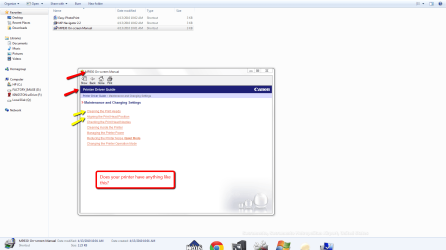
My old HP deskjet 6122 use to have a maintenance tool like
this one for my Canon printer.
2012-01-02_1246.png

This is where I can clean the heads and do an alignment.
Might want to check the online manual for you type of printer.
THW
 

My Computer My Computer

At a glance

Windows 7 Home Premium 64bitIntel(R)Core(TM)2 quad [email protected] 2.39GHz6GB DDR2 6400GeForce 8500/512MB
Computer Manufacturer/Model Number
HP M9077c
OS
Windows 7 Home Premium 64bit
CPU
Intel(R)Core(TM)2 quad [email protected] 2.39GHz
Motherboard
ASUSeK
Memory
6GB DDR2 6400
Graphics Card(s)
GeForce 8500/512MB
Sound Card
Realtek High Def Audio
Monitor(s) Displays
HP w2408 LCD 24" widescreen
Screen Resolution
1920x1200
Cooling
6 pack of Bud
Keyboard
MS wireless Inteli
Mouse
MS wireless Inteli
Yes, I have Googled for it, but from the instructions that I found:

Printed Images Contain White or Single Color Streaks HP Photosmart 7260 Photo Printer - HP technical support (Turkey - English)

It seems that they are talking about accessing it from a settings tab of the printer in Devices and Printers, but when I get to where is sound that they are speaking of, I don't find anything, except a window that says to acess this from Devices and Printers, exactly where I started from, but there is nothing there of this sort. I think that the instructions that I link are obsolete, and probably for XP, since it talk about accessing Devices and Printers from the Control Panel, instead of directly from the Start Menu. On XP x32, there is some software that can be installed that includes this...I think, but even that doesn't work in XP x64.
 

My Computer My Computer

At a glance

W7x64 Pro, SuSe 12.1/** W7 x64 Pro, XP MCEPhenom II 1090T w/Noctua NH-D14 /**4400+ X2 w...2 x 2GB Patriot PGS34g1600LLKA/**4x1GB Corsai...EVGA GTX460 SC/**EVGA 8800GTS
Computer Manufacturer/Model Number
DIY
OS
W7x64 Pro, SuSe 12.1/** W7 x64 Pro, XP MCE
CPU
Phenom II 1090T w/Noctua NH-D14 /**4400+ X2 w/CM Hyper TX 3
Motherboard
ASRock 890FX Deluxe 4/**A8N-SLI
Memory
2 x 2GB Patriot PGS34g1600LLKA/**4x1GB Corsair VS
Graphics Card(s)
EVGA GTX460 SC/**EVGA 8800GTS
Sound Card
Asus Xonar D2X/**Xonar D1
Monitor(s) Displays
Acer X233H, Dell E152FPc /**LG M237-WD
Screen Resolution
1920x1080 & 1024x768/**1980x1080
Hard Drives
WDC 2TB, 1.5TB, 1TB, 500GB,Seagate 500GB , Maxtor 80GB /**500GB Seagate & WDC 1TB Black
PSU
CM RS600 w/ APC BX1000G/**Antec 500 TP w/ APC BX1000
Case
HAF922/**Antec 1040IIB
Cooling
3x200mm, 1x140 and 1x120mm/**5x80mm fans
Keyboard
Logitech Media USB/**Saitek Eclipse
Mouse
Cordless Trackman Wheel/**Ditto
Internet Speed
3.3Mbps
Other Info
SB 560 5.1 w/ Sennheiser RS140/**Creative T20 speakers, Dvico FusionHDTV7 Gold RT, Cisco E3000, HP 5510V AIO, Linksys E3000, Belkin F5U237 hub and **F5D8055 adapter
(** = 2nd rig)
Seekermeister,
Do you have a maintenance tool for this printer.
If so, there should be a place where it will clean and or align heads.
Do several head cleanings until the test page meets your satisfaction.
THW

A point I didn't make explicitly: the heads should all be working with new cartridges. Running software to clean the heads should be unnecessary.
 

My Computer My Computer

At a glance

Windows 7 Pro X64 SP1Intel Core I7-3930k16 GB Gskill DDR3-2133eVGA GTX680
Computer Manufacturer/Model Number
homegrown
OS
Windows 7 Pro X64 SP1
CPU
Intel Core I7-3930k
Motherboard
Asus P9X79 Pro
Memory
16 GB Gskill DDR3-2133
Graphics Card(s)
eVGA GTX680
Sound Card
Creative X-Fi Titanium
Monitor(s) Displays
As PA246Q
Screen Resolution
1920 X 1200
Hard Drives
Corsair Force GT, 120 GB
WDC 1.5TB Caviar Black
PSU
PCP&C Silencer 750 Crossfire
Case
Silverstone FT02
Cooling
Noctua NH-D14
Keyboard
cheap Logitech USB
Mouse
Microsoft Intellimouse Explorer (old optical) USB
Internet Speed
6Mb cable
Other Info
Pioneer BDR-205
Samsung SH-203B
Monsoon 5.1 speakers
Did you see if you can install the XP software in compatibility mode? Otherwise this printer may be obsolete for you. I remember when I upgraded from XP to Vista my old HP all-in-one only had basic functionality (no b/w only prints, no HP toolbox, etc.) so I bought my C7180.

Seekermeister,
Do you have a maintenance tool for this printer.
If so, there should be a place where it will clean and or align heads.
Do several head cleanings until the test page meets your satisfaction.
THW

A point I didn't make explicitly: the heads should all be working with new cartridges. Running software to clean the heads should be unnecessary.

I agree, if the print heads are built into the cartridges as suggested then cleaning them is pointless. However, an alignment might be helpful
 

My Computer My Computer

At a glance

Windows 7 Ultimate x64Intel Core i7 740QMG. Skill 8GB (2x4GB) DDR3 @ 1333MHznVidia GeForce GTX 460M
Computer Manufacturer/Model Number
Alienware m15x (my main PC)
OS
Windows 7 Ultimate x64
CPU
Intel Core i7 740QM
Memory
G. Skill 8GB (2x4GB) DDR3 @ 1333MHz
Graphics Card(s)
nVidia GeForce GTX 460M
Sound Card
IDT Integrated HD Audio
Monitor(s) Displays
15.6HDF+ WLED
Screen Resolution
1600 x 900
Hard Drives
240GB OCZ Agility 3 SSD
Mouse
Razer Orochi
Internet Speed
50Mb/s
Other Info
Intel Ultimate N Wi-Fi Link 5300, Bluetooth 2.0
Okay, forget about the cleaning, how would one do an alignment, since I've not found any kind of maintenance tools in Devices and Printers, and there doesn't seem to be any kind of downloadable software for this purpose?
 

My Computer My Computer

At a glance

W7x64 Pro, SuSe 12.1/** W7 x64 Pro, XP MCEPhenom II 1090T w/Noctua NH-D14 /**4400+ X2 w...2 x 2GB Patriot PGS34g1600LLKA/**4x1GB Corsai...EVGA GTX460 SC/**EVGA 8800GTS
Computer Manufacturer/Model Number
DIY
OS
W7x64 Pro, SuSe 12.1/** W7 x64 Pro, XP MCE
CPU
Phenom II 1090T w/Noctua NH-D14 /**4400+ X2 w/CM Hyper TX 3
Motherboard
ASRock 890FX Deluxe 4/**A8N-SLI
Memory
2 x 2GB Patriot PGS34g1600LLKA/**4x1GB Corsair VS
Graphics Card(s)
EVGA GTX460 SC/**EVGA 8800GTS
Sound Card
Asus Xonar D2X/**Xonar D1
Monitor(s) Displays
Acer X233H, Dell E152FPc /**LG M237-WD
Screen Resolution
1920x1080 & 1024x768/**1980x1080
Hard Drives
WDC 2TB, 1.5TB, 1TB, 500GB,Seagate 500GB , Maxtor 80GB /**500GB Seagate & WDC 1TB Black
PSU
CM RS600 w/ APC BX1000G/**Antec 500 TP w/ APC BX1000
Case
HAF922/**Antec 1040IIB
Cooling
3x200mm, 1x140 and 1x120mm/**5x80mm fans
Keyboard
Logitech Media USB/**Saitek Eclipse
Mouse
Cordless Trackman Wheel/**Ditto
Internet Speed
3.3Mbps
Other Info
SB 560 5.1 w/ Sennheiser RS140/**Creative T20 speakers, Dvico FusionHDTV7 Gold RT, Cisco E3000, HP 5510V AIO, Linksys E3000, Belkin F5U237 hub and **F5D8055 adapter
(** = 2nd rig)
Okay, forget about the cleaning, how would one do an alignment, since I've not found any kind of maintenance tools in Devices and Printers, and there doesn't seem to be any kind of downloadable software for this purpose?
On the HP website you can find the software, but for your model it's only available for XP. All other versions simply say to plug it into windows and let it install the driver.

The XP software should be what would have come with the device on a CD when it was purchased. Try installing that in compatibility mode or XP mode.
 

My Computer My Computer

At a glance

Windows 7 Ultimate x64Intel Core i7 740QMG. Skill 8GB (2x4GB) DDR3 @ 1333MHznVidia GeForce GTX 460M
Computer Manufacturer/Model Number
Alienware m15x (my main PC)
OS
Windows 7 Ultimate x64
CPU
Intel Core i7 740QM
Memory
G. Skill 8GB (2x4GB) DDR3 @ 1333MHz
Graphics Card(s)
nVidia GeForce GTX 460M
Sound Card
IDT Integrated HD Audio
Monitor(s) Displays
15.6HDF+ WLED
Screen Resolution
1600 x 900
Hard Drives
240GB OCZ Agility 3 SSD
Mouse
Razer Orochi
Internet Speed
50Mb/s
Other Info
Intel Ultimate N Wi-Fi Link 5300, Bluetooth 2.0
I haven't tried it on the 7260 yet, but I found that there is a Setup button on the printer itself, that displays a menu of functions, including cleaning of the cartridges and alignment. However using my 5510v to test this out, cleaning the cartridges made no difference in the output, and when I attempted the alignment, it printed the alignment test page, but when I tried to scan it, the printer said that it couldn't detect the alignment page and aborted.
 

My Computer My Computer

At a glance

W7x64 Pro, SuSe 12.1/** W7 x64 Pro, XP MCEPhenom II 1090T w/Noctua NH-D14 /**4400+ X2 w...2 x 2GB Patriot PGS34g1600LLKA/**4x1GB Corsai...EVGA GTX460 SC/**EVGA 8800GTS
Computer Manufacturer/Model Number
DIY
OS
W7x64 Pro, SuSe 12.1/** W7 x64 Pro, XP MCE
CPU
Phenom II 1090T w/Noctua NH-D14 /**4400+ X2 w/CM Hyper TX 3
Motherboard
ASRock 890FX Deluxe 4/**A8N-SLI
Memory
2 x 2GB Patriot PGS34g1600LLKA/**4x1GB Corsair VS
Graphics Card(s)
EVGA GTX460 SC/**EVGA 8800GTS
Sound Card
Asus Xonar D2X/**Xonar D1
Monitor(s) Displays
Acer X233H, Dell E152FPc /**LG M237-WD
Screen Resolution
1920x1080 & 1024x768/**1980x1080
Hard Drives
WDC 2TB, 1.5TB, 1TB, 500GB,Seagate 500GB , Maxtor 80GB /**500GB Seagate & WDC 1TB Black
PSU
CM RS600 w/ APC BX1000G/**Antec 500 TP w/ APC BX1000
Case
HAF922/**Antec 1040IIB
Cooling
3x200mm, 1x140 and 1x120mm/**5x80mm fans
Keyboard
Logitech Media USB/**Saitek Eclipse
Mouse
Cordless Trackman Wheel/**Ditto
Internet Speed
3.3Mbps
Other Info
SB 560 5.1 w/ Sennheiser RS140/**Creative T20 speakers, Dvico FusionHDTV7 Gold RT, Cisco E3000, HP 5510V AIO, Linksys E3000, Belkin F5U237 hub and **F5D8055 adapter
(** = 2nd rig)
Are you sure you had it lined up properly?
 

My Computer My Computer

At a glance

Windows 7 Ultimate x64Intel Core i7 740QMG. Skill 8GB (2x4GB) DDR3 @ 1333MHznVidia GeForce GTX 460M
Computer Manufacturer/Model Number
Alienware m15x (my main PC)
OS
Windows 7 Ultimate x64
CPU
Intel Core i7 740QM
Memory
G. Skill 8GB (2x4GB) DDR3 @ 1333MHz
Graphics Card(s)
nVidia GeForce GTX 460M
Sound Card
IDT Integrated HD Audio
Monitor(s) Displays
15.6HDF+ WLED
Screen Resolution
1600 x 900
Hard Drives
240GB OCZ Agility 3 SSD
Mouse
Razer Orochi
Internet Speed
50Mb/s
Other Info
Intel Ultimate N Wi-Fi Link 5300, Bluetooth 2.0
If you are referring to lining up the test page on the scanner, then yes I'm sure.
 

My Computer My Computer

At a glance

W7x64 Pro, SuSe 12.1/** W7 x64 Pro, XP MCEPhenom II 1090T w/Noctua NH-D14 /**4400+ X2 w...2 x 2GB Patriot PGS34g1600LLKA/**4x1GB Corsai...EVGA GTX460 SC/**EVGA 8800GTS
Computer Manufacturer/Model Number
DIY
OS
W7x64 Pro, SuSe 12.1/** W7 x64 Pro, XP MCE
CPU
Phenom II 1090T w/Noctua NH-D14 /**4400+ X2 w/CM Hyper TX 3
Motherboard
ASRock 890FX Deluxe 4/**A8N-SLI
Memory
2 x 2GB Patriot PGS34g1600LLKA/**4x1GB Corsair VS
Graphics Card(s)
EVGA GTX460 SC/**EVGA 8800GTS
Sound Card
Asus Xonar D2X/**Xonar D1
Monitor(s) Displays
Acer X233H, Dell E152FPc /**LG M237-WD
Screen Resolution
1920x1080 & 1024x768/**1980x1080
Hard Drives
WDC 2TB, 1.5TB, 1TB, 500GB,Seagate 500GB , Maxtor 80GB /**500GB Seagate & WDC 1TB Black
PSU
CM RS600 w/ APC BX1000G/**Antec 500 TP w/ APC BX1000
Case
HAF922/**Antec 1040IIB
Cooling
3x200mm, 1x140 and 1x120mm/**5x80mm fans
Keyboard
Logitech Media USB/**Saitek Eclipse
Mouse
Cordless Trackman Wheel/**Ditto
Internet Speed
3.3Mbps
Other Info
SB 560 5.1 w/ Sennheiser RS140/**Creative T20 speakers, Dvico FusionHDTV7 Gold RT, Cisco E3000, HP 5510V AIO, Linksys E3000, Belkin F5U237 hub and **F5D8055 adapter
(** = 2nd rig)
HP C8180 Photosmart

Hi everyone,

I have a HP C8180 Photosmart printer that would not work with my new Windows 7 pc. I did the research, went thru HP online and downloaded the newer drivers and everything seems to be okay with my new machine so far. BUT, since I did that, my son's Vista pc will not connect to the printer. He uninstalls his driver and re-installs it in order to connect to the printer. He has to do this on every re-start now.

My question is this: If he updates his driver thru HP online for his Vista pc the way I did for my Windows 7 pc, will it change anything on the printer that might screw up my connection or functionality with it???

The Vista driver is clearly a different driver than the Windows 7 driver on the HP website. I'm just wondering if downloading another driver on a different pc changes anything in the printer itself, or just on the pc.

Thank you.
 

My Computer My Computer

At a glance

Windows 7 Home 64 bit
OS
Windows 7 Home 64 bit
Back
Top