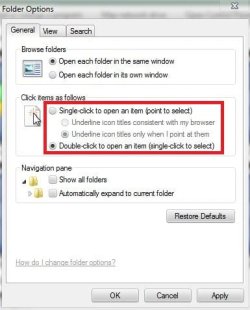
Cannot choose single/double click in explorer->tools->folder options
After re-install of Win7 Ult my mouse acts as though single click is selected. When I go to Tools>Folder Options double click is selected and single click is grayed out. I'm hoping to find a registry hack to overcome this problem. I am open to any and all suggestions. I really do not like single click.
By the way I have tried multiple mice with the same results
After re-install of Win7 Ult my mouse acts as though single click is selected. When I go to Tools>Folder Options double click is selected and single click is grayed out. I'm hoping to find a registry hack to overcome this problem. I am open to any and all suggestions. I really do not like single click.
By the way I have tried multiple mice with the same results
My Computer
- Computer Manufacturer/Model Number
- Gateway 560GE
- OS
- windows 7 professional
- CPU
- 3.00 gigahertz Intel Pentium 4
- Motherboard
- Intel Corporation D915GAG AAC77881-306
- Memory
- 2 GB
- Graphics Card(s)
- NVIDIA GeForce4 MX 440 & 82915G/GV/910GL Express Chipset Fam
- Sound Card
- Realtek High Definition Audio
- Monitor(s) Displays
- Hanns.G HG216 LCD-Monitor 21.7" & Toshiba LCD-MONITOR 17.1"
- Hard Drives
- ST3250310AS [Hard drive] (250.06 GB) drive 0
ST34311A USB Device [Hard drive] (4.33 GB) -- drive 2
WDC WD2500JD-00HBC0 [Hard drive] (250.06 GB) drive 1