Windows 7 Forums Search
Welcome to Windows 7 Forums. Our forum is dedicated to helping you find solutions with any problems, errors or issues you are experiencing with Windows 7. The Windows 7 forum also covers news and updates and has an extensive Windows 7 tutorial section that covers a wide range of tips and tricks.


Windows 7 - Hard drive Installation help

 
01-04-2012   #1


windows 7 build 7600


Hard drive Installation help

Hey guys.
I recently built a new gaming computer with 2 1tb samsung spinpoint HDDS and i remember it was a real pain to get one to appear without thinking it was the boot hdd (didnt have windows on that one) but i i ended up getting it working.
For christmas i got a 2TB HDD and now im worried how to put it in without screwing my computer up (last time i had to reformat again which was lucky cos nothing was on it at the time)
Its asking me for master boot record or that other option GPT i think it was
Which one do i choose and how do i make it just another partition not primary or anything like that. Just want it to be simple
Thanks

My System SpecsSystem Spec
01-04-2012   #2


Windows 7 Ultimate x64 SP1


Hello MajorFoley,

Very nice HDD. If you are just going to be using it as a internal data HDD, then you should be able to just connect it, and format it as NTFS in Disk Management (diskmgmt.msc) to then be able to use how you like. You may need to initialize the HDD first in Disk Management before being able to format it.

If you like, post a screenshot of the options it's giving you in Disk Management, and I'll be happy to help.

Hope this helps,
Shawn
My System SpecsSystem Spec
01-04-2012   #3


windows 7 build 7600


hmm mbr and gpt option arent there now

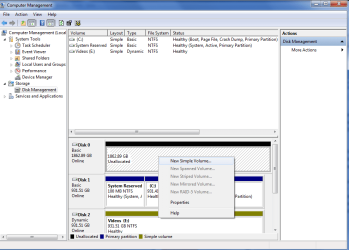
hey, those options arent appearing anymore i think cos i used gpt the first time about some warning with 2tbs and now i can create a simple volume. but how do i make it not a primary and just a healthy one like my videos hdd
screenshot attached
My System SpecsSystem Spec
.


01-04-2012   #4


Windows 7 Ultimate x64 SP1


Sorry, but I do not see a screenshot of your Disk Management window in your post.

When you create a partition on a HDD, it will usually be either a "Primary", "Logical", or "Extended" partition. So if the partition is a primary partition with this color bar on it, then it's normal for it to say Healthy (Primary Partition) since that's what it is.
My System SpecsSystem Spec
01-04-2012   #5


windows 7 build 7600


sorry

sorry seem it didnt attach
Attached Thumbnails
Hard drive Installation help-untitled.png  
My System SpecsSystem Spec
01-04-2012   #6


Windows 7 Ultimate x64 SP1


A dynamic disk, like your Disk 2 E: drive, only has volumes instead of partitions, so this is why it only has "Healthy".

If you wanted your Disk 2 E: drive to be a Basic disk like Disk 1 instead of a Dynamic disk, then you would need to convert E: (Disk 2) back to a basic disc using the tutorial below. Afterwards you'll be able to create primary partitions (new simple volumes) on it. Be sure to backup anything that you do not want to lose first though.
Convert a Dynamic Disk to a Basic Disk
Are you able to create a "New Simple Volume" with Disk 0 to make primary partitions on it?
Partition or Volume - Create New
My System SpecsSystem Spec
01-05-2012   #7


windows 7 build 7600


make it like disk 2

i would like to make it like disc 2 (E however i can only make it like disc 1 (c when i try to make a simple partition
My System SpecsSystem Spec
01-05-2012   #8


Windows 7 Ultimate x64 SP1


Be sure to not make Disk 1 to be a dynamic disk like Disk 2. Doing so will render Windows 7 unbootable.

For Disk 0, you can use the tutorial below to make it a dynamic disk, then create a "New Simple Volume" on the unallocated space for it to be like Disk 2.

Convert a Basic Disk to a Dynamic Disk
My System SpecsSystem Spec
01-05-2012   #9


windows 7 build 7600


thanks

thanks alot now i know if i do want to convert to a simple partition, doesnt seem to be that different from a primary anyway, this thread can be closed
My System SpecsSystem Spec
01-05-2012   #10


Windows 7 Ultimate x64 SP1


You're most welcome.
My System SpecsSystem Spec
Reply

 Hard drive Installation help problems?


Thread Tools


Similar Threads for: Hard drive Installation help
Thread Forum
Solved Win 7 OEM Disk & new Hard drive installation Installation & Setup
New/Old Hard Drive Installation Problem Hardware & Devices
Internal Hard Drive Installation (Help) Hardware & Devices
Installation and Wiping the Hard Drive Installation & Setup
Copy of Hard Drive before Installation Installation & Setup


All times are GMT -5. The time now is 12:02 PM.


Windows 7 Forums is an independent web site and has not been authorized,
sponsored, or otherwise approved by Microsoft Corporation.
"Windows 7" and related materials are trademarks of Microsoft Corp.
© Designer Media Ltd
  

1 2 3 4 5 6 7 8 9 10 11 12 13 14 15 16 17 18 19 20 21 22 23 24 25 26 27 28 29 30