|
Welcome to Windows 7 Forums. Our forum is dedicated to helping you find solutions with any problems, errors or issues you are experiencing with Windows 7. The Windows 7 forum also covers news and updates and has an extensive Windows 7 tutorial section that covers a wide range of tips and tricks.
Windows 7 - New to SSD's. First install attempt with bad read/writes |
01-04-2012
|
#1 | | windows 7 home premium 64bit |
New to SSD's. First install attempt with bad read/writes Hi everyone, first time poster here. Maybe you all can help me figure out what i did wrong.
I switched over from a hdd to a ssd for the first time. I installed the new 120gb Patriot Pyro on my sata mobo and took the advice from some other posts here about doing a quick Windows 7 backup/restore to get my OS back on the new ssd. Everything seemed to work fine. Booted up first time with no problem. Thought everything was okay until i started gaming. Noticed significant decrease in performance. Did a couple of speed tests on the read/write for my ssd. I know that no ssd is gonna perform to factory specs but mine is horribly low. Patriot describes this Pyro model as having 550 give or take a few on the read/write. Im getting less than 150 on multiple tests with different software. Anything that you all can see thats an obvious mistake with my install process and maybe how to fix? thanks in advance.
*Major Update*
I called Gigabyte and this particular model mobo is only Sata2 @ 3gbs and does not have the capability in the bios to set AHCI mode. Is this my major issue?
Last edited by njneer75; 01-05-2012 at 12:12 PM..
Reason: added important info
| My System Specs | | System Manufacturer/Model Number custom OS windows 7 home premium 64bit CPU AMD Phenom II X4 965 ti black box Motherboard Gigabyte M68MT-S2P Memory 8 Gb Corsair Graphics Card Nvidia FeForce GTX 460 Sound Card Creative Soundblaster Audigy Hard Drives 1- 120Gb Patriot Pyro SSD
1- 500gb standard HDD |
01-04-2012
|
#2 | | Windows 7 Pro x64 -- PCLinuxOS KDE4 FullMonty 2011 |
What port is it plugged into? Makes a huge difference. | My System Specs | | System Manufacturer/Model Number Custom OS Windows 7 Pro x64 -- PCLinuxOS KDE4 FullMonty 2011 CPU i7-875k @ Turbo - 7,6,5,5 - 3.6ghz Motherboard Asus P7P55D-E Deluxe Memory Corsair CMD8GX3M4A1600C8 8gb Graphics Card Asus EAH5850 DirectCU/2DIS/1GD5 Sound Card On Board Monitor(s) Displays Samsung SyncMaster T220 - Panasonic VT30a 50" Screen Resolution 1680x1050 - Keyboard Logitech Wireless MK700 Mouse Logitech Wireless MX620 PSU Corsair HX-850 Power Supply Case Coolmaster HAF 932 Cooling Corsair H50 Hard Drives Corsair Force 3 SSD 120GB x 2 ::
WD VelociRaptor 150GB WD1500HLFS x 2 Internet Speed Good enough for now Other Info Voip. Insanely cheap phone calls. |
01-04-2012
|
#3 | | Windows 7 X64 Professional/Windows 8 |
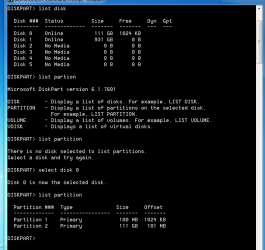
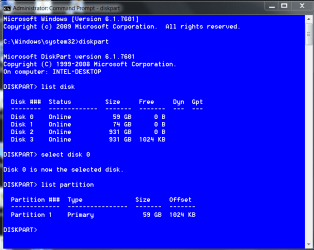
When You restored the image it did not slign your SSD. To check, open a elevated compemand prompt. (click start, type cmd in the search box, right click the cmd snd select run as administrator) In the box thst opens type diskpart and press enter, when it responds diskpart, type list disk and press enter, It will list every drive in your computer and give each a number. (Hopefully, yours is drive 0) type selrct disk 0 (or the number given for your SSD. Next type list partition and press enter. It will show each partition on the drive with it's size and offset. The offset is your alignment. Use the snipping tool and take a snip of the window, save it to your desktop (or wherever it is easy to find) use the paperclip icon at the top of the reply window here to attach it. The alignment must be divisible by 4, but if you have the 100MB partition the results can be confusing. If that is the case, it can be fixed with this tutorial.
EDIT: to help, this is what it should look like. | My System Specs | | System Manufacturer/Model Number Home Brew - Always under construction OS Windows 7 X64 Professional/Windows 8 CPU intel i7-2600K Motherboard Asus P8Z68 V-Pro/GEN 3 Memory 8GB G.Skill Sniper DDR3-2133 (2X4GB) Graphics Card EVGA 670 2GB Sound Card Asus Xonar Monitor(s) Displays Asus 24" LCD VW246H Screen Resolution 1920X1080 Keyboard Logitech G510 Mouse Logitech G500/Logitech Wireless PSU CORSAIR HX850W Case Cooler Master HAF X Cooling Corsair H100 w/ 4 noctua fans in push/pull. Hard Drives Crucial M4 128GB,Crucial M4 64GB,Samsung HD103SJ 1TB, 1TB WD FAEX,Samsung 1.5TB, EXTERNAL HD- 2X Rosewill case esata w/ 1TB Samsung spinpoints & Black X esata 1TB Spinpoint, Rosewill USB 3.0 dock 1TB Spinpoint, Seagate GOFlex Pro 500GB & 750GB USB Internet Speed Foot Messenger speed Other Info 2nd Computer- Samsung RF711-SO1 17" Laptop i5-2310M, 8GB DDR3-1333, Crucial M4 and OCZ vertex2, Nvidia GT540M.Win 7 HP X64. |
01-04-2012
|
#4 | | windows 7 home premium 64bit |

Quote: Originally Posted by Hipster Doofus What port is it plugged into? Makes a huge difference.
Not sure, there are 3 sata ports on my mobo. im not home right now but i think i remember that 1 port is a different color from the other two, any way for me to tell which port my primary ssd is on? i also had a hdd and an optical drive hooked up on the other two ports when i did the install | My System Specs | | System Manufacturer/Model Number custom OS windows 7 home premium 64bit CPU AMD Phenom II X4 965 ti black box Motherboard Gigabyte M68MT-S2P Memory 8 Gb Corsair Graphics Card Nvidia FeForce GTX 460 Sound Card Creative Soundblaster Audigy Hard Drives 1- 120Gb Patriot Pyro SSD
1- 500gb standard HDD |
01-04-2012
|
#5 | | Windows 7 Pro x64 -- PCLinuxOS KDE4 FullMonty 2011 |
It should be doing better than that. Check out the tutorial essenbe posted. | My System Specs | | System Manufacturer/Model Number Custom OS Windows 7 Pro x64 -- PCLinuxOS KDE4 FullMonty 2011 CPU i7-875k @ Turbo - 7,6,5,5 - 3.6ghz Motherboard Asus P7P55D-E Deluxe Memory Corsair CMD8GX3M4A1600C8 8gb Graphics Card Asus EAH5850 DirectCU/2DIS/1GD5 Sound Card On Board Monitor(s) Displays Samsung SyncMaster T220 - Panasonic VT30a 50" Screen Resolution 1680x1050 - Keyboard Logitech Wireless MK700 Mouse Logitech Wireless MX620 PSU Corsair HX-850 Power Supply Case Coolmaster HAF 932 Cooling Corsair H50 Hard Drives Corsair Force 3 SSD 120GB x 2 ::
WD VelociRaptor 150GB WD1500HLFS x 2 Internet Speed Good enough for now Other Info Voip. Insanely cheap phone calls. |
01-04-2012
|
#6 | | Windows 7 X64 Professional/Windows 8 |
When you do the diskpart I posted above, when you do the list disk command, it usually lists them in order. But, your mobo manual should tell you the port numbers. | My System Specs | | System Manufacturer/Model Number Home Brew - Always under construction OS Windows 7 X64 Professional/Windows 8 CPU intel i7-2600K Motherboard Asus P8Z68 V-Pro/GEN 3 Memory 8GB G.Skill Sniper DDR3-2133 (2X4GB) Graphics Card EVGA 670 2GB Sound Card Asus Xonar Monitor(s) Displays Asus 24" LCD VW246H Screen Resolution 1920X1080 Keyboard Logitech G510 Mouse Logitech G500/Logitech Wireless PSU CORSAIR HX850W Case Cooler Master HAF X Cooling Corsair H100 w/ 4 noctua fans in push/pull. Hard Drives Crucial M4 128GB,Crucial M4 64GB,Samsung HD103SJ 1TB, 1TB WD FAEX,Samsung 1.5TB, EXTERNAL HD- 2X Rosewill case esata w/ 1TB Samsung spinpoints & Black X esata 1TB Spinpoint, Rosewill USB 3.0 dock 1TB Spinpoint, Seagate GOFlex Pro 500GB & 750GB USB Internet Speed Foot Messenger speed Other Info 2nd Computer- Samsung RF711-SO1 17" Laptop i5-2310M, 8GB DDR3-1333, Crucial M4 and OCZ vertex2, Nvidia GT540M.Win 7 HP X64. |
01-04-2012
|
#7 | | Vista and Windows7, sometimes Ubuntu and Fedora |

Quote: Originally Posted by njneer75 
Quote: Originally Posted by Hipster Doofus What port is it plugged into? Makes a huge difference.
Not sure, there are 3 sata ports on my mobo. im not home right now but i think i remember that 1 port is a different color from the other two, any way for me to tell which port my primary ssd is on? i also had a hdd and an optical drive hooked up on the other two ports when i did the install That sounds like a Sata3 port and that would be OK. I agree with the others, you have an alignment problem. That can degrade the performance by up to 300%.
Before you do anything, check the alignment and let us kow what it says - copy the command prompt result here. See under "Verification" at the end of this tutorial: SSD Alignment | My System Specs | | System Manufacturer/Model Number HP, Dell, Gateway - 2 laptops and 2 desktops OS Vista and Windows7, sometimes Ubuntu and Fedora CPU from 1.6GHz Duo to 2.5GHz Quad Monitor(s) Displays 2x HP w2207 Keyboard with trackball - no mices Mouse terrible devices, who wants them Hard Drives 5x HDD, 2x SSD, 6x Externals Internet Speed DSL 6000 |
01-04-2012
|
#8 | | windows 7 home premium 64bit |
ok i'll check the mobo manual for port info. what exactly am i looking for? what port should the ssd be on? | My System Specs | | System Manufacturer/Model Number custom OS windows 7 home premium 64bit CPU AMD Phenom II X4 965 ti black box Motherboard Gigabyte M68MT-S2P Memory 8 Gb Corsair Graphics Card Nvidia FeForce GTX 460 Sound Card Creative Soundblaster Audigy Hard Drives 1- 120Gb Patriot Pyro SSD
1- 500gb standard HDD |
01-04-2012
|
#9 | | Vista and Windows7, sometimes Ubuntu and Fedora |

Quote: Originally Posted by njneer75 ok i'll check the mobo manual for port info. what exactly am i looking for? what port should the ssd be on? I think you are OK. | My System Specs | | System Manufacturer/Model Number HP, Dell, Gateway - 2 laptops and 2 desktops OS Vista and Windows7, sometimes Ubuntu and Fedora CPU from 1.6GHz Duo to 2.5GHz Quad Monitor(s) Displays 2x HP w2207 Keyboard with trackball - no mices Mouse terrible devices, who wants them Hard Drives 5x HDD, 2x SSD, 6x Externals Internet Speed DSL 6000 |
01-04-2012
|
#10 | | windows 7 home premium 64bit |
Thanks for all the helpful replies so far. When i get home in a few hours i'll jump into all the suggestions and get those screenshots up on post. Just thinking ahead a little....
If i wanted to start over, since I have a good recent backup of my hard drive and a ssd that is obviously in good working order, what would be the suggested course of action to wipe the drive and start over with doing all this the right way from the beginning. Im assuming that i did/did not do something during my initial install and would like to know for future reference how to get it right from the start. | My System Specs | | System Manufacturer/Model Number custom OS windows 7 home premium 64bit CPU AMD Phenom II X4 965 ti black box Motherboard Gigabyte M68MT-S2P Memory 8 Gb Corsair Graphics Card Nvidia FeForce GTX 460 Sound Card Creative Soundblaster Audigy Hard Drives 1- 120Gb Patriot Pyro SSD
1- 500gb standard HDD New to SSD's. First install attempt with bad read/writes problems? All times are GMT -5. The time now is 12:03 PM. |  |