
Windows 7 Forums Search
Welcome to Windows 7 Forums. Our forum is dedicated to helping you find solutions with any problems, errors or issues you are experiencing with Windows 7. The Windows 7 forum also covers news and updates and has an extensive Windows 7 tutorial section that covers a wide range of tips and tricks.


Windows 7 - Partition not showing up after crash.

 
01-04-2012   #1


Windows 7 Ultimate x64


Partition not showing up after crash.

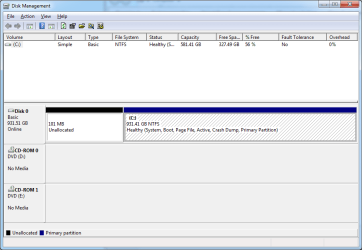
About two weeks ago I was having problems with my hard drive so I decided to create a new partition to install Windows on (I was having problems installing it from the disk for some reason). When I was creating that partition something caused my computer to crash and it took the amount I created for the partition with it (~350gb if Im not mistaken).

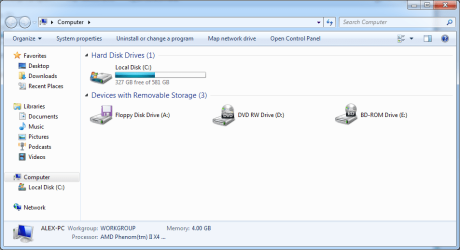
Well now I am coming here for help. I have no clue what to do. It shows my hdd as only having 581gb in My Computer but in Disk Management it knows it has 931gb. It does not, however, show the other partition. I have attached pictures in case you all are curious. I would really appreciate the help.
Partition not showing up after crash.-1.png Partition not showing up after crash.-2.png

My System SpecsSystem Spec
01-04-2012   #2


Windows 7 Ultimate SP1 x64


Hello MajorHarrison72

Check your HDD for errors. By doing these steps:
Open computer right click on your drive, select properties, click the Tools tab, and then, under Error-checking, click Check Now.
My System SpecsSystem Spec
01-05-2012   #3
Arc


windows 7 Home Premium 64 Bit SP 1


As windows uses the binary multiples, 1TB Disks report the capacity of 931 GB, its normal. But The 931 GB in disk management is showing as 581 GB in explorer that's odd.

If the steps suggested by N0b0dy cannot recover the disk, you may try for a fresh formatting .
My System SpecsSystem Spec
.


01-05-2012   #4


Windows 7 Ultimate x64


Should I check "Scan for and attempt recovery of bad sectors" too? It was unchecked when I ran it and I was unsure if it should be.
My System SpecsSystem Spec
01-05-2012   #5


Windows 7 X64 Professional/Windows 8


Quote   Quote: Originally Posted by MajorHarrison72 View Post
Should I check "Scan for and attempt recovery of bad sectors" too? It was unchecked when I ran it and I was unsure if it should be.
I can't tell you if you should, but I do. But, if you have already run a scan for errors and it found none, there is no reason.
My System SpecsSystem Spec
Reply

 Partition not showing up after crash. problems?


Thread Tools


Similar Threads for: Partition not showing up after crash.
Thread Forum
Dual Boot 7/XP Partition Not Showing Installation & Setup
Solved C Partition not showing on windows 7 install General Discussion
D:\ not showing in Explorer but shows as the partition in disk managem Hardware & Devices
3rd disk partition(HD) not showing up during OS install Hardware & Devices
Partition not showing after installing Windows 7 Hardware & Devices


All times are GMT -5. The time now is 12:03 PM.


Windows 7 Forums is an independent web site and has not been authorized,
sponsored, or otherwise approved by Microsoft Corporation.
"Windows 7" and related materials are trademarks of Microsoft Corp.
© Designer Media Ltd
  

1 2 3 4 5 6 7 8 9 10 11 12 13 14 15 16 17 18 19 20 21 22 23 24 25 26 27 28 29 30