Windows 7 Forums


Windows 7: RAM issue on Windows7 Home Premium

05 Jan 2012   #1

Windows 7 Home Premium 64Bit
 
 
RAM issue on Windows7 Home Premium

Hi all,

Hoping I can find a solution to my problem here as I have been googling with no luck. I am currently using an Acer Aspire 5733.
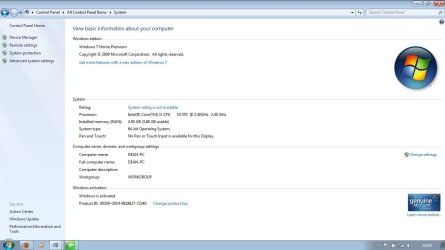
It came with 4GB of RAM already installed (One 4GB DDR3) and had a slot to upgrade. I have put in another 4GB stick, but in my System specs, it is still only showing as 4GB (see attached screen). Just wondering, should it work straight away, or is there a setting I need to change at all?


Many Thanks in advance for any help
Attached Thumbnails
RAM issue on Windows7 Home Premium-system.jpg  
My System SpecsSystem Spec

05 Jan 2012   #2

Windows 7 Ultimate SP1 X64/ linux in VM
NW Florida


It should be recognized right away. The first thing is the ram sticks. While it can be done, you'll have less potential for problems if both sticks are bought as a package or at least the same make and model number. But, that does not seem to be the problem. I would go back and re-seat both sticks of ram to make sure they are properly installed. Then go into bios and see how much ram it sees.
My System SpecsSystem Spec
05 Jan 2012   #3

Windows 7 Ultimate x64 & Mac OS X 10.7.1
United Kingdom


first of all, are you sure your laptop supports 8gb of ram? if you are follow these steps

click start orb and type "run". then type "msconfig" and hit enter. Click on the boot tab and then advance settings, and make sure the maximum memory box is unchecked.
My System SpecsSystem Spec
.


06 Jan 2012   #4

Windows 7 Home Premium 64Bit


Thanks for the tips guys, still no luck though. Re-sat both sticks of RAM, and the machine didnt boot. I took one stick out and it booted up fine.
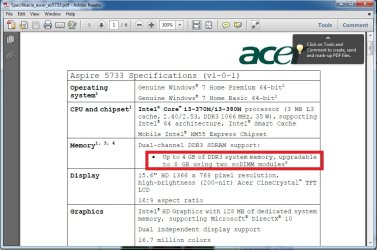
@Badger906 I managed to find a user manual online for my machine, which says it is upgradable to 8GB (see attached) I also went in to msconfig, the max memory box was already unticked.
On a side note, the new RAM stick specs are; DDR3 PC3-8500 1066Mhz (as far as i can see from my digging online, thats the same spec as the preinstalled RAM in the machine). Again, thanks for any tips
Attached Thumbnails
RAM issue on Windows7 Home Premium-ramspec.jpg  
My System SpecsSystem Spec
06 Jan 2012   #5

Main - Windows 7 Pro SP1 64-Bit; 2nd - Windows Server 2008 R2
Westlake, Ohio


Try putting the new stick in where the old one was and leaving the old one out. You may have a bad slot. If it works that way, try putting the old stick back in along with the new one, but leave the new one in the slot originally used by the old one.

I've also seen many cases where it magically seems to work after removing and reinstalling the stick a few times. All I can figure is that it never made good contact until it was reinserted enough times.

What does the BIOS say about memory with both sticks in?
My System SpecsSystem Spec
06 Jan 2012   #6

Windows 7 Home Premium 64Bit


Thanks for the info profdlp, ill give it a go. I resat both sticks and couldnt boot to the BIOS after that so removed the new stick
My System SpecsSystem Spec
06 Jan 2012   #7

Main - Windows 7 Pro SP1 64-Bit; 2nd - Windows Server 2008 R2
Westlake, Ohio


I should have added that there might not be anything wrong with either the RAM or the slot. Some combinations just don't work well together.
My System SpecsSystem Spec
06 Jan 2012   #8

Windows 7 Home Premium 64Bit


Ok, for some reason, it works now. New RAM is in the old slot and old in the new. Thanks for the tips guys
My System SpecsSystem Spec
06 Jan 2012   #9

Main - Windows 7 Pro SP1 64-Bit; 2nd - Windows Server 2008 R2
Westlake, Ohio


Glad you got it going!
My System SpecsSystem Spec
Reply

 RAM issue on Windows7 Home Premium problems?


Thread Tools


Similar help and support threads for: RAM issue on Windows7 Home Premium
Thread Forum
Having an Issue with Win7 Home Premium 64-bit. General Discussion
Start up & Windows7 home premium update problems General Discussion
BSOD on Windows7 Home Premium 64 bit, dump file url provided,Thanks BSOD Help and Support
Solved windows7 home premium 64bit desktop sound does not work Sound & Audio
Solved windows7 home premium Windows Updates & Activation


All times are GMT -5. The time now is 05:45 PM.


Seven Forums Android App Seven Forums IOS App Follow us on Facebook

Windows 7 Forums is an independent web site and has not been authorized,
sponsored, or otherwise approved by Microsoft Corporation.
"Windows 7" and related materials are trademarks of Microsoft Corp.
© Designer Media Ltd
  

1 2 3 4 5 6 7 8 9 10 11 12 13 14 15 16 17 18 19 20 21 22 23 24 25 26 27 28 29 30 31 32