Windows 7 Forums


Windows 7: System hangs when external hard disk is accessed

12 Jan 2012   #1

Microsoft Windows 7 Ultimate 32-bit 7600 Multiprocessor Free
 
 
System hangs when external hard disk is accessed

I have a 1 TB western digital external portable hard disk (of my passport series).
It was perfectly fine, until now. Whenever I try to access it, my system hangs. And sometimes it does open but it takes a awful lot of time. What maybe the reason for this. Can anyone help me on this matter?

My System SpecsSystem Spec

12 Jan 2012   #2

64-bit Windows 7 Ultimate SP1 & Windows 8 Enterprise
Texas


Hello Shwetha, and welcome to Seven Forums.

If this is an eSATA drive, then double check in your advanced power plan settings to see if you may have set Turn off hard disk after X amount of minutes. If so, then set it to Never to see if that may be the issue.

Hard Drive - Turn Off Hard Disk After Idle or Never

Hope this helps,
Shawn
My System SpecsSystem Spec
12 Jan 2012   #3

Windows 7 Home Premium 32 bit


Have you installed any software recently that could possibly have an impact on this? I know that ESET security creates this problem. Possibly some other software too.

Suggest you restore the sytem to a point back in time where you think there was no problem.
My System SpecsSystem Spec
.


14 Jan 2012   #4

Microsoft Windows 7 Ultimate 32-bit 7600 Multiprocessor Free


Thanks Shawn and jumanji for your suggestions.
Shawn, I've changed it to never, but I am not very sure if it was really a problem coz it has worked perfectly fine till now. And the problem cropped up just 2 days back.
Jumanji,I could not restore it to a earlier point of time, since I'd never created a time stamp in System restore.
I will post if i get any positive results. Thanks once again to both of you. Appreciate your help.
My System SpecsSystem Spec
14 Jan 2012   #5

Microsoft Windows 7 Ultimate 32-bit 7600 Multiprocessor Free


The icon for the drive does not show up at times when i connect. Or sometimes if I check the properties of the drive it shows 0 bytes everywhere or the window becomes non responsive. I'd just bought it 6 months ago. I am really confused about what might be wrong. Please help me.
My System SpecsSystem Spec
14 Jan 2012   #6

Windows 7 Ultimate SP1 X64/ linux in VM
NW Florida


Try going to Western Digital's web site and downloading their diagnostic program, Data Lifeguard for Windows to check the drive for problems. That should tell you whether there is a problem with the hard drive or whether it is something else.
My System SpecsSystem Spec
14 Jan 2012   #7

Windows 7 Home Premium 32 bit


Plug your Western Digital into another PC and check whether it exhibits the same problem.

If it does, then check your external as essenbe has suggested above.

To help us help you better, please fill in your System Specifications in the User CP.

System Info - See Your System Specs

Do post a screenshot of the Disk Management with the external plugged in.

Right click on Computer > Manage > Disk Management.

Last edited by jumanji; 14 Jan 2012 at 09:25 AM..
My System SpecsSystem Spec
14 Jan 2012   #8

Microsoft Windows 7 Ultimate 32-bit 7600 Multiprocessor Free


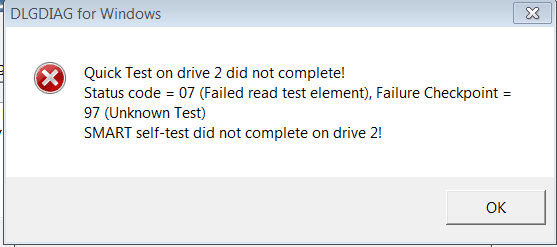
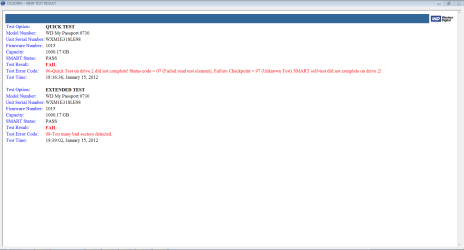
During the quick test i got a message saying that System hangs when external hard disk is accessed-capture.png

Here's the screenshot of Disk Management


System hangs when external hard disk is accessed-capture.png

Last edited by Brink; 14 Jan 2012 at 12:19 PM.. Reason: merged
My System SpecsSystem Spec
14 Jan 2012   #9

Windows 7 Home Premium 32 bit


OK, Thanks for putting in the system specs and also the screenshot.

The screenshot does not show anything obviously wrong. However it does not mean that nothing is wrong with the drive.

The quick test failure is not a good sign. IMO, the drive may have developed bad sectors and may be in the process of deteriorating.( A repair and reformat in some cases had restored the drive good and arrested any further deterioration)

Now try running the other tests and check whether the bad sectors are repaired.

If the Windows version is unable to repair the bad sectors and throws up an error message, download the DOS version, burn it on to a CD, boot from the CD and run the tests.( Sometimes Windows is not capable of repairing when it is active. Putting it to rest and running DOS may help. )

And before doing this check to see if you can backup any important data you may have on the drive.

EDIT: If the drive is under warranty, invoke the warranty replacement if the drive cannot be repaired by the software.
My System SpecsSystem Spec
15 Jan 2012   #10

Microsoft Windows 7 Ultimate 32-bit 7600 Multiprocessor Free


Thanks jumanji. I will try doing this
It is under warranty, but I wanted to see if there's anything I could do before replacing it.
My System SpecsSystem Spec
Reply

 System hangs when external hard disk is accessed problems?


Thread Tools


Similar help and support threads for: System hangs when external hard disk is accessed
Thread Forum
Solved Hard Disk Hangs When Windows Load Files. Hardware & Devices
USB external hard disk shows up as internal fixed disk Hardware & Devices
Create system image won't detect external hard disk Backup and Restore
Create system repair disk hangs right at the start General Discussion


All times are GMT -5. The time now is 12:21 AM.


Seven Forums Android App Seven Forums IOS App Follow us on Facebook

Windows 7 Forums is an independent web site and has not been authorized,
sponsored, or otherwise approved by Microsoft Corporation.
"Windows 7" and related materials are trademarks of Microsoft Corp.
© Designer Media Ltd
  

1 2 3 4 5 6 7 8 9 10 11 12 13 14 15 16 17 18 19 20 21 22 23 24 25 26 27 28 29 30 31 32