Windows 7 Forums Search
Welcome to Windows 7 Forums. Our forum is dedicated to helping you find solutions with any problems, errors or issues you are experiencing with Windows 7. The Windows 7 forum also covers news and updates and has an extensive Windows 7 tutorial section that covers a wide range of tips and tricks.


Windows 7 - Computer shows drive which isn't there

 
01-15-2012   #1


Windows 7 Home Premium x64


Computer shows drive which isn't there

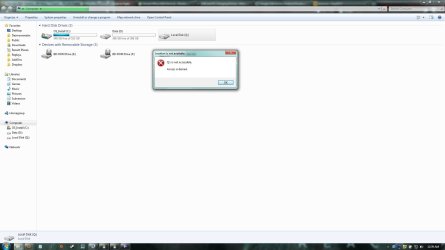
I had a friend who plugged his USB hard drive into my computer the other day and my computer wasn't able to use it (I think it was a mac format), but it still showed up in my Computer folder. When we took it back out, the drive is still in my Computer folder. It's been over 24 hours and I've restarted my computer... the stupid non-existent hard drive is still in my Computer. Does anyone know how to get rid of this? It's listed under "Hard Disk Drives" not "Devices with Removable Storage", so there is no eject option when I right-click.

My System SpecsSystem Spec
01-15-2012   #2


Systems 1 and 2: Windows 7 Enterprise x64, Win 8 Developer


Do you have a program (such as smartdefrag) that was mapped to this drive?
My System SpecsSystem Spec
01-15-2012   #3


Windows 7 Home Premium x64


I have VirtualCloneDrive mapped to another drive (drive F), which works just fine. But this drive is mapped to drive Q, and it just appeared when I plugged the external hard drive in
My System SpecsSystem Spec
.


01-16-2012   #4


Vista x64 / 7 X64


Something to do with Office 2010 perhaps.
My System SpecsSystem Spec
01-16-2012   #5


Windows 7 Home Premium 64 Bit


Quote   Quote: Originally Posted by SIW2 View Post
Something to do with Office 2010 perhaps.
Probably. May want to see Office 2010 Drive Q for more information.

Also Office 2010 Starter Virtual Q: drive may intermittently disappear from My Computer and An overview of Microsoft Office Click-to-Run for Office 2010 are good further reading.
My System SpecsSystem Spec
01-16-2012   #6


Windows 7 Home Premium x64


Hmmmm
However, his drive seems to have a bar under it showing how much data is stored. Mine is just blank.
Here's the message I get when I double-click it.
Attached Thumbnails
Computer shows drive which isn't there-screen.jpg   Computer shows drive which isn't there-screen2.jpg  
My System SpecsSystem Spec
01-16-2012   #7


Windows 7 Home Premium 64 Bit


Quote   Quote: Originally Posted by dasmowenator View Post
Hmmmm
However, his drive seems to have a bar under it showing how much data is stored. Mine is just blank.
Here's the message I get when I double-click it.
That is actually pretty standard. It looks like the image by Derekimo was of the Q drive he created to test if the installation could finish. See Extra Drives showing up in explorer, Mystery Drive (Q:), and Office 2010 Beta Click-to-Run causes Q Drive issue! - Microsoft Help | DSLReports Forums as they have the same behavior as your Q drive.
My System SpecsSystem Spec
01-16-2012   #8


Windows 7 Home Premium x64


Wow, well I guess that must be it then - weird that it first appeared when I plugged in an improperly formatted hard drive

So do you know how to get rid of that Q drive? I don't see the solution in any of the links

Thanks
My System SpecsSystem Spec
01-16-2012   #9


Windows 7 Home Premium 64 Bit


Quote   Quote: Originally Posted by dasmowenator View Post
Wow, well I guess that must be it then - weird that it first appeared when I plugged in an improperly formatted hard drive

So do you know how to get rid of that Q drive? I don't see the solution in any of the links

Thanks
You would have to uninstall Office and re-install it without the Click to Run feature.
My System SpecsSystem Spec
Reply

 Computer shows drive which isn't there problems?


Thread Tools


Similar Threads for: Computer shows drive which isn't there
Thread Forum
Solved Computer shows external drive empty while its not. Hardware & Devices
External hard drive shows up in devices but not in my computer Hardware & Devices
My Hard Drive no longer shows up in My Computer Hardware & Devices
Hard Drive shows in device manager, not My Computer Hardware & Devices
SOS: Drive space shows 156GB used but drive contents empty Hardware & Devices


All times are GMT -5. The time now is 12:14 PM.


Windows 7 Forums is an independent web site and has not been authorized,
sponsored, or otherwise approved by Microsoft Corporation.
"Windows 7" and related materials are trademarks of Microsoft Corp.
© Designer Media Ltd
  

1 2 3 4 5 6 7 8 9 10 11 12 13 14 15 16 17 18 19 20 21 22 23 24 25 26 27 28 29 30