
- Local time
- 5:42 PM
- Messages
- 109
Hi. Where can I change the property settings for an integrated camera? Specifically, where can I change the autofocus property?
I recently started using the camera built into my notebook (I don't have any other cameras). Sometimes the camera zooms in and out automatically. I'm told I can fix this by turning off autofocus. However, I can't find such a setting.
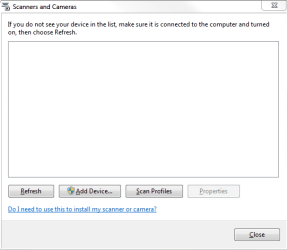
I opened Control Panel - View scanners and cameras. But that just gives me an empty window (see attachment). If I click "Scan Profiles", I get an error "No scanners were detected....". The Refresh button does nothing and the Add Device button is for adding a not-integrated device.
If I go to Control Panel - Devices and Printers, there is nothing camera related there. I don't know where else to look. Thanks for your help.
(Not sure if this is the right subforum. Sorry if it isn't.)
I recently started using the camera built into my notebook (I don't have any other cameras). Sometimes the camera zooms in and out automatically. I'm told I can fix this by turning off autofocus. However, I can't find such a setting.
I opened Control Panel - View scanners and cameras. But that just gives me an empty window (see attachment). If I click "Scan Profiles", I get an error "No scanners were detected....". The Refresh button does nothing and the Add Device button is for adding a not-integrated device.
If I go to Control Panel - Devices and Printers, there is nothing camera related there. I don't know where else to look. Thanks for your help.
(Not sure if this is the right subforum. Sorry if it isn't.)
Attachments
My Computer
At a glance
Microsoft Windows 7 Professional 64-bit 7601 ...AMD A6-5350M APU with Radeon(tm) HD Graphics16.00 GBAMD Radeon HD 8450G
- Computer type
- PC/Desktop
- Computer Manufacturer/Model Number
- Lenovo/2757CTO Thinkpad W700
- OS
- Microsoft Windows 7 Professional 64-bit 7601 Multiprocessor Free Service Pack 1
- CPU
- AMD A6-5350M APU with Radeon(tm) HD Graphics
- Motherboard
- LENOVO 20B20011US
- Memory
- 16.00 GB
- Graphics Card(s)
- AMD Radeon HD 8450G
- Sound Card
- (1) AMD High Definition Audio Device (2) Conexant 20671 Sm
- Monitor(s) Displays
- ??
- Screen Resolution
- 1366 x 768 x 32 bits (4294967296 colors) @ 60 Hz
- Hard Drives
- HGST HTS 545032A7E380 SATA Disk Device
- Mouse
- Microsoft Optical Wheel Mouse
- Other Info
- BIOS: Ver 1.00PARTTBLX

