|
Welcome to Windows 7 Forums. Our forum is dedicated to helping you find solutions with any problems, errors or issues you are experiencing with Windows 7. The Windows 7 forum also covers news and updates and has an extensive Windows 7 tutorial section that covers a wide range of tips and tricks.
Windows 7 - Best method to clone SSDs |
01-20-2012
|
#1 | | Windows 7 Ultimate x64 SP1 |
Best method to clone SSDs I have used many cloning apps in the past, such as Ghost (for many years) and TrueImage. However, these have all been with HDDs. Does it matter what application is used when cloning a small SSD to a larger one?
I have a license for a recent version of TrueImage from work, and I've used it many times as a bootable disc to clone a drive to or from a network share. Would that work going directly from a 128 GB C300 to a 240 GB OCZ Agility 3?
| My System Specs | | OS Windows 7 Ultimate x64 SP1 CPU Intel Core i7-2600 Motherboard Gigabyte GA-P67A-UD3P-B3 Memory 12 GB Patriot Extreme DDR3-1333 Graphics Card Nvidia GTX 470 Monitor(s) Displays Dell UltraSharp 2209WA PSU OCZ ModStream 700W Case CoolerMaster HAF 912 Advanced Cooling CoolerMaster Hyper 212 Plus Hard Drives OCZ Agility3 240 GB, WD5001AALS, WD7501AALS |
01-20-2012
|
#2 | | |
i don't see why not. it should work fine, although i have to admit i've never used TrueImage. I assume the software sees a disk as a disk and doesn't differentiate between hdd and ssd.
you may have to resize the partition afterwards to make full use of the new drive's capacity, but you already probably know that. | My System Specs | | System Manufacturer/Model Number mickey megabyte 1234 OS ultimate 64 sp1 CPU i5 2500K 3.3@4.2GHz Motherboard MSI P67A-GD53 Memory 8 gigs GSkill Ripjaws 1600 Graphics Card amd hd6950 Sound Card creative x-fi gamer Monitor(s) Displays samsung 24" Screen Resolution 1920x1080 Keyboard saitek eclipse ii Mouse logitech g3 PSU antec 550 Case antec three hundred Cooling i'm a cooling fan Hard Drives ocz vertex 2e 60 gig, samsung f3 1tb, buffalo 2tb ext Internet Speed about 4 Mbps Other Info i love win7 |
01-20-2012
|
#3 | | Windows 7 SP1, Home Premium, 64-bit |
The fact is that cloning is not often discussed on these forums---there aren't many threads devoted to it, let alone from SSD to SSD.
Imaging discussions vastly outnumber cloning discussions.
Having said that, I can't recall any cloning failures attributed to any particular application.
I moved from HDD to SDD about 10 months ago and seriously considered cloning, but ultimately did a clean install precisely because I could not get up-to-date and reliable info about the choice of applications and the entire process.
All I can suggest is to dive in with a particular app and see what happens. I'd be interested in hearing about the details after the fact. | My System Specs | | System Manufacturer/Model Number Ignatz Special; 4 speed manual gearbox; factory air conditioning; one of one OS Windows 7 SP1, Home Premium, 64-bit CPU Intel Sandy Bridge i5-2500, not overclocked Motherboard Gigabyte H67A-UD3H-B3, full ATX Memory 4 GB Crucial DDR3-1333 Graphics Card none; graphics are integrated on CPU Sound Card onboard: Realtek ALC892; external: USB Behringer UF0-202 Monitor(s) Displays NEC 90GX2-BK 19" LCD Screen Resolution 800 x 640 Keyboard Leopold Tenkeyless with Cherry Blue switches, USB Mouse Logitech or Microsoft optical wired; either USB or PS 2 PSU Seasonic SS-560KM, modular Case Antec Solo II Cooling CPU: Scythe Big Shuriken; Case: Scythe Slipstream 800 & 500 Hard Drives System: Intel 320 Series SSD, 80 GB;
Data: Samsung Spinpoint 103SJ, 1 TB;
Backup: WD Caviar Green WD15EADS-00P8B0, 1.5TB Other Info Power consumption of this system, including monitor: 68 watts at idle; 144 watts at full load |
01-20-2012
|
#4 | | Windows 7 64 Bit Home Premium SP1 |
Curious: I know this is probably a matter of semantics, but what is the difference between cloning drives and installing a disk image of one drive to another? | My System Specs | | System Manufacturer/Model Number DESKTOP - Home Built - March 2009 OS Windows 7 64 Bit Home Premium SP1 CPU i7-920 Motherboard Asus P6T - Bios 1408 Memory Corsair TR3X6G1333C9 - 6GB Graphics Card EVGA GeForce GTX260+ - Driver 296.10 Sound Card On board Realtek ACL1200 Monitor(s) Displays Dell 2007FP Screen Resolution 1280 x 960 Keyboard MS KC-0405 Mouse Intellimouse 5-button PSU Corsair CMPSU-750TX - 750 watt Case Lian Li PC-K10B Cooling Standard, 3 120mm case fans Hard Drives #1- Western Digital WD6401AALS Sata Black
#2- Western Digital WD6401AALS Sata Black Internet Speed 20Mbits/Sec (on a good day) |
01-20-2012
|
#5 | | W7 X-64 RTM,SUSE 11.1, XP PRO SP3 as a VM, VMware ESXi |
Hi there
It works fine (TI version 2012 or the previous version).
You can also clone from HDD to SSD or SSD to HDD too.
Rather than "Clone" per se use Imaging method -- Image say your "C" drive to a file then restore this image to your other disk drive.
The final target drive can have a smaller or larger partition - the only restriction that the size must be large enough to fit on to the target drive.
Imaging is better than cloning since with an SSD you don't want to replicate an HDD sector by sector. The image will have the same data as the original of course.
Cheers
jimbo | My System Specs | | System Manufacturer/Model Number Custom built OS W7 X-64 RTM,SUSE 11.1, XP PRO SP3 as a VM, VMware ESXi CPU Q9400 QUAD Motherboard P5QL-CM Memory 8GB Graphics Card On Motherborad Sound Card Realtek HD audio Monitor(s) Displays Apple Cinema display Mouse Toshiba wireless laser Hard Drives 4 X 1TB SATA Internet Speed > 20MB up |
01-20-2012
|
#6 | | Windows 7 SP1, Home Premium, 64-bit |

Quote: Originally Posted by TVeblen Curious: I know this is probably a matter of semantics, but what is the difference between cloning drives and installing a disk image of one drive to another? I think the term "cloning' is often used loosely and perhaps incorrectly.
When used loosely, the speaker often means simply getting a system moved from drive 1 to drive 2---which could imply imaging.
More strictly speaking, cloning doesn't use an intervening file that is later restored---it's all real-time, on-the-fly. It isn't a "backup" solution in the sense that imaging is. I think of cloning as a possibility when everything is OK, to move to a larger drive. Imaging, on the other hand, is for disaster recovery. | My System Specs | | System Manufacturer/Model Number Ignatz Special; 4 speed manual gearbox; factory air conditioning; one of one OS Windows 7 SP1, Home Premium, 64-bit CPU Intel Sandy Bridge i5-2500, not overclocked Motherboard Gigabyte H67A-UD3H-B3, full ATX Memory 4 GB Crucial DDR3-1333 Graphics Card none; graphics are integrated on CPU Sound Card onboard: Realtek ALC892; external: USB Behringer UF0-202 Monitor(s) Displays NEC 90GX2-BK 19" LCD Screen Resolution 800 x 640 Keyboard Leopold Tenkeyless with Cherry Blue switches, USB Mouse Logitech or Microsoft optical wired; either USB or PS 2 PSU Seasonic SS-560KM, modular Case Antec Solo II Cooling CPU: Scythe Big Shuriken; Case: Scythe Slipstream 800 & 500 Hard Drives System: Intel 320 Series SSD, 80 GB;
Data: Samsung Spinpoint 103SJ, 1 TB;
Backup: WD Caviar Green WD15EADS-00P8B0, 1.5TB Other Info Power consumption of this system, including monitor: 68 watts at idle; 144 watts at full load |
01-20-2012
|
#7 | | Windows 7 64 Bit Home Premium SP1 |
Thanks Ig - I think you are right.
I just looked up the topic on acronis and that seems to be the case: no difference in terms of result, just in terms of function: Difference between Backup and Disk Clone | Knowledge Base
I don't see why it would be a problem Deacon. | My System Specs | | System Manufacturer/Model Number DESKTOP - Home Built - March 2009 OS Windows 7 64 Bit Home Premium SP1 CPU i7-920 Motherboard Asus P6T - Bios 1408 Memory Corsair TR3X6G1333C9 - 6GB Graphics Card EVGA GeForce GTX260+ - Driver 296.10 Sound Card On board Realtek ACL1200 Monitor(s) Displays Dell 2007FP Screen Resolution 1280 x 960 Keyboard MS KC-0405 Mouse Intellimouse 5-button PSU Corsair CMPSU-750TX - 750 watt Case Lian Li PC-K10B Cooling Standard, 3 120mm case fans Hard Drives #1- Western Digital WD6401AALS Sata Black
#2- Western Digital WD6401AALS Sata Black Internet Speed 20Mbits/Sec (on a good day) |
01-20-2012
|
#8 | | Windows 7 Ultimate x64 SP1 |
I always considered cloning the process of going drive to drive, where as imaging involved creating a file that would be stored somewhere first, and possibly kept for future use as well. With cloning, no image file is created, as it is a one-time process.
I guess I'll give it a shot this weekend and report back. Since I always leave the source drive untouched, rolling back would be as simple as moving the SATA cables back to the source drive, if the new one doesn't boot for some reason. | My System Specs | | OS Windows 7 Ultimate x64 SP1 CPU Intel Core i7-2600 Motherboard Gigabyte GA-P67A-UD3P-B3 Memory 12 GB Patriot Extreme DDR3-1333 Graphics Card Nvidia GTX 470 Monitor(s) Displays Dell UltraSharp 2209WA PSU OCZ ModStream 700W Case CoolerMaster HAF 912 Advanced Cooling CoolerMaster Hyper 212 Plus Hard Drives OCZ Agility3 240 GB, WD5001AALS, WD7501AALS |
01-22-2012
|
#9 | | |
For what it's worth.... Just cloned an hdd to ssd. Installed them both on the computer and used a freeware program called EaseUS. Really couldn't have been easier.
Select source drive, select destination drive, check "optimize for ssd" box, move slider on destination drive to use all available space and click "clone". Easy-peasy .... | My System Specs | | OS XP, Win7 Pro, Ubuntu LL |
01-23-2012
|
#10 | | Windows 7 Ultimate x64 SP1 |
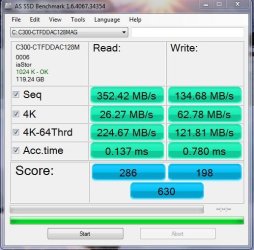
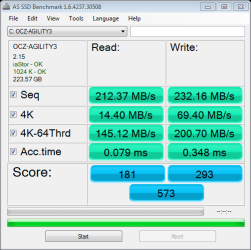
I hooked up my new SSD on port 2 and booted from an Acronis TrueImage boot disc. I used the clone option, and I am happy to report it worked flawlessly, and only took about 2 minutes to run. It gave me a choise of destination sizes, so I used proportional, which kept 100% of the drive as one whole C partition. I shut down and swapped drives, so the new one was on the first port, and the system booted without issue. Even the alignment held, which is what I was worried about it.
My scores are lower than I thought, but maybe that has something to do with the cloning? Attached are the screens from AS SSD. The first is my C300, and the second is from the new Agility 3. | My System Specs | | OS Windows 7 Ultimate x64 SP1 CPU Intel Core i7-2600 Motherboard Gigabyte GA-P67A-UD3P-B3 Memory 12 GB Patriot Extreme DDR3-1333 Graphics Card Nvidia GTX 470 Monitor(s) Displays Dell UltraSharp 2209WA PSU OCZ ModStream 700W Case CoolerMaster HAF 912 Advanced Cooling CoolerMaster Hyper 212 Plus Hard Drives OCZ Agility3 240 GB, WD5001AALS, WD7501AALS Best method to clone SSDs problems? All times are GMT -5. The time now is 01:14 PM. |  |