| Windows 7: Format old OS hard drive |
21 Jan 2012
|
#1 | | Windows 7 Ultimate 64 Bit UK |
Format old OS hard drive Hi, I recently upgraded and moved the OS to a new drive. I want to format the old OS drive (now D drive). How would I go about doing this? I know you can't format a bootable drive too
Any help?
Thanks! | My System Specs |
| System Manufacturer/Model Number Custom OS Windows 7 Ultimate 64 Bit CPU Intel Core i7 2600k 3.8GHz Motherboard Asus P8Z68-V Pro Memory Corsair Vengeance 16GB DDR3 1600Mhz Graphics Card Asus NVIDIA GeForce GTX 680 - 2GB GDDR5 Sound Card On Board Monitor(s) Displays LG DM2780D Screen Resolution 1920 x 1080 Keyboard Logitech G110 Mouse Logitech G500 PSU Corsair TX650M PSU Case NZXT Phantom Full Tower Case - Black Cooling 1 x Sickleflow, 2 x AF120 Quiet, 1 x 200mm Top, Corsair H70 Hard Drives OCZ Vertex 4 240GB SATA-III SSD
OCZ Agility 3 240GB SATA-III SSD
WD 500 GB SATA-II HDD
Hitachi 500 GB SATA-II HDD
Hitachi 1 TB SATA-II HDD
Seagate Barracuda 2 TB SATA-III HDD
250GB External HD Internet Speed 80 Down / 20 Up |
21 Jan 2012
|
#2 | | Win 7 Pro 64-bit South Central Texas |
Make sure the drive is connected to your computer (internal drive should be, external drive needs to be plugged in.) Then click Start > Computer and find the drive in the list of drives. Ensure any data on the drive that you wish to keep has been copied to another drive, as formatting will remove all data. Right-click on the drive's icon and select the "Format..." option to bring up the Format window. Select the required file system (you'll probably want to stay with NTFS) and give the drive a new name (called a "Volume label"). If you just want to erase a drive that has already been formatted, consider using the "Quick Format" option; otherwise leave this option unchecked. Click "Start" to begin the formatting process. A full format could take several hours. | My System Specs | | Computer type Laptop System Manufacturer/Model Number Sony Vaio VPCEB47GM Laptop OS Win 7 Pro 64-bit CPU Intel i5 2.4 Ghz Memory 8GB DDR3 Graphics Card Intel HD 3000 Sound Card IDT High Definition Monitor(s) Displays 15.6 WGXA Anti-Glare LED Screen Resolution 1280x800 Hard Drives 640Gb 7200rpm Antivirus MSE Browser Opera (primary) with IE9 backup |
21 Jan 2012
|
#3 | | Windows 7 Ultimate 64 Bit UK |
I tried that but it says "windows cannot format this drive" or something like that. It's because the drive has old windows files on it. I've deleted the boot path using easyBCD but it doesn't work still. | My System Specs | | System Manufacturer/Model Number Custom OS Windows 7 Ultimate 64 Bit CPU Intel Core i7 2600k 3.8GHz Motherboard Asus P8Z68-V Pro Memory Corsair Vengeance 16GB DDR3 1600Mhz Graphics Card Asus NVIDIA GeForce GTX 680 - 2GB GDDR5 Sound Card On Board Monitor(s) Displays LG DM2780D Screen Resolution 1920 x 1080 Keyboard Logitech G110 Mouse Logitech G500 PSU Corsair TX650M PSU Case NZXT Phantom Full Tower Case - Black Cooling 1 x Sickleflow, 2 x AF120 Quiet, 1 x 200mm Top, Corsair H70 Hard Drives OCZ Vertex 4 240GB SATA-III SSD
OCZ Agility 3 240GB SATA-III SSD
WD 500 GB SATA-II HDD
Hitachi 500 GB SATA-II HDD
Hitachi 1 TB SATA-II HDD
Seagate Barracuda 2 TB SATA-III HDD
250GB External HD Internet Speed 80 Down / 20 Up |
21 Jan 2012
|
#5 | | Windows 7 Ultimate 64 Bit UK |
That sounds good, I'll have to have a look later after work. Would formatting it affect booting into windows at all? The boot drive is now my new one but I'm unsure if booting into windows will be an issue. | My System Specs | | System Manufacturer/Model Number Custom OS Windows 7 Ultimate 64 Bit CPU Intel Core i7 2600k 3.8GHz Motherboard Asus P8Z68-V Pro Memory Corsair Vengeance 16GB DDR3 1600Mhz Graphics Card Asus NVIDIA GeForce GTX 680 - 2GB GDDR5 Sound Card On Board Monitor(s) Displays LG DM2780D Screen Resolution 1920 x 1080 Keyboard Logitech G110 Mouse Logitech G500 PSU Corsair TX650M PSU Case NZXT Phantom Full Tower Case - Black Cooling 1 x Sickleflow, 2 x AF120 Quiet, 1 x 200mm Top, Corsair H70 Hard Drives OCZ Vertex 4 240GB SATA-III SSD
OCZ Agility 3 240GB SATA-III SSD
WD 500 GB SATA-II HDD
Hitachi 500 GB SATA-II HDD
Hitachi 1 TB SATA-II HDD
Seagate Barracuda 2 TB SATA-III HDD
250GB External HD Internet Speed 80 Down / 20 Up |
21 Jan 2012
|
#6 | | |
Only if you format your OS drive, so don't format it
Boot will be okay | My System Specs | | |
21 Jan 2012
|
#7 | | Windows 7 Ultimate 64 Bit UK |
Sounds good, I'll give it a shot later, I'll post my results | My System Specs | | System Manufacturer/Model Number Custom OS Windows 7 Ultimate 64 Bit CPU Intel Core i7 2600k 3.8GHz Motherboard Asus P8Z68-V Pro Memory Corsair Vengeance 16GB DDR3 1600Mhz Graphics Card Asus NVIDIA GeForce GTX 680 - 2GB GDDR5 Sound Card On Board Monitor(s) Displays LG DM2780D Screen Resolution 1920 x 1080 Keyboard Logitech G110 Mouse Logitech G500 PSU Corsair TX650M PSU Case NZXT Phantom Full Tower Case - Black Cooling 1 x Sickleflow, 2 x AF120 Quiet, 1 x 200mm Top, Corsair H70 Hard Drives OCZ Vertex 4 240GB SATA-III SSD
OCZ Agility 3 240GB SATA-III SSD
WD 500 GB SATA-II HDD
Hitachi 500 GB SATA-II HDD
Hitachi 1 TB SATA-II HDD
Seagate Barracuda 2 TB SATA-III HDD
250GB External HD Internet Speed 80 Down / 20 Up |
21 Jan 2012
|
#8 | | Windows 7 64 Bit Home Premium SP1 In The Woods |
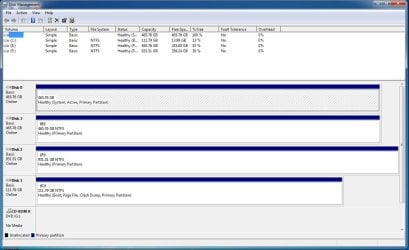
It might be a good idea to post a screenshot of your Disk Management window with both drives connected. You may have a system reserved partition on the old drive.
How did you "move the OS" to the other drive?
Other thoughts:
Run Disk Check on the drive to test for potential problems in windows, and run the hard drive manufacturer's diagnostic program also before using the old drive as a data drive. | My System Specs | | Computer type PC/Desktop System Manufacturer/Model Number Home Built - Jan 2013 OS Windows 7 64 Bit Home Premium SP1 CPU i7-3820 Motherboard Asus P9X79-PRO - Bios 3305 Memory GSkill F3-14900CL9Q - 16GB Graphics Card EVGA GeForce GTX660 - Driver 310.90 Sound Card On board Realtek ALC898 Monitor(s) Displays Acer S271HL Screen Resolution 1920 x 1080 Keyboard MS KC-0405 Mouse Intellimouse 5-button PSU Corsair CMPSU-850TX-V2 - 850 watt (by Seasonic) Case Corsair Obsidian 550D Cooling Standard 3 120mm case fans, Cooler Master Hyper 212 EVO Hard Drives #1- Samsung 840 Pro Series
#2- Western Digital WD1002FAEX Sata3 Black
#3- Western Digital WD1002FAEX Sata3 Black Internet Speed 25Mbits/Sec (on a good day) Antivirus Avast & Malwarebytes Browser Firefox Other Info Asus DVD - DRW-24B1ST 24X |
21 Jan 2012
|
#9 | | |
Oh, I use disk clone to clone from hard drive A to B since I have 2 hard drives
try this http://www.easeus.com/disk-copy/
ummm TVeblen, my seagate hard drive never came with a diagnostic program, so I check it whenever I install a OS | My System Specs | | |
21 Jan 2012
|
#10 | | Windows 7 Ultimate SP1 X64/ linux in VM NW Florida |
| My System Specs | | Computer type PC/Desktop System Manufacturer/Model Number Home Built- Always under construction OS Windows 7 Ultimate SP1 X64/ linux in VM CPU Intel i7-3770K Motherboard Asus Maximus V Extreme Z77 Memory 8GB G.Skill Ripjaws Z DDR3-2400 (2X4GB) Graphics Card EVGA GTX 670 SC 4GB Sound Card On Board Monitor(s) Displays Asus 24" LCD Screen Resolution 1920X1080 Keyboard Logitech G510 Mouse Logitech G500 PSU CORSAIR AX850 Case Cooler Master HAF X Cooling Custom Water Cooling Hard Drives Samsung 840 Pro 256 GB, Samsung 840 Pro 256 GB, Samsung 830 256GB, Samsung HD103SJ 1TB . External HD- Black X dock esata 1TB Samsung Spinpoint, Rosewill USB 3.0 dock 1TB Samsung Spinpoint Internet Speed carrier pigeon speed Antivirus MSE/MBAM Browser ie8 Other Info 2nd Rig,Windows 7 Ultimate SP1 X64, i7-2600K, Asrock P67 Extreme 4, 8GB DDR3-2133, HAF XM case, Noctua NH-D14, Gigabyte HD6950 OC 1GB, 2 X Crucial M4 128GB, Asus 24" LED.
Laptop- Samsung RF711-SO1 17" i5-2310M, 8GB DDR3-1333, Crucial M4 and OCZ vertex2, Nvidia GT540M.Win 7 HP X64 SP1. Format old OS hard drive problems? All times are GMT -5. The time now is 12:19 AM. | |