Hey Guys
ok i noticed this A LONG LONG time ago and it just hit me that since im on this fourm now i should ask if anyone know what the problem is and how to fix it
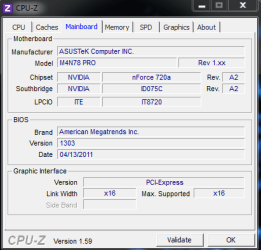
ok so i got a ASUS M4N79 PRO Motherboard (it was brand new when i bought it) and every time if i put it to sleep and its a sleep for longer then like 40 mins when i try to "wake it up" by the movment of the mouse etc it fires up monitor turns on and the fans etc get going and the screen stays Black .
then i have to unplug it for liek 10 misn and then plug it back in and then turn the power back on to get the monitor to display (i have tried different monitors and graphics cards)
Thanks
-Matt
My Computer
At a glance
Windows 7 Ultimate x64AMD Bulldozer FX-8120 Eight-Core CPU 3.1GHz16GB DDR3 AMD Entertainment Edition 1333MHz P...Asus GeForce Nvidia 660
Computer type
PC/Desktop
Computer Manufacturer/Model Number
Home Built
OS
Windows 7 Ultimate x64
CPU
AMD Bulldozer FX-8120 Eight-Core CPU 3.1GHz
Motherboard
ASUS M5A97 AM3+
Memory
16GB DDR3 AMD Entertainment Edition 1333MHz PC3-16000 4X4GB
Graphics Card(s)
Asus GeForce Nvidia 660
Sound Card
None
Monitor(s) Displays
27" Samsung SyncMaster S27B370 + Sony 21.5 Playstation 3d TV
Hey there Zeldafan1993; I have the exact same mobo. Double check your bios update...I do believe the latest version is 1302. Also update your chipset driver as well if you haven't already.
Are you using AI Nap for putting it to sleep - or the Win 7 Power Management? Can you wake your PC by pressing the power button on the case & do you get the same results?
I don't have the same ASUS board, but I have to wake mine by pressing the power button. Mouse movement doesn't do it, but it's no big issue.
My Computer
At a glance
Windows 7 Professional 64 Bit SP1Intel i7-3770K. Mild Overclock to 4.2 GhzCrucial Ballistix Sport 32GB DDR3-1600 (PC3-1...Intel 4000 - On CPU
Computer type
PC/Desktop
Computer Manufacturer/Model Number
Custom Build
OS
Windows 7 Professional 64 Bit SP1
CPU
Intel i7-3770K. Mild Overclock to 4.2 Ghz
Motherboard
ASUS Sabertooth Z77
Memory
Crucial Ballistix Sport 32GB DDR3-1600 (PC3-12800)
Graphics Card(s)
Intel 4000 - On CPU
Sound Card
On Board
Monitor(s) Displays
HP w2408h
Screen Resolution
1920 x 1200
Hard Drives
Samsung 840 Pro 256Gb SSD, --
Two - WDC WD1001FALS-00J7B0 SATA
The latest BIOS is 1303...if you checked the link. Im running 1302 as well but no need to update for me. I'm inclined with TBoyd that it's a setting issue.
My Computer
At a glance
Windows 7 Ultimate 64 bitAMD Phenom II X4 965 Black EditionGSkill 4 X 2 GB PC 8500XFX Radeon HD 6790 D
Computer Manufacturer/Model Number
Custom built
OS
Windows 7 Ultimate 64 bit
CPU
AMD Phenom II X4 965 Black Edition
Motherboard
Gigabyte GA-MA790X-DS4
Memory
GSkill 4 X 2 GB PC 8500
Graphics Card(s)
XFX Radeon HD 6790 D
Sound Card
On board RealTek HD
Monitor(s) Displays
Dual monitors:Samsung SyncMaster S20B300
Screen Resolution
1600 X 900
Hard Drives
Seagate Barracuda 1TB (primary)
Seagate Barracuda 2 X 320 GB
PSU
Ultra X4 750 watt fully modular
Case
Thermaltake Overseer RX 1 full tower
Cooling
Core-Contact 92 mm CPU Cooler
Keyboard
Logitech G510
Mouse
Razor DeathAdder
Internet Speed
50/5 Mbps UL/DL
Other Info
Optical: Super Muliti DVD burner w/lightscribe, Hauppauge WinTV HVR-1800
OK i just checked i do have 1303 , and i just hit Start>Sleep and the PC goes to sleep ill come back like 1 -2 hours later and the fans and everything start to run etc but the monitor just wont display anything and i have tried different Monitors and GFX cards too
PS my OS is Win 7 Ultimate 64 Bit
My Computer
At a glance
Windows 7 Ultimate x64AMD Bulldozer FX-8120 Eight-Core CPU 3.1GHz16GB DDR3 AMD Entertainment Edition 1333MHz P...Asus GeForce Nvidia 660
Computer type
PC/Desktop
Computer Manufacturer/Model Number
Home Built
OS
Windows 7 Ultimate x64
CPU
AMD Bulldozer FX-8120 Eight-Core CPU 3.1GHz
Motherboard
ASUS M5A97 AM3+
Memory
16GB DDR3 AMD Entertainment Edition 1333MHz PC3-16000 4X4GB
Graphics Card(s)
Asus GeForce Nvidia 660
Sound Card
None
Monitor(s) Displays
27" Samsung SyncMaster S27B370 + Sony 21.5 Playstation 3d TV
ok so i have now reinstalled my OS for the liek 3000 time when i got my RAM and CPU back from RMA and if i let the pc go to sleep and hit the power button on the Case it seems to lunch back up
so this is solved (for now)
My Computer
At a glance
Windows 7 Ultimate x64AMD Bulldozer FX-8120 Eight-Core CPU 3.1GHz16GB DDR3 AMD Entertainment Edition 1333MHz P...Asus GeForce Nvidia 660
Computer type
PC/Desktop
Computer Manufacturer/Model Number
Home Built
OS
Windows 7 Ultimate x64
CPU
AMD Bulldozer FX-8120 Eight-Core CPU 3.1GHz
Motherboard
ASUS M5A97 AM3+
Memory
16GB DDR3 AMD Entertainment Edition 1333MHz PC3-16000 4X4GB
Graphics Card(s)
Asus GeForce Nvidia 660
Sound Card
None
Monitor(s) Displays
27" Samsung SyncMaster S27B370 + Sony 21.5 Playstation 3d TV

 .
.