|
Welcome to Windows 7 Forums. Our forum is dedicated to helping you find solutions with any problems, errors or issues you are experiencing with Windows 7. The Windows 7 forum also covers news and updates and has an extensive Windows 7 tutorial section that covers a wide range of tips and tricks.
Windows 7 - Could really use Some HDD Partitioning help. |
01-26-2012
|
#1 | | |
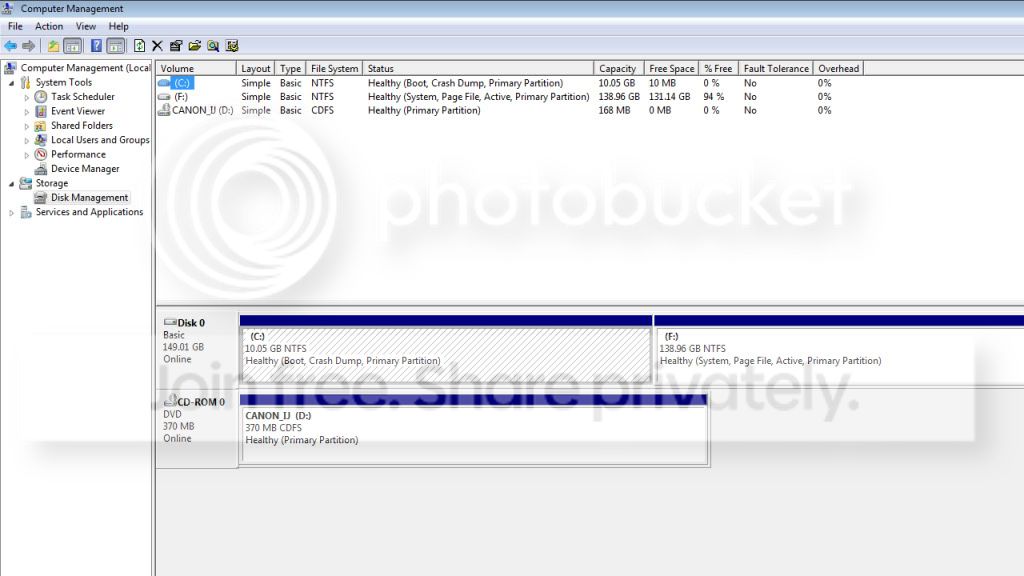
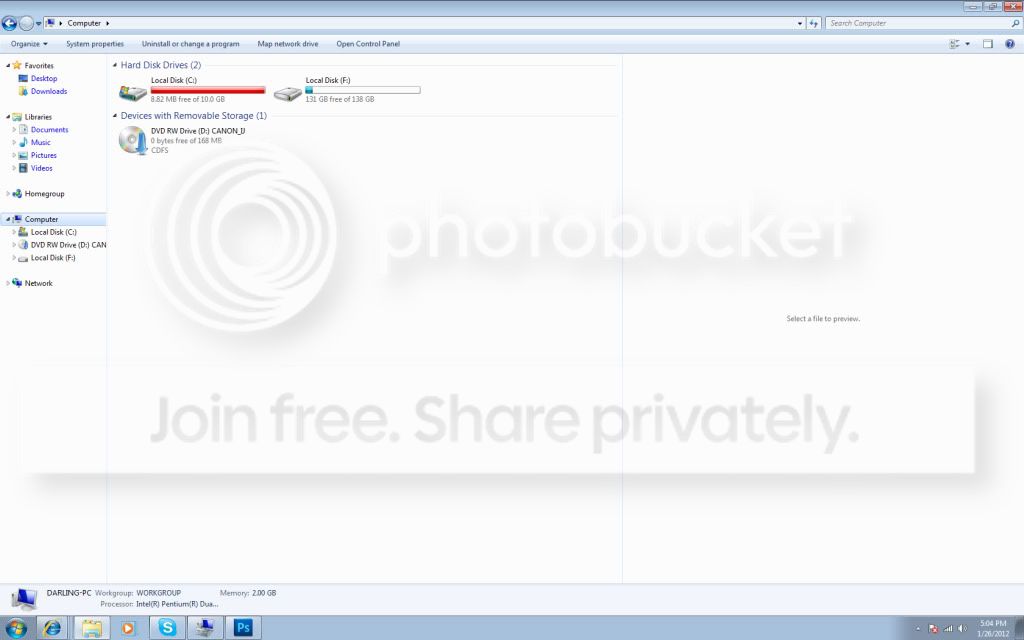
Could really use Some HDD Partitioning help. One day I booted up my comp & My HDD was Partitioned into 2 Parts. My C: Drive Also my Boot Drive has Windows 7 on it while The other Half of my HDD My F: Drive has all my files on it. I was wondering how I could Merge these to Together without hurting or losing anything on my comp? Thanks in advance
| My System Specs | | |
01-26-2012
|
#2 | | |

Quote: Originally Posted by GingyGFX One day I booted up my comp & My HDD was Partitioned into 2 Parts. My C: Drive Also my Boot Drive has Windows 7 on it while The other Half of my HDD My F: Drive has all my files on it. I was wondering how I could Merge these to Together without hurting or losing anything on my comp? Thanks in advance Why do you want to? Is there an over-riding reason to merge them?
Merging them is going to change a lot of things. | My System Specs | | System Manufacturer/Model Number HP Pavillion dv-7 1005 Tx OS WCP ONLY CPU 2@2.4 Memory 4 gigs Graphics Card Nvidia 9600M Sound Card HD built-in Monitor(s) Displays 17" Wxga Screen Resolution 1440x900 Cooling none Internet Speed 45Mb down 5Mb up |
01-26-2012
|
#3 | | |
Basically, you want to move all the stuff on F: to C: then delete F: partition, this will make the space 'unallocated', then you can merge it with C: and have all your stuff on one partition. | My System Specs | | System Manufacturer/Model Number HP a1250n, dv7 3173nr OS Windows 8102 x64 CPU AMD 3800+ X2 Motherboard MSI 7093 Memory 3GB Monitor(s) Displays Hitachi 22" CRT Screen Resolution 1600x1200 Internet Speed 10Mb/s Other Info http://www.windows7newsinfo.com |
01-26-2012
|
#4 | | |
Because I boot off my C: Drive & That drive only has like 10gb but its mostly taken up by Windows 7 So I dont have room to download Programs | My System Specs | | |
01-26-2012
|
#5 | | Windows 7 SP1, Home Premium, 64-bit |
DMHolt has it right.
Move your files off of F.
Then you should be able to do what you need to do in Windows Disk Management.
You shouldn't have any problems as long as F contains only personal data. | My System Specs | | System Manufacturer/Model Number Ignatz Special; 4 speed manual gearbox; factory air conditioning; one of one OS Windows 7 SP1, Home Premium, 64-bit CPU Intel Sandy Bridge i5-2500, not overclocked Motherboard Gigabyte H67A-UD3H-B3, full ATX Memory 4 GB Crucial DDR3-1333 Graphics Card none; graphics are integrated on CPU Sound Card onboard: Realtek ALC892; external: USB Behringer UF0-202 Monitor(s) Displays NEC 90GX2-BK 19" LCD Screen Resolution 800 x 640 Keyboard Leopold Tenkeyless with Cherry Blue switches, USB Mouse Logitech or Microsoft optical wired; either USB or PS 2 PSU Seasonic SS-560KM, modular Case Antec Solo II Cooling CPU: Scythe Big Shuriken; Case: Scythe Slipstream 800 & 500 Hard Drives System: Intel 320 Series SSD, 80 GB;
Data: Samsung Spinpoint 103SJ, 1 TB;
Backup: WD Caviar Green WD15EADS-00P8B0, 1.5TB Other Info Power consumption of this system, including monitor: 68 watts at idle; 144 watts at full load |
01-26-2012
|
#7 | | Vista and Windows7, sometimes Ubuntu and Fedora |
This is not quite clear. I suggest you post a picture of your Disk Management and tell us what is on which partition - especially whether you have user data on C:. | My System Specs | | System Manufacturer/Model Number HP, Dell, Gateway - 2 laptops and 2 desktops OS Vista and Windows7, sometimes Ubuntu and Fedora CPU from 1.6GHz Duo to 2.5GHz Quad Monitor(s) Displays 2x HP w2207 Keyboard with trackball - no mices Mouse terrible devices, who wants them Hard Drives 5x HDD, 2x SSD, 6x Externals Internet Speed DSL 6000 |
01-26-2012
|
#8 | | |
Oh dear.
Well I think you May have a little trouble if you DONT have the space on C:\ to move all the Data From F:\
So if this is the Case I suggest the Following, And plz Follow this too the "T"
1, open Disk manager.
2, Click on F:\ And select Shrink
3, Whats left over Format and move data over.
4, Delete the F:\ partition
5, Extend the C:\ partition
6, Move or leave the Data depending on how much space you have made for C:\
If you want 1 on 1 assistance MSN me. | My System Specs | | System Manufacturer/Model Number Home Build. OS Windows 7 Home Pre CPU Q8200 Intell 2.333 Motherboard Asus P5Q3 Delux Memory DDR3 1333 4gig Graphics Card Ati HD4870 Sound Card Onboard Soundmax. 7.1 Monitor(s) Displays 1, 20" Samsung Screen Resolution 1600/900 Keyboard Standard, Gaming Wolfking Mouse Cm-storm-inferno-wired-gaming-mouse PSU Good enough Case Le Shark Cooling FAN FAN FAN FAN, Thermaltake Minitype 90 with speed fan 4. Internet Speed Sky Crappy upto 20meg I get a whapping 5.8mbs. |
01-26-2012
|
#9 | | Windows 7x64 Home Premium SP1 x 2 |
For most spinning hard drives it makes sense to have a separate OS/Installed programs partition and another - call it a data partition.
The ability to do sensible imaging is the reason.
Once you lump everything into one partition you must image the whole partition and these can become ridiculously large.
I recommend ~100GB for OS/program partition and use the rest for a data partition. This excludes additional partitions like System Reserved (TINY) and recovery partitions.
Once you backup your F: Partition resizing is straightforward. Even easier with free Partition Wizard. | My System Specs | | System Manufacturer/Model Number Own build (+ Recased Acer Aspire x1800) OS Windows 7x64 Home Premium SP1 x 2 CPU Intel i7 2600k Motherboard ASUS P8Z68 Deluxe Memory G.Skill Ripjaws (DDR3-1600) 2x4GB Graphics Card Nvidia GeForce GTS 450; Intel HD Graphics 3000(GT2+) Monitor(s) Displays Dell Ultrasharp IPS panel U2311H, Samsung SyncMaster P2350 Screen Resolution 1920x1080 Keyboard Logitech MK520 (wireless) Mouse Logitech MK520 PSU Seasonic M12II 520W Case Lian Li Lancool PC-K60 Cooling Case: 1x120mm, 3x140mm CPU: Hyper 212+ Hard Drives Crucial M4 128GB (0309), Seagates 1TB Barracuda ST31000528AS + Internet Speed 6-7 Mbps Other Info Audio: Logitech Z523 2.1 |
01-26-2012
|
#10 | | Windows 7 Ultimate SP1 64-Bit |
It would help us to help you if you upload a screenshot of your fully expanded disk management layout as requested earlier by whs. Screenshots and Files - Upload and Post in Seven Forums | My System Specs | | System Manufacturer/Model Number HP Pavilion Elite 495UK OS Windows 7 Ultimate SP1 64-Bit CPU Intel Core i7 870 @ 2.93GHz Motherboard MSI 2A9C (CPU1) Memory 8Gb Dual-Channel DDR3 @ 664MHz Graphics Card nVidia GeForce GTX 460 1024MB dedicated RAM Sound Card Realtek HD Audio Monitor(s) Displays HP2310i Screen Resolution 1920 x 1080 Keyboard Logitech K750 solar-powered keyboard Mouse Logitech Wireless M180 mouse PSU 460W Case HP Elite Cooling Air cooled Hard Drives 1x1954GB Hitachi HDS22020ALA 330 (RAID), 1x1954GB Hitachi External for backup and storage Internet Speed 2Mb Other Info Pure Avanti Flow Internet Radio with iPod Dock, 64Gb iPod, HP USB Speakers, Sony MDR-V500 Headphones, Sony Vaio F-Series Laptop Could really use Some HDD Partitioning help. problems? All times are GMT -5. The time now is 01:19 PM. |  |