|
Welcome to Windows 7 Forums. Our forum is dedicated to helping you find solutions with any problems, errors or issues you are experiencing with Windows 7. The Windows 7 forum also covers news and updates and has an extensive Windows 7 tutorial section that covers a wide range of tips and tricks.
Windows 7 - usb devices plugged in one port only lights up.. |
01-28-2012
|
#1 | | windows home premium 64bit OS |
usb devices plugged in one port only lights up.. hello.. i need help please..
i have a hp pavilion g6 usb port problem.. i have windows 7 home premium..
everything was working well weeks ago.. then suddenly.. one usb port suddenly stopped working.. everytime i insert a device into that port.. example.. a flash drive.. it only lights up.. (not blinking when its supposed to be when it is being read by windows.) no connect sound.. i can't see it in my computer or in disk manager.. the device can be read when inserted to other ports of my laptop. so does that means somethings wrong with that port?..
fixes that i have tried:
- uninstalling and reinstalling usb drivers
- deleting upper and lower filters in registry
- unpluging and taking out the battery
please help..
thanks in advance.. | My System Specs | | OS windows home premium 64bit OS |
01-29-2012
|
#2 | | Windows 7 Professional x64 |
Hello score, and welcome to Sevenforums
First off, do you have a restore point to before the time your computer started acting up?: System Restore
Try this tutorial out: USB Selective Suspend - Turn On or Off
After that, test another USB device in the same USB Port that you are having trouble with. Let me know if that device works or not.
Try this tutorial. Though not particularly related to your problem, it can only help: USB Driver - General Fix for Problems
Try uninstalling the USB driver and see if windows driver (unless it is a USB3.0) works for it. If you go into Device manager, if there is a yellow exclaimation point, right click the device and select 'update'.
Why are you deleting anything in the registry? Do you have registry 'cleaners'? That could be the cause of this problem to begin with, you know. | My System Specs | | System Manufacturer/Model Number Custom Built PC (In French it is called "PC de moi") OS Windows 7 Professional x64 CPU Intel Core i7-3820 CPU OC @ 3.80GHz Motherboard Gigabyte G1.Assassin2 Memory 8.00GB (2GBx4) DDR3 1866MHz Graphics Card Nvidia-Gigabyte GeForce GTX 580 1.5GB SLI-soon 680 Sound Card On board Creative SB X-Fi Monitor(s) Displays acer 24" H243H Screen Resolution 1920x1080 Keyboard Microsoft Comfort Curve 2000 Mouse Tek Republic Wired Laser 3600 dpi Gaming Mouse PSU Silent Pro 1000w gold 80+ Case Azza Hurrican 2000 Cooling Liquid CPU cooler & fan Hard Drives 120GB OCZ Vertex III SSD,
500GB OS Hybrid Drive @ 7,200RPM Internet Speed 5.14Mbps Download Speed, .65Mbps Upload Speed & 5ms Ping Other Info You're such a good person for reading all the way down to the end. People like you truly do care! We should take all the people, and make them into people like you! :p |
01-29-2012
|
#3 | | windows home premium 64bit OS |
thanks for the reply dust sailor..
i tried restoring a couple of times.. one time.. it fixed the port but eventually for just a couple of second..
tried to turn off selective suspend.. but nothing happened..
i tried deleting upper and lower filters in registry.. found it in one of the forums..  but didn't help..
its confusing because when i plugged in any device (to this one port).. led just lights up.. hmm.. | My System Specs | | OS windows home premium 64bit OS |
01-29-2012
|
#4 | | Windows 7 Professional x64 |
Hello score,
As I said, messing with the registry is a dangerous thing. Shouldn't do it even if another person suggests it, unless you personally know what you are doing, and you personally know about that portion of the registry.
When you restore, does anything happen to indicate what causes the port to close down (ie does a program open, does opening a program cause it to stop functioning, etc.)?
Can you restore to a point before that restore point that you just used?
Do you have all windows updates installed? | My System Specs | | System Manufacturer/Model Number Custom Built PC (In French it is called "PC de moi") OS Windows 7 Professional x64 CPU Intel Core i7-3820 CPU OC @ 3.80GHz Motherboard Gigabyte G1.Assassin2 Memory 8.00GB (2GBx4) DDR3 1866MHz Graphics Card Nvidia-Gigabyte GeForce GTX 580 1.5GB SLI-soon 680 Sound Card On board Creative SB X-Fi Monitor(s) Displays acer 24" H243H Screen Resolution 1920x1080 Keyboard Microsoft Comfort Curve 2000 Mouse Tek Republic Wired Laser 3600 dpi Gaming Mouse PSU Silent Pro 1000w gold 80+ Case Azza Hurrican 2000 Cooling Liquid CPU cooler & fan Hard Drives 120GB OCZ Vertex III SSD,
500GB OS Hybrid Drive @ 7,200RPM Internet Speed 5.14Mbps Download Speed, .65Mbps Upload Speed & 5ms Ping Other Info You're such a good person for reading all the way down to the end. People like you truly do care! We should take all the people, and make them into people like you! :p |
01-29-2012
|
#5 | | windows home premium 64bit OS |
 one time when i tried the system restore, the port functioned well. but when i opened MS office.. suddenly it turned off.. i remove it.. place it back again.. and that's it.. nothing happened from then on..
i have all windows updates installed.. all usb drivers says its up to date..
are ms office updates important?.. does it affect the usb drivers?.. cause i choose not to download those updates.. | My System Specs | | OS windows home premium 64bit OS |
01-29-2012
|
#6 | | windows home premium 64bit OS |
additional detail.. before my usb port fails.. i installed an application called PowerISO.. this app used one drive for mounting image (not exactly sure bout the term).. after i uninstalled powerISO.. my wired mouse attached to my usb port (the one malfunctioning now) suddenly turned off.. when i plugged it back in.. nothing happens.. then that's it.. from then on.. whew..
is there a virus that can cause these malfunctioning?.. i have norton internet security.. i scanned my laptop many times but no detections..
thanks for replying and for the patience.. hope you can help me.. | My System Specs | | OS windows home premium 64bit OS |
01-29-2012
|
#7 | | Windows 7 Professional x64 |
Hey score,
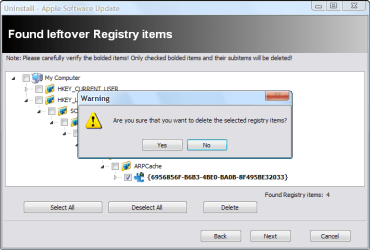
I know nothing about that program, but if you can, try installing it again. Then, remove it using Revo Uninstaller free: Download Revo Uninstaller Freeware - Free and Full Download - Uninstall software, remove programs, solve uninstall problems. Find the program in Revo, click uninstall, then click advanced, and follow the tutorial. When the registry picture (posted) pops up, make sure all the registry boxes are checked (only the registry boxes, not the folders). Then delete them and click next. If a page full of folders pops up, select them all and delete them as well:
After that, run this scan: SFC /SCANNOW Command - System File Checker
And if all of that fails, follow this tutorial: Repair Install
Believe me, I have all the patience in the world. It is you, I am sure, who would prefer a speedy recovery of your USB port
Hope this fixes it. Post back to let me know!
PS - Yes, MS Office updates are important. And likely it isn't a virus' fault. But if you aren't sure, use your antivirus to check. Make sure you update it first, and do a 'full scan'. By the way did you tell me which antivirus you were using? | My System Specs | | System Manufacturer/Model Number Custom Built PC (In French it is called "PC de moi") OS Windows 7 Professional x64 CPU Intel Core i7-3820 CPU OC @ 3.80GHz Motherboard Gigabyte G1.Assassin2 Memory 8.00GB (2GBx4) DDR3 1866MHz Graphics Card Nvidia-Gigabyte GeForce GTX 580 1.5GB SLI-soon 680 Sound Card On board Creative SB X-Fi Monitor(s) Displays acer 24" H243H Screen Resolution 1920x1080 Keyboard Microsoft Comfort Curve 2000 Mouse Tek Republic Wired Laser 3600 dpi Gaming Mouse PSU Silent Pro 1000w gold 80+ Case Azza Hurrican 2000 Cooling Liquid CPU cooler & fan Hard Drives 120GB OCZ Vertex III SSD,
500GB OS Hybrid Drive @ 7,200RPM Internet Speed 5.14Mbps Download Speed, .65Mbps Upload Speed & 5ms Ping Other Info You're such a good person for reading all the way down to the end. People like you truly do care! We should take all the people, and make them into people like you! :p |
01-31-2012
|
#8 | | windows home premium 64bit OS |
hello dust sailor..
i factory reset my laptop since i have trouble with my administrator rights.. since these laptop was swapped with my sister.. maybe the system got messed up with usernames..
well anyways.. i've updated everything.. the usb seem to work but only for a few minutes.. i tried to unchek the 'allow the computer to turn off this device to save power' box in the device manager.. and disabled the usb selective suspend setting.. maybe this is happening because of the power saver thing.. hmmm.. any more ideas?..
thanks for always responding.. | My System Specs | | OS windows home premium 64bit OS |
01-31-2012
|
#9 | | Windows 7 Professional x64 |
Hello score,
Don't rule out that it may have been damaged somehow. I can think of nothing else that may be wrong with it relating to software, so maybe someone else may pop in here with an idea. Gently check to see if you can find any evidence of damage in the USB port? Any software likely effects all USB ports, not a single one. Could be wiring has come loose, any number of hypothetical situations.
Hope this info comes in handy | My System Specs | | System Manufacturer/Model Number Custom Built PC (In French it is called "PC de moi") OS Windows 7 Professional x64 CPU Intel Core i7-3820 CPU OC @ 3.80GHz Motherboard Gigabyte G1.Assassin2 Memory 8.00GB (2GBx4) DDR3 1866MHz Graphics Card Nvidia-Gigabyte GeForce GTX 580 1.5GB SLI-soon 680 Sound Card On board Creative SB X-Fi Monitor(s) Displays acer 24" H243H Screen Resolution 1920x1080 Keyboard Microsoft Comfort Curve 2000 Mouse Tek Republic Wired Laser 3600 dpi Gaming Mouse PSU Silent Pro 1000w gold 80+ Case Azza Hurrican 2000 Cooling Liquid CPU cooler & fan Hard Drives 120GB OCZ Vertex III SSD,
500GB OS Hybrid Drive @ 7,200RPM Internet Speed 5.14Mbps Download Speed, .65Mbps Upload Speed & 5ms Ping Other Info You're such a good person for reading all the way down to the end. People like you truly do care! We should take all the people, and make them into people like you! :p |
02-02-2012
|
#10 | | windows home premium 64bit OS |
hi dusty..
everything's fine now.. thanks for all your replies.. maybe the factory reset got rid of the files which cause my port to malfunction.. i'll be careful with installing things from now on.. | My System Specs | | OS windows home premium 64bit OS usb devices plugged in one port only lights up.. problems? All times are GMT -5. The time now is 01:23 PM. |  |