
 |
Welcome to Windows 7 Forums. Our forum is dedicated to helping you find solutions with any problems, errors or issues you are experiencing with Windows 7. The Windows 7 forum also covers news and updates and has an extensive Windows 7 tutorial section that covers a wide range of tips and tricks.
Windows 7 - Installing additional RAM - need to know speed, type and size. |
01-30-2012
|
#1 | | |
Installing additional RAM - need to know speed, type and size. Hello,
I have 2GB RAM on my Windows 7 Ultimate 32-bit. I would like to buy additional 2GB RAM making a total of 4GB. I know that 32bit Windows 7 will not detect 4GB of RAM so ill be installing 64Bit version. I have a AMD athlon x2 dual core 5000+ 64Bit processor at 2.60GHz. I just opened up my chases to find out what type of RAM I have and also did a "Crucial Scan" which tells me I have a DDR2 PC2-6400, DDR2 PC2-5300 type of memory. I read somewhere that I need same type of RAM for better performance. My RAM card's label says it is a 2GB 2Rx8 PC2-6400U-666.
I need to know if I should install the same PC2-6400U-666 RAM in another slot or I can even use PC2-5300? which one is better? My RAM card labels does not show the RAM speed.
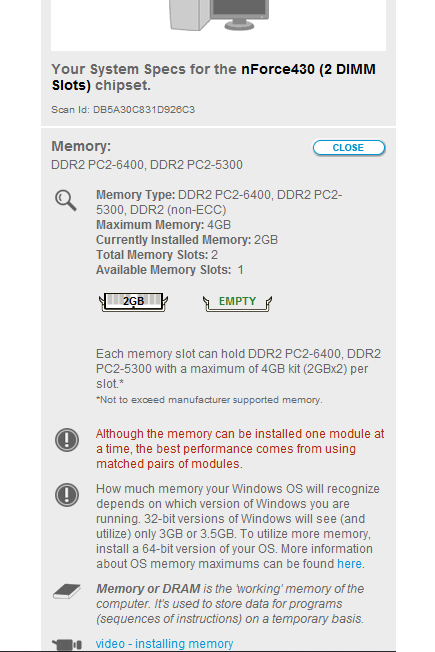
Also the Crucial Scan says that I can install a maximum of 4GB RAM. But is it 4GB per slot of the manufacturers maximum is 4GB?
My Crucial Scan:
Edit:
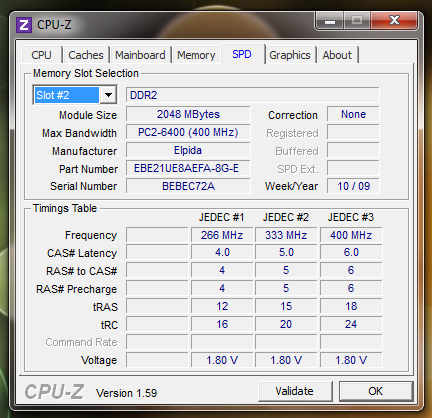
You can get all information you want about your RAM with a little tool called CPUZ even without opening your CPU case,
(Just for people who will have same problems in future)
My RAM details:
Last edited by bhaveshnande; 01-30-2012 at 01:10 PM..
| My System Specs | | System Manufacturer/Model Number HP Compaq OS Windows 7 Ultimate 32Bit CPU AMD Athlon(tm) 64 X2 Dual Core Processor 5000+ 2.60GHz Motherboard Pegatron corporation Memory DDR2 PC2-6400 400MHz (2GB) Graphics Card NVIDIA GeForce 6150SE nForce 430 Sound Card RealTek High Definition Audio Monitor(s) Displays HP 1859 Series Wide LCD Monitor Screen Resolution 1366x768 Keyboard Standard PS/2 Keyboard Mouse PS/2 Compatible Mouse Hard Drives ST332081 3AS SCSI Disk Device Internet Speed ~750Kbps |
01-30-2012
|
#2 | | Windows 7 Ultimate x64 SP1 |
If you want the best results, I would go in one of two ways. I'd either pull he existing chip out and buy the identical one....or just buy a new 2x2 GB kit. Either way, for best results and best chance of compatibility, you'll want identical chips.
Given the link, it means you have two slots in total, that can accept up to 2 GB per slot, for a total of 4 GB. | My System Specs | | OS Windows 7 Ultimate x64 SP1 CPU Intel Core i7-2600 Motherboard Gigabyte GA-P67A-UD3P-B3 Memory 12 GB Patriot Extreme DDR3-1333 Graphics Card Nvidia GTX 470 Monitor(s) Displays Dell UltraSharp 2209WA PSU OCZ ModStream 700W Case CoolerMaster HAF 912 Advanced Cooling CoolerMaster Hyper 212 Plus Hard Drives OCZ Agility3 240 GB, WD5001AALS, WD7501AALS |
01-30-2012
|
#3 | | Systems 1 and 2: Windows 7 Enterprise x64, Win 8 Developer |
I like crucial. Max of 4 Gb kit with 2GB per slot. 6400 is faster than 5300. You will want to match these, to get the best performance. | My System Specs | | System Manufacturer/Model Number Dell and Custom OS Systems 1 and 2: Windows 7 Enterprise x64, Win 8 Developer CPU System 1: i7 2600@3.4GHz, System 2: AMD FX-4100 Zambezi 3.6G Motherboard System 1:Dell 06NWYK System 2: ASUS M5A97 AM3+ Memory System 1: 8GB System 2: 8GB Graphics Card System 1: ATI FirePro V4800 System 2: Radeon HD 6850 Sound Card System 1: onboard System 2: onboard Monitor(s) Displays System1: Viewsonic HDMI 24" Screen Resolution System 1: 1920x1080 System 2: 1920x1080 Case System 1: Dell System 2: Cooler Master Hard Drives System 1: Mirrored .5B drives System 2: Seagate Barracuda ST1000DM003 1TB 7200 RPM 64MB Cache SATA 6.0Gb/s Internet Speed 10 MBPS |
01-30-2012
|
#4 | | Windows 7 Ultimate x64 SP1 |
Not necessarily. Just because the memory is capable of a faster speed, doesn't mean it will actually run at that speed. The BIOS will determine that, and if it is an OEM system, there's a chance that the user can't set any custom options or speeds. As long as the chips match, there won't be anything to worry about. | My System Specs | | OS Windows 7 Ultimate x64 SP1 CPU Intel Core i7-2600 Motherboard Gigabyte GA-P67A-UD3P-B3 Memory 12 GB Patriot Extreme DDR3-1333 Graphics Card Nvidia GTX 470 Monitor(s) Displays Dell UltraSharp 2209WA PSU OCZ ModStream 700W Case CoolerMaster HAF 912 Advanced Cooling CoolerMaster Hyper 212 Plus Hard Drives OCZ Agility3 240 GB, WD5001AALS, WD7501AALS |
01-30-2012
|
#5 | | Windows 7 Ultimate SP1 64-Bit |
I agree with DeaconFrost.
Your maximum RAM capability is 4GB so there's no point in switching to a 64-bit version of Windows.
I'd be inclined to buy 2 2GB matching sticks of RAM too. | My System Specs | | System Manufacturer/Model Number HP Pavilion Elite 495UK OS Windows 7 Ultimate SP1 64-Bit CPU Intel Core i7 870 @ 2.93GHz Motherboard MSI 2A9C (CPU1) Memory 8Gb Dual-Channel DDR3 @ 664MHz Graphics Card nVidia GeForce GTX 460 1024MB dedicated RAM Sound Card Realtek HD Audio Monitor(s) Displays HP2310i Screen Resolution 1920 x 1080 Keyboard Logitech K750 solar-powered keyboard Mouse Logitech Wireless M180 mouse PSU 460W Case HP Elite Cooling Air cooled Hard Drives 1x1954GB Hitachi HDS22020ALA 330 (RAID), 1x1954GB Hitachi External for backup and storage Internet Speed 2Mb Other Info Pure Avanti Flow Internet Radio with iPod Dock, 64Gb iPod, HP USB Speakers, Sony MDR-V500 Headphones, Sony Vaio F-Series Laptop |
01-30-2012
|
#6 | | Systems 1 and 2: Windows 7 Enterprise x64, Win 8 Developer |

Quote: Originally Posted by DeaconFrost Not necessarily. Just because the memory is capable of a faster speed, doesn't mean it will actually run at that speed. The BIOS will determine that, and if it is an OEM system, there's a chance that the user can't set any custom options or speeds. As long as the chips match, there won't be anything to worry about. Agree that I probably wouldn't switch to 64-bit for a slight memory gain. But Deacon, the architecture does support both speeds. If you mix chip speeds, I think it defaults to the slower speed. | My System Specs | | System Manufacturer/Model Number Dell and Custom OS Systems 1 and 2: Windows 7 Enterprise x64, Win 8 Developer CPU System 1: i7 2600@3.4GHz, System 2: AMD FX-4100 Zambezi 3.6G Motherboard System 1:Dell 06NWYK System 2: ASUS M5A97 AM3+ Memory System 1: 8GB System 2: 8GB Graphics Card System 1: ATI FirePro V4800 System 2: Radeon HD 6850 Sound Card System 1: onboard System 2: onboard Monitor(s) Displays System1: Viewsonic HDMI 24" Screen Resolution System 1: 1920x1080 System 2: 1920x1080 Case System 1: Dell System 2: Cooler Master Hard Drives System 1: Mirrored .5B drives System 2: Seagate Barracuda ST1000DM003 1TB 7200 RPM 64MB Cache SATA 6.0Gb/s Internet Speed 10 MBPS |
01-30-2012
|
#7 | | |
Thank you for the replies
But wait, a 32Bit Windows 7 OS supports 3GB to 3.5GB RAM but is that for each slot or considering both the slots? Purchasing 2 2GB RAM 's would make the total to 4GB and my OS won't support it? | My System Specs | | System Manufacturer/Model Number HP Compaq OS Windows 7 Ultimate 32Bit CPU AMD Athlon(tm) 64 X2 Dual Core Processor 5000+ 2.60GHz Motherboard Pegatron corporation Memory DDR2 PC2-6400 400MHz (2GB) Graphics Card NVIDIA GeForce 6150SE nForce 430 Sound Card RealTek High Definition Audio Monitor(s) Displays HP 1859 Series Wide LCD Monitor Screen Resolution 1366x768 Keyboard Standard PS/2 Keyboard Mouse PS/2 Compatible Mouse Hard Drives ST332081 3AS SCSI Disk Device Internet Speed ~750Kbps |
01-30-2012
|
#8 | | Windows 7 Ultimate x64 SP1 |

Quote: Originally Posted by Lemur Agree that I probably wouldn't switch to 64-bit for a slight memory gain. But Deacon, the architecture does support both speeds. If you mix chip speeds, I think it defaults to the slower speed. Yes, if you mix chips, the slowest speed is what will be used...but you are missing my point. If the BIOS decides to run the chips at 5300, based on multipliers from the processor, it won't matter if you use faster memory or not. In most OEM systems, you can't manually set the memory speeds. 
Quote: Originally Posted by bhaveshnande But wait, a 32Bit Windows 7 OS supports 3GB to 3.5GB RAM but is that for each slot or considering both the slots? Purchasing 2 2GB RAM 's would make the total to 4GB and my OS won't support it? I think you're missing something as well. Windows memory support has nothing to do with the slots. The maximum memory is governed by the motherboard. If your board says 4 GB is the max, than that's it. Windows will then have a limit based on what is available to it. For example, if you had a newer board that allowed 16 GB of memory, and you installed Windows 7 x86, you still wouldn't only see a max of 3.25 or 3.5 GB.
If you decide to install 4 GB of memory and stay with Windows 7 x86, you will only use 3.25 or 3.5 GB of memory. If you switch to x64, then you will be able to use all 4 GB. That decision is solely up to you.
The part we're trying to get you to realize is that you have two slots, capable of using a maximum of 2 GB per slot, as detailed in your screenshot. So, that means you will have a maximum of 4 GB available to whatever OS you decide to install. Once you get past that, then you will have to decide on an OS, as non-x64 versions will only see a portion of the 4 GB. | My System Specs | | OS Windows 7 Ultimate x64 SP1 CPU Intel Core i7-2600 Motherboard Gigabyte GA-P67A-UD3P-B3 Memory 12 GB Patriot Extreme DDR3-1333 Graphics Card Nvidia GTX 470 Monitor(s) Displays Dell UltraSharp 2209WA PSU OCZ ModStream 700W Case CoolerMaster HAF 912 Advanced Cooling CoolerMaster Hyper 212 Plus Hard Drives OCZ Agility3 240 GB, WD5001AALS, WD7501AALS |
01-30-2012
|
#9 | | |

Quote: Originally Posted by DeaconFrost The part we're trying to get you to realize is that you have two slots, capable of using a maximum of 2 GB per slot, as detailed in your screenshot. So, that means you will have a maximum of 4 GB available to whatever OS you decide to install. Once you get past that, then you will have to decide on an OS, as non-x64 versions will only see a portion of the 4 GB. I understood that I have 2 slots 2GB each and I can install a maximum memory of 4GB
So either I can buy 2 2GB new RAM cards or a single one similar to my original.
Thank you everyone who helped me.
(I will switch to x64 version of Windows 7 to use the full 4GB(already have a installation copy of it  )) | My System Specs | | System Manufacturer/Model Number HP Compaq OS Windows 7 Ultimate 32Bit CPU AMD Athlon(tm) 64 X2 Dual Core Processor 5000+ 2.60GHz Motherboard Pegatron corporation Memory DDR2 PC2-6400 400MHz (2GB) Graphics Card NVIDIA GeForce 6150SE nForce 430 Sound Card RealTek High Definition Audio Monitor(s) Displays HP 1859 Series Wide LCD Monitor Screen Resolution 1366x768 Keyboard Standard PS/2 Keyboard Mouse PS/2 Compatible Mouse Hard Drives ST332081 3AS SCSI Disk Device Internet Speed ~750Kbps |
01-30-2012
|
#10 | | Windows 7 Ultimate x64 SP1 |
Yes, that's exactly it. If you plan to buy just one chip, I suggest trying to get an identical one. Anytime you mix chips, there is always a chance they won't "play nice" with each other, even if they are both compatible with the motherboard. | My System Specs | | OS Windows 7 Ultimate x64 SP1 CPU Intel Core i7-2600 Motherboard Gigabyte GA-P67A-UD3P-B3 Memory 12 GB Patriot Extreme DDR3-1333 Graphics Card Nvidia GTX 470 Monitor(s) Displays Dell UltraSharp 2209WA PSU OCZ ModStream 700W Case CoolerMaster HAF 912 Advanced Cooling CoolerMaster Hyper 212 Plus Hard Drives OCZ Agility3 240 GB, WD5001AALS, WD7501AALS Installing additional RAM - need to know speed, type and size. problems? All times are GMT -5. The time now is 01:24 PM. |  |