|
Welcome to Windows 7 Forums. Our forum is dedicated to helping you find solutions with any problems, errors or issues you are experiencing with Windows 7. The Windows 7 forum also covers news and updates and has an extensive Windows 7 tutorial section that covers a wide range of tips and tricks.
Windows 7 - How do I burn CDs |
01-31-2012
|
#1 | | Microsoft Windows 7 Ultimate 64-bit 7600 Multiprocessor Free |
How do I burn CDs Hi. Is there a tutorial on here (or anywhere, for that matter) on how to burn CDs in Windows 7?
My PC is capable of burning them, but whenever I do it, things go wrong. I drag files to somewhere and burn and remove the CD, but the files keep showing up as ready to burn. Sometimes they're not on the CD, but they remain as ready to burn, or other strange happenings that I can't quite understand. I would like a simple explanation of what is happening and how to burn CDs, the goal is to burn all of my notes from school (I just finished all my classes) onto CD for future use - but off of my space limited SDD.
Thanks.
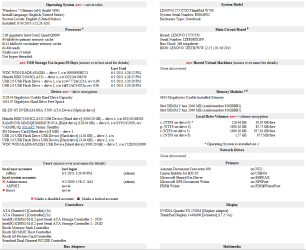
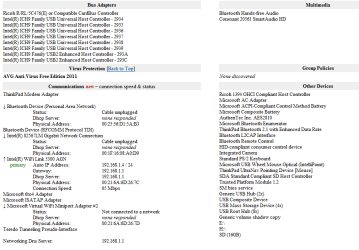
| My System Specs | | System Manufacturer/Model Number Lenovo/2757CTO Thinkpad W700 OS Microsoft Windows 7 Ultimate 64-bit 7600 Multiprocessor Free CPU Intel(R) Core(TM)2 Quad CPU Q9000 @ 2.00GHz Motherboard LENOVO 2757CTO Memory 4.00 GB Graphics Card NVIDIA Quadro FX 2700M Sound Card (1) Bluetooth Hands-free Audio (2) Conexant 20561 SmartAud Monitor(s) Displays The integrated screen Screen Resolution 1440x900 Mouse Microsoft Optical Wheel Mouse Hard Drives (1) SAMSUNG MMCQE28G8MUP-0VA ATA Device Other Info BIOS: Ver 1.00PARTTBLX |
01-31-2012
|
#2 | | Main - Windows 7 Pro SP1 64-Bit; 2nd - Windows Server 2008 R2 |
What program are you using to burn them?
I would recommend CDBurnerXP: Free CD and DVD burning software - it's free and has enough options for pretty much every task.
Common burning errors:
Choosing the wrong type of project - make sure that for copying data you choose Data Disc, if it's an iso you need to create a Disc From Image, etc.
Not closing the disc - Closing the disc writes all the special files needed to identify it to another computer. A disc which hasn't been closed might show up as empty when you go back to it.
You may want to look these over: Burning to CD and DVD - Enable or Disable Burn Disc Image - ISO or IMG file You have files waiting to be burned to disc - Stop Message | My System Specs | | System Manufacturer/Model Number Self OS Main - Windows 7 Pro SP1 64-Bit; 2nd - Windows Server 2008 R2 CPU Main - Core i7 2600K; 2nd - Core i7 920 Motherboard Main - Asus P8Z68-V Pro/Gen3; 2nd - Gigabyte GA-EX58-UDR3 Memory Main - 16GB Corsair Vengeance; 2nd - 12GB Corsair Vengeance Graphics Card Main - XFX Radeon 6870 1GB; 2nd - XFX Radeon 4870 1GB Sound Card Both: Onboard Realtek Azalia Monitor(s) Displays Main - Hann 25" + I-INC 25" + Acer 23"; 2nd - Upgrading Soon Screen Resolution Main - 1920x1080 (All Three Monitors); 2nd - Upgrading Soon Keyboard Main - Razer Reclusa; 2nd - Old MS Keyboard Mouse Main - Logitech MX Revolution; 2nd - Old MS Mouse PSU Main - OCZ 600W Modular; 2nd - OCZ 600W Case Main - Thermaltake Element G; 2nd - NZXT something or other Cooling Main - Corsair H80; 2nd - Prolimatech Megahalems Hard Drives Main - (1) Crucial M4 128GB (Boot)
Main - (1) Seagate 2TB 64MB Cache (Data)
Main - (1) Seagate 2TB 64MB Cache (Data Backup)
2nd - (1) Intel X25-M SSD 80GB (Boot)
2nd - (3) Seagate 1TB 32MB Cache (Data Backup)
2nd - (1) Seagate 320GB (Because) Internet Speed 20Mbps Time-Warner Cable |
01-31-2012
|
#3 | | Windows 7 Ultimate 64bit (Build 7600) |
Hiya pal
You might find it easier to use a program like CDBurnerXP: Free CD and DVD burning software
It's free to use and works on Windows 7
There's some easy to follow help guides here CDBurnerXP FAQ
.... hope this helps a bit
*edit ooops prof beat me to it | My System Specs | | System Manufacturer/Model Number Self Built OS Windows 7 Ultimate 64bit (Build 7600) CPU AMD Phenom Quad core 9950 black edition Motherboard Gigabyte Memory 8Gb Graphics Card 2x XFX Radeon 5850 Sound Card PCI Express X-Fi Titanium / Logitech G35 Monitor(s) Displays 2x HP 2410i Screen Resolution 1920x1080 Keyboard Logitech G15 Mouse Logitech G9 PSU Jean Tech Storm 700W Case Cooler Master COSMOS S Cooling Akasa Evo Blue Pro Hard Drives 1x 500Gb Seagate
1x 1Tb Seagate
2x 1Tb Hitatchi Internet Speed 12mb |
01-31-2012
|
#4 | | Microsoft Windows 7 Ultimate 64-bit 7600 Multiprocessor Free |

Quote: Originally Posted by profdlp What program are you using to burn them? Well, I prefer to use built in Windows tools. I am down to 5GB free space on my (too small) SSD and I really don't like installing applications which I will rarely use (my next post: how do I clean registry/PC after installing/uninstalling tons of apps). If the program you guys suggest has a small, easy to use, portable version, then... well... maybe I'll use it (we'll see). | My System Specs | | System Manufacturer/Model Number Lenovo/2757CTO Thinkpad W700 OS Microsoft Windows 7 Ultimate 64-bit 7600 Multiprocessor Free CPU Intel(R) Core(TM)2 Quad CPU Q9000 @ 2.00GHz Motherboard LENOVO 2757CTO Memory 4.00 GB Graphics Card NVIDIA Quadro FX 2700M Sound Card (1) Bluetooth Hands-free Audio (2) Conexant 20561 SmartAud Monitor(s) Displays The integrated screen Screen Resolution 1440x900 Mouse Microsoft Optical Wheel Mouse Hard Drives (1) SAMSUNG MMCQE28G8MUP-0VA ATA Device Other Info BIOS: Ver 1.00PARTTBLX |
01-31-2012
|
#5 | | Windows 7 Ultimate 64bit (Build 7600) |
CD burnerXP is only 5Mb so it's as about as light as it's gonna get | My System Specs | | System Manufacturer/Model Number Self Built OS Windows 7 Ultimate 64bit (Build 7600) CPU AMD Phenom Quad core 9950 black edition Motherboard Gigabyte Memory 8Gb Graphics Card 2x XFX Radeon 5850 Sound Card PCI Express X-Fi Titanium / Logitech G35 Monitor(s) Displays 2x HP 2410i Screen Resolution 1920x1080 Keyboard Logitech G15 Mouse Logitech G9 PSU Jean Tech Storm 700W Case Cooler Master COSMOS S Cooling Akasa Evo Blue Pro Hard Drives 1x 500Gb Seagate
1x 1Tb Seagate
2x 1Tb Hitatchi Internet Speed 12mb |
01-31-2012
|
#6 | | Windows 7 SP1, Home Premium, 64-bit |
ImgBurn is another possibility.
My installation of it uses 3.07 MB.
Do you have hibernation turned off on your SSD installation? | My System Specs | | System Manufacturer/Model Number Ignatz Special; 4 speed manual gearbox; factory air conditioning; one of one OS Windows 7 SP1, Home Premium, 64-bit CPU Intel Sandy Bridge i5-2500, not overclocked Motherboard Gigabyte H67A-UD3H-B3, full ATX Memory 4 GB Crucial DDR3-1333 Graphics Card none; graphics are integrated on CPU Sound Card onboard: Realtek ALC892; external: USB Behringer UF0-202 Monitor(s) Displays NEC 90GX2-BK 19" LCD Screen Resolution 800 x 640 Keyboard Leopold Tenkeyless with Cherry Blue switches, USB Mouse Logitech or Microsoft optical wired; either USB or PS 2 PSU Seasonic SS-560KM, modular Case Antec Solo II Cooling CPU: Scythe Big Shuriken; Case: Scythe Slipstream 800 & 500 Hard Drives System: Intel 320 Series SSD, 80 GB;
Data: Samsung Spinpoint 103SJ, 1 TB;
Backup: WD Caviar Green WD15EADS-00P8B0, 1.5TB Other Info Power consumption of this system, including monitor: 68 watts at idle; 144 watts at full load |
01-31-2012
|
#7 | | Microsoft Windows 7 Ultimate 64-bit 7600 Multiprocessor Free |

Quote: Originally Posted by PooMan UK CD burnerXP is only 5Mb so it's as about as light as it's gonna get  And, FYI, it has a portable version. You have to find the small link which says "More download options". The 64-bit version is 6MB (still pretty small). | My System Specs | | System Manufacturer/Model Number Lenovo/2757CTO Thinkpad W700 OS Microsoft Windows 7 Ultimate 64-bit 7600 Multiprocessor Free CPU Intel(R) Core(TM)2 Quad CPU Q9000 @ 2.00GHz Motherboard LENOVO 2757CTO Memory 4.00 GB Graphics Card NVIDIA Quadro FX 2700M Sound Card (1) Bluetooth Hands-free Audio (2) Conexant 20561 SmartAud Monitor(s) Displays The integrated screen Screen Resolution 1440x900 Mouse Microsoft Optical Wheel Mouse Hard Drives (1) SAMSUNG MMCQE28G8MUP-0VA ATA Device Other Info BIOS: Ver 1.00PARTTBLX |
01-31-2012
|
#8 | | Microsoft Windows 7 Ultimate 64-bit 7600 Multiprocessor Free |

Quote: Originally Posted by ignatzatsonic ImgBurn is another possibility.
My installation of it uses 3.07 MB.
Do you have hibernation turned off on your SSD installation? No. I have hibernation turned on. I like that feature.
Why do you ask? I don't like hibernation so much that I wouldn't get rid of it in the right circumstances. | My System Specs | | System Manufacturer/Model Number Lenovo/2757CTO Thinkpad W700 OS Microsoft Windows 7 Ultimate 64-bit 7600 Multiprocessor Free CPU Intel(R) Core(TM)2 Quad CPU Q9000 @ 2.00GHz Motherboard LENOVO 2757CTO Memory 4.00 GB Graphics Card NVIDIA Quadro FX 2700M Sound Card (1) Bluetooth Hands-free Audio (2) Conexant 20561 SmartAud Monitor(s) Displays The integrated screen Screen Resolution 1440x900 Mouse Microsoft Optical Wheel Mouse Hard Drives (1) SAMSUNG MMCQE28G8MUP-0VA ATA Device Other Info BIOS: Ver 1.00PARTTBLX |
01-31-2012
|
#9 | | Vista and Windows7, sometimes Ubuntu and Fedora |
Hibernation uses as much space on your SSD as you have RAM. How small is your SSD. I have a bunch of 60GB SSDs and never ran out of space. Maybe we can help you clean it up. | My System Specs | | System Manufacturer/Model Number HP, Dell, Gateway - 2 laptops and 2 desktops OS Vista and Windows7, sometimes Ubuntu and Fedora CPU from 1.6GHz Duo to 2.5GHz Quad Monitor(s) Displays 2x HP w2207 Keyboard with trackball - no mices Mouse terrible devices, who wants them Hard Drives 5x HDD, 2x SSD, 6x Externals Internet Speed DSL 6000 |
01-31-2012
|
#10 | | Windows 7 SP1, Home Premium, 64-bit |

Quote: Originally Posted by StupidUser 
Quote: Originally Posted by ignatzatsonic ImgBurn is another possibility.
My installation of it uses 3.07 MB.
Do you have hibernation turned off on your SSD installation? No. I have hibernation turned on. I like that feature.
Why do you ask? I don't like hibernation so much that I wouldn't get rid of it in the right circumstances. If you don't want it, you can turn it off from an elevated command prompt with this command:
powercfg -h off
and press Enter
As WHS says, you would get back SSD space equivalent to the amount of your installed RAM.
You might want to also inspect the size of your page file and the amount of space devoted to System Restore. | My System Specs | | System Manufacturer/Model Number Ignatz Special; 4 speed manual gearbox; factory air conditioning; one of one OS Windows 7 SP1, Home Premium, 64-bit CPU Intel Sandy Bridge i5-2500, not overclocked Motherboard Gigabyte H67A-UD3H-B3, full ATX Memory 4 GB Crucial DDR3-1333 Graphics Card none; graphics are integrated on CPU Sound Card onboard: Realtek ALC892; external: USB Behringer UF0-202 Monitor(s) Displays NEC 90GX2-BK 19" LCD Screen Resolution 800 x 640 Keyboard Leopold Tenkeyless with Cherry Blue switches, USB Mouse Logitech or Microsoft optical wired; either USB or PS 2 PSU Seasonic SS-560KM, modular Case Antec Solo II Cooling CPU: Scythe Big Shuriken; Case: Scythe Slipstream 800 & 500 Hard Drives System: Intel 320 Series SSD, 80 GB;
Data: Samsung Spinpoint 103SJ, 1 TB;
Backup: WD Caviar Green WD15EADS-00P8B0, 1.5TB Other Info Power consumption of this system, including monitor: 68 watts at idle; 144 watts at full load How do I burn CDs problems? All times are GMT -5. The time now is 01:25 PM. |  |