| Windows 7: BSOD when GPU overheats... Seems too cool to be overheating. |
04 Feb 2012
|
#1 | | |
BSOD when GPU overheats... Seems too cool to be overheating. My computer fairly consistently BSODs while playing games for extended periods of time. Usually while playing a game my GPU peaks at about 70~72 C. I know this is up there, but I've seen lots of people not having to worry about overheating until they get to 90 or so.
So my question is, is it normal for my computer to be overheating with a GPU at 72? Or could there be something else underfoot that is causing my issue?
Unfortunately, the last few bluescreens I had were too quick to save any minidumps, and all my old ones are gone... I think I may have accidentally wiped them with CCleaner or something. I've been having this problem for a while and have finally (I think) narrowed it down to my GPU. If it happens again and I get a minidump, I will post it.
My GPU is an Geforce GTS 450. | My System Specs |
| OS Windows 7 Ultimate x64 CPU AMD Phenom II x4 Motherboard ASUS M4A785-M Memory 2 x 2GB Transcend JETRAM DDR2 Graphics Card EVGA GEFORCE GTS 450 Monitor(s) Displays LG Flatron E2250 Screen Resolution 1920 x 1080 Keyboard Microsoft Wireless Natural Keyboard Mouse Logitech MX Revolution PSU Coolmax CLU-650 Case CoolerMaster Scout Cooling 2 x 140 mm, 3 x 120 mm Hard Drives Seagate 1TB,
Seagate 250 GB,
Patriot 32 GB SSD Internet Speed Crappy. |
04 Feb 2012
|
#2 | | |

Quote: Originally Posted by Siesna
So my question is, is it normal for my computer to be overheating with a GPU at 72? Or could there be something else underfoot that is causing my issue?
That temp is fine, so it's unlikely that heat is an issue. (The GPU core temp anyway)
I'd go with something underfoot - but without a crash dump, it's hard to offer a definitive alternative.
If it's only after an extended period of time, have you monitored your CPU's peak temps?
Have you updated your drivers during this period, or is it the same driverset? | My System Specs | | Computer type PC/Desktop System Manufacturer/Model Number SmartEyeball Custom Systems OS 8 Pro x64 CPU i7 3770K 4.6GHz Motherboard ASUS P8Z77 WS (great board good slot placement) Memory 16GB G.Skill Trident X 2400mhz Graphics Card 2x Gigabyte GTX 670 OC WindForce SLI Sound Card X-FI Forte 7.1 + ATH-AD900 Headphones Monitor(s) Displays x3 Dell U2410 / 58" Samsung / "40 Sony Screen Resolution 1920*1200 / 1920*1080 Keyboard Topre Realforce // Ducky Shine MX Black // Filco Ninja TKL Mouse Razer Imperator + Thermaltake Theron PSU Corsair AX1200W Case Thermaltake Level 10 GT Snow Edition Cooling Noctua NH-D14 Hard Drives 2x Intel 520 240GB (RAID 0) * 2x WD Caviar Blacks 2TB (RAID 0) * 2TB WD Caviar Black Antivirus MSE Browser Opera, Chrome, FF Other Info GT Extreme V2 Sim Racing Cockpit + 40" LCD and K/B Mouse stand ▼
Fanatec CSR Elite Wheel + Clubsport Pedals + CSR shifter/7GS ▼
Buttkicker v2 Seat Rumbler with Dedicated 5.1 and Sub Woofer attached to frame ▼
=
Bloody Big Grin |
05 Feb 2012
|
#3 | | |

Quote: Originally Posted by Siesna My computer fairly consistently BSODs while playing games for extended periods of time. Usually while playing a game my GPU peaks at about 70~72 C. I know this is up there, but I've seen lots of people not having to worry about overheating until they get to 90 or so.
So my question is, is it normal for my computer to be overheating with a GPU at 72? Or could there be something else underfoot that is causing my issue?
Unfortunately, the last few bluescreens I had were too quick to save any minidumps, and all my old ones are gone... I think I may have accidentally wiped them with CCleaner or something. I've been having this problem for a while and have finally (I think) narrowed it down to my GPU. If it happens again and I get a minidump, I will post it.
My GPU is an Geforce GTS 450.
That is kind of high for that GPU. I have the same and fully stressed I have the fan control set so it doesn't go over 60. I would advise using the MSI Afterburner program - it works for most any Nvidia and I use it for my Asus GTS 450. It allows you to create a fan response profile, which as I said I use to keep the GPU under 60 event overclocked under load | My System Specs | | Computer type PC/Desktop System Manufacturer/Model Number Home built (GeneO industries)/Model 3 OS Windows 7 64 bit SP1 CPU i5 2500k @ 4.5 GHz, 1.264V 124 GFlop (IBT with AVX) Motherboard ASUS P8Z68-V PRO/GEN3 Memory 16GB (4GBx4) 1600MHz G.skill Ripjaws X 8-8-8-24 Graphics Card MSI GTX 660 Ti PE/OC, 2GB 7160 MHz DDR5 clock, 1228 Mhz Core Sound Card Onboard Realtek HD Monitor(s) Displays NEC Spectraview 2490WUXi-SV Screen Resolution 1920 x 1200 Keyboard HP Wireless Mouse HP wireless PSU Seasonic X-850 (2012 KM3 model) Case Fractal Design "Define R3" Cooling CM TPC 812 push/pull, 3 120mm, 2 TY-140 case fans Hard Drives Samsung 128GB 840 Pro SSD (System), Crucial 128GB M4 SSD, 2x WD Caviar 1TB Black internal (data), 1x WD Blue 6Gb/s 1TB Internal, 1x 2TB eSata WD20EARS Green, 2x 500GB Seagate external USB, 1x 350GB exte Internet Speed 27.8 Mb/s down, 5.6 Mb/s up Other Info USB 3.0 x4 , SATA III x4, eSATA x3, SATA II x4, USB 2.0 x8. 2 Samsung DVD R/W drives.
WEI: CPU 7.7, Memory 7.8, Graphics 7.9, Disk 7.9 |
05 Feb 2012
|
#4 | | |
Smarty, my CPU never gets over 45C or so. It never gets very hot. It's the same drivers, so next time I play anything, I'll just let it run until it bluescreens, and hopefully get a crash dump this time.
Geneo, thanks for the advice. I will check it out and try to keep my GPU around 60 and see if that helps. After I started getting these blue screens a while back, I even installed two more fans pointed at the card to hopefully cool it down, and it only helped by about 5 degrees or so, dropping me from 75 to around 70.
By the way, none of my hardware is overclocked. This is all stock. | My System Specs | | OS Windows 7 Ultimate x64 CPU AMD Phenom II x4 Motherboard ASUS M4A785-M Memory 2 x 2GB Transcend JETRAM DDR2 Graphics Card EVGA GEFORCE GTS 450 Monitor(s) Displays LG Flatron E2250 Screen Resolution 1920 x 1080 Keyboard Microsoft Wireless Natural Keyboard Mouse Logitech MX Revolution PSU Coolmax CLU-650 Case CoolerMaster Scout Cooling 2 x 140 mm, 3 x 120 mm Hard Drives Seagate 1TB,
Seagate 250 GB,
Patriot 32 GB SSD Internet Speed Crappy. |
05 Feb 2012
|
#5 | | Windows 7 Ultimate SP1 X64/ linux in VM NW Florida |
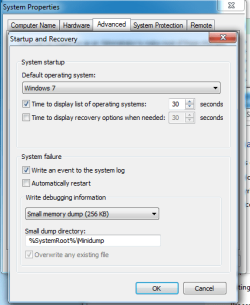
This will enable you to have mini dumps on BSODs. But, those GPU temps should not be high enough to cause BSODs. | My System Specs | | Computer type PC/Desktop System Manufacturer/Model Number Home Built- Always under construction OS Windows 7 Ultimate SP1 X64/ linux in VM CPU Intel i7-3770K Motherboard Asus Maximus V Extreme Z77 Memory 8GB G.Skill Ripjaws Z DDR3-2400 (2X4GB) Graphics Card EVGA GTX 670 SC 4GB Sound Card On Board Monitor(s) Displays Asus 24" LCD Screen Resolution 1920X1080 Keyboard Logitech G510 Mouse Logitech G500 PSU CORSAIR AX850 Case Cooler Master HAF X Cooling Custom Water Cooling Hard Drives Samsung 840 Pro 256 GB, Samsung 840 Pro 256 GB, Samsung 830 256GB, Samsung HD103SJ 1TB . External HD- Black X dock esata 1TB Samsung Spinpoint, Rosewill USB 3.0 dock 1TB Samsung Spinpoint Internet Speed carrier pigeon speed Antivirus MSE/MBAM Browser ie8 Other Info 2nd Rig,Windows 7 Ultimate SP1 X64, i7-2600K, Asrock P67 Extreme 4, 8GB DDR3-2133, HAF XM case, Noctua NH-D14, Gigabyte HD6950 OC 1GB, 2 X Crucial M4 128GB, Asus 24" LED.
Laptop- Samsung RF711-SO1 17" i5-2310M, 8GB DDR3-1333, Crucial M4 and OCZ vertex2, Nvidia GT540M.Win 7 HP X64 SP1. |
05 Feb 2012
|
#6 | | |
Thanks for the tip about MSI Afterburner. My GPU is running about 50C instead of 70C. Even though those temps are not hot enough to cause my problem, I like my system running cooler, regardless.
I got a BSOD again with my GPU only at 50C this time, so, definitely not an overheating issue. But once again, no dump file was generated. I don't know why. My system used to create small dumps in the minidump folder, but just now when I went to investigate, it had somehow gotten changed to a kernel dump. I changed it back to minidumps. However, no MEMORY.DMP was generated.. The BSOD is weird. The blue screen is only up for a half a second, then my system restarts, almost like it didn't have time to dump anything. When I restart, windows does not acknowledge the fact that it shut down unexpectedly. The event viewer only states that "The system has rebooted without cleanly shutting down first. This error could be caused if the system stopped responding, crashed, or lost power unexpectedly."
Trying to cause another BSOD now that I have told it to save small dumps.
Obviously this isn't a simple overheating problem. I only thought it was because my system is only restarting when I've been playing a game for a while. | My System Specs | | OS Windows 7 Ultimate x64 CPU AMD Phenom II x4 Motherboard ASUS M4A785-M Memory 2 x 2GB Transcend JETRAM DDR2 Graphics Card EVGA GEFORCE GTS 450 Monitor(s) Displays LG Flatron E2250 Screen Resolution 1920 x 1080 Keyboard Microsoft Wireless Natural Keyboard Mouse Logitech MX Revolution PSU Coolmax CLU-650 Case CoolerMaster Scout Cooling 2 x 140 mm, 3 x 120 mm Hard Drives Seagate 1TB,
Seagate 250 GB,
Patriot 32 GB SSD Internet Speed Crappy. |
05 Feb 2012
|
#7 | | |
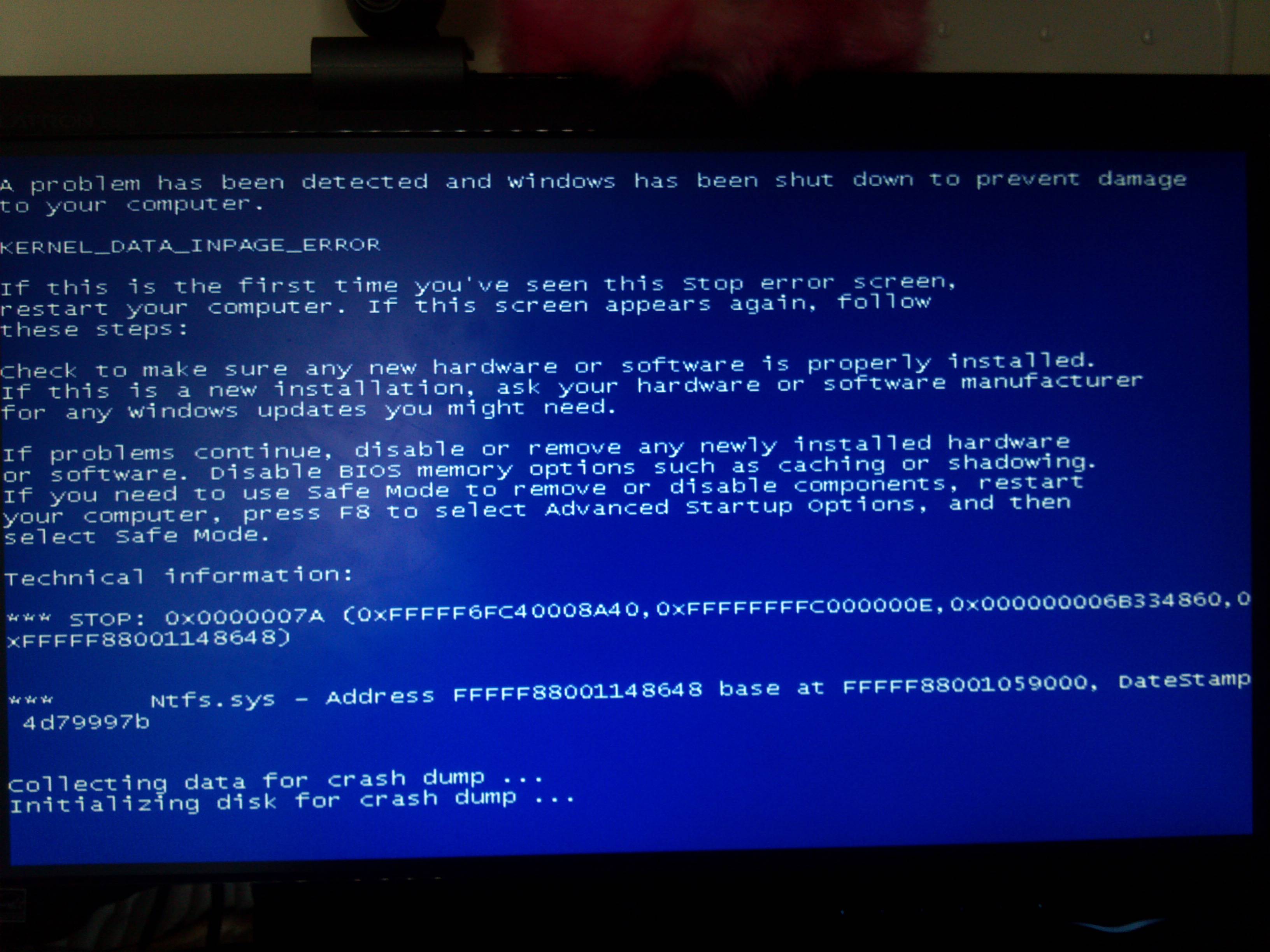
Well good then, you can probably rule out temperature. Is the BSOD error code, address and faulting module the same every time? Can you capture those an post them?
The are probably in your system log. Open the event viewer to the system log and filter on error, warning and critical messages.
What Nvidia driver version are you at. | My System Specs | | Computer type PC/Desktop System Manufacturer/Model Number Home built (GeneO industries)/Model 3 OS Windows 7 64 bit SP1 CPU i5 2500k @ 4.5 GHz, 1.264V 124 GFlop (IBT with AVX) Motherboard ASUS P8Z68-V PRO/GEN3 Memory 16GB (4GBx4) 1600MHz G.skill Ripjaws X 8-8-8-24 Graphics Card MSI GTX 660 Ti PE/OC, 2GB 7160 MHz DDR5 clock, 1228 Mhz Core Sound Card Onboard Realtek HD Monitor(s) Displays NEC Spectraview 2490WUXi-SV Screen Resolution 1920 x 1200 Keyboard HP Wireless Mouse HP wireless PSU Seasonic X-850 (2012 KM3 model) Case Fractal Design "Define R3" Cooling CM TPC 812 push/pull, 3 120mm, 2 TY-140 case fans Hard Drives Samsung 128GB 840 Pro SSD (System), Crucial 128GB M4 SSD, 2x WD Caviar 1TB Black internal (data), 1x WD Blue 6Gb/s 1TB Internal, 1x 2TB eSata WD20EARS Green, 2x 500GB Seagate external USB, 1x 350GB exte Internet Speed 27.8 Mb/s down, 5.6 Mb/s up Other Info USB 3.0 x4 , SATA III x4, eSATA x3, SATA II x4, USB 2.0 x8. 2 Samsung DVD R/W drives.
WEI: CPU 7.7, Memory 7.8, Graphics 7.9, Disk 7.9 |
05 Feb 2012
|
#8 | | |
Event viewer is quite unhelpful. Not even acknowledging that it was a blue screen, when clearly I saw one when it restarted.
Whenever I've had a restart, the only relevant thing listed in the event manager is citing Event 41, being a Kernel-Power error. "The system has rebooted without cleanly shutting down first. This error could be caused if the system stopped responding, crashed, or lost power unexpectedly."
I'm just going to keep using my system like usual for now in hopes that I will get a blue screen that actually generates a helpful dump file. I've been having this issue for going on 6 months, but I gave up on figuring it out for a long while. I know I *was* getting dumps, but I apparently accidentally deleted them all. So here's hoping for a new one that will be useful.
My driver version is 290.36, by the way. | My System Specs | | OS Windows 7 Ultimate x64 CPU AMD Phenom II x4 Motherboard ASUS M4A785-M Memory 2 x 2GB Transcend JETRAM DDR2 Graphics Card EVGA GEFORCE GTS 450 Monitor(s) Displays LG Flatron E2250 Screen Resolution 1920 x 1080 Keyboard Microsoft Wireless Natural Keyboard Mouse Logitech MX Revolution PSU Coolmax CLU-650 Case CoolerMaster Scout Cooling 2 x 140 mm, 3 x 120 mm Hard Drives Seagate 1TB,
Seagate 250 GB,
Patriot 32 GB SSD Internet Speed Crappy. |
05 Feb 2012
|
#9 | | Windows 7 Ultimate 64bit SP1 |
Well....we need the minidumps.
In meantime,
290.36 is beta,install and use an older driver,for the moment dont use any beta driver.
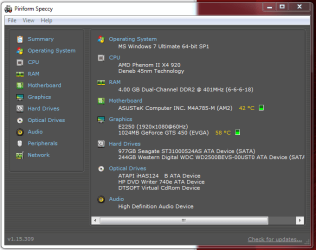
Download and install Speccy-Free-Version take a snip of the summary and upload it here.
Download,install and run OCCT-video-card-test. Finish,find the OCCT test results folder in your documents,zip the folder and upload it here.
During occt stress\test If you see artifacts, or the temperature of your GPU exceeds 80C, stop the test.
Run RAM - Test with Memtest86+
Let it run until at least 9 passes are completed, or errors are found (whichever comes first). The longer you run it,the better. | My System Specs | | System Manufacturer/Model Number Custom Built by me. OS Windows 7 Ultimate 64bit SP1 CPU Intel Core 2 Quad Q6600 Motherboard Gigabyte GA-X38-DS4 Memory 2X2GB DDR2 PC6400 800MHZ DUAL CHANNEL Graphics Card XFX RADEON HD 6850 1GB GDDR5 Sound Card 2/4/5.1/7.1-channel Realtek High Definition Monitor(s) Displays Samsung LE40A656F1 1080p 100Hz LCD HD TV 50,000:1 Screen Resolution 1366x768 in Desktop,1920x1080p in gaming and video Keyboard Wireless Logitech LX710 Mouse Logitech Wireless Gaming Mouse G700 PSU THERMALTAKE W0229 TOUGHPOWER XT 750W Case A-Case Twin Engine BB Cooling 3 x thermaltake smart case fan II + 1 arctic cooling fan Hard Drives C:\WD VelociRaptor 150 GB,10,000 RPM
E:\WESTERN DIGITAL WD15EADS 1.5TB CAVIAR GREEN SATA2 F:\WESTERN DIGITAL WD15EADS 1.5TB CAVIAR GREEN SATA2 Internet Speed ADSL 12000 plus Other Info Mouse Logitech G700,with 13 buttons who needs keyboard in RPG?
D:\Sony high speed sata Dvd Rewriter
Logitech Cordless Rumblepad 2 |
05 Feb 2012
|
#10 | | |
Or the latest beta, 295.51. | My System Specs | | Computer type PC/Desktop System Manufacturer/Model Number Home built (GeneO industries)/Model 3 OS Windows 7 64 bit SP1 CPU i5 2500k @ 4.5 GHz, 1.264V 124 GFlop (IBT with AVX) Motherboard ASUS P8Z68-V PRO/GEN3 Memory 16GB (4GBx4) 1600MHz G.skill Ripjaws X 8-8-8-24 Graphics Card MSI GTX 660 Ti PE/OC, 2GB 7160 MHz DDR5 clock, 1228 Mhz Core Sound Card Onboard Realtek HD Monitor(s) Displays NEC Spectraview 2490WUXi-SV Screen Resolution 1920 x 1200 Keyboard HP Wireless Mouse HP wireless PSU Seasonic X-850 (2012 KM3 model) Case Fractal Design "Define R3" Cooling CM TPC 812 push/pull, 3 120mm, 2 TY-140 case fans Hard Drives Samsung 128GB 840 Pro SSD (System), Crucial 128GB M4 SSD, 2x WD Caviar 1TB Black internal (data), 1x WD Blue 6Gb/s 1TB Internal, 1x 2TB eSata WD20EARS Green, 2x 500GB Seagate external USB, 1x 350GB exte Internet Speed 27.8 Mb/s down, 5.6 Mb/s up Other Info USB 3.0 x4 , SATA III x4, eSATA x3, SATA II x4, USB 2.0 x8. 2 Samsung DVD R/W drives.
WEI: CPU 7.7, Memory 7.8, Graphics 7.9, Disk 7.9 BSOD when GPU overheats... Seems too cool to be overheating. problems? All times are GMT -5. The time now is 01:09 PM. | |