|
Welcome to Windows 7 Forums. Our forum is dedicated to helping you find solutions with any problems, errors or issues you are experiencing with Windows 7. The Windows 7 forum also covers news and updates and has an extensive Windows 7 tutorial section that covers a wide range of tips and tricks.
Windows 7 - DVD died. How do I reinstall OS with external USB DVD drive |
02-06-2012
|
#1 | | |
DVD died. How do I reinstall OS with external USB DVD drive I wiped my hard drive clean with a Wipedrive CD, then went to reinstall my Windows 7 OS and the DVD drive is dead. NO DVD will open. I have an external USB DVD drive, but can't get it to boot. Any ideas on how I can reinstall Windows 7 in this laptop without having to get the built in DVD drive repaired?
| My System Specs | | System Manufacturer/Model Number Dell Vostro v13 OS Windows 7 Professional CPU 1.30 Core 2 Duo Memory 4GB Hard Drives 500 GB Seagate 7200 RPM |
02-06-2012
|
#2 | | 32bit: XP, Win7 H.P. / 64bit: 2008R2, Win7 Pro, Ultimate / Several flavors of Linux |
Start by checking the BIOS settings - set the boot devices and order then let us know what happens.
Regards,
GEWB | My System Specs | | System Manufacturer/Model Number (5 different computers booting up to 12 systems) OS 32bit: XP, Win7 H.P. / 64bit: 2008R2, Win7 Pro, Ultimate / Several flavors of Linux |
02-06-2012
|
#3 | | |
I tried that. It doesn't do anything. | My System Specs | | System Manufacturer/Model Number Dell Vostro v13 OS Windows 7 Professional CPU 1.30 Core 2 Duo Memory 4GB Hard Drives 500 GB Seagate 7200 RPM |
02-06-2012
|
#4 | | |
I don't know how to make a bootable external HD.
However, using an external flash drive works well. Here's one way to prepare it: Installing Win7 using a USB Stick | TechNet Edge
(If you scroll down to the bottom, there's a brief description of the technique. It's too bad that the author replaced the original text article with a 7 minute video.) | My System Specs | | System Manufacturer/Model Number homegrown OS Windows 7 Pro X64 SP1 CPU Intel Core I7-3930k Motherboard Asus P9X79 Pro Memory 16 GB Gskill DDR3-2133 Graphics Card eVGA GTX680 Sound Card Creative X-Fi Titanium Monitor(s) Displays As PA246Q Screen Resolution 1920 X 1200 Keyboard cheap Logitech USB Mouse Microsoft Intellimouse Explorer (old optical) USB PSU PCP&C Silencer 750 Crossfire Case Silverstone FT02 Cooling Noctua NH-D14 Hard Drives Corsair Force GT, 120 GB
WDC 1.5TB Caviar Black Internet Speed 6Mb cable Other Info Pioneer BDR-205
Samsung SH-203B
Monsoon 5.1 speakers |
02-06-2012
|
#5 | | Windows 7 Home Premium 32 bit |
Can you get into the boot-menu? What are the boot devices listed there?
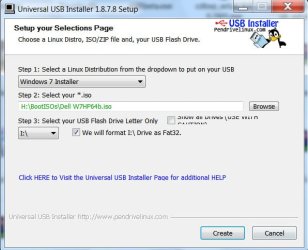
You may create an install pendrive with Universal USB installer. Universal USB Installer – Easy as 1 2 3 | USB Pen Drive Linux . Select Windows 7 Installer in the drop-down menu, show it the location of the Windows 7 ISO, select your pendrive, tick format and then Create. | My System Specs | | OS Windows 7 Home Premium 32 bit |
02-07-2012
|
#6 | | Windows 7 X64 Professional/Windows 8 |

Quote: Originally Posted by jumanji Can you get into the boot-menu? What are the boot devices listed there?
You may create an install pendrive with Universal USB installer. Universal USB Installer – Easy as 1 2 3 | USB Pen Drive Linux . Select Windows 7 Installer in the drop-down menu, show it the location of the Windows 7 ISO, select your pendrive, tick format and then Create. Attachment 197175 +1 works every time. | My System Specs | | System Manufacturer/Model Number Home Brew - Always under construction OS Windows 7 X64 Professional/Windows 8 CPU intel i7-2600K Motherboard Asus P8Z68 V-Pro/GEN 3 Memory 8GB G.Skill Sniper DDR3-2133 (2X4GB) Graphics Card EVGA 670 2GB Sound Card Asus Xonar Monitor(s) Displays Asus 24" LCD VW246H Screen Resolution 1920X1080 Keyboard Logitech G510 Mouse Logitech G500/Logitech Wireless PSU CORSAIR HX850W Case Cooler Master HAF X Cooling Corsair H100 w/ 4 noctua fans in push/pull. Hard Drives Crucial M4 128GB,Crucial M4 64GB,Samsung HD103SJ 1TB, 1TB WD FAEX,Samsung 1.5TB, EXTERNAL HD- 2X Rosewill case esata w/ 1TB Samsung spinpoints & Black X esata 1TB Spinpoint, Rosewill USB 3.0 dock 1TB Spinpoint, Seagate GOFlex Pro 500GB & 750GB USB Internet Speed Foot Messenger speed Other Info 2nd Computer- Samsung RF711-SO1 17" Laptop i5-2310M, 8GB DDR3-1333, Crucial M4 and OCZ vertex2, Nvidia GT540M.Win 7 HP X64. |
02-07-2012
|
#7 | | |
you can simply select it in the boot menu. You don't even need to set it in the BIOS as boot device, just make sure there is an option such as "USB legacy detect" or "USB for DOS" enabled in that BIOS. To get into your boot menu, when post screen appears press the needed key like crazy until there's the boot menu. Key is F11 for AsRock motherboard, F8 for Asus and Packard Bell, F12 for Gigabyte, etc | My System Specs | | System Manufacturer/Model Number Home brewed OS Windows 7 Ultimate 64bit CPU Core2Quad Q6600 Motherboard Asus P5N-E sli Memory 4GB DDR 2 Adata Graphics Card 2x GF9800GT 1024MB/256bit Sound Card Creative SB Live! 5.1 PCI Monitor(s) Displays LG Flatron W245 Screen Resolution 1920x1200 PSU FSP Blue Storm II 500W Case Antec Twelve Hundred Hard Drives Maxtor STM3250820AS; 2xSamsung SP2014N; Seagate ST310005AS; 2xSeagate ST3120026AS; WesternDigital WD10EARS; WesternDigital WD1600AAJB; WesternDigital WD2500JS Other Info additional PCIE JMB363 SATA+IDE controller |
02-07-2012
|
#8 | | W7 Pro, W7 Ult, Vista Ult, Vista Bus, XP Pro |

Quote: Originally Posted by bobkn I don't know how to make a bootable external HD. At the risk of a brief hijack of this thread, I wanted to comment on this. It *is* possible to install from a bootable HD, but it's a pretty bad idea because you will have major startup issues (due to the installed boot configuration being spread between the source and target disks) with the resulting setup. It also creates a single Windows partition (omitting the hidden 100MB partition) on the target disk that looks more like a Vista installation. OTOH, it's REALLY FAST to setup from a HDD, and even faster from a SSD. Yeah, setting up from a SSD to a SSD takes about 4-5 minutes. It takes less time to perform the installation than it does to fix the resulting Boot problem. | My System Specs | | OS W7 Pro, W7 Ult, Vista Ult, Vista Bus, XP Pro DVD died. How do I reinstall OS with external USB DVD drive problems? All times are GMT -5. The time now is 01:50 PM. |  |